
js时间格式化和相互转换
1. Thu Mar 07 2019 12:00:00 GMT+0800 (中国标准时间) 转换为 2019-03-07 12:00:00
  const d = new Date(Thu Mar 07 2019 12:00:00 GMT+0800 (中国标准时间))

        const resDate = d.getFullYear() + '-' + this.p((d.getMonth() + 1)) + '-' + this.p(d.getDate())

        const resTime = this.p(d.getHours()) + ':' + this.p(d.getMinutes()) + ':' + this.p(d.getSeconds())
p为不够10添加0的函数
  p(s) {

      return s < 10 ? '0' + s : s

    },
2.2019-03-07 12:00:00转换为 Thu Mar 07 2019 12:00:00 GMT+0800 (中国标准时间)
parserDate(date) {

      var t = Date.parse(date)

      if (!isNaN(t)) {

        return new Date(Date.parse(date.replace(/-/g, '/')))

      }

    },
3.时间转时间戳
将Thu Sep 20 2018 16:47:52 GMT+0800 (中国标准时间)转换为1537433272051
console.log(Date.parse(new Date()))

console.log(new Date().getTime())
将"2018-09-20 16:50:48"转换为1537433448000
var timeDate = "2018-09-20 16:50:48";

var Time = new Date(timeDate);

var timestemp = Time.getTime();

console.log(timestemp)
4.将日期转换为指定的格式:比如转换成 年月日时分秒 这种格式:yyyy-MM-dd hh:mm:ss 或者 yyyy-MM-dd
Date.prototype.format = function(fmt) {

     var o = {

        "M+" : this.getMonth()+1,                 //月份

        "d+" : this.getDate(),                    //日

        "h+" : this.getHours(),                   //小时

        "m+" : this.getMinutes(),                 //分

        "s+" : this.getSeconds(),                 //秒

        "q+" : Math.floor((this.getMonth()+3)/3), //季度

        "S"  : this.getMilliseconds()             //毫秒

    };

    if(/(y+)/.test(fmt)) {

            fmt=fmt.replace(RegExp.$1, (this.getFullYear()+"").substr(4 - RegExp.$1.length));

    }

     for(var k in o) {

        if(new RegExp("("+ k +")").test(fmt)){

             fmt = fmt.replace(RegExp.$1, (RegExp.$1.length==1) ? (o[k]) : (("00"+ o[k]).substr((""+ o[k]).length)));

         }

     }

    return fmt;

}
调用
var time1 = new Date().format("yyyy-MM-dd hh:mm:ss");

console.log(time1);
运行如下:
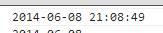
也可以转换成 ”年月日”的格式
var time2 = new Date().format("yyyy-MM-dd");

console.log(time2);
运行如下:

还将指定的日期转换为"年月日"的格式,代码如下:
    var oldTime = (new Date("2012/12/25 20:11:11")).getTime();

    var curTime = new Date(oldTime).format("yyyy-MM-dd");

    console.log(curTime);
运行如下:

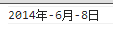
还可以将 "时间戳" 转换为 "年月日" 的格式.
比如如下代码:

    var da = 1402233166999;

    da = new Date(da);

    var year = da.getFullYear()+'年';

    var month = da.getMonth()+1+'月';

    var date = da.getDate()+'日';

    console.log([year,month,date].join('-'));
js时间格式化和相互转换的更多相关文章
- js 时间格式化 (兼容safari)
js 时间格式化,兼容IE8和safari浏览器. function formatDate(date, fmt, near, type) { var dateStr = date; if (!date ...
- js时间格式化函数,支持Unix时间戳
<!DOCTYPE HTML PUBLIC "-//W3C//DTD HTML 4.01 Transitional//EN" "http://www.w3.org/ ...
- 时间戳显示为多少分钟前,多少天前的JS处理,JS时间格式化,时间戳的转换
var dateDiff = function (timestamp) { // 补全为13位 var arrTimestamp = (timestamp + '').split(''); for ( ...
- 表单序列化json字符串和js时间格式化
js时间格式化 new Date().format("时间格式") Date.prototype.format = function(fmt) { var o = { ...
- js时间格式化
const formatDate = timestamp => { const date = new Date(timestamp); const m = date.getMonth() + 1 ...
- js时间格式化(yy年MM月dd日 hh:mm)
//时间格式化 Date.prototype.format = function (format) { var o = { "M+": this.getMonth() + 1, / ...
- js 时间格式化 -- 时间加减实现
时间格式化的方法: Date.prototype.Format = function (fmt) { //author: meizz var o = { "M+": this.ge ...
- JS 时间格式化函数
//时间格式化函数 Date.prototype.format = function (format) { var o = { "M+": this.getMonth() + 1, ...
- js时间格式化函数(兼容IOS)
* 时间格式化 * @param {Object} dateObj 时间对象 * @param {String} fmt 格式化字符串 */ dateFormat(dateObj, fmt) { le ...
随机推荐
- 使用java移位运算符进行转化
import java.util.Scanner; public class Main { public static void main(String[] args) { new Main().sy ...
- 【Redis】Redis 主从模式搭建
主从模式介绍 Redis虽然读取写入的速度都特别快,但是也会产生读压力特别大的情况.为了分担读压力,Redis支持主从复制,Redis的主从结构可以采用一主多从或者级联结构,Redis主从复制可以根据 ...
- Qt编写气体安全管理系统15-网络转发
一.前言 在本系统中网络转发是个什么功能含义呢,其实就是将本地采集设备的所有数据打包发送到指定的网络地址,默认采用UDP的形式,无连接开销小,我也是看到很多的组态软件有这个功能,其实现有的很多的气体探 ...
- html如何修改hr水平直线的粗细
hr是常见的超文本标签,是一条水平直线,要设置该直线变粗一些.可以先把hr本身的border隐藏掉,然后设置border-top-width,也就是只留上边框,如图:hr的默认高度height是0,所 ...
- CSS3 Transition 过渡
CSS3属性中有关于制作动画的三个属性:Transform,Transition,Animation: Transition:对元素某个属性或多个属性的变化,进行控制(时间等),类似flash的补间动 ...
- 【ARTS】01_42_左耳听风-201900826~201900901
ARTS: Algrothm: leetcode算法题目 Review: 阅读并且点评一篇英文技术文章 Tip/Techni: 学习一个技术技巧 Share: 分享一篇有观点和思考的技术文章 Algo ...
- composer 添加贝宝PayPal
composer require "paypal/rest-api-sdk-php:1.7.2"
- Redis持久化RDB、AOF
持久化的意思就是保存,保存到硬盘.第一次接触这个词是在几年前学习EF. 为什么要持久化 redis定义:Redis是一个开源(BSD许可),内存存储的数据结构服务器,可用作数据库,高速缓存和消息队列代 ...
- java实现根据特定密钥对字符串进行加解密功能
在项目中我们经常遇到这样的场景,我们避免重要资源泄露需要将一些信息按照特定的方式(密钥)进行加密保存,然后在使用的时候再按照特定的方式(密钥)进行解密读取,以保证信息的相对安全.那么如何对信息进行加解 ...
- 【工具】导入导出 Excel
文章目录 前言 当前支持的功能 方法api 配置 如何使用(Demo) 实现思路(该工具类可正确的一个大前提) 后记 前言 之前写的项目中,有个需求,需要导出导入Excel表格: 本来很简单的一件事, ...