
阶段5 3.微服务项目【学成在线】_day04 页面静态化_10-freemarker静态化测试-基于模板文件静态化

把resource拷贝到test目录下

只保留文件夹结构和test1.ftl这个模板文件就可以了。

新建一个包
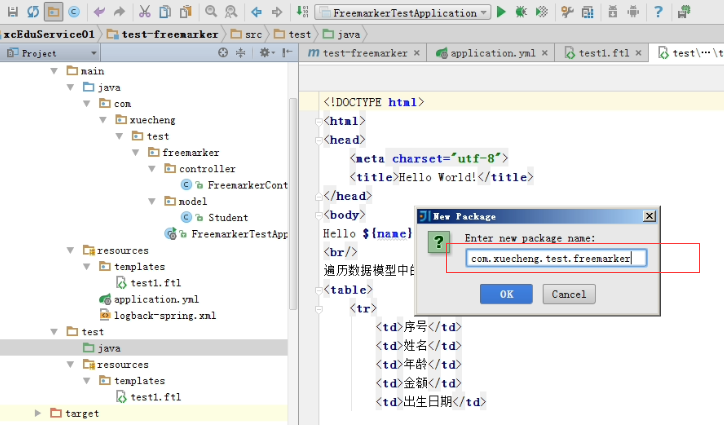
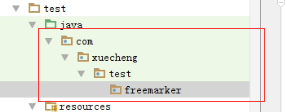
编写测试类

使用freemaker提供的方法生成静态文件
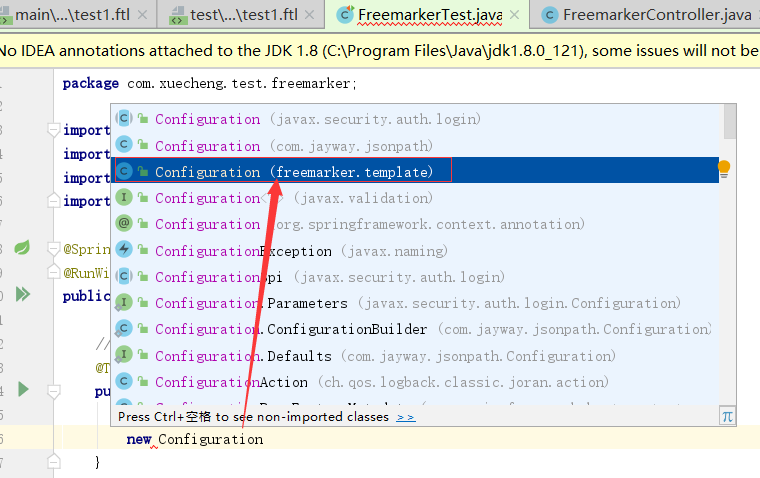
Configuration是import freemarker.template.Configuration;包下的
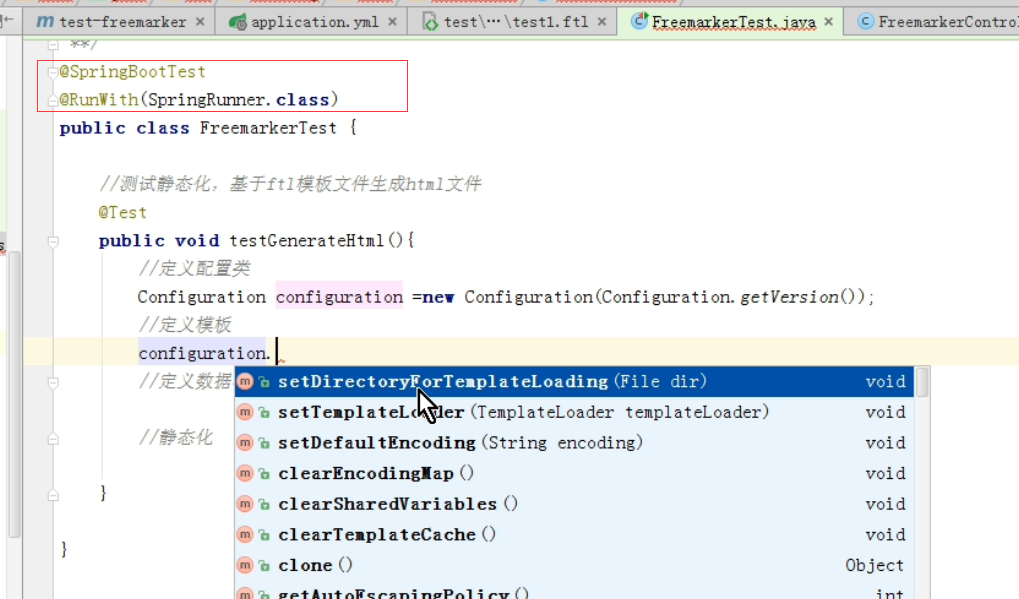
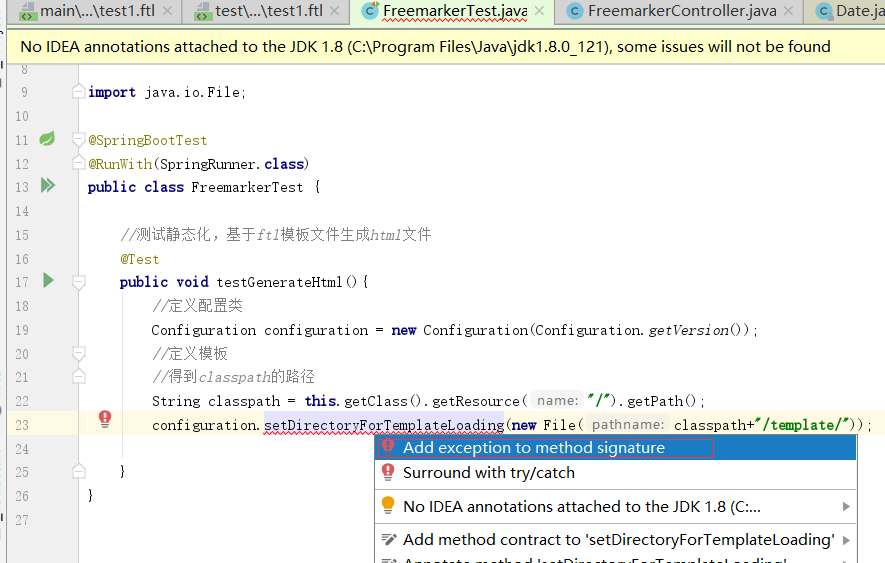
手动的设置模板的路径。获取当前类的classPath然后拼上template的路径

抛出异常
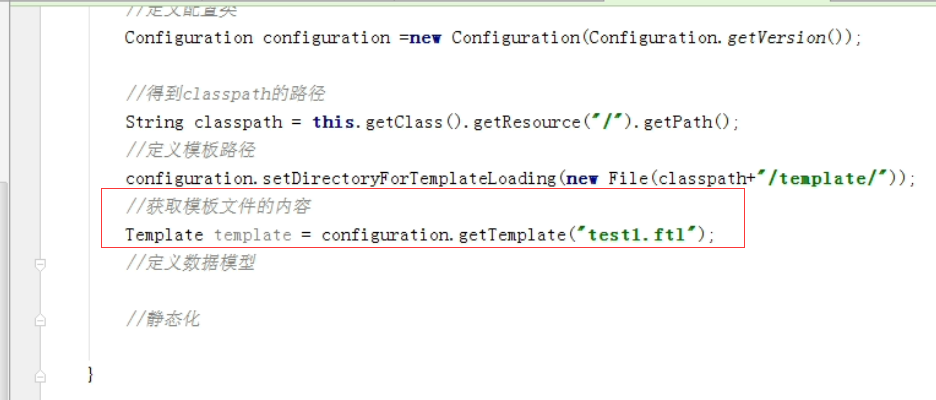
获取test1.ftl这个模板
定义获取数据的方法。填充map的数据是从上节课的controller里面复制过来的。单独定义一个getMap的方法来获取。

静态化

processTemplateIntoString方法也要抛出异常。TemplateException

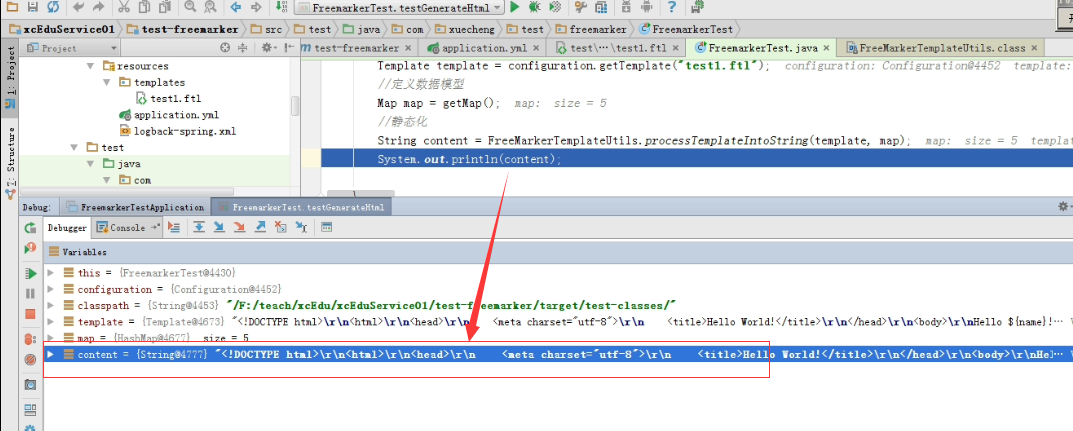
加断点一步步测试

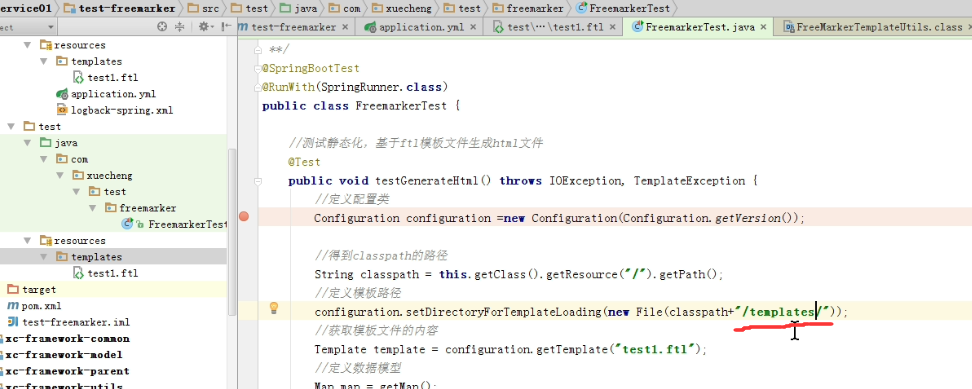
一步步往下走报错。

路径写错了 漏了一个s
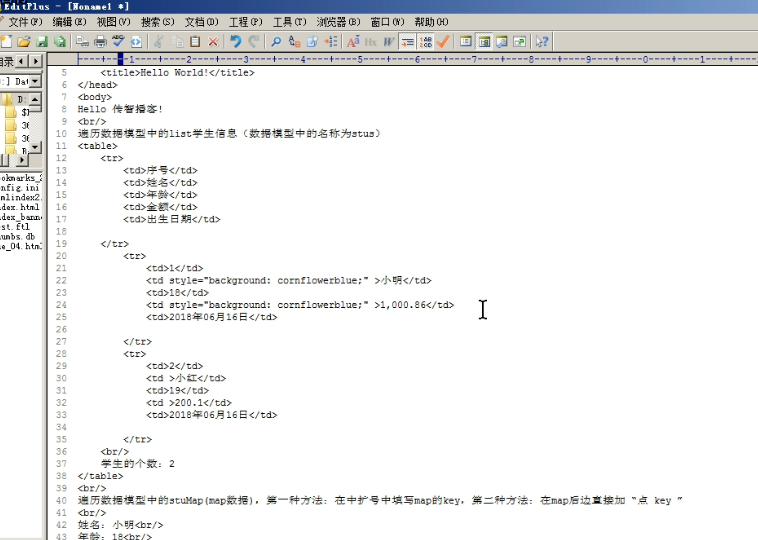
复制静态化后的字符串内容。
粘贴到一个编辑器里面
package com.xuecheng.test.freemarker;

import com.xuecheng.test.freemarker.model.Student;

import freemarker.template.Configuration;

import freemarker.template.Template;

import freemarker.template.TemplateException;

import org.junit.Test;

import org.junit.runner.RunWith;

import org.springframework.boot.test.context.SpringBootTest;

import org.springframework.test.context.junit4.SpringRunner;

import org.springframework.ui.freemarker.FreeMarkerTemplateUtils;

import java.io.File;

import java.io.IOException;

import java.util.*;

@SpringBootTest

@RunWith(SpringRunner.class)

public class FreemarkerTest {

    //测试静态化,基于ftl模板文件生成html文件

    @Test

    public void testGenerateHtml() throws IOException, TemplateException {

        //定义配置类

        Configuration configuration = new Configuration(Configuration.getVersion());

        //定义模板

        //得到classpath的路径

        String classpath = this.getClass().getResource("/").getPath();

        configuration.setDirectoryForTemplateLoading(new File(classpath+"/templates/"));

        //获取模板文件内容。

        Template template = configuration.getTemplate("test1.ftl");

        //定义数据模型。

        Map map=getMap();

        //静态化

        String content = FreeMarkerTemplateUtils.processTemplateIntoString(template, map);

        System.out.println(content);

    }

    public Map getMap(){

        Map<String,Object> map=new HashMap<>();

        map.put("name","黑马程序员");

        Student stu1 = new Student();

        stu1.setName("小明");

        stu1.setAge();

        stu1.setMoney(1000.86f);

        stu1.setBirthday(new Date());

        Student stu2 = new Student();

        stu2.setName("小红");

        stu2.setMoney(200.1f);

        stu2.setAge();

        stu2.setBirthday(new Date());

        List<Student> friends = new ArrayList<>();

        friends.add(stu1);

        stu2.setFriends(friends);

        stu2.setBestFriend(stu1);

        List<Student> stus = new ArrayList<>();

        stus.add(stu1);

        stus.add(stu2);

        //向数据模型放数据

        map.put("stus",stus);

        //准备map数据

        HashMap<String,Student> stuMap = new HashMap<>();

        stuMap.put("stu1",stu1);

        stuMap.put("stu2",stu2);

        //向数据模型放数据

        map.put("stu1",stu1);

        //向数据模型放数据

        map.put("stuMap",stuMap);

        map.put("point",);

        return map;

    }

}
FreemarkerTest.cs
<!DOCTYPE html>

<html>

<head>

    <meta charset="utf-8">

    <title>Hello World!</title>

</head>

<body>

<table>

    <tr>

        <td>序号</td>

        <td>名字</td>

        <td>年龄</td>

        <td>金额</td>

    </tr>

        <tr>

            <td></td>

            <td style="background-color:cornflowerblue">小明</td>

            <td></td>

            <td style="background-color: cornflowerblue",000.86</td>

            <td>2019年11月02日</td>

        </tr>

        <tr>

            <td></td>

            <td >小红</td>

            <td></td>

            <td 200.1</td>

            <td>2019年11月02日</td>

        </tr>

</table>

<br/>

遍历数据模型中的stuMap(map)数据

<br/>

姓名:小明<br/>

年龄:<br/>

姓名:小明<br/>

年龄:<br/>

<br/>

遍历map中的key.stuMap?keys就是key列表(是一个list)

<br/>

    姓名:小红<br/>

    年龄:<br/>

    姓名:小明<br/>

    年龄:<br/>

<br/>

学生的个数:

<br/>

<br/>

开户行:工商银行  账号:

</body>

</html>
生成的静态页内容
生成静态页
用一个很有名的IOUtil。是这个包下的:org.apache.commons.io.IOUtils;

上面定义输入流,下面定义输出流。第三行输入流拷贝到输出流

拷贝完成后就关闭流


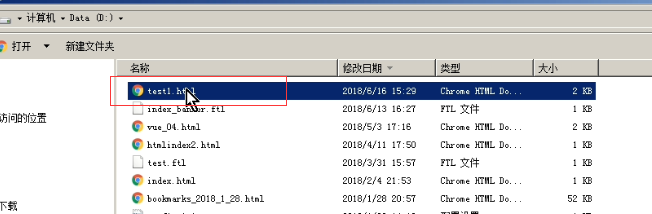
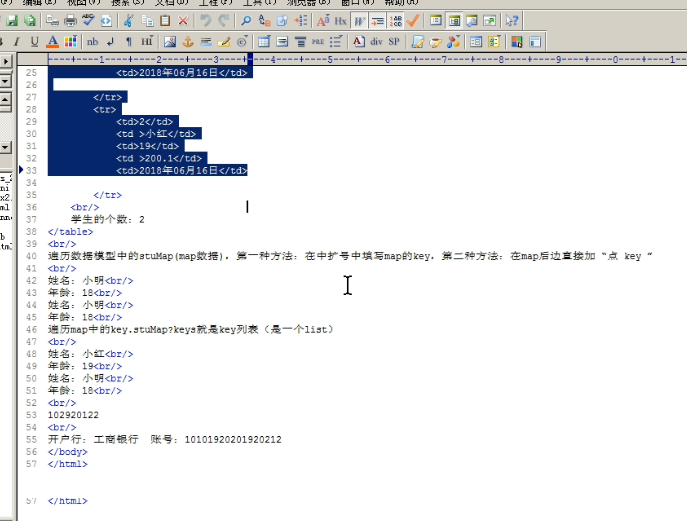

最终代码
package com.xuecheng.test.freemarker;

import com.xuecheng.test.freemarker.model.Student;

import freemarker.template.Configuration;

import freemarker.template.Template;

import freemarker.template.TemplateException;

import org.apache.commons.io.IOUtils;

import org.junit.Test;

import org.junit.runner.RunWith;

import org.springframework.boot.test.context.SpringBootTest;

import org.springframework.test.context.junit4.SpringRunner;

import org.springframework.ui.freemarker.FreeMarkerTemplateUtils;

import java.io.File;

import java.io.FileOutputStream;

import java.io.IOException;

import java.io.InputStream;

import java.util.*;

@SpringBootTest

@RunWith(SpringRunner.class)

public class FreemarkerTest {

    //测试静态化,基于ftl模板文件生成html文件

    @Test

    public void testGenerateHtml() throws IOException, TemplateException {

        //定义配置类

        Configuration configuration = new Configuration(Configuration.getVersion());

        //定义模板

        //得到classpath的路径

        String classpath = this.getClass().getResource("/").getPath();

        configuration.setDirectoryForTemplateLoading(new File(classpath+"/templates/"));

        //获取模板文件内容。

        Template template = configuration.getTemplate("test1.ftl");

        //定义数据模型。

        Map map=getMap();

        //静态化

        String content = FreeMarkerTemplateUtils.processTemplateIntoString(template, map);

//        System.out.println(content);

        InputStream inputStream = IOUtils.toInputStream(content);

        FileOutputStream outputStream = new FileOutputStream(new File("d:/test1.html"));

        //输出文件

        IOUtils.copy(inputStream,outputStream);

        inputStream.close();

        outputStream.close();

    }

    public Map getMap(){

        Map<String,Object> map=new HashMap<>();

        map.put("name","黑马程序员");

        Student stu1 = new Student();

        stu1.setName("小明");

        stu1.setAge();

        stu1.setMoney(1000.86f);

        stu1.setBirthday(new Date());

        Student stu2 = new Student();

        stu2.setName("小红");

        stu2.setMoney(200.1f);

        stu2.setAge();

        stu2.setBirthday(new Date());

        List<Student> friends = new ArrayList<>();

        friends.add(stu1);

        stu2.setFriends(friends);

        stu2.setBestFriend(stu1);

        List<Student> stus = new ArrayList<>();

        stus.add(stu1);

        stus.add(stu2);

        //向数据模型放数据

        map.put("stus",stus);

        //准备map数据

        HashMap<String,Student> stuMap = new HashMap<>();

        stuMap.put("stu1",stu1);

        stuMap.put("stu2",stu2);

        //向数据模型放数据

        map.put("stu1",stu1);

        //向数据模型放数据

        map.put("stuMap",stuMap);

        map.put("point",);

        return map;

    }

}
Configuration
阶段5 3.微服务项目【学成在线】_day04 页面静态化_10-freemarker静态化测试-基于模板文件静态化的更多相关文章
- 阶段5 3.微服务项目【学成在线】_day04 页面静态化_16-页面静态化-模板管理-模板制作
这是轮播图的原始文件 运行门户需要把 nginx启动起来 单独运行轮播图.把里面的css的引用都加上网址的url 这就是单独访问到的轮播图的效果 轮播图模板的地址: 阶段5 3.微服务项目[学成在线] ...
- 阶段5 3.微服务项目【学成在线】_day02 CMS前端开发_16-CMS前端工程创建-导入系统管理前端工程
提供了基于脚手架封装好的前端工程 H:\BaiDu\黑马传智JavaEE57期 2019最新基础+就业+在职加薪\阶段5 3.微服务项目[学成在线]·\day02 CMS前端开发\资料\xc-ui-p ...
- 阶段5 3.微服务项目【学成在线】_day16 Spring Security Oauth2_03-用户认证技术方案-Oauth2协议
2.2 Oauth2认证 2.2.1 Oauth2认证流程 第三方认证技术方案最主要是解决认证协议的通用标准 问题,因为要实现 跨系统认证,各系统之间要遵循一定的 接口协议. OAUTH协议为用户资源 ...
- 阶段5 3.微服务项目【学成在线】_day16 Spring Security Oauth2_01-用户认证需求分析
1.1 用户认证与授权 截至目前,项目已经完成了在线学习功能,用户通过在线学习页面点播视频进行学习.如何去记录学生的学习过程 呢?要想掌握学生的学习情况就需要知道用户的身份信息,记录哪个用户在什么时间 ...
- 阶段5 3.微服务项目【学成在线】_day09 课程预览 Eureka Feign_05-Feign远程调用-客户端负载均衡介绍
2 Feign远程调用 在前后端分离架构中,服务层被拆分成了很多的微服务,服务与服务之间难免发生交互,比如:课程发布需要调用 CMS服务生成课程静态化页面,本节研究微服务远程调用所使用的技术. 下图是 ...
- 阶段5 3.微服务项目【学成在线】_day09 课程预览 Eureka Feign_02-Eureka注册中心-搭建Eureka单机环境
我们先搭建单机环境 govern是治理的意思, 这样就把工程创建好了 创建包 创建SpringBoot的启动类. 在父工程里面已经确定了Spring Cloud的版本了.相当于锁定了版本 接下里只需要 ...
- 阶段5 3.微服务项目【学成在线】_day09 课程预览 Eureka Feign_04-Eureka注册中心-将服务注册到Eureka Server
cms相当于客户端 配置客户端的信息 后面加逗号分隔开 50102表示向两台eureka服务上报服务,如果有一台死掉了 那么还可以上另外的一台去注册服务 直接把ip注册到eureka 启动类加注解 重 ...
- 阶段5 3.微服务项目【学成在线】_day09 课程预览 Eureka Feign_01-Eureka注册中心-Eureka介绍
1 Eureka注册中心 1.1 需求分析 在前后端分离架构中,服务层被拆分成了很多的微服务,微服务的信息如何管理?Spring Cloud中提供服务注册中 心来管理微服务信息. 为什么 要用注册中心 ...
- 阶段5 3.微服务项目【学成在线】_day18 用户授权_03-方法授权-jwt令牌包含权限
修改认证服务的UserDetailServiceImpl类,下边的代码中 permissionList列表中存放了用户的权限, 并且将权限标识按照中间使用逗号分隔的语法组成一个字符串,最终提供给Spr ...
随机推荐
- SQL ISNULL 参数
SQL Server 中有两个参数,语法: ISNULL(check_expression, replacement_value) check_expression 与 replacement ...
- less匹配模式
less里面的匹配模式相当于js里面的if,但又不完全是,比如用css画一个三角 html <div class="sanjiao"></div> less ...
- ArrayList 和 LinkedList 的区别是什么?(未完成)
ArrayList 和 LinkedList 的区别是什么?(未完成)
- 阿里云服务器搭建gitlab
参考这位大神的博客 https://blog.csdn.net/zhaoyanjun6/article/details/79144175 安装邮件通知服务系统时,报了如下错误:send-mail: f ...
- 0010Springboot整合thymeleaf
1.pom.xml中添加thymeleaf的起步依赖 2.编写html文件并放在classpath:/templates/路径下 3.编写controller并返回字符串,会到classpath:/t ...
- 使用 webpack-bundle-analyzer 分析 webpack 代码库拆分块
github:https://github.com/webpack-contrib/webpack-bundle-analyzer 1.安装: cnpm install webpack-bundle- ...
- C# 之 .net core -- MVC模式的显示、增、删、改
上一篇介绍数据的创建连接,接下来就是基本的增删改 一.右键添加.控制器 二.选择这个带试图的 三.其他的不要动,点击添加 四.执行一下,改下url 试一下他的增删改. 其实自己写的话可以用form表单 ...
- process 请求数据解析问题
开发过程中发现ajax提交的数据无法被express正确的解析,主要的情况是这样的: // 浏览器端post一个对象 $.ajax({ url:"/save", type:&quo ...
- 【题解】间隔排列-C++
题目Description小Q是班长.在校运动会上,小Q班要进行队列表演.小Q要选出2*N名同学编队,每人都被编上一个号,每一个从1到N的自然数都被某2名同学佩戴,现在要求将他们排成一列,使两个编号为 ...
- C++编译错误--C++连接redis:编译错误error C2371: “off_t”: 重定义;不同的基类型
编译错误:对于编译C++调用hiredis编译错误:error C2371: “off_t”: 重定义:不同的基类型,如下图: 可能的解决方案: 1. 因为hiredis预处理器定义了_OFF_T_D ...