
IdentityServer4入门四:应用Implicit模式保护网站(上)
我们先新增一个网站,名为“ClientMvc",也是asp.net core Web应用程序(模型视图控制器)
使用nuget安装以下引用
Microsoft.AspNetCore.Authentication.Cookies
Microsoft.AspNetCore.Authentication.OpenIdConnect
打开Properties\launchSettings.json,修改端口为44302
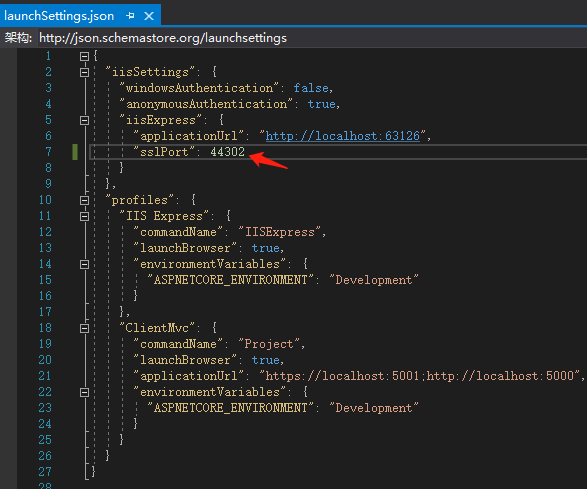
我们修改该网站的Home页,打开View/Home/Index.cshtml,使用以下内容替换
@using Microsoft.AspNetCore.Authentication

<h2>Claims</h2>

<dl>

    @foreach (var claim in User.Claims)

    {

        <dt>@claim.Type</dt>

        <dd>@claim.Value</dd>

    }

</dl>

<h2>Properties</h2>

<dl>

    @foreach (var prop in (await Context.AuthenticateAsync()).Properties.Items)

    {

        <dt>@prop.Key</dt>

        <dd>@prop.Value</dd>

    }

</dl>
修改控制器,加上Authorize属性
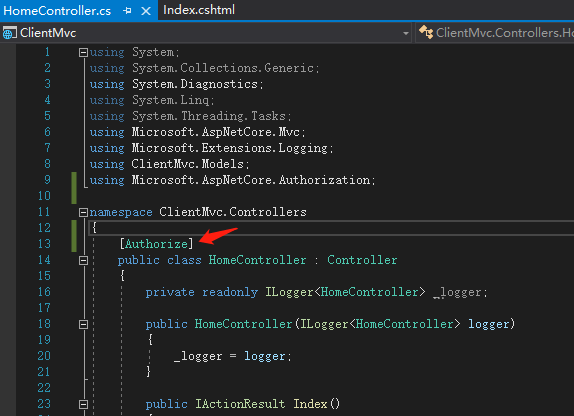
同样需要调整startup.cs的两个方法
public void ConfigureServices(IServiceCollection services)

{

    services.AddControllersWithViews();

    JwtSecurityTokenHandler.DefaultInboundClaimTypeMap.Clear();

    IdentityModelEventSource.ShowPII = true;

    services.AddAuthentication(options =>

        {

            options.DefaultScheme = "Cookies";

            options.DefaultChallengeScheme = "oidc";

        })

        .AddCookie("Cookies")

        .AddOpenIdConnect("oidc", options =>

        {

            options.SignInScheme = "Cookies";

            options.Authority = "https://localhost:44300";

            options.RequireHttpsMetadata = true;

            options.ClientId = "mvc";

            options.SaveTokens = true;

        });

}
Configure方法,增加app.UseAuthentication();
MVC的网站调整好了,现在如果运行该网站的话,会提示错误
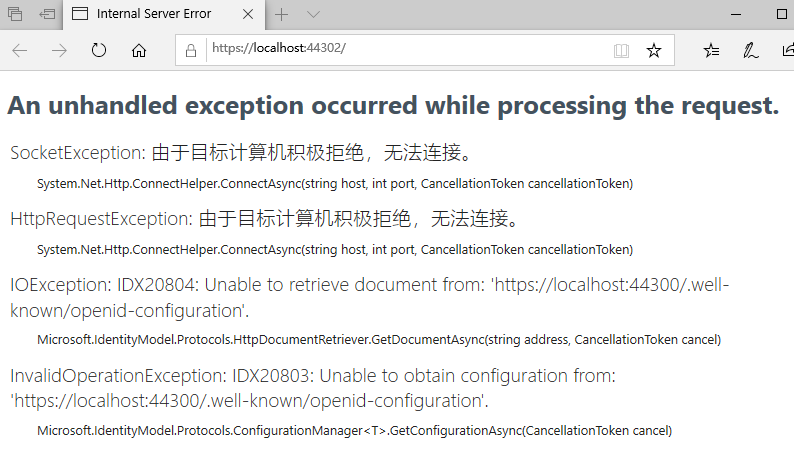
好了,现在需要去为我们的认证服务器加上Implicit模式的支持
在Config.cs上需修改两处
1.加上相应的Client。
2.添加IdentityResource
以下是整个文件代码
using IdentityServer4;

using IdentityServer4.Models;

using System.Collections.Generic;

namespace IdentityMvc

{

    public static class Config

    {

        public static IEnumerable<IdentityResource> GetIdentityResources()

        {

            return new IdentityResource[]

            {

                new IdentityResources.OpenId(),

                //Implicit need it.

                new IdentityResources.Profile()

            };

        }

        public static IEnumerable<ApiResource> GetApiResources()

        {

            return new List<ApiResource>

            {

                new ApiResource("api1", "My API")

            };

        }

        public static IEnumerable<Client> GetClients()

        {

            return new List<Client>

            {

                new Client

                {

                    ClientId = "client",

                    // no interactive user, use the clientid/secret for authentication

                    AllowedGrantTypes = GrantTypes.ClientCredentials,

                    // secret for authentication

                    ClientSecrets =

                    {

                        new Secret("secret".Sha256())

                    },

                    // scopes that client has access to

                    AllowedScopes = { "api1" }

                },

                new Client

                {

                    ClientId = "mvc",

                    ClientName = "MVC Client",

                    AllowedGrantTypes = GrantTypes.Implicit,

                    RequireConsent=false,//不需要显示否同意授权 页面 这里就设置为false

                    RedirectUris = { "https://localhost:44302/signin-oidc" },//登录成功后返回的客户端地址

                    PostLogoutRedirectUris = { "https://localhost:44302/signout-callback-oidc" },//注销登录后返回的客户端地址

                    AllowedScopes =

                    {

                        IdentityServerConstants.StandardScopes.OpenId,

                        IdentityServerConstants.StandardScopes.Profile,

                        IdentityServerConstants.StandardScopes.Email,

                        "api1", "api2.read_only"

                    },

                }

            };

        }

    }

}
修改项目为多启动项目
鼠标右键点击”解决方案”,选择属性
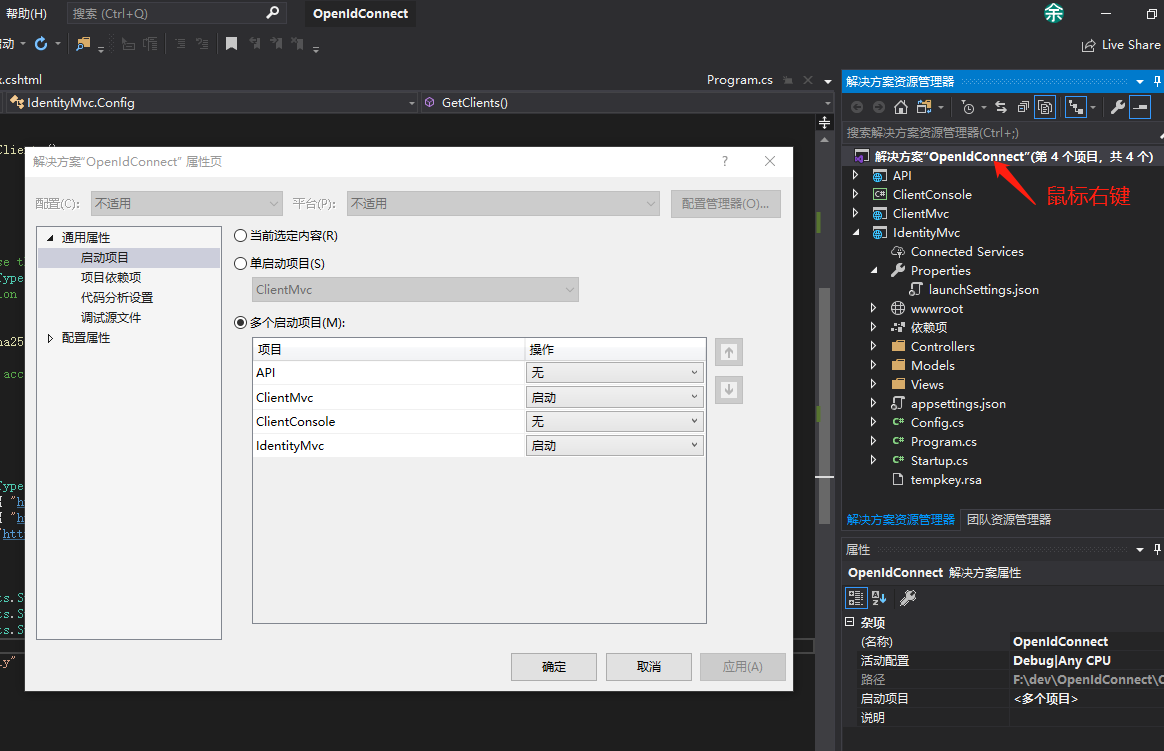
按上图启动后,你会发现IE打开两个page,且都访问了44300端口

至此,44302的首页处于认证保护之下了。下一步就是回到44300去实现Account控制器的Login方法,完成整个认证过程。因为要读取数据库,内容比较多,另起一篇来说明过程。
IdentityServer4入门四:应用Implicit模式保护网站(上)的更多相关文章
- IdentityServer4入门四:应用Implicit模式保护网站(下)
为认证服务端增加数据库支持 我计划使用一个名为Admin的表,放在一个已有的数据库里.所以我需要定义Admin类和在配置里预先加上数据库连接 新增类:Admin.cs public class Adm ...
- IdentityServer4入门三:授权模式
在入门一.入门二我们实现了一个完整的API保护的过程.需要保护的API只需在其Controler上应用[Authorize]特性,来显式指定受保护的资源.而我们实现的这个例子,所应用的模式叫“Clie ...
- Java设计模式从精通到入门四 工厂方法模式
工厂方法模式 属于23中设计模式中创建型类型. 核心思想:工厂提供创建对象的接口,由子类决定实例化哪一个子类. 来源 设计模式之禅中的例子,女娲造人,通过八卦炉来进行造人,没有烧熟的为白人,烧太熟 ...
- 大型网站技术架构(四)--核心架构要素 开启mac上印象笔记的代码块 大型网站技术架构(三)--架构模式 JDK8 stream toMap() java.lang.IllegalStateException: Duplicate key异常解决(key重复)
大型网站技术架构(四)--核心架构要素 作者:13GitHub:https://github.com/ZHENFENG13版权声明:本文为原创文章,未经允许不得转载.此篇已收录至<大型网站技 ...
- IdentityServer4 中文文档 -9- (快速入门)使用客户端凭证保护API
IdentityServer4 中文文档 -9- (快速入门)使用客户端凭证保护API 原文:http://docs.identityserver.io/en/release/quickstarts/ ...
- 解析汽车B2C商城网站四种盈利模式
汽车已成为家庭的日常用品,汽车的配套设施也成为销售的热点,汽车B2C电子商城为行业营销的新平台,汽车B2C电子商务网站盈利的模式是怎样的?创新的盈利模式才能在行业竞争中生存. 资讯产品一体模式 网站的 ...
- 微服务(入门四):identityServer的简单使用(客户端授权)
IdentityServer简介(摘自Identity官网) IdentityServer是将符合规范的OpenID Connect和OAuth 2.0端点添加到任意ASP.NET核心应用程序的中间件 ...
- IdentityServer4 实现自定义 GrantType 授权模式
OAuth 2.0 默认四种授权模式(GrantType): 授权码模式(authorization_code) 简化模式(implicit) 密码模式(password) 客户端模式(client_ ...
- 从Client应用场景介绍IdentityServer4(四)
原文:从Client应用场景介绍IdentityServer4(四) 上节以对话形式,大概说了几种客户端授权模式的原理,这节重点介绍Hybrid模式在MVC下的使用.且为实现IdentityServe ...
随机推荐
- active port
2510099 - SSL Port XXXXX Not Active - message on NWA even though SSL works Resolution Open the defau ...
- HTML5 - 初识
众所周知,我们现在的手机APP开发模式分为一下几大类: 一.原生APP 二.纯HTML5 三.原生+HTML5 四.React Native 公司的职位划分: 1.平面设计师 : 作图.切图.HTM ...
- iOS动画:CAKeyframeAnimation
网络中Core Animation类的继承关系图 属性简介 @interface CAKeyframeAnimation : CAPropertyAnimation /* 提供关键帧数据的 ...
- MySQL基础篇
数据库基础知识 以MySQL为基础 数据库事务 :数据库中一组原子性的SQL操作,彼此状态一致.具有ACID特性. 事务 ACID 特性: 原子性:数据库事务是一个整体,其中的SQL操作要么全部提交成 ...
- 前端框架开始学习Vue(一)
MVVM开发思想图(图片可能会被缩小,请右键另存查看,图片来源于网络) 定义基本Vue代码结构 1 v-text,v-cloak,v-html命令 默认 v-text没有闪烁问题,但是会覆盖元 ...
- http协议工作原理(精简)
HTTP协议进行通信时,需要有客户端(即终端用户)和服务端(即Web服务器),在Web客户端向Web服务器发送请求报文之前,先要通过TCP/IP协议在Web客户端和服务器之间建立一个TCP/IP连接 ...
- pandas(四)
合并 merge,concat,join pd.merge(df1,df2,on=‘列名’,how='') df1.join(df2,how='outer',on='') pd.concat([df ...
- Android笔记(三十三) Android中线程之间的通信(五)Thread、Handle、Looper和MessageQueue
ThreadLocal 往下看之前,需要了解一下Java的ThreadLocal类,可参考博文: 解密ThreadLocal Looper.Handler和MessageQueue 我们分析一下之前的 ...
- java容器一:Collection概述
Collection概览 java容器有两类,第一类是Collection,存储的是对象的集合:第二类是Map,存储的是键值对(两个对象以及它们之间的对应关系)的集合 Collection接口下面有三 ...
- 使用宏定义来判断是a和b 的大小
#include <stdio.h> #include <math.h> #define MAX(a, b) (a) > (b) ? printf("a > ...