
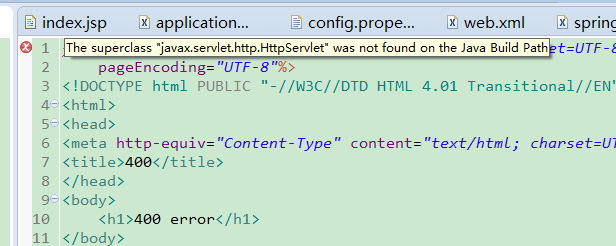
新maven项目创建JSP出现小红叉报错 javax.servlet.http.HttpServlet not found
展示:
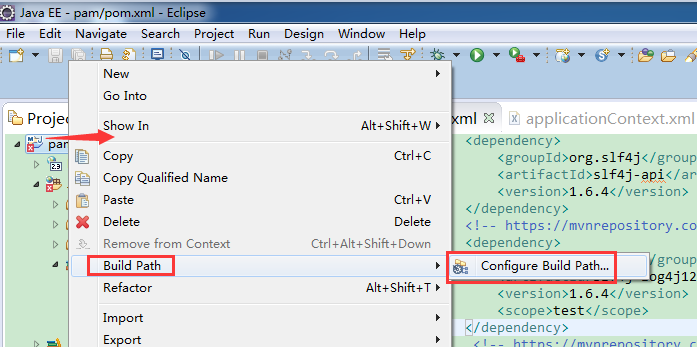
右击项目----build path -----Configure Build Path
进入到窗口 libraries -------add libraries ------ server runtime
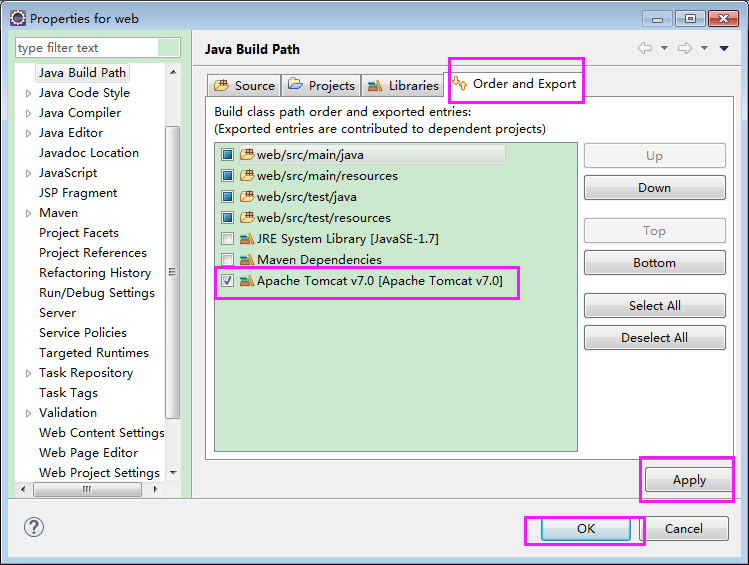
进入下图窗口 选择tomcat finish

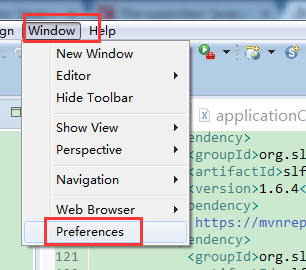
如果 在add library 没有tomcat
请按以下步骤操作:
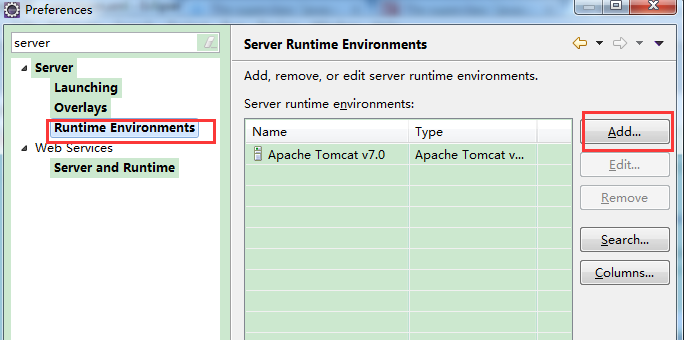
window -----Preferences ---- Runtimes Environments ----加入 tomcat 即可
新maven项目创建JSP出现小红叉报错 javax.servlet.http.HttpServlet not found的更多相关文章
- jsp使用c:forEach报错 javax.servlet.jsp.PageContext.getELContext()Ljavax/el/ELContext的问题
今天发现了一个折磨我一天的问题: 在jsp文件中使用 <c:forEach items="${checkResult}" var="item"> & ...
- maven项目引用时,导入类报错,选择两个项目同时执行Maven update
maven项目引用时,导入类报错,选择两个项目同时执行Maven update springboot引入第三方jar,需要扫描时加@ComponentScan("第三方的包名") ...
- js页面报错javax.servlet.jsp.PageContext cannot be resolved to a type解决
构建了一个maven项目但是项目创建好的jsp总会报错javax.servlet.jsp.PageContext cannot be resolved to a type,但是不影响项目运行.但总归难 ...
- maven项目中各文件都没有报错,但是项目名称有红叉
项目报错可以看到Problems(可以在Window--Show View--other--输入Problems找到) 一.可能原因 1.项目中各文件没有报错,但是项目名称中 ...
- maven项目(引入依赖失败, pom.xml 报错\爆红)
引入项目过程中,idea引入磁盘的某个的maven项目 这里以springboot项目以例子,发现pom.xml 的依赖大面积爆红,springboot的版本依赖也报错了,然后发现下面有进度条在下载, ...
- 报错:javax.servlet.jsp.PageContext cannot be resolved to a type;javax.servlet.jsp.JspException cannot be resolved to a type
Multiple annotations found at this line: - javax.servlet.jsp.PageContext cannot be resolved to a typ ...
- 在eclipse的web项目里面创建jsp时第一行报错
原因是因为项目里面没有配置tomcat,配置一下tomcat就好了
- maven项目中使用redis集群报错: java.lang.NumberFormatException: For input string: "7001@17001"
解决:由于redis集群的采用的版本是2.7的,在maven的pom.xml中将jedis的版本改成2.9的就可以了
- maven项目中使用redis集群报错: java.lang.NumberFormatException: For input string: "7006@17006"
Caused by: org.springframework.beans.BeanInstantiationException: Failed to instantiate [redis.client ...
随机推荐
- Mha-Atlas-MySQL高可用方案实践
一,mysql-mha环境准备 1.1 实验环境: 1.1 实验环境: 主机名 IP地址(NAT) 描述 mysql-master eth0:10.1.1.154 系统:CentOS6.5(6.x都可 ...
- Struts2 Action类的创建以及参数传递以及接收
一.Struts中Action得创建方式 1,直接创建一个简单的Action类 添加Struts.xml,配置转发方法返回转发的页面. 2,实现一个Action类 Strust.xml配置对应的Url ...
- hive动态分区常用参数
set mapreduce.job.queuename=root.sc;set hive.exec.dynamic.partition=true;set hive.exec.dynamic.parti ...
- 大数据之路week05--day01(I/O流阶段一 之File)
众所周知,我们电脑中有许许多多的文件夹和文件,文件的形式也有许多不同的格式,文件夹中也可以新建文件夹的存在,也就是多层的一步一步的嵌套. 我们想要实现I/O操作,就必须知道硬盘上文件的表现形式. 而J ...
- 能用的单纯形法python代码
网上找了一些代码,发现有一些是不能用的,出现错误说集合为空 1.网上出现了好多次,但是不能用的,只能部分模型能用,比如例子中所示 原链接:https://www.jianshu.com/p/b233c ...
- Java 实现简单的SQL动态组装工具类
第一版 package com.zh.oukele.util; import java.util.HashMap; import java.util.Iterator; import java.uti ...
- P5043【模板】树同构([BJOI2015]树的同构)
思路:树哈希 提交:1次 题解: 怕不是用的oi-wiki上的公式: \[f_u=size_u\times\sum f_{son_{u,i}}\times Base^{i-1}\] #include& ...
- 牛客练习赛53 (C 富豪凯匹配串) bitset
没想到直接拿 bitset 能过 $10^8$~ code: #include <bits/stdc++.h> #define N 1004 #define setIO(s) freope ...
- P1558 色板游戏 状压线段树
P1558 色板游戏 状压线段树 题面 洛谷P1558 每次不同颜色覆盖一段区间,每次询问一段区间有多少种颜色 因为颜色数\(T\)很小,使用二进制表示状态当前区间有那些颜色,二进制第\(i\)位表示 ...
- 【概率论】3-5:边缘分布(Marginal Distribution)
title: [概率论]3-5:边缘分布(Marginal Distribution) categories: Mathematic Probability keywords: Marginal p. ...