
【nginx】负载均衡和proxy的配置
简介
使用upstream模块实现nginx负载均衡
使用nginx_upstream_check_module模块实现后端服务器的健康检查
使用nginx-sticky-module扩展模块实现Cookie会话黏贴(session-sticky效果)
使用proxy模块实现静态文件缓存
使用ngx_cache_purge实现更强大的缓存清除功能
1. nginx-sticky-module
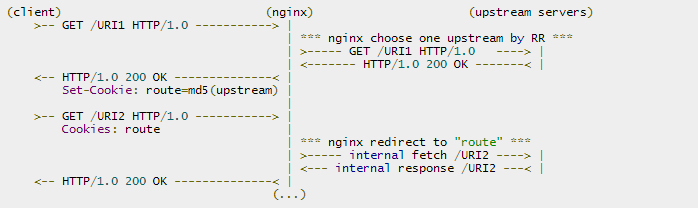
这个模块的作用是通过cookie的方式将来自同一个客户端(浏览器)的请求发送到同一个后端服务器上处理,这样一定程度上可以解决多个backend servers的session同步的问题 —— 因为不再需要同步,而RR轮询模式必须要运维人员自己考虑session同步的实现。
另外内置的 ip_hash 也可以实现根据客户端IP来分发请求,但它很容易造成负载不均衡的情况,而如果nginx前面有CDN网络或者来自同一局域网的访问,它接收的客户端IP是一样的,容易造成负载不均衡现象。淘宝Tengine的 ngx_http_upstream_session_sticky_module 也是类似的功能。nginx-sticky-module的cookie过期时间,默认浏览器关闭就过期,也就是会话方式。
这个模块并不合适不支持 Cookie 或手动禁用了cookie的浏览器,此时默认sticky就会切换成RR。它不能与ip_hash同时使用。
原理其实很简单,当一个客户端请求过来时,会 set-cookie 一个 cookie 来标注本次请求的服务器(第一次是随机).然后下次请求都会包含这个 cookie .然后就能很好的区分原本请求的服务器了.我测试过,当默认请求的后端服务器死掉后,会还是会自动切换的.另外,这个模块并不合适对不支持 Cookie 的浏览器
Sticky module is based on a "best effort" algorithm. Its aim is not to handle security somehow. It's been made to ensure that normal users are always redirected to the same backend server: that's all!
sticky安装
./configure ... --add-module=/absolute/path/to/nginx-sticky-module-ng

make

make install
sticky配置
upstream {

  sticky;

  server 127.0.0.1:9000;

  server 127.0.0.1:9001;

  server 127.0.0.1:9002;

}

  sticky [name=route] [domain=.foo.bar] [path=/] [expires=1h]

       [hash=index|md5|sha1] [no_fallback] [secure] [httponly];
- name: the name of the cookies used to track the persistant upstream srv; default: route
- domain: the domain in which the cookie will be valid default: nothing. Let the browser handle this.
- path: the path in which the cookie will be valid default: /
- expires: the validity duration of the cookie default: nothing. It's a session cookie. restriction: must be a duration greater than one second
- hash: the hash mechanism to encode upstream server. It cant' be used with hmac. default: md5hmac: the HMAC hash mechanism to encode upstream server It's like the hash mechanism but it uses hmac_key to secure the hashing. It can't be used with hash. md5|sha1: well known hash default: none. see hash.
- md5|sha1: well known hash
- index: it's not hashed, an in-memory index is used instead, it's quicker and the overhead is shorter Warning: the matching against upstream servers list is inconsistent. So, at reload, if upstreams servers has changed, index values are not guaranted to correspond to the same server as before! USE IT WITH CAUTION and only if you need to!
- hmac_key: the key to use with hmac. It's mandatory when hmac is set default: nothing.
- no_fallback: when this flag is set, nginx will return a 502 (Bad Gateway or Proxy Error) if a request comes with a cookie and the corresponding backend is unavailable.
- secure enable secure cookies; transferred only via https
- httponly enable cookies not to be leaked via js
官方文档也有个 sticky 指令,作用几乎是一样的,但这是nginx商业版本里才有的特性。包括后面的check指令,在nginx的商业版本里也有对应的health_check(配在 location )实现几乎一样的监控检查功能。
2、nginx负载均衡
- 轮询(默认) : 每个请求按时间顺序逐一分配到不同的后端服务器,如果后端某台服务器宕机,故障系统被自动剔除,使用户访问不受影响。Weight 指定轮询权值,Weight值越大,分配到的访问机率越高,主要用于后端每个服务器性能不均的情况下。
- ip_hash : 每个请求按访问IP的hash结果分配,这样来自同一个IP的访客固定访问一个后端服务器,有效解决了动态网页存在的session共享问题。当然如果这个节点不可用了,会发到下个节点,而此时没有session同步的话就注销掉了。
- least_conn : 请求被发送到当前活跃连接最少的realserver上。会考虑weight的值。
- url_hash : 此方法按访问url的hash结果来分配请求,使每个url定向到同一个后端服务器,可以进一步提高后端缓存服务器的效率。Nginx本身是不支持url_hash的,如果需要使用这种调度算法,必须安装nginx 的hash软件包 nginx_upstream_hash 。
- fair : 这是比上面两个更加智能的负载均衡算法。此种算法可以依据页面大小和加载时间长短智能地进行负载均衡,也就是根据后端服务器的响应时间来分配请求,响应时间短的优先分配。Nginx本身是不支持fair的,如果需要使用这种调度算法,必须下载Nginx的 upstream_fair 模块。
ip_hash的配置
upstream backend {

	ip_hash;

	server 192.168.1.225:8080 weight 2;

	server 192.168.1.226:8080 weight=1 max_fails=2 fail_timeout=30s ;

	server 192.168.1.227:8080 backup;

}

server {

	location / {

		proxy_pass http://backend;

		proxy_next_upstream error timeout invalid_header http_500 http_502 http_503 http_504;

	}

}
- weight:轮询权值也是可以用在ip_hash的,默认值为1
- max_fails:允许请求失败的次数,默认为1。当超过最大次数时,返回proxy_next_upstream 模块定义的错误。
- fail_timeout:有两层含义,一是在 30s 时间内最多容许 2 次失败;二是在经历了 2 次失败以后,30s时间内不分配请求到这台服务器。
- backup:备份机器。当其他所有的非backup机器出现故障的时候,才会请求backup机器
- max_conns: 限制同时连接到某台后端服务器的连接数,默认为0即无限制。因为queue指令是commercial,所以还是保持默认吧。
- proxy_next_upstream:这个指令属于 http_proxy 模块的,指定后端返回什么样的异常响应时,使用另一个realserver
项目地址:
https://bitbucket.org/nginx-goodies/nginx-sticky-module-ng
https://code.google.com/p/nginx-sticky-module/
3、 upstream_check
nginx自带是没有针对负载均衡后端节点的健康检查的,但是可以通过默认自带的 ngx_http_proxy_module 模块和 ngx_http_upstream_module 模块中的相关指令来完成当后端节点出现故障时,自动切换到下一个节点来提供访问。
nginx_upstream_check_module 是专门提供负载均衡器内节点的健康检查的外部模块,由淘宝工程师开发,通过它可以用来检测后端 realserver 的健康状态。如果后端 realserver 不可用,则后面的请求就不会转发到该节点上,并持续检查几点的状态。在淘宝自己的 tengine 上是自带了该模块。
upstream backend {

	sticky;

	server 192.168.1.225:8080 weight=2;

	server 192.168.1.226:8081 weight=1 max_fails=2 fail_timeout=30s ;

	server 192.168.1.227:8080 weight=1 max_fails=2 fail_timeout=30s ;

	server 192.168.1.227:8081;

	check interval=5000 rise=2 fall=3 timeout=1000 type=http;

	check_http_send "HEAD / HTTP/1.0\r\n\r\n";

	check_http_expect_alive http_2xx http_3xx;

}

server {

	location / {

		proxy_pass http://backend;

	}

	location /status {

		check_status;

		access_log off;

		allow 192.168.1.0/24;

		deny all;

	}

}
interval: 向后端发送的健康检查包的间隔。fall: 如果连续失败次数达到fall_count,服务器就被认为是down。rise: 如果连续成功次数达到rise_count,服务器就被认为是up。timeout: 后端健康请求的超时时间。default_down: 设定初始时服务器的状态,也就是一开始服务器认为是不可用,要等健康检查包达到一定成功次数以后才会被认为是健康的。type:健康检查包的类型,现在支持以下多种类型tcp:简单的tcp连接,如果连接成功,就说明后端正常。http:发送HTTP请求,通过后端的回复包的状态来判断后端是否存活。ajp:向后端发送AJP协议的Cping包,通过接收Cpong包来判断后端是否存活。ssl_hello:发送一个初始的SSL hello包并接受服务器的SSL hello包。mysql: 向mysql服务器连接,通过接收服务器的greeting包来判断后端是否存活。fastcgi:发送一个fastcgi请求,通过接受解析fastcgi响应来判断后端是否存活
port: 指定后端服务器的检查端口。你可以指定不同于真实服务的后端服务器的端口,比如后端提供的是443端口的应用,你可以去检查80端口的状态来判断后端健康状况。默认是0,表示跟后端server提供真实服务的端口一样。该选项出现于Tengine-1.4.0。
如果 type 为 http ,你还可以使用check_http_send来配置http监控检查包发送的请求内容,为了减少传输数据量,推荐采用 HEAD 方法。当采用长连接进行健康检查时,需在该指令中添加keep-alive请求头,如: HEAD / HTTP/1.1\r\nConnection: keep-alive\r\n\r\n 。当采用 GET 方法的情况下,请求uri的size不宜过大,确保可以在1个interval内传输完成,否则会被健康检查模块视为后端服务器或网络异常。
check_http_expect_alive 指定HTTP回复的成功状态,默认认为 2XX 和 3XX 的状态是健康的。
项目地址:https://github.com/yaoweibin/nginx_upstream_check_module 。
4、 proxy缓存的使用
缓存配置如下
http {

	proxy_temp_path /usr/local/nginx-1.6/proxy_temp;

	proxy_cache_path /usr/local/nginx-1.6/proxy_cache levels=1:2 keys_zone=cache_one:100m inactive=2d max_size=2g;

	server {

		location ~ .*\.(gif|jpg|png|html|css|js|ico|swf|pdf)(.*) {

			proxy_pass http://backend;

			proxy_redirect off;

			proxy_set_header Host $host;

			proxy_set_header X-Real-IP $remote_addr;

			proxy_set_header X-Forwarded-For $proxy_add_x_forwarded_for;

			proxy_cache cache_one;

			add_header Nginx-Cache $upstream_cache_status;

			proxy_cache_valid 200 304 301 302 8h;

			proxy_cache_valid 404 1m;

			proxy_cache_valid any 2d;

			proxy_cache_key $host$uri$is_args$args;

			expires 30d;

		}

		location ~ /purge(/.*) {

			allow 127.0.0.1;

			allow 192.168.1.0/24;

			deny all;

			proxy_cache_purge cache_one $host$1$is_args$args;

			error_page 405 =200 /purge$1;

		}

	}

}
清除缓存
上述配置的proxy_cache_purge指令用于方便的清除缓存,需要ngx_cache_purge 模块
echo -e 'PURGE / HTTP/1.0\r\n' | nc http:/example.com/purge/path

echo -e 'GET /purge/ HTTP/1.0\r\n' | nc http:/example.com/purge/path
【nginx】负载均衡和proxy的配置的更多相关文章
- FastDFS分布式文件系统&Nginx负载均衡最小环境安装配置[超级详解]
1.背景 FastDFS 是一款开源的.分布式文件系统(Distributed File System),由淘宝开发平台部资深架构师余庆开发.该开源项目的主页是 http://code.google. ...
- 手把手教你玩转nginx负载均衡(五)----配置后端服务器组
引言 在前面几篇中,我们成功的搭建起了一台nginx服务器,所以我们要重复前面的步骤,把服务器的数量增加到3台以上,我这里已经建好了另外两台,分别是centos7-22,centos7-23,对应的i ...
- 手把手教你玩转nginx负载均衡(三)----配置虚拟服务器网络
引言 虽然上一篇我们成功的启动了虚拟机,也安装好了操作系统,但是这台虚拟机和主机以及其他虚拟机是没有办法连通的,我们的目标是配置多台服务器并且配置nginx反向代理,来实现负载均衡,所以不能访问内网是 ...
- nginx负载均衡tomcat和配置ssl
目录 tomcat 组件功能 engine host context connector service server valve logger realm UserDatabaseRealm 工作流 ...
- Nginx负载均衡:分布式/热备Web Server的搭建
Nginx是一款轻量级的Web server/反向代理server及电子邮件(IMAP/POP3)代理server.并在一个BSD-like 协议下发行.由俄罗斯的程序设计师Igor Sysoev所开 ...
- Web Server 分布式服务: Nginx负载均衡
Nginx是一款轻量级的Web 服务器/反向代理服务器及电子邮件(IMAP/POP3)代理服务器.由俄罗斯的程序设计师Igor Sysoev所开发,供俄国大型的入口网站及搜索引擎Rambler使用.其 ...
- [转载]nginx负载均衡+keepalived三主(多主)配置
nginx负载均衡+keepalived三主(多主)配置 1.实验环境,实现目标三台主机分别配置nginx负载均衡对后端多台主机做转发,同时配置keepalived实现HA,保证任意主机出现故障时其他 ...
- Nginx负载均衡、SSL原理、生成SSL密钥对、Nginx配置SSL
6月12日任务 12.17 Nginx负载均衡12.18 ssl原理12.19 生成ssl密钥对12.20 Nginx配置ssl扩展 针对请求的uri来代理 http://ask.apelearn.c ...
- nginx负载均衡常见问题配置信息
nginx为后端web服务器(apache,nginx,tomcat,weblogic)等做反向代理 几台后端web服务器需要考虑文件共享,数据库共享,session共享问题.文件共享可以使用nfs, ...
随机推荐
- WCF回顾一、基本概念和应用场景
一.WCF描述 wcf是一款基于面向服务的架构的通讯框架平台,在分布式框架中得到了广泛使用. wcf入门非常简单,只要花几分钟就能编写一个完整的wcf程序,而实际上WCF是概念非常多的一门技术,需要花 ...
- Repository模式中,Update总是失败及其解析
在Repository模式中,我的Update方法总是无法更新实体,这个非常郁闷,Update方法如下: 1: public virtual void Update(T entity) 2: { 3: ...
- CentOS6.5菜鸟之旅:VirtualBox4.3识别USB设备
一.前言 VirtualBox默认是不能识别USB设备的,但可以通过Oracle VM VirtualBox Extension Pack来增强VirtualBox的功能,增强的功能如下: 1. US ...
- Redis设计与实现-客户端服务端与事件
事件 redis服务器是事件驱动的,事件分为文件事件与时间事件 文件事件是服务器通过套接字与客户端连接,两者之间的通信会产生相应的文件事件,服务器监听并处理这些事件完成网络操作: 时间事件是指redi ...
- 怎么快速了解自己的MySQL服务器
1.查看数据库服务器状态:status Linux 下的MySQL服务器状态 该列表中主要包括MySQL的版本(为version 5.1.61).运行平台(debian-linux-gnu(i68 ...
- “康园圈--互联网+校园平台“项目之sprint2
一.sprint2任务列表 1.部署框架,并上传代码到github. 2.原型设计 * 设计首页界面原型(包括功能公告.快速通道等展示栏) * 设计店铺浏览页面原型 * 设计店内浏览页面原型 * 设计 ...
- 第一次Sprint总结
回顾流程 这次我们做(done)的是设计用户登录界面.注册界面.查询功能.链接数据库等,我们成功地把todo变成了done,首先不管我们结果如何,不管我们的付出是否与收获成正比,但我们做到了 ...
- Linq专题之查询操作
前面我们主要讲解的是Linq的查询表达式,Linq不但提供了一些基本的查询表达式,还提供了数十个查询操作.比如筛选操作.聚合操作.投影操作等等.通过这些查询操作可以更方便的对数据源进行处理. Linq ...
- 关于URL、Web的一些概念
关于URL ★ 书写路径时,网络文件用斜杠“/”划分不同层级,本地文件管理系统用反斜杠“\”,分隔不同层级: 如下图示 ★ 绝对/相对 ...
- Oracle级联查询
在ORACLE 数据库中有一种方法可以实现级联查询 select * //要查询的字段 from table //具有子接点ID与父接点I ...