
line-block代替float布局;
line-block代替float布局;
我们先看看float的一些特性(特征)
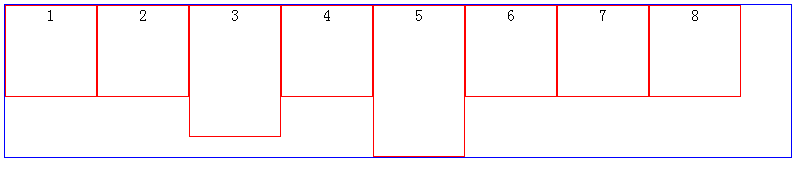
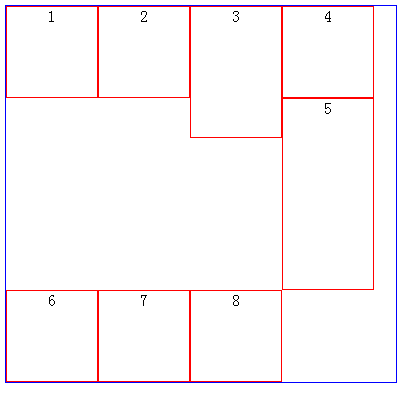
当我们改变浏览器的大小会出现这样的效果:

或则这样:
有时候,我们希望,以第一排最高的元素为换行基准时,我们就可以使用display:inline-block属性了滴呀
效果图

不能发现上图中有一个bug,那就是每个元素之间都有空白,解决方法;已经在我们另外一篇博客中记录了
这样的布局算是完成了,接下来,我们看如何实现两端对齐的效果滴啊
具体应用实例一(text-align:center)
css
 .container{

     width:100%;

     height:40px;

     padding:;

     margin:;

     list-style:none;

     background:#eee;

     text-align:center;

 }

 .liStyle{

     color:white;

     width:14px;

     height:14px;

     margin:15px 5px 0 5px;

     background:red;

     display:inline-block;

     cursor:pointer;

 }
html
 <ul class="container">

  <li class="liStyle">1</li>

  <li class="liStyle">2</li>

  <li class="liStyle">3</li>

  <li class="liStyle">4</li>

  <li class="liStyle">5</li>

  <li class="liStyle">6</li>

 </ul>
效果:

text-align
text-align是用于文字对齐的
接下来,我们看实例:
html
<div class="box1">There is clearly a need for CSS to be taken seriously by graphic artists. The Zen Garden aims to excite, inspire, and encourage participation. To begin, view some of the existing designs in the list. Clicking on any one will load the style sheet into this very page. The code remains the same, the only thing that has changed is the external .css file. Yes, really
</div>

<div class="box2">There is clearly a need for CSS to be taken seriously by graphic artists. The Zen Garden aims to excite, inspire, and encourage participation. To begin, view some of the existing designs in the list. Clicking on any one will load the style sheet into this very page. The code remains the same, the only thing that has changed is the external .css file. Yes, really
</div>

<div class="box3">There is clearly a need for CSS to be taken seriously by graphic artists. The Zen Garden aims to excite, inspire, and encourage participation. To begin, view some of the existing designs in the list. Clicking on any one will load the style sheet into this very page. The code remains the same, the only thing that has changed is the external .css file. Yes, really
</div>

<div class="box4">There is clearly a need for CSS to be taken seriously by graphic artists. The Zen Garden aims to excite, inspire, and encourage participation. To begin, view some of the existing designs in the list. Clicking on any one will load the style sheet into this very page. The code remains the same, the only thing that has changed is the external .css file. Yes, really
</div>
css
.box1{ width:500px; line-height:20px; margin:10px auto; background-color:#cdd; text-align:justify}

.box2{ width:500px; line-height:20px; margin:10px auto; background-color:#cdd; text-align:left;}

.box3{ width:500px; line-height:20px; margin:10px auto; background-color:#cdd; text-align:right;}

.box4{ width:500px; line-height:20px; margin:10px auto; background-color:#cdd; text-align:center;}
效果:

ps:有些人在测试text-align:justify的时候,发现无效,那是因为,文字还没有容器一行那么宽;
所以,至少要超过一行才能看到text-align:justify的效果滴呀
text-align:justify display:inline-block实现两端对齐
<!DOCTYPE HTML>

<html>

    <head>

        <title>文本两端对齐 by hongchenok</title>

        <meta http-equiv="Content-Type" content="text/html; charset=UTF-8">

        <style>

            .box{

                width:50%;

                padding:20px;

                margin:20px auto;

                background-color:#f0f3f9;

                text-align:justify;

                text-justify:distribute-all-lines;/*ie6-8*/

            }

            .list{

                width:120px;

                display:inline-block;

                *display: inline;

                *zoom:1;

                padding-bottom:20px;

                text-align:center;

                vertical-align:top;

            }

            .justify_fix{

                display:inline-block;

                *display: inline;

                *zoom:1; width:100%;

                height:0;

                overflow:hidden;

            }

            .list_head{

                height: 50px;

                width: 50px;

                background-color: red;

                float: left;

            }

            .list_content{

                width: 70px;

                height: 50px;

                float: left;

            }

            .clearfix:after {

                content: ".";

                display: block;

                height: 0;

                clear: both;

                visibility: hidden;

            }

            * html .clearfix {height: 1%;}

        </style>

    </head>

    <body>

        <div class="box">

            <div class="list clearfix">

                <div class="list_head"></div>

            </div>

            <div class="list clearfix">

                <div class="list_head"></div>

            </div>

            <span class="justify_fix"></span>

        </div>

        <div class="box">

            <div class="list clearfix">

                <div class="list_head"></div>

            </div>

            <div class="list clearfix">

                <div class="list_head"></div>

            </div>

            <div class="list clearfix">

                <div class="list_head"></div>

            </div>

            <div class="list clearfix">

                <div class="list_head"></div>

            </div>

            <span class="justify_fix"></span>

        </div>

    </body>

</html>
效果:

line-block代替float布局;的更多相关文章
- float布局打破标准流,神助攻clear清浮动
布局是什么?根据功能划分小块,再根据设计稿还原,书写静态页面,然后再在块里面填充内容,完善功能,js施加交互效果.div作为一个容器,独占一行,代码书写习惯从上至下属于标准流,而浮动float的css ...
- CSS布局:Float布局过程与老生常谈的三栏布局
原文见博客主站,欢迎大家去评论. 使用CSS布局网页,那是前端的基本功了,什么两栏布局,三栏布局,那也是前端面试的基本题了.一般来说,可以使用CSSposition属性进行布局,或者使用CSSfloa ...
- 转:CSS布局:Float布局过程与老生常谈的三栏布局
使用CSS布局网页,那是前端的基本功了,什么两栏布局,三栏布局,那也是前端面试的基本题了.一般来说,可以使用CSSposition属性进行布局,或者使用CSSfloat属性布局.前者适合布局首页,因为 ...
- 【深入BFC】 关于CSS中float布局,清除浮动,和margin合并的原理解析,解开你心中的那些困惑!
BFC的通俗理解: Block Formatting Context(块级格式化上下文)是W3C CSS 2.1 规范中的一个概念,它决定了元素如何对其内容进行定位,以及与其他元素的关系和相互作用. ...
- inline-block和float 布局的选择
浮动通常表现正常,但有时候搞起来会很纠结.特别是处理内部容器中的浮动,比如对一排图片使用浮动后对齐出现问题.Inline-block是我们的另一种选择.使用这种属性可以模拟部分浮动的特征,而不需要处理 ...
- inline-block,inline,block,table-cell,float
float:left ---------------------------------------------------------------------------------------- ...
- 关于CSS三列Float布局任务
任务目标 掌握HTML/CSS布局的概念 掌握盒模型的概念 掌握position与float的概念以及在布局时的用法 任务描述 使用 HTML 与 CSS 按照示意图;实现三栏式布局. 左右两栏宽度固 ...
- 十、一行多个:使用float布局的经典方法 ---接(一)
1.使用float必须要清除float:即在使用float元素的父级元素上清除float. 清除float的方法有三种,在父元素上加:1.width: 100% 或者固定宽度 +overflow:hi ...
- 布局方式-float布局
float的特性一 .元素‘浮动’ .脱离文档流 .但不脱离文本流 首先看一个案例,直观的了解下float的特性 <style> .container{ background: red; ...
随机推荐
- 【BZOJ】1192: [HNOI2006]鬼谷子的钱袋(水题)
http://www.lydsy.com/JudgeOnline/problem.php?id=1192 看到题我就好像想起以前小学升学考数学的最后一题,将一条金块分割最少的部分,使得每一天都能够支付 ...
- hiho#1033 : 交错和
描述 给定一个数 x,设它十进制展从高位到低位上的数位依次是 a0, a1, ..., an - 1,定义交错和函数: f(x) = a0 - a1 + a2 - ... + ( - 1)n - 1a ...
- CentOS Git的还原和操作
$ git log --graph --oneline $ git reset --hard 版本号 用 reflog 挽救错误的重置 [jackluo@localhost demo]$ git re ...
- linux开启ssh服务
本文概略:1)ubuntu发行版开启ssh.2)centos发行版开启ssh 1.ubuntu发行版安装/开启ssh服务 1.1 安装ssh服务端 sudo apt-get install opens ...
- hdu 3415
单调队列即保持队列中的元素单调递增(或递减)的这样一个队列,可以从两头删除,只能从队尾插入.单调队列的具体作用在于,由于保持队列中的元素满足单调性,对于上述问题中的每个j,可以用O(1)的时间找到对应 ...
- Union大小
在一个union类型结构中,所有的成员公用同样的存储空间,其占用的大小为其成员中需要空间最大者: union本身只保留一块地址空间,因为只有一个成员真正存储于该地址, 但这块地址也要满足内存对齐原则. ...
- 1. Nginx
参考: http://www.darrenfang.com/2014/02/install-php-with-nginx-on-ubuntu/ 安装: apt-get install python ...
- fail2ban 保护
Fail2ban是一款非常使用的软件,它能够监控系统日志,能够有效的防止ssh被暴力破解,下面小编将针对Fail2ban在Linux下的安装和使用给大家做个介绍,一起来了解下吧. https://gi ...
- PAT 基础编程题 4-11 求自定类型元素序列的中位数(希尔排序)
4-11 求自定类型元素序列的中位数 (25分) 本题要求实现一个函数,求N个集合元素A[]的中位数,即序列中第\lfloor N/2 +1\rfloor⌊N/2+1⌋大的元素.其中集合元素的类型 ...
- POJ 1573 Robot Motion(BFS)
Robot Motion Time Limit: 1000MS Memory Limit: 10000K Total Submissions: 12856 Accepted: 6240 Des ...