
linux:ACL权限
ACL权限是为了防止权限不够用的情况,一般的权限有所有者、所属组、其他人这三种,当这三种满足不了我们的需求的时候就可以使用ACL权限;
比如:一个网络老师,给一个班的学员上课,他在linux的根目录下面建立了一个文件,只允许本班级的 学员对该目录进行上传下载,其他人都不行,这是该目录的权限一般是770(一般我们设置权限都是所有者的权限大于所属组的权限,所属组的权限大于其他人的权限,依次往下),此时有个同学想试听我们的课程,该怎么给他分配权限呢?此时的话所属组、所有者、其他人都不满足,这是就用到ACL权限;
ACL权限的原理类似windows给一个文件添加用户(这个用户对该文件具有的权限):
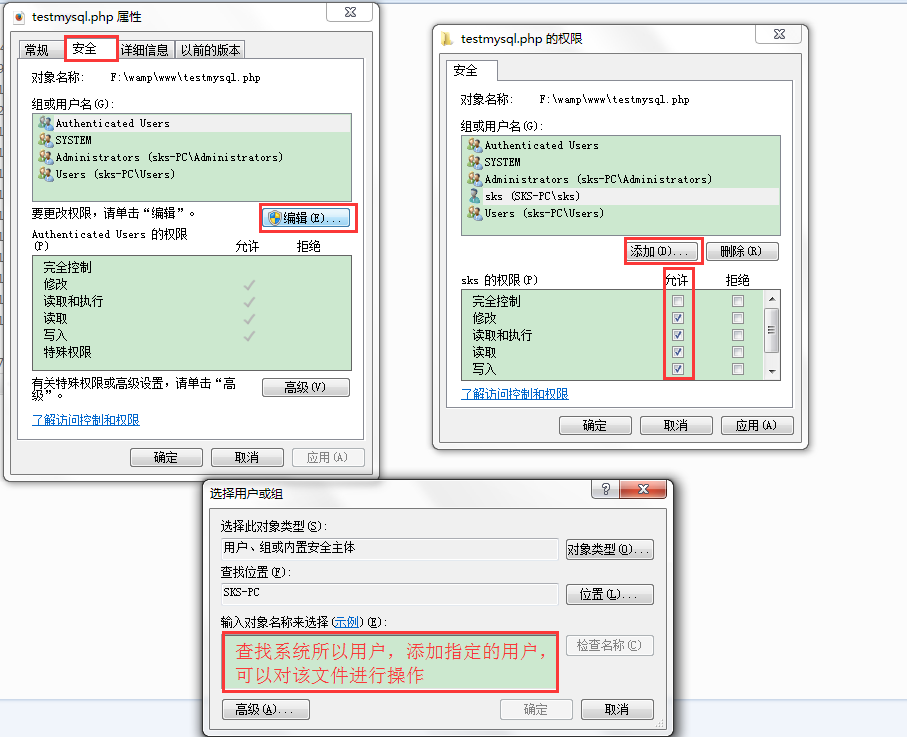
linux的ACL权限也是给一个文件或者目录添加指定的用户或者组,然后给对应的权限;
一、ACL权限的开启
1.查看acl权限是否支持(文件系统是否支持ACL权限):
a.ext4文件系统:使用 dumpe2fs -h /dev/sda3 来查看超级块中的信息,里面有 Default mount options: user_xattr acl 或者使用 mount 查询
b.xfs文件系统 :xfs系统貌似已经强制开启了ACL权限了
2.开启acl权限
a.临时开启:mount -o remount,acl / (remount:重新挂载;[,acl]添加acl权限;[/]分区)
b.永久开启:编辑我们开机挂载文件/etc/fstab
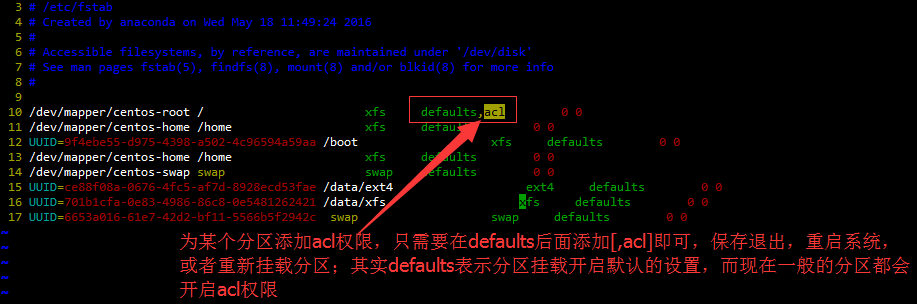
然后需要让修改生效,因为是开机自动挂载的文件,所以要让修改生效有两种方式:
1.重启系统
2.重新挂载:mount -o remount /
二、查看和设置ACL权限
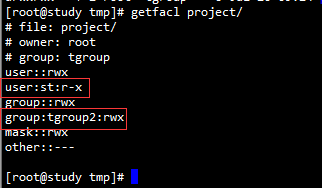
1.查看ACL权限:getfacl 文件名 下面是我做的试验之后的数据,我添加了一个st用户和一个tgroup2组,这两个就是alc权限做到的在
2.设定ALC权限:setfacl 命令设置(下面是我做的试验)
[root@study tmp]# mkdir project

[root@study tmp]# ls -l

total

srwxrwxrwx  mysql mysql  Jul  : mysql.sock

srw-rw----  root  root   Jul  : php-fcgi.sock

drwxr-xr-x  root  root   Jul  : project

[root@study tmp]# chmod  project/

[root@study tmp]# groupadd zhy

[root@study tmp]# chown root:zhy project/

[root@study tmp]# ls -ld project/

drwxrwx---  root zhy  Jul  : project/

[root@study tmp]# useradd zgw1

useradd: user 'zgw1' already exists

[root@study tmp]# useradd zgw2

[root@study tmp]# useradd zgw3

[root@study tmp]# gpasswd -a zgw2 zhy

Adding user zgw2 to group zhy

[root@study tmp]# gpasswd -a zgw3 zhy

Adding user zgw3 to group zhy

[root@study tmp]# ls -ld zhy

ls: cannot access zhy: No such file or directory

[root@study tmp]# ls -ld project/

drwxrwx---  root zhy  Jul  : project/

[root@study tmp]# su zgw3

Attempting to create directory /home/zgw3/perl5

[zgw3@study tmp]$ cd project/

[zgw3@study project]$ ls -l

total

[zgw3@study project]$ vi a

[zgw3@study project]$ ls -l

total

-rw-rw-r--  zgw3 zgw3  Jul  : a

[zgw3@study project]$ exit

exit

[root@study tmp]# su st

[st@study tmp]$ cd project/

bash: cd: project/: Permission denied

[st@study tmp]$ exit

exit

[root@study tmp]# setfacl -m u:st:rx project/

[root@study tmp]# getfacl project/

# file: project/

# owner: root

# group: zhy

user::rwx

user:st:r-x

group::rwx

mask::rwx

other::---

[root@study tmp]# su st

[st@study tmp]$ cd project/

[st@study project]$ ls -l

total

-rw-rw-r--  zgw3 zgw3  Jul  : a

[st@study project]$ touch a

touch: cannot touch ‘a’: Permission denied

[st@study project]$
设置用户:setfacl -m u:st:rx project [u指定用户]
设置组:setfacl -m g:tgroup:rx project [g指定组]
[root@study tmp]# getfacl project/

# file: project/

# owner: root

# group: zhy

user::rwx

user:st:r-x

group::rwx

mask::rwx

other::---

[root@study tmp]# groupadd zhy2

[root@study tmp]# setfacl -m g:zhy2:rx project/

[root@study tmp]# getfacl project/

# file: project/

# owner: root

# group: zhy

user::rwx

user:st:r-x

group::rwx

group:zhy2:r-x

mask::rwx

other::---
三、ACL权限的最大有效权限,和删除acl权限
[root@study tmp]# getfacl project/

# file: project/

# owner: root

# group: zhy

user::rwx

user:st:r-x

group::rwx

group:zhy2:r-x

mask::rwx

other::---
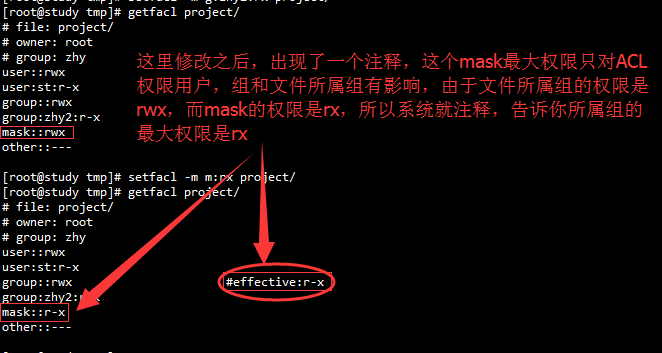
大家看上面的acl权限中有个"mask"的选项,它就是ACL权限的最大权限,现在是rwx,当你设置某个用户或组的ACL权限时,要跟mask的权限“相与”之后产生的权限才是该用户的最终权限,也就是加入mask的最大权限是rx,但是你给st用户设置的是rwx权限,此时st用户它的权限只有rx的权限,因为与最大权限“相与”得出的结果就是rx
命令:setfacl -m m:rx project
2.删除ACL权限
删除ACL用户权限:setfacl -x u:st 文件名
删除ACL组权限:setfacl -x g:tgroup 文件名
删除整个ACL权限:setfacl -b 文件名
[root@study tmp]# getfacl project/

# file: project/

# owner: root

# group: zhy

user::rwx

user:st:r-x

group::rwx                      #effective:r-x

group:zhy2:r-x

mask::r-x

other::---

[root@study tmp]# setfacl -x u:st project/

[root@study tmp]# getfacl project/

# file: project/

# owner: root

# group: zhy

user::rwx

group::rwx

group:zhy2:r-x

mask::rwx

other::---

[root@study tmp]# setfacl -x g:zhy2 project/

[root@study tmp]# getfacl project/

# file: project/

# owner: root

# group: zhy

user::rwx

group::rwx

mask::rwx

other::---

[root@study tmp]# ls -ld project/

drwxrwx---+  root zhy  Jul  : project/

[root@study tmp]# setfacl -b project/

[root@study tmp]# ls -ld project/

drwxrwx---  root zhy  Jul  : project/
四、设置默认ACL权限和递归ACL权限
1.命令:setfacl -m u:st:rx -R project 递归只对该目录下面现有的子文件或目录有用,对于该目录下面新添加的子文件或目录没用
[root@study tmp]# cd project/

[root@study project]# ls -l

total

-rw-rw-r--  zgw3 zgw3  Jul  : a

[root@study project]# cd ..

[root@study tmp]# setfacl -m u:st:rx -R project/

[root@study tmp]# ls -l project/

total

-rw-rwxr--+  zgw3 zgw3  Jul  : a
[root@study tmp]# cd project/
[root@study project]# ls -l
total 4
-rw-rwxr--+ 1 zgw3 zgw3 8 Jul 20 10:44 a
[root@study project]# touch b
[root@study project]# ls -l
total 4
-rw-rwxr--+ 1 zgw3 zgw3 8 Jul 20 10:44 a
-rw-r--r-- 1 root root 0 Jul 20 11:34 b
[root@study project]#
2.默认权限:使用d ,格式:setfacl -m d:u:st:rx project 默认权限只对该目录下面新建的文件或目录有效,对已经存在的子文件无效
[root@study tmp]# setfacl -m d:u:st:rx project/

[root@study tmp]# ls -l project/

total

-rw-rwxr--+  zgw3 zgw3  Jul  : a

-rw-r--r--  1 root root 0 Jul 20 11:34 b

[root@study tmp]# touch project/c

[root@study tmp]# ls -l project/

total

-rw-rwxr--+ 1 zgw3 zgw3 8 Jul 20 10:44 a

-rw-r--r--  1 root root 0 Jul 20 11:34 b

-rw-rw----+ 1 root root 0 Jul 20 11:38 c
linux:ACL权限的更多相关文章
- Linux ACL 权限之进阶篇
笔者在<Linux ACL 权限>一文中介绍了 Linux ACL 权限的基本用法,本文笔者将尝试探究 ACL 中的基本概念和实现原理,希望能够通过进一步的加深对 Linux 权限系统的理 ...
- Linux ACL 权限
ACL 是什么 ACL的全称是 Access Control List (访问控制列表) ,一个针对文件/目录的访问控制列表.它在UGO权限管理的基础上为文件系统提供一个额外的.更灵活的权限管理机制. ...
- linux ACL权限规划:getfacl,setfacl使用
ACL即Access Control List 主要的目的是提供传统的owner,group,others的read,write,execute权限之外的具体权限设置,ACL可以针对单一用户.单一文件 ...
- linux ACL权限
利用这两个指令就可以了: getfacl:获取某個文件的 ACL 设置 setfacl:设置某個文件的 ACL 规范 [root@study ~]# setfacl [-bkRd] [{-m|-x} ...
- LInux ACL权限控制
1.ACL简介 ACL是一种可以实现灵活的权限管理(文件的额外赋权机制)除了文件所有者,所属组和其他人,可以对更多的用户设置权限,这就是访问控制列表(Access Control List) 2.AC ...
- Linux ACL权限查看与设定
getfacl 文件名,可以查看文件的acl权限 setfacl [选项] 文件名,可以设定文件的acl权限,例如:setfacl -m u:boduo:rx /project/ 这时候,创建了bod ...
- 12 Linux ACL权限
1.查看facl权限 getfacl /home/test.txt [root@localhost ~]# getfacl /home/test.txt getfacl: Removing leadi ...
- Linux UGO和ACL权限管理
自主访问控制(Discretionary Access Control, DAC)是指对象(比如程序.文件.进程)的拥有者可以任意修改或者授予此对象相应的权限.Linux的UGO(User, Grou ...
- Linux文件目录权限浅谈
1.基本权限三种(1)r (read) 读 针对目录,有读(r)权限就代表能对此目录有列表功能,就是可以执行ls命令进行查看,另外还有cp的功能.针对文件,有读(r)权限就代表能对此文件有阅读功能,可 ...
- Linux系统文件权限管理(6)
Linux操作系统是多任务(Multi-tasks)多用户(Multi-users)分时操作系统,linux操作系统的用户就是让我们登录到linux的权限,每当我们使用用户名登录操作系统时,linux ...
随机推荐
- PHP IDE phpstorm 常用快捷键
PHP IDE phpstorm 常用快捷键 投稿:junjie 字体:[增加 减小] 类型:转载 这篇文章主要介绍了PHP IDE phpstorm 常用快捷键,本文分别列出了mac系统和Win ...
- 【IOS笔记】Windows
Windows Every iOS application needs at least one window—an instance of the UIWindow class—and some m ...
- 彻底删除oracle的方法
环境:Windows 2000+ORACLE,其他环境类似 假设ORACLE安装路径为:D:\ORACLE ,其他路径操作类似 方法: 1.开始->设置->控制面板->管理工具-&g ...
- Andrew Ng机器学习公开课笔记 -- Mixtures of Gaussians and the EM algorithm
网易公开课,第12,13课 notes,7a, 7b,8 从这章开始,介绍无监督的算法 对于无监督,当然首先想到k means, 最典型也最简单,有需要直接看7a的讲义 Mixtures of G ...
- addevent兼容函数 && 阻止默认行为 && 阻止传播
function addEvent(a, b, c, d) { a.addEventListener ? a.addEventListener(b, c, d) : a.attachEvent(&qu ...
- myeclipse 8.5 常用快捷键【转】
eclipse 里查找行号的方法 今天开发的时候为了方便查找报错行的位置,特意在网上找了一下快捷键是什么,现做记录. 在Eclipse里的show the line number 后,使用" ...
- 使用SecureCRT连接ubuntu
SecureCRT SSH2连接新装的UBUNTU 14.04 LTS 发现UBUNTU默认没有安装SSH 服务 在UBUNTU上 sudo apt-get install openssh-serve ...
- Error executing aapt: Return code -1073741819
在做andrid项目的时候,本来想把a项目中的a功能模块复制到b项目中,但是复制过程中出现xml文件id的问题, Error executing aapt: Return code -10737418 ...
- start from here
简单介绍下,小码农一只,工作两年左右,从事移动端游戏开发工作. 人类,精神正常,男,爱好游戏音乐足球美女,if(有妹子) 喜欢旅游;,取向正常. 很喜欢java,喜欢关注新技术, 应一些朋友的建议,今 ...
- iOS 获取当前时间 年、月、日、周几
NSDate * nowDate = [NSDate new]; NSCalendar *calendar = [NSCalendar currentCalendar]; NSUInteger uni ...