
JavaScript——DOM操作——Window.document对象
一、找到元素:
docunment.getElementById("id");根据id找,最多找一个;
var a =docunment.getElementById("id");将找到的元素放在变量中;
docunment.getElementsByName("name");根据name找,找出来的是数组;
docunment.getElementsByTagName("name");根据标签名找,找出来的是数组;
docunment.getElementsByClassName("name") 根据classname找,找出来的是数组;
二、操作内容:
1. 非表单元素:
(1)获取内容:
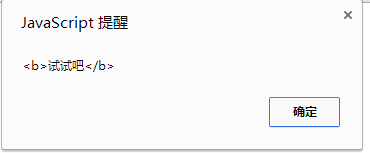
alert(a.innerHTML);标签里的html代码和文字都获取了,标签里面的所有内容。
如:body中有这么一个div:
<div id="me"><b>试试吧</b></div>
在script中用innerHTML获取div中的内容:
var a= document.getElementById("me");
alert(a.innerHTML);
结果如下图:
alert(a.innerText);只取里面的文字
alert(a.outerHTML);包括标签本身的内容(简单了解)
(2)设置内容:
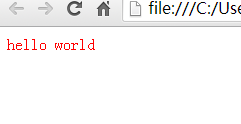
a.innerHTML = "<font color=red >hello world </font>";
如果用设置内容代码结果如下,div中的内容被替换了:
a.innerText会将赋的东西原样呈现
清空内容:赋值个空字符串
2. 表单元素:
(1)获取内容,有两种获取方式:
var t = document.f1.t1; form表单ID为f1里面的ID为t1的input;
var t = document.getElementById("id"); 直接用ID获取。
alert(t.value); 获取input中的value值;
alert(t.innerHTML); 获取<textarea> 这里的值 </textarea>;
(2)设置内容: t.value="内容改变";
3. 一个小知识点:
<a href="http://www.baidu.com" onclick ="return false">转向百度</a> ;加了return flase则不会跳转,默认是return true会跳转。按钮也一样,如果按钮中设置return flase 则不会进行提交,利用这个可以对提交跳转进行控制。
三、操作属性
首先利用元素的ID找到该元素,存于一个变量中:
var a = document.getElementById("id");
然后可以对该元素的属性进行操作:
a.setAttribute("属性名","属性值"); 设置一个属性,添加或更改都可以;
a.getAttribute("属性名");获取属性的值;
a.removeAttribute("属性名");移除一个属性。
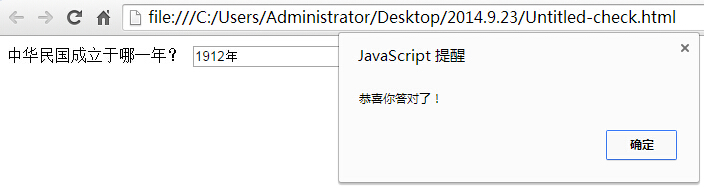
例子1:做一个问题,如果输入的答案正确则弹出正确,错误弹出错误;
这里在text里面写了一个daan属性,里面存了答案的值,点击检查答案的时候cheak输入的内容和答案是否一样:
<form>中华民国成立于哪一年?<input type="text" daan="1912年" value="" id="t1" name="t1" /><input type="button" onclick="check()" id="t2" name="t2" value="检查答案" /></form>
body
function check()

{

    var a=document.getElementById("t1");

    var a1=a.value;

    var a2=a.getAttribute("daan");

    if(a1==a2)

    {

        alert("恭喜你答对了!");

    }

   else

   {

       alert("笨蛋!");

   }

}
JS中
回答正确时的结果:
例子2: 同意按钮,倒计时10秒,同意按钮变为可提交的,这里用了操作属性:disabled,来改变按钮的状态,当disabled=”disabled”时按钮不可用。
<form><input type="submit" id="b1" name="b1" value="同意(10)" disabled="disabled" /></form>
body中
var n=10;

var a= document.getElementById("b1");

function bian()

{

      n--;

      if(n==0)

      {

            a.removeAttribute("disabled");

            a.value="同意";

            return;

      }

      else

      {

            a.value= "同意("+n+")";

            window.setTimeout("bian()",1000);

      }

}

window.setTimeout("bian()",1000);
JS中
四、操作样式
首先利用元素的ID找到该元素,存于一个变量中:
var a = document.getElementById("id");
然后可以对该元素的属性进行操作:
a.style="" ; 操作此ID样式的属性。
样式为CSS中的样式,所有的样式都可以用代码进行操作。
document.body.style.backgroundColor="颜色"; 整个窗口的背景色。
操作样式的class:a.className="样式表中的classname" 操作一批样式
例子1:展示图片的自动和手动切换;
<div id="tuijian" style=" background-image:url(imges/tj1.jpg);">             <div class="pages" id="p1" onclick="dodo(-1)"></div>

<div class="pages" id="p2" onclick="dodo(1)"></div></div>
body中
<script language="javascript">

var jpg =new Array();

jpg[0]="url(imges/tj1.jpg)";

jpg[1]="url(imges/tj2.jpg)";

jpg[2]="url(imges/tj3.jpg)";

var tjimg = document.getElementById("tuijian");

var xb=0;

var n=0;

function huan()

{

      xb++;

      if(xb == jpg.length)

      {

           xb=0;

      }

      tjimg.style.backgroundImage=jpg[xb];

      if(n==0)

      {

           var id = window.setTimeout("huan()",3000);

      }

}

function dodo(m)

{

      n=1;

      xb = xb+m;

      if(xb < 0)

      {

             xb = jpg.length-1;

      }

      else if(xb >= jpg.length)

      {

             xb = 0;

      }

      tjimg.style.backgroundImage=jpg[xb];

}

window.setTimeout("huan()",3000);</script>
JS中
五、相关元素操作:
var a = document.getElementById("id");找到a;
var b = a.nextSibling,找a的下一个同辈元素,注意包含空格;
var b = a.previousSibling,找a的上一个同辈元素,注意包含空格;
var b = a.parentNode,找a的上一级父级元素;
var b = a.childNodes,找出来的是数组,找a的下一级子元素;
var b = a.firstChild,第一个子元素,lastChild最后一个,childNodes[n]找第几个;
alert(nodes[i] instanceof Text); 判断是不是文本,是返回true,不是返回flase,用if判断它的值是不是false,可以去除空格。
六、元素的创建、添加、删除:
var a = document.getElementById("id");找到a;
var obj = document.createElement("标签名");创建一个元素
obj.innerHTML = "hello world";添加的时候首先需要创建出一个元素。
a.appendChild(obj);向a中添加一个子元素。
a.removeChild(obj);删除一个子元素。
列表中a.selectedIndex:选中的是第几个;
//a.options[a.selectIndex]按下标取出第几个option对象
七、字符串的操作:
var s = new String(); 或var s ="aaaa";
var s = "hello world";
alert(s.toLowerCase());转小写 toUpperCase() 转大写
alert(s.substring(3,8));从第三个位置截取到第八个位置
alert(s.substr(3,8));从第三个位置开始截取,截取八个字符长度,不写后面的数字是截到最后.
s.split('');将字符换按照指定的字符拆开,放入数组,自动排序
s.length是属性
s.indexOf("world");world在字符串中第一次出现的位置,没有返回-1
s.lastIndexOf("o");o在字符串中最后一次出现的位置
八、日期时间的操作
var d = new Date();当前时间
d.setFullYear(2015,11,6);/*在想要设置的月份上减1设置*/
d.getFullYear:取年份;
d.getMonth():取月份,取出来的少1;
d.getDate():取天;
d.getDay():取星期几
d.getHours():取小时;
d.getMinutes():取分钟;d.getSeconds():取秒
d.setFullYear():设置年份,设置月份的时候注意-1。
九、数学函数的操作
Math.ceil();大于当前小数的最小整数
Math.floor();小鱼当前小数的最大整数
Math.sqrt();开平方
Math.round();四舍五入 (跟日常习惯一样不同于C#)
Math.random();随机数,0-1之间
十、小知识点
外面双引号,里面的双引号改为单引号;
在div里面行高设置时,无论设置多么高,所占用的行默认在中间位置(div上下区域内中间——【默认】垂直居中)。
文本框取出来的值是字符串,需要用parseint()转化为数字
s.match(reg); s代表一个字符串,reg代表一个字符串,两者进行匹配,如果两个字符串不匹配,返回一个null。
练习 带缩略图的图片轮播:
<style>

* {

    margin: 0px;

    padding: 0px;

}

#tuijian {

    width: 476px;

    height: 350px;

    background-repeat: no-repeat;

    background-position: center;

}

.pages {

    top: 200px;

    background-color: #000;

    background-position: center;

    background-repeat: no-repeat;

    opacity: 0.4;

    width: 100px;

    height: 100px;

    border-radius: 50px;

}

#p1 {

    background-image: url(%E7%AE%AD%E5%A4%B4%E5%B7%A6.png);

    float: left;

    margin: 150px 0px 0px 10px;

}

#p2 {

    background-image: url(%E7%AE%AD%E5%A4%B4%E5%8F%B3.png);

    float: right;

    margin: 150px 10px 0px 0px;

}

#gundong {

    width: 800px;

    height: 500px;

    position: relative;

    margin: 30px auto;

    overflow: hidden;

}

#ta {

    margin-left: 0px;

    transition: 0.7s;

}

.ir {

    width: 32px;

    height: 32px;

    position: absolute;

    top: 230px;

    z-index: 99;

}

#left {

    left: 10px;

}

#right {

    right: 10px;

}

.xiao {

    width: 1080px;

    height: 130px;

    position: relative;

    margin-top: 50px;

    left: 450px;

}

.x1 {

    width: 200px;

    height: 125px;

    position: relative;

    float: left;

    margin-left: 10px;

    border: 3px solid #999;

}
css
<div id="gundong" onmouseover="pause()" onmouseout="conti()">

  <table id="ta" cellpadding="0" cellspacing="0">

    <tr height="500">

      <td width="800"><img src="轮播/Images/1.jpg" /></td>

      <td width="800"><img src="轮播/Images/2.jpg" /></td>

      <td width="800"><img src="轮播/Images/3.jpg" /></td>

      <td width="800"><img src="轮播/Images/4.jpg" /></td>

      <td width="800"><img src="轮播/Images/5.jpg" /></td>

    </tr>

  </table>

  <div class="ir" id="left" onclick="dong(-1)"><img src="轮播/Images/left.png" /></div>

  <div class="ir" id="right" onclick="dong(1)"><img src="轮播/Images/right.png" /></div>

</div>

<div class="xiao">

  <div id="d1" class="x1" onclick="dian(1)" style="border-color:#F00"><img width="200" src="轮播/Images/1.jpg" /></div>

  <div id="d2" class="x1" onclick="dian(2)"><img width="200" src="轮播/Images/2.jpg" /></div>

  <div id="d3" class="x1" onclick="dian(3)"><img width="200" src="轮播/Images/3.jpg" /></div>

  <div id="d4" class="x1" onclick="dian(4)"><img width="200" src="轮播/Images/4.jpg" /></div>

  <div id="d5" class="x1" onclick="dian(5)"><img width="200" src="轮播/Images/5.jpg" /></div>

</div>
body
<script>

function huan()

{

    var tu=document.getElementById("ta");

    var a=parseInt(tu.style.marginLeft);

    if(a<=-3200)

    {

        tu.style.marginLeft="0px";}

        else

        {

            tu.style.marginLeft=(a-800)+"px";}

            qie(parseInt(tu.style.marginLeft));

            shi=window.setTimeout("huan()",3000);

}

var shi=window.setTimeout("huan()",3000)

function pause()

{

    window.clearTimeout(shi);}

    function qie(a)

{

    if(a==0)

    {

        document.getElementById("d1").style.borderColor="#F00";

        document.getElementById("d2").style.borderColor="#999";

        document.getElementById("d3").style.borderColor="#999";

        document.getElementById("d4").style.borderColor="#999";

        document.getElementById("d5").style.borderColor="#999";

        }

    else if(a==-800){

        document.getElementById("d1").style.borderColor="#999";

        document.getElementById("d2").style.borderColor="#F00";

        document.getElementById("d3").style.borderColor="#999";

        document.getElementById("d4").style.borderColor="#999";

        document.getElementById("d5").style.borderColor="#999";

        }

    else if(a==-1600){

        document.getElementById("d1").style.borderColor="#999";

        document.getElementById("d2").style.borderColor="#999";

        document.getElementById("d3").style.borderColor="#F00";

        document.getElementById("d4").style.borderColor="#999";

        document.getElementById("d5").style.borderColor="#999";

        }

    else if(a==-2400){

        document.getElementById("d1").style.borderColor="#999";

        document.getElementById("d2").style.borderColor="#999";

        document.getElementById("d3").style.borderColor="#999";

        document.getElementById("d4").style.borderColor="#F00";

        document.getElementById("d5").style.borderColor="#999";

        }

    else if(a==-3200){

        document.getElementById("d1").style.borderColor="#999";

        document.getElementById("d2").style.borderColor="#999";

        document.getElementById("d3").style.borderColor="#999";

        document.getElementById("d4").style.borderColor="#999";

        document.getElementById("d5").style.borderColor="#F00";

        }

}

function dian(n)

{

    var tu =document.getElementById("ta");

    if(n==1){tu.style.marginLeft="0px";}

    else if(n==2){tu.style.marginLeft="-800px";    }

    else if(n==3){tu.style.marginLeft="-1600px";}

    else if(n==4){tu.style.marginLeft="-2400px";}

    else if(n==5){tu.style.marginLeft="-3200px";}

    qie(parseInt(tu.style.marginLeft));

}

document.getElementById("ta").style.marginLeft="0px";

    function conti()

    {

        shi=window.setTimeout("huan()",3000)}

        function dong(m)

        {

            var tu=document.getElementById("ta");

            var a=parseInt(tu.style.marginLeft);

            if(m==-1)

            {

                if(a==0)

                {tu.style.marginLeft=-3200+"px";

                }

                else

                {

                    tu.style.marginLeft=(a+800)+"px";}

            }

            else

            {

                if(a==-3200)

                {tu.style.marginLeft=0+"px";}

                else

                {tu.style.marginLeft=(a-800)+"px";}

            }qie(parseInt(tu.style.marginLeft));

}
JS
JavaScript——DOM操作——Window.document对象的更多相关文章
- JavaScript(四)——DOM操作——Window.document对象
一.找到元素: docunment.getElementById("id"):根据id找,最多找一个: var a =docunment.getElementById(&qu ...
- HTML中 DOM操作的Document 对象详解(收藏)
Document 对象Document 对象代表整个HTML 文档,可用来访问页面中的所有元素.Document 对象是 Window 对象的一个部分,可通过 window.document 属性来访 ...
- JavaScript的DOM操作。Window.document对象
间隔执行一段代码:window.setlnteval("需要执行的代码",间隔毫秒数) 例 : window.setlnteval("alert("你 ...
- javascript DOM 操作
在javascript中,经常会需要操作DOM操作,在此记录一下学习到DOM操作的知识. 一.JavaScript DOM 操作 1.1.DOM概念 DOM :Document Object Mode ...
- javascript DOM 操作 attribute 和 property 的区别
javascript DOM 操作 attribute 和 property 的区别 在做 URLRedirector 扩展时,注意到在使用 jquery 操作 checkbox 是否勾选时,用 at ...
- Window.document对象
1.Window.document对象 一.找到元素: docunment.getElementById("id"):根据id找,最多找一个: var a =docunme ...
- Window.document对象 轮播练习
Window.document对象 一.找到元素: docunment.getElementById("id"):根据id找,最多找一个: var a =docun ...
- HTML Window.document对象
1.Window.document对象 一.找到元素: docunment.getElementById("id"):根据id找,最多找一个: var a =docunmen ...
- JS中window.document对象
小知识点注:外面双引号,里面的双引号改为单引号: 在div里面行高设置和整个外面高度一样,才能用竖直居中,居中是行居中 文本框取出来 ...
随机推荐
- SQL优化(zhuan)
转自:http://www.jfox.info/SQL-you-hua 数据库的优化问题 一.问题的提出 在应用系统开发初期,由于开发数据库数据比较少,对于查询SQL语句,复杂视图的的编写等体会不出S ...
- 浅谈 举家搬迁静态文件到CDN
由于七牛CDN最近做活动,对于标准用户可以免费使用如下优惠 10 GB 存储空间 10 G/月 下载流量 10 万次/月 PUT/DELETE 请求 100 万次/月 GET 请求 以上这些指标直接就 ...
- string strSQL = "Select * From Employees;Select * from Customers";执行两次查询
SqlCommand对象的字符串SQL命令可以做多个,以查询为例,用到SqlDataReader的一些方法,如ExecuteReader(),Read()(一条命令内的移动至下一记录),NextRes ...
- background和background-size
今天偶遇一个小问题. 添加logo图片时, 由于不需要重新定位图片位置,就准备偷懒在间歇属性中省略background-position的属性,然而很不幸的是,结果却是酱紫的(谷歌浏览器): 不能加载 ...
- [LeetCode] Letter Combinations of a Phone Number(bfs)
Given a digit string, return all possible letter combinations that the number could represent. A map ...
- Four Operations---hdu5938(暴力)
题目链接:http://acm.hdu.edu.cn/showproblem.php?pid=5938 题意:给一个不超过20位并且大于2位的数字字符串(只包含1-9)然后找到适当的位置依次放入&qu ...
- QQ聊天气泡(图片拉伸不变样)、内容尺寸定制(高度随字数、字体而变)
- (void)viewDidLoad { [super viewDidLoad]; self.view.backgroundColor = [UIColor whiteColor]; /** QQ聊 ...
- golang AES/ECB/PKCS5 加密解密 url-safe-base64
因为项目的需要用到golang的一种特殊的加密解密算法AES/ECB/PKCS5,但是算法并没有包含在标准库中,经过多次失败的尝试,终于解码成功,特此分享: /* 描述 : golang AES/EC ...
- Swift-08-闭包引起的循环强引用
循环强引用还会发生在当你将一个闭包赋值给类实例的某个实例,并且这个闭包体中又实用了这个类实例.这个闭包体重可能访问了实例的某个属性,例如self.**,或者闭包中调用了实例的某个方法,例如self.* ...
- SSH验证原理
http://www.tuicool.com/articles/qyiyim 下面会讲解ssh的密码登陆和免密码登陆.无论是密码登陆还是免密码登陆,安全使用的都是RSA非对称加密. SSH之所以能够保 ...