
xamarin.android 给View控件 添加数字提醒效果-BadgeView
本文代码从java项目移植到.net项目 java开源项目:https://github.com/jgilfelt/android-viewbadger
using System;

using System.Collections.Generic;

using System.Linq;

using System.Text;

using Android.App;

using Android.Content;

using Android.OS;

using Android.Runtime;

using Android.Views;

using Android.Widget;

using Android.Graphics;

using Java.Lang;

using Android.Util;

using Android.Content.Res;

using Android.Views.Animations;

using Android.Graphics.Drawables;

using Android.Graphics.Drawables.Shapes;

using static Android.Resource;

using static Android.App.ActionBar;

namespace Dorid.UI

{

    public class BadgeView : TextView

    {

        public const int POSITION_TOP_LEFT = ;

        public const int POSITION_TOP_RIGHT = ;

        public const int POSITION_BOTTOM_LEFT = ;

        public const int POSITION_BOTTOM_RIGHT = ;

        public const int POSITION_CENTER = ;

        private const int DEFAULT_MARGIN_DIP = ;

        private const int DEFAULT_LR_PADDING_DIP = ;

        private const int DEFAULT_CORNER_RADIUS_DIP = ;

        private const int DEFAULT_POSITION = POSITION_TOP_RIGHT;

        private static Android.Graphics.Color DEFAULT_BADGE_COLOR = Android.Graphics.Color.ParseColor("#CCFF0000"); //Color.RED;

        private static Android.Graphics.Color DEFAULT_TEXT_COLOR = Android.Graphics.Color.White;

        private static Android.Views.Animations.Animation fadeIn;

        private static Android.Views.Animations.Animation fadeOut;

        private Context context;

        private View target;

        private int badgePosition;

        private int badgeMarginH;

        private int badgeMarginV;

        private Android.Graphics.Color badgeColor;

        private bool isShown;

        private ShapeDrawable badgeBg;

        private int targetTabIndex;

        public BadgeView(Context context):this(context,(IAttributeSet)null, Android.Resource.Attribute.TextViewStyle)

        {

        }

        public BadgeView(Context context, IAttributeSet attrs) : this(context, attrs, Android.Resource.Attribute.TextViewStyle)

        {

        }

        /**

         * Constructor -

         *

         * create a new BadgeView instance attached to a target {@link android.view.View}.

         *

         * @param context context for this view.

         * @param target the View to attach the badge to.

         */

        public BadgeView(Context context, View target) : this(context,null, Android.Resource.Attribute.TextViewStyle,target,)

        {

        }

        /**

         * Constructor -

         *

         * create a new BadgeView instance attached to a target {@link android.widget.TabWidget}

         * tab at a given index.

         *

         * @param context context for this view.

         * @param target the TabWidget to attach the badge to.

         * @param index the position of the tab within the target.

         */

        public BadgeView(Context context, TabWidget target, int index):this(context,null, Android.Resource.Attribute.TextViewStyle,target,index)

        {

        }

        public BadgeView(Context context, IAttributeSet attrs, int defStyle):this(context,attrs,defStyle,null,)

        {

        }

        public BadgeView(Context context, IAttributeSet attrs, int defStyle, View target, int tabIndex):base(context,attrs,defStyle)

        {

            init(context, target, tabIndex);

        }

        private void init(Context context, View target, int tabIndex)

        {

            this.context = context;

            this.target = target;

            this.targetTabIndex = tabIndex;

            // apply defaults

            badgePosition = DEFAULT_POSITION;

            badgeMarginH = DipToPixels(DEFAULT_MARGIN_DIP);

            badgeMarginV = badgeMarginH;

            badgeColor = DEFAULT_BADGE_COLOR;

            Typeface = Typeface.DefaultBold;

            int paddingPixels = DipToPixels(DEFAULT_LR_PADDING_DIP);

            SetPadding(paddingPixels, , paddingPixels, );

            SetTextColor(DEFAULT_TEXT_COLOR);

            fadeIn = new AlphaAnimation(, );

            fadeIn.Interpolator = new DecelerateInterpolator();

            fadeIn.Duration = ;

            fadeOut = new AlphaAnimation(, );

            fadeOut.Interpolator = new DecelerateInterpolator();

            fadeOut.Duration = ;

            isShown = false;

            if (this.target != null)

            {

                ApplyTo(this.target);

            }

            else

            {

                Show();

            }

        }

        private void ApplyTo(View target)

        {

            ViewGroup.LayoutParams lp = target.LayoutParameters;

            IViewParent parent = target.Parent;

            FrameLayout container = new FrameLayout(context);

            if (target is TabWidget) {

                // set target to the relevant tab child container

                target = ((TabWidget)target).GetChildTabViewAt(targetTabIndex);

                this.target = target;

                ((ViewGroup)target).AddView(container,

                        new LayoutParams(LayoutParams.FillParent, LayoutParams.FillParent));

                this.Visibility= ViewStates.Gone;

                container.AddView(this);

            } else {

                // TODO verify that parent is indeed a ViewGroup

                ViewGroup group = (ViewGroup)parent;

                int index = group.IndexOfChild(target);

                group.RemoveView(target);

                group.AddView(container, index, lp);

                container.AddView(target);

                this.Visibility= ViewStates.Gone;

                container.AddView(this);

                group.Invalidate();

            }

        }

        /**

         * Make the badge visible in the UI.

         *

         */

        public void Show()

        {

            Show(false, null);

        }

        /**

         * Make the badge visible in the UI.

         *

         * @param animate flag to apply the default fade-in animation.

         */

        public void Show(bool animate)

        {

            Show(animate, fadeIn);

        }

        /**

         * Make the badge visible in the UI.

         *

         * @param anim Animation to apply to the view when made visible.

         */

        public void Show(Android.Views.Animations.Animation anim)

        {

            Show(true, anim);

        }

        /**

         * Make the badge non-visible in the UI.

         *

         */

        public void Hide()

        {

            Hide(false, null);

        }

        /**

         * Make the badge non-visible in the UI.

         *

         * @param animate flag to apply the default fade-out animation.

         */

        public void Hide(bool animate)

        {

            Hide(animate, fadeOut);

        }

        /**

         * Make the badge non-visible in the UI.

         *

         * @param anim Animation to apply to the view when made non-visible.

         */

        public void Hide(Android.Views.Animations.Animation anim)

        {

            Hide(true, anim);

        }

        /**

         * Toggle the badge visibility in the UI.

         *

         */

        public void Toggle()

        {

            Toggle(false, null, null);

        }

        /**

         * Toggle the badge visibility in the UI.

         *

         * @param animate flag to apply the default fade-in/out animation.

         */

        public void Toggle(bool animate)

        {

            Toggle(animate, fadeIn, fadeOut);

        }

        /**

         * Toggle the badge visibility in the UI.

         *

         * @param animIn Animation to apply to the view when made visible.

         * @param animOut Animation to apply to the view when made non-visible.

         */

        public void Toggle(Android.Views.Animations.Animation animIn, Android.Views.Animations.Animation animOut)

        {

            Toggle(true, animIn, animOut);

        }

        private void Show(bool animate, Android.Views.Animations.Animation anim)

        {

            if (Background == null)

            {

                if (badgeBg == null)

                {

                    badgeBg = getDefaultBackground();

                }

                SetBackgroundDrawable(badgeBg);

            }

            ApplyLayoutParams();

            if (animate)

            {

                this.StartAnimation(anim);

            }

            this.Visibility = ViewStates.Visible;

            isShown = true;

        }

        private void Hide(bool animate, Android.Views.Animations.Animation anim)

        {

            this.Visibility = ViewStates.Gone;

            if (animate)

            {

                this.StartAnimation(anim);

            }

            isShown = false;

        }

        private void Toggle(bool animate, Android.Views.Animations.Animation animIn, Android.Views.Animations.Animation animOut)

        {

            if (isShown)

            {

                Hide(animate && (animOut != null), animOut);

            }

            else

            {

                Show(animate && (animIn != null), animIn);

            }

        }

        /**

         * Increment the numeric badge label. If the current badge label cannot be converted to

         * an integer value, its label will be set to "0".

         *

         * @param offset the increment offset.

         */

        public int Increment(int offset)

        {

            var txt = Text;

            int i;

            if (txt != null)

            {

                try

                {

                    i = Convert.ToInt32(txt.ToString());

                }

                catch (NumberFormatException e)

                {

                    i = ;

                }

            }

            else

            {

                i = ;

            }

            i = i + offset;

            //Text = String.ValueOf(i);

            return i;

        }

        /**

         * Decrement the numeric badge label. If the current badge label cannot be converted to

         * an integer value, its label will be set to "0".

         *

         * @param offset the decrement offset.

         */

        public int Decrement(int offset)

        {

            return Increment(-offset);

        }

        private ShapeDrawable getDefaultBackground()

        {

            int r = DipToPixels(DEFAULT_CORNER_RADIUS_DIP);

            float[] outerR = new float[] { r, r, r, r, r, r, r, r };

            RoundRectShape rr = new RoundRectShape(outerR, null, null);

            ShapeDrawable drawable = new ShapeDrawable(rr);

            drawable.Paint.Color = badgeColor;

            return drawable;

        }

        private void ApplyLayoutParams()

        {

            FrameLayout.LayoutParams lp = new FrameLayout.LayoutParams(LayoutParams.WrapContent, LayoutParams.WrapContent);

            switch (badgePosition)

            {

                case POSITION_TOP_LEFT:

                    lp.Gravity = GravityFlags.Left | GravityFlags.Top;

                    lp.SetMargins(badgeMarginH, badgeMarginV, , );

                    break;

                case POSITION_TOP_RIGHT:

                    lp.Gravity = GravityFlags.Right | GravityFlags.Top;

                    lp.SetMargins(, badgeMarginV, badgeMarginH, );

                    break;

                case POSITION_BOTTOM_LEFT:

                    lp.Gravity = GravityFlags.Left | GravityFlags.Bottom;

                    lp.SetMargins(badgeMarginH, , , badgeMarginV);

                    break;

                case POSITION_BOTTOM_RIGHT:

                    lp.Gravity = GravityFlags.Right | GravityFlags.Bottom;

                    lp.SetMargins(, , badgeMarginH, badgeMarginV);

                    break;

                case POSITION_CENTER:

                    lp.Gravity = GravityFlags.Center;

                    lp.SetMargins(, , , );

                    break;

                default:

                    break;

            }

            LayoutParameters = lp;

        }

        /**

         * Returns the target View this badge has been attached to.

         *

         */

        public View GetTarget()

        {

            return target;

        }

        /**

         * Is this badge currently visible in the UI?

         *

         */

        public override bool IsShown

        {

            get

            {

                return isShown;

            }

        }

        /**

         * Returns the positioning of this badge.

         *

         * one of POSITION_TOP_LEFT, POSITION_TOP_RIGHT, POSITION_BOTTOM_LEFT, POSITION_BOTTOM_RIGHT, POSTION_CENTER.

         *

         */

        public int getBadgePosition()

        {

            return badgePosition;

        }

        /**

         * Set the positioning of this badge.

         *

         * @param layoutPosition one of POSITION_TOP_LEFT, POSITION_TOP_RIGHT, POSITION_BOTTOM_LEFT, POSITION_BOTTOM_RIGHT, POSTION_CENTER.

         *

         */

        public void setBadgePosition(int layoutPosition)

        {

            this.badgePosition = layoutPosition;

        }

        /**

         * Returns the horizontal margin from the target View that is applied to this badge.

         *

         */

        public int getHorizontalBadgeMargin()

        {

            return badgeMarginH;

        }

        /**

         * Returns the vertical margin from the target View that is applied to this badge.

         *

         */

        public int getVerticalBadgeMargin()

        {

            return badgeMarginV;

        }

        /**

         * Set the horizontal/vertical margin from the target View that is applied to this badge.

         *

         * @param badgeMargin the margin in pixels.

         */

        public void setBadgeMargin(int badgeMargin)

        {

            this.badgeMarginH = badgeMargin;

            this.badgeMarginV = badgeMargin;

        }

        /**

         * Set the horizontal/vertical margin from the target View that is applied to this badge.

         *

         * @param horizontal margin in pixels.

         * @param vertical margin in pixels.

         */

        public void setBadgeMargin(int horizontal, int vertical)

        {

            this.badgeMarginH = horizontal;

            this.badgeMarginV = vertical;

        }

        /**

         * Returns the color value of the badge background.

         *

         */

        public int getBadgeBackgroundColor()

        {

            return badgeColor;

        }

        /**

         * Set the color value of the badge background.

         *

         * @param badgeColor the badge background color.

         */

        public void setBadgeBackgroundColor(Android.Graphics.Color badgeColor)

        {

            this.badgeColor = badgeColor;

            badgeBg = getDefaultBackground();

        }

        private int DipToPixels(int dip)

        {

            Resources r =Resources;

            float px = TypedValue.ApplyDimension(ComplexUnitType.Dip, dip, r.DisplayMetrics);

            return (int)px;

        }

    }

}
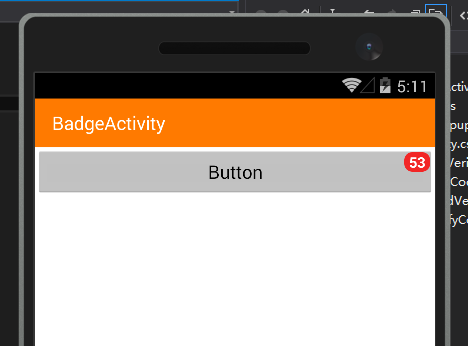
使用方法:
    [Activity(Label = "BadgeActivity", MainLauncher = true)]

    public class BadgeActivity : Activity

    {

        private ZsCMS.Dorid.UI.BadgeView bv;

        protected override void OnCreate(Bundle savedInstanceState)

        {

            base.OnCreate(savedInstanceState);

            SetContentView(Resource.Layout.Badge);

            View buttion= FindViewById(Resource.Id.button1);

            bv = new UI.BadgeView(this, buttion);

            bv.Text = "";

            bv.Show();

            buttion.Click += Buttion_Click;

            // Create your application here

        }

        private int i = ;

        private void Buttion_Click(object sender, EventArgs e)

        {

            bv.Text = (++i).ToString();

        }

    }
xamarin.android 给View控件 添加数字提醒效果-BadgeView的更多相关文章
- Android自定义view控件
转载自: http://blog.163.com/ppy2790@126/blog/static/103242241201382210910473/ 开发自定义控件的步骤: 1.了解View的工作原理 ...
- 安卓控件 仪表盘控件 柱状图控件 曲线控件 xamarin.android 分类器 瓶子控件 报警控件 水箱控件 进度条控件等
本篇博客主要介绍一个控件库,HslControls.dll 的界面,这个控件库支持winform,winform的参考另一篇文章:https://www.cnblogs.com/dathlin/p/1 ...
- xamarin android——数据绑定到控件(三)
如果当前活动中,只存在一个listview视图,可以借助ListActivity快速的实现一个列表,即当前Activity继承ListActivity.在OnCreate方法中简单的两行代码,就可以创 ...
- Xamarin.android 重写axml控件
https://www.cnblogs.com/lonelyxmas/p/5632694.html <Laco: 用来用引指定的控件 android:layout_widt ...
- Xamarin.Android DatePickerFragment 日期控件
MainActivity 代码: public class MainActivity : Activity { TextView _dateDisplay; Button _dateSelectBut ...
- xamarin android——数据绑定到控件(二)
本示例为通过媒体内容提供器获取本机中的图片显示在Gallery中. 活动中简单的初始化代码 private void InitGallery() { Gallery gallery = FindVie ...
- xamarin android——数据绑定到控件(四)
本文为通过自定义列表适配器定义ListView,以上文为基础,基于ListActivity. 定义列表项布局,包含一个图片显示,标题和描述 <LinearLayout xmlns:android ...
- xamarin android——数据绑定到控件(一)
mono for android 中光标由ICursor 接口标识,该接口公开了操作结果数据集的所有方法.光标的使用非常消耗系统资源,所以不使用时应该光比光标.可以通过StartManagingCur ...
- Android给控件添加默认点击效果
Android控件点击效果 Android中Button控件是有点击效果的,但是像TextView.ImageView.各种Layout是没有点击效果的,给TextView设置点击事件后,加个点击效果 ...
随机推荐
- Requested registry access is not allowed(不允许所请求的注册表访问权)
尝试创建自定义事件日志时,将会收到“Requested registry access is not allowed(不允许所请求的注册表访问权)”错误消息 EventLog.CreateEventS ...
- 重新想象 Windows 8 Store Apps (43) - 多线程之任务: Task 基础, 多任务并行执行, 并行运算(Parallel)
[源码下载] 重新想象 Windows 8 Store Apps (43) - 多线程之任务: Task 基础, 多任务并行执行, 并行运算(Parallel) 作者:webabcd 介绍重新想象 W ...
- PHP框架中最喜欢的WindFramework
题外话, 像我这样从小到大作文打0分居多的人,写文章,实在是没有耐心的,抱歉. 尽管自己也山寨过许多PHP框架,但被山寨的对象中,最喜欢的是WindFramework. Yii其实更好,但太大而全. ...
- Ubuntu14.04安装ROOT集群
之前尝试在CentOS7上部署ROOT集群,却发现无论是源码包安装,还是官方提供的二进制包,都缺少了关键的xproofd可执行文件,导致PoD不能运行.没有办法,只能尝试在其他OS上部署,这里我选择了 ...
- JavaWebSession
一.Session简单介绍 在WEB开发中,服务器可以为每个用户浏览器创建一个会话对象(session对象),注意:一个浏览器独占一个session对象(默认情况下).因此,在需要保存用户数据时,服务 ...
- 四、MyBatis主配置文件
//备注:该博客引自:http://limingnihao.iteye.com/blog/1060764 在定义sqlSessionFactory时需要指定MyBatis主配置文件: Xml代码 收藏 ...
- Android 手机卫士11--窗体弹出PopupWindow
protected void showPopupWindow(View view) { View popupView = View.inflate(this, R.layout.popupwindow ...
- AutoCAD .NET二次开发(三)
在ArcGIS中,锁是一个经常遇到的东西,在打开一个该当时要锁定,编辑一个文档是再次锁定.要深入理解这个,要学习一下进程与线程.在CAD.NET中,也有Lock与Unlock. 获取一个文档,在进行处 ...
- SharePoint 门户添加内网域名
原理:在DNS服务器上,添加一条SharePoint门户所在主机的别名,当我们在浏览器里访问这个别名的时候,会自动到Dns去解析,解析出来这台主机,从而访问到我们的SharePoint门户. 1.打开 ...
- 数组拷贝 copyOf()
Arrarys类的copyof方法与copyOfRange方法可以实现对数组的复制,前者是复制数组到指定的长度,后者将指定的长度复制到一个新数组中. 1.copyOf()方法 该方法提供了很多种重载形 ...