
CheckListBox的实现方式分析
实际项目中常常要实现有CheckBox列表框。但是WPF没有自带这样的一个控件,下面就用Style来实现这样的功能。而对于CheckBox列表框,又常常会有一个Select All的CheckBox来表示当前列表框的选择状态。这个功能也会被包含在下面的示例之中。效果如下图所示。
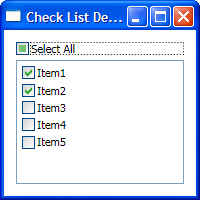
对于单纯的,没有后台数据绑定的情况下,这个功能可以用ItemContainerStyle来实现。代码如下:
CheckListBoxItemContainerStyle

Code highlighting produced by Actipro CodeHighlighter (freeware)http://www.CodeHighlighter.com/--><Style x:Key="CheckListBoxItemContainerStyle"

       TargetType="{x:Type ListBoxItem}">

  <!--Set it un-focusable, becaues the CheckBox in it should be focusable and only it.-->

  <Setter Property="Focusable" Value="False"/>

  <Setter Property="Template">

    <Setter.Value>

      <ControlTemplate TargetType="{x:Type ListBoxItem}">

        <CheckBox Content="{TemplateBinding Content}"

              ContentTemplate="{TemplateBinding ContentTemplate}"

              ContentTemplateSelector="{TemplateBinding ContentTemplateSelector}"

              IsChecked="{Binding IsSelected, RelativeSource={RelativeSource TemplatedParent}}"/>

      </ControlTemplate>

    </Setter.Value>

  </Setter>

</Style>
CheckListBoxItemContainerStyle
其中要对Content和ContentTemplate等属性进行绑定,以方便对其进行扩展,保证其通用性。这个Style一般会放在Application级别的Resource中。
对于有后台数据绑定的情况,一般会有双个属性要绑定,一个是CheckBox里的Content,一个是CheckBox的IsChecked。绑定的路径,只有在用一个Style的ListBox那里才知道,所以并不能写在这个Style里,否则会破坏这个Style的通用性。比较合理的方式是基于这个现有的Style进行修改。
对于下面的数据类。
public string Name { get { return name; } set { name = value; OnPropertyChanged("Name"); } }
public bool IsEnabled { get { return isEnabled; } set { isEnabled = value; OnPropertyChanged("IsEnabled"); } }
#region INotifyPropertyChanged Members
public event PropertyChangedEventHandler PropertyChanged;
#endregion
protected virtual void OnPropertyChanged(string propertyName) { PropertyChangedEventHandler temp = PropertyChanged; if (temp != null) { temp(this, new PropertyChangedEventArgs(propertyName)); } } }
我们需要下面这个有针对性的Style来应用数据绑定。
DataItemCheckListBoxStyle

Code highlighting produced by Actipro CodeHighlighter (freeware)http://www.CodeHighlighter.com/--><Style x:Key="DataItemCheckListBoxStyle"

       TargetType="{x:Type ListBox}"

       BasedOn="{StaticResource {x:Type ListBox}}">

  <Setter Property="ItemTemplate">

    <Setter.Value>

      <DataTemplate>

        <TextBlock Text="{Binding Name}"/>

      </DataTemplate>

    </Setter.Value>

  </Setter>

  <Setter Property="ItemContainerStyle">

    <Setter.Value>

      <Style TargetType="{x:Type ListBoxItem}"

             BasedOn="{StaticResource CheckListBoxItemContainerStyle}">

        <Setter Property="IsSelected"

                Value="{Binding IsEnabled}"/>

        <Setter Property="Margin" Value="2,2,0,0"/>

      </Style>

    </Setter.Value>

  </Setter>

  <Setter Property="SelectionMode" Value="Multiple"/>

</Style>
DataItemCheckListBoxStyle
在上面的Style中,使用了ItemTemplate来指定CheckBox里的Content绑定到的属性,并把ListBoxItem的IsSelected绑定数据的相应属性上。由于这个Style是针对特定数据写的,所以应当放置在使用这个Style的ListBox所在的Window的Resource中。
当然,也可以为ListBox添加两个绑定类型的Attached Property来实现一个通用的Style。不过这个Property一样要在使用的地方设置,其实没有太大区别。有兴趣的读者可以自己试一下。
对于Select All这个CheckBox而言,用Attached Property倒是很方便。给CheckBox添加一个SyncTarget属性指向要同步的ListBox,就可以在Window.xaml.cs之外的地方同步CheckBox和ListBox了。代码如下:
ToggleButtonProperty

Code highlighting produced by Actipro CodeHighlighter (freeware)http://www.CodeHighlighter.com/-->public class ToggleButtonProperty

{

    // Using a DependencyProperty as the backing store for SyncTarget.  This enables animation, styling, binding, etc...

    public static readonly DependencyProperty SyncTargetProperty =

        DependencyProperty.RegisterAttached("SyncTarget", typeof(ListBox), typeof(ToggleButtonProperty), new UIPropertyMetadata(new PropertyChangedCallback(OnSyncTargetChanged)));

    public static ListBox GetSyncTarget(DependencyObject obj)

    {

        return obj.GetValue(SyncTargetProperty) as ListBox;

    }

    public static void SetSyncTarget(DependencyObject obj, ListBox value)

    {

        obj.SetValue(SyncTargetProperty, value);

    }

    private static void OnSyncTargetChanged(DependencyObject sender, DependencyPropertyChangedEventArgs e)

    {

        ToggleButton checker = sender as ToggleButton;

        if (checker == null)

        {

            throw new InvalidOperationException("SyncTarget property only works on ToggleButton.");

        }

        ListBox targetList = e.NewValue as ListBox;

        if (targetList == null)

        {

            throw new InvalidOperationException("Sync target must be a ListBox.");

        }

        //TODO: Un-subscribe OldValue's Event.

        checker.Checked += (s, a) =>

        {

            targetList.SelectAll();

        };

        checker.Unchecked += (s, a) =>

        {

            targetList.UnselectAll();

        };

        targetList.SelectionChanged += (s, a) =>

        {

            checker.IsChecked = targetList.SelectedItems.Count ==  ? false :

                targetList.SelectedItems.Count == targetList.Items.Count ? (bool?)true : null;

        };

    }

}
ToggleButtonProperty
使用方式也很简单。如下代码所示。
用法

Code highlighting produced by Actipro CodeHighlighter (freeware)http://www.CodeHighlighter.com/--><DockPanel Margin="12">

    <CheckBox Content="Select All"

              Margin="0,0,0,5"

              DockPanel.Dock="Top"

              ext:ToggleButtonProperty.SyncTarget="{Binding ElementName=checkListBox}"/>

    <ListBox x:Name="checkListBox"

             Style="{StaticResource DataItemCheckListBoxStyle}"

             ItemsSource="{Binding Path=Items, ElementName=mainWindow}"/>

</DockPanel>
用法
完整的项目文件可以从这里下载。
转载至http://www.cnblogs.com/nankezhishi/archive/2009/12/30/checkablelistbox.html
CheckListBox的实现方式分析的更多相关文章
- 4.总结近5周以来的github上的工作情况,以图表方式分析你小组的工作情况、存在的问题及解决的方案。(尤心心)
4.总结近5周以来的github上的工作情况,以图表方式分析你小组的工作情况.存在的问题及解决的方案. (1)利用github本身的graphs可以清晰的看出小组成员在github上面的交互,可以直接 ...
- apigw鉴权分析(1-3)百度 AI - 鉴权方式分析
http://ai.baidu.com/docs#/Begin/top 一.访问入口 二.鉴权方式分析 1.鉴权认证方式一 - access_token - 针对HTTP API调用者 2.鉴权认证方 ...
- apigw鉴权分析(1-1)阿里数加 - 鉴权方式分析
一.访问方式 1.访问阿里云首页 https://www.aliyun.com/?utm_medium=text&utm_source=bdbrand&utm_campaign=bdb ...
- Wps 2013 拼音标注两种方式分析
Wps 2013 拼音标注两种方式分析 太阳火神的漂亮人生 (http://blog.csdn.net/opengl_es) 本文遵循"署名-非商业用途-保持一致"创作公用协议 转 ...
- Netty学习——Google Protobuf使用方式分析和环境搭建
Google Protobuf使用方式分析 在RPC框架中,Google Protobuf是很常用的一个库,和Apache Thrift 是同款的用于进行序列化的第三方库.原理都是大同小异,无非就是使 ...
- 数据库join方式分析
前言 不管是博客园还是CSDN,看到很多朋友对数据库的理解.认识还是没有突破一个瓶颈 ,而这个瓶颈往往只是一层窗纸,越过了你将看到一个新世界. 04.05年做项目的时候,用SQL Serv ...
- xamarin studio And linq 查询方式分析
在 Windows 操作系统可以正常读取网络上的 https 数据流,在 Linux 操作系统中会失败:http://www.cnblogs.com/skyivben/archive/2012/03/ ...
- Apache Spark源码走读之7 -- Standalone部署方式分析
欢迎转载,转载请注明出处,徽沪一郎. 楔子 在Spark源码走读系列之2中曾经提到Spark能以Standalone的方式来运行cluster,但没有对Application的提交与具体运行流程做详细 ...
- Android窗口管理服务WindowManagerService对窗口的组织方式分析
文章转载至CSDN社区罗升阳的安卓之旅,原文地址:http://blog.csdn.net/luoshengyang/article/details/8498908 我们知道,在Android系统中, ...
随机推荐
- 发布订阅 - 基于A2DFramework的事件机制实现
SUMMARY 能做什么 DEMO 原理图 应用场景 能做什么 A2DFramework的事件机制是基于发布订阅模式改进得来的一套API,中间件部分实现了msmq.redis.Supersocket可 ...
- Ubunbu新建的用户使用SecureCrt无法Table补全、无法高亮
Check 两个地方: 1. 确保/etc/passwd中配置有/bin/bash (这个是用来控制补全). 2. 在~/.bashrc中配置, export TERM=linux (这个是用来控制 ...
- [JS Compose] 0. Understand 'Box' or 'Container', they are just like Array!
We'll examine how to unnest function calls, capture assignment, and create a linear data flow with a ...
- Hadoop - Kylin On OLAP
1.概述 Apache Kylin是一个开源的分布式分析引擎,提供SQL接口并且用于OLAP业务于Hadoop的大数据集上,该项目由eBay贡献于Apache. 2.What is Kylin 在使用 ...
- Kruskal算法java版
/** * sample Kruskal.java Description: * kruskal算法的思想是找最小边,且每次找到的边不会和以找出来的边形成环路,利用一个一维数组group存放当前顶点所 ...
- win7搭建ios开发环境
安装过程参考文章: http://jingyan.baidu.com/article/ff411625b9011212e48237b4.html http://www.loukit.com/threa ...
- 安装vs2013以后,链接数据库总是报内存损坏,无法写入的错误
安装vs2013以后,链接数据库总是报内存损坏,无法写入的错误 这个错误几个月以前解决过一次,但是到又碰到的时候,竟然完全忘记当时怎么解决的了, 看来上了年纪记忆真是越来越不行了... 解决方案很简单 ...
- JMir——Java版热血传奇2之资源文件与地图
我虽然是90后,但是也很喜欢热血传奇2(以下简称“传奇”)这款游戏. 进入程序员行业后自己也对传奇客户端实现有所研究,现在将我的一些研究结果展示出来,如果大家有兴趣的话不妨与我交流. 项目我托管到co ...
- iframe高度宽度自适应(转)
http://www.cnblogs.com/snandy/p/3900016.html 跨子域的iframe高度自适应 完全跨域的iframe高度自适应 同域的我们可以轻松的做到 1. 父页面通过i ...
- Linux下动态链接库 与gcc 选项
-L 编译时查找动态链接库的路径 -lxxx(小写) e.g -lcudart = link libcudart.so , -I(大写) 头文件的路径 -rpath (-R), 编译时指定链接 ...