
[ Office 365 开发系列 ] 身份认证
前言
本文完全原创,转载请说明出处,希望对大家有用。
通常我们在开发一个应用时,需要考虑用户身份认证及授权,Office 365使用AAD(Azure Active Directory)作为其认证机构,为应用程序提供身份认证及授权服务。因此,在开发Office 365应用前,我们需要了解AAD的认证和授权机制。
正文
AAD认证授权机制
当前的AAD支持多种身份认证标准:
- OpenId Connect
- OAuth2
- SAML-P
- WS-Federation and WS-Trust
- Graph web api
这几种身份认证标准会应用在不同的场景中,如OAuth2.0应用于Office 365应用程序接口,SAML-P多应用于Office 365的混合部署,如果想要详细了解,可以参阅此文章,详细介绍了Office 365身份认证支持的各项协议。我们在开发应用的过程中,最主要是使用OpenID Connect和OAuth2.0.因此,本篇内容中只涉及到OpenID和OAuth2.0两种类型的身份认证分析,后续文章中会涉及到Office 365的混合部署及令牌交换协议内容。
OAuth2.0是OAuth的最新版本,升级并简化了验证的过程,相关描述可以查看RFC 6749,在资源授权方面,OAuth2.0支持多种授予流,Office 365使用授权代码授予流和客户端凭证授予流,两者适用于不同的应用场景,同时在AAD中配置权限也进行了区分,稍后会具体讲解。下图为标准的OAuth2.0处理过程:
+--------+                               +---------------+

|        |--(A)- Authorization Request ->|   Resource    |

|        |                               |     Owner     |

|        |<-(B)-- Authorization Grant ---|               |

|        |                               +---------------+

|        |

|        |                               +---------------+

|        |--(C)-- Authorization Grant -->| Authorization |

| Client |                               |     Server    |

|        |<-(D)----- Access Token -------|               |

|        |                               +---------------+

|        |

|        |                               +---------------+

|        |--(E)----- Access Token ------>|    Resource   |

|        |                               |     Server    |

|        |<-(F)--- Protected Resource ---|               |

+--------+                               +---------------+
OpenID是目前各大网站普遍支持的开放协议,OpenID Connect 1.0是基于OAuth2.0设计的用户认证标准,Azure Active Directory (Azure AD) 中的 OpenID Connect 1.0 允许你使用 OAuth 2.0 协议进行单一登录。 OAuth 2.0 是一种授权协议,但 OpenID Connect 扩展了 OAuth 2.0 的身份验证协议用途。OpenID Connect 协议(OpenId Connect 1.0)的主要功能是返回 id_token,后者用于对用户进行身份验证。 下图为OpenID的标准处理过程:
+--------+                                   +--------+

|        |                                   |        |

|        |---------(1) AuthN Request-------->|        |

|        |                                   |        |

|        |  +--------+                       |        |

|        |  |        |                       |        |

|        |  |  End-  |<--(2) AuthN & AuthZ-->|        |

|        |  |  User  |                       |        |

|   RP   |  |        |                       |   OP   |

|        |  +--------+                       |        |

|        |                                   |        |

|        |<--------(3) AuthN Response--------|        |

|        |                                   |        |

|        |---------(4) UserInfo Request----->|        |

|        |                                   |        |

|        |<--------(5) UserInfo Response-----|        |

|        |                                   |        |

+--------+                                   +--------+
OpenID的标准过程需要以下几步:
1. 客户端(RP)发送一个请求到OpenID的提供商(OP);
2. OP验证用户,如果用户尚未授权,则跳转到授权页面;
3. 用户授权后,OP会引导用户返回到客户端,并会携带一个Token和id token;
4. RP使用收到的Token请求用户其他信息资源;
5. OP返回请求的资源信息
通过上述的步骤,第三方应用(也就是客户端)不仅可以验证用户的合法性,同时可以在用户授权的情况下获取用户基本信息。在AAD中使用的OpenID Connect 1.0为Auth2.0进行了扩展,在返回Token的同时,会返回一个JWT形式的id_token。AAD中的OpenID终结点配置信息可通过访问此链接查看:https://login.windows.net/common/.well-known/openid-configuration 。id_token包含用户的基本信息,作为应用的CurrentUser属性。获取到Token后,应用可以通过此凭证请求资源,Office 365使用Bearer方式获取资源,请参阅Bearer Token Usage
授权代码流和客户端凭证授予流
AAD中的授权代码授予流使用如下流程:
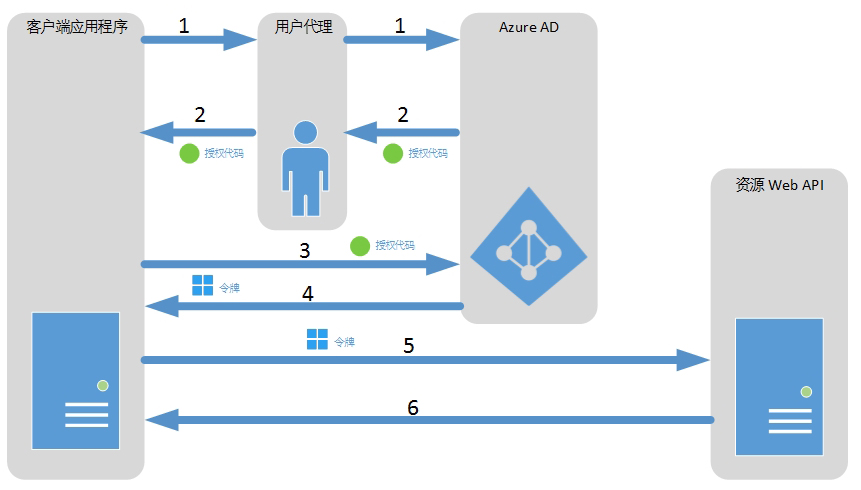 (此图引用自msdn)
对比OAuth2.0的标准流程,授权代码流会以授权代码(Code)的方式返回授权标识,用户通过使用Code请求资源Token,应用程序使用获取到的Token调用资源Web API。
当我们的Office 365应用使用授权代码授予流时,需要我们在AAD中设置资源代理权限,设置过程如下:
(一)通过Office 365设置页面进入Azure AD:
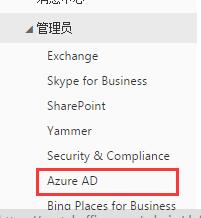
(二)进入AD中的应用程序,并找到我们的注册应用(如何注册应用请参考),进入应用的Configure页面,如下图:

(三)设置资源的Delegated Permissions,如果我们使用过授权代码流来请求资源,只需设置Delegation Permissions
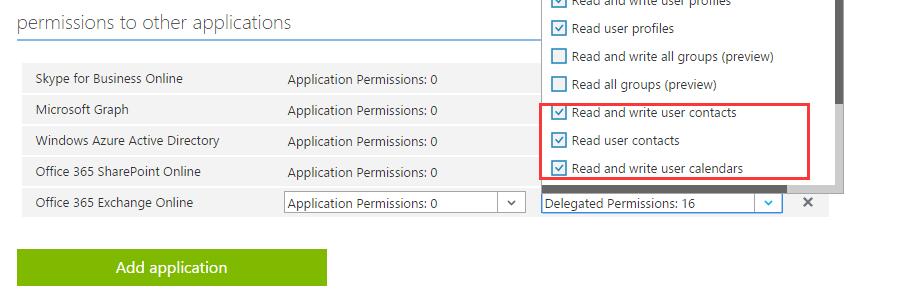
AAD中的客户端凭证授予流使用如下流程:
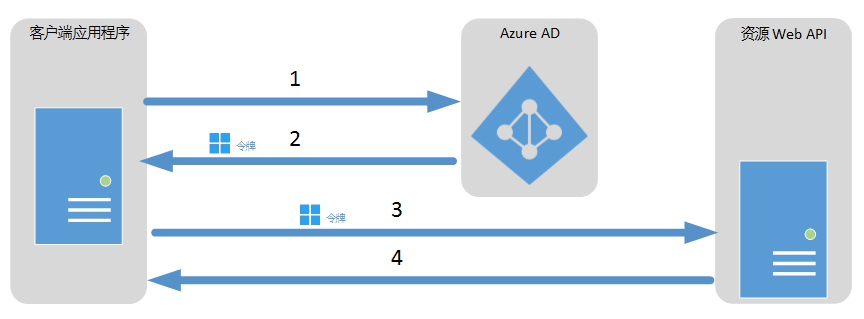 (此图引用自msdn)
与标准OAuth2.0流程相比,客户端凭证授予流不需要用户授权,而是由应用程序直接访问AAD请求token。请注意,如果使用此方式,则应用程序对资源有最大权限。
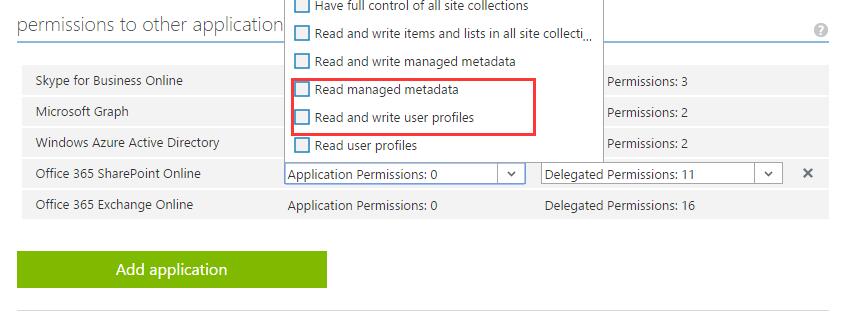
当我们的Office 365应用使用授权代码授予流时,需要我们在AAD中设置资源的应用权限,与授权代码授予流只是配置权限不同,设置的是Application Permission,如下图:
应用示例
在实际应用中,我们通常会使用Owin中间件来完成用户身份认证,我们使用Office Dev Center中的实例来分析。
先来看如何实现用户登录后验证,我们贴出重要代码来分析:
    public partial class Startup

    {

        public void ConfigureAuth(IAppBuilder app)

        {

            app.SetDefaultSignInAsAuthenticationType(CookieAuthenticationDefaults.AuthenticationType);

            app.UseCookieAuthentication(new CookieAuthenticationOptions());

            app.UseOpenIdConnectAuthentication(

                new OpenIdConnectAuthenticationOptions

                {

                    ClientId = SettingsHelper.ClientId,

                    Authority = SettingsHelper.Authority,

                    TokenValidationParameters = new System.IdentityModel.Tokens.TokenValidationParameters

                    {

                        ValidateIssuer = false

                    },

                    Notifications = new OpenIdConnectAuthenticationNotifications()

                    {

                        AuthorizationCodeReceived = (context) =>

                        {

                            var code = context.Code;

                            ClientCredential credential = new ClientCredential(SettingsHelper.ClientId, SettingsHelper.AppKey);

                            string tenantID = context.AuthenticationTicket.Identity.FindFirst("http://schemas.microsoft.com/identity/claims/tenantid").Value;

                            String signInUserId = context.AuthenticationTicket.Identity.FindFirst(ClaimTypes.NameIdentifier).Value;

                            AuthenticationContext authContext = new AuthenticationContext(string.Format("{0}/{1}", SettingsHelper.AuthorizationUri, tenantID), new ADALTokenCache(signInUserId));

                            AuthenticationResult result = authContext.AcquireTokenByAuthorizationCode(code, new Uri(HttpContext.Current.Request.Url.GetLeftPart(UriPartial.Path)), credential, SettingsHelper.AADGraphResourceId);

                            return Task.FromResult();

                        },

                        RedirectToIdentityProvider = (context) =>

                        {

                            string appBaseUrl = context.Request.Scheme + "://" + context.Request.Host + context.Request.PathBase;

                            context.ProtocolMessage.RedirectUri = appBaseUrl + "/";

                            context.ProtocolMessage.PostLogoutRedirectUri = appBaseUrl;

                            return Task.FromResult();

                        },

                        AuthenticationFailed = (context) =>

                        {

                            context.HandleResponse();

                            return Task.FromResult();

                        }

                    }

                });

    }
上述代码在项目中的App_Start文件夹下Startup.Auth.cs,是Owin的Server端配置内容。Owin中间件是在应用启动时注册,注册方式是扫描跟文件夹下的Startup.cs,存在则使用该配置类注册。针对OWIN的处理机制,我们在后续的章节中单独分析OWIN中间件的架构,当前我们主要聚焦在如何使用OpenID及OAuth。在上面的代码中,有这么一句:
app.SetDefaultSignInAsAuthenticationType(CookieAuthenticationDefaults.AuthenticationType);
app.UseCookieAuthentication(new CookieAuthenticationOptions());
- AuthenticationDefaults.cs
- AuthenticationExtensions.cs
- AuthenticationHandler.cs
- AuthenticationMiddleware.cs
- AuthenticationOptions.cs
app.UseOpenIdConnectAuthentication
- ClientId:应用程序ID,标识我们在AAD中的应用
- Authority:发起验证请求的目标地址,如当前的https://login.windows.net,这里要说明一下,根据我的实测,https://login.microsoftonline.com也是可以的。
- TokenValidationParameters:这个方法是为了验证通过OpenID验证的用户是否为本应用程序的合法用户,可根据业务实际情况编写自己的验证机制。
- Notifications:在OpenID验证并返回后,Owin调用Notifications方法,也正是我们使用OAuth进行用户授权的触发方法。
下面是一个TokenValidationParameters参数的示例:
TokenValidationParameters = new System.IdentityModel.Tokens.TokenValidationParameters

{

   IssuerValidator = (issuer, token) =>

   {

      return DoesIssuerBelongToMyCustomersList(issuer);//DoesIssuerBelongToMyCustomersList方法根据当前登陆人信息判断是否在用户列表中,如果不存在,则返回false

   }

}
接下来分析Notifications参数:
AuthorizationCodeReceived = (context) =>

{

    var code = context.Code;

    ClientCredential credential = new ClientCredential(SettingsHelper.ClientId, SettingsHelper.AppKey);

    String signInUserId = context.AuthenticationTicket.Identity.FindFirst(ClaimTypes.NameIdentifier).Value;

    AuthenticationContext authContext = new AuthenticationContext("https://login.windows.net/common", new ADALTokenCache(signInUserId));

    AuthenticationResult result = authContext.AcquireTokenByAuthorizationCode(code, new Uri(HttpContext.Current.Request.Url.GetLeftPart(UriPartial.Path)), credential, SettingsHelper.AADGraphResourceId);

    return Task.FromResult();

},

RedirectToIdentityProvider = (context) =>

{

    string appBaseUrl = context.Request.Scheme + "://" + context.Request.Host + context.Request.PathBase;

    context.ProtocolMessage.RedirectUri = appBaseUrl + "/";

    context.ProtocolMessage.PostLogoutRedirectUri = appBaseUrl;

    return Task.FromResult();

},

AuthenticationFailed = (context) =>

{

    context.HandleResponse();

    return Task.FromResult();

}
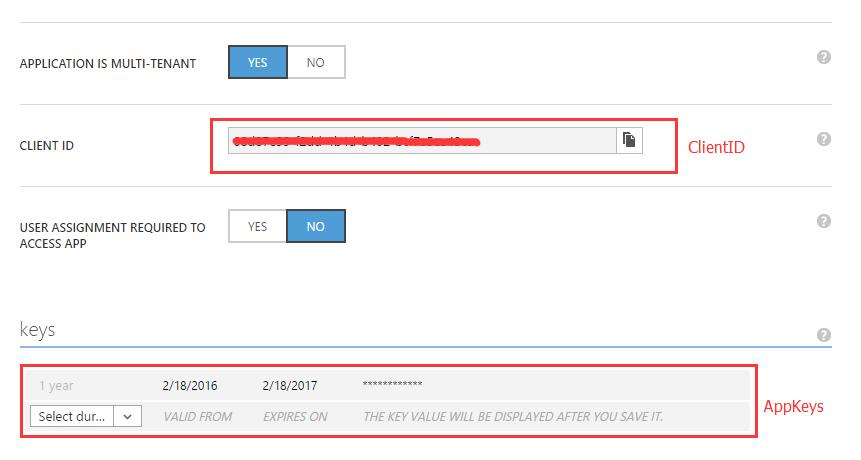
在Notifications参数方法中定义了3个委托方法,当调用OpenId验证通过并返回Code参数时,Owin调用AuthorizationCodeReceived,RedirectToIdentityProvider方法用于定义验证通过后的返回页面地址,AuthenticationFailed定义验证失败后的处理方法。在AuthorizationCodeReceived这个方法中,我们使用文档开始提到的AAD授权代码流方式为用户授权。SettingsHelper.ClientId是应用程序ID,是应用程序在AAD中的唯一标识。SettingsHelper.AppKey是应用程序中新建的keys(可以使用多个),新建的方法如下:
进入AAD中的应用程序管理,添加app key,这个key是有过期时间的,最多2年。这里提醒一下,新建key以后需要保存才能看到key字符串,而且只有第一次能查看,如果忘记了只能重新建一个。
接着往下面看,context对象是Owin根据返回的id_token生成的上下文,这里的signInUserId是用户在AAD中对象标识符:
String signInUserId = context.AuthenticationTicket.Identity.FindFirst(ClaimTypes.NameIdentifier).Value;
我们使用signInUserId来唯一标识用户的Token缓存对象,新建一个AuthenticationContext对象,这个对象是基于ADAL 创建,如有想要了解什么是ADAL,请参阅The New Token Cache in ADAL v2。创建对象的同时,我们将对象ADALTokenCache作为TokenCache传入对象,ADALTokenCache是我们自定义用来缓存用户Token的类,如下:
 public class ADALTokenCache : TokenCache

    {

        string User;

        UserTokenCache Cache;

        // constructor

        public ADALTokenCache(string user)

        {

            // associate the cache to the current user of the web app

            User = user;

            this.AfterAccess = AfterAccessNotification;

            this.BeforeAccess = BeforeAccessNotification;

            this.BeforeWrite = BeforeWriteNotification;

            using (ApplicationDbContext db = new ApplicationDbContext())

            {

                Cache = db.UserTokenCacheList.FirstOrDefault(c => c.webUserUniqueId == User);

            }

            this.Deserialize((Cache == null) ? null : Cache.cacheBits);

        }

        public override void Clear()

        {

            base.Clear();

            using (ApplicationDbContext db = new ApplicationDbContext())

            {

                Cache = db.UserTokenCacheList.FirstOrDefault(c => c.webUserUniqueId == User);

                if (Cache != null)

                    db.UserTokenCacheList.Remove(Cache);

                db.SaveChanges();

            }

        }

        void BeforeAccessNotification(TokenCacheNotificationArgs args)

        {

            using (ApplicationDbContext db = new ApplicationDbContext())

            {

                if (Cache == null)

                {

                    // first time access

                    Cache = db.UserTokenCacheList.FirstOrDefault(c => c.webUserUniqueId == User);

                }

                else

                {   // retrieve last write from the DB

                    var status = from e in db.UserTokenCacheList

                                 where (e.webUserUniqueId == User)

                                 select new

                                 {

                                     LastWrite = e.LastWrite

                                 };

                    // if the in-memory copy is older than the persistent copy

                    if (status != null && status.Count() >  && status.First().LastWrite > Cache.LastWrite)

                    {

                        Cache = db.UserTokenCacheList.FirstOrDefault(c => c.webUserUniqueId == User);

                    }

                }

            }

            this.Deserialize((Cache == null) ? null : Cache.cacheBits);

        }

        // Notification raised after ADAL accessed the cache.

        // If the HasStateChanged flag is set, ADAL changed the content of the cache

        void AfterAccessNotification(TokenCacheNotificationArgs args)

        {

            if (this.HasStateChanged)

            {

                using (ApplicationDbContext db = new ApplicationDbContext())

                {

                    if (Cache == null || Cache.UserTokenCacheId == )

                    {

                        Cache = new UserTokenCache

                        {

                            webUserUniqueId = User,

                            cacheBits = this.Serialize(),

                            LastWrite = DateTime.Now

                        };

                    }

                    else

                    {

                        Cache.cacheBits = this.Serialize();

                        Cache.LastWrite = DateTime.Now;

                    }

                    db.Entry(Cache).State = Cache.UserTokenCacheId ==  ? EntityState.Added : EntityState.Modified;

                    db.SaveChanges();

                }

                this.HasStateChanged = false;

            }

        }

        void BeforeWriteNotification(TokenCacheNotificationArgs args)

        {

            // if you want to ensure that no concurrent write take place, use this notification to place a lock on the entry

        }

    }
这里我修改了一些代码,示例中的代码是用户每次获取新资源的Token时新增一条Cache数据,为了多用户访问,我将缓存机制改为每个用户对应一条Cache数据。
AuthenticationResult result = authContext.AcquireTokenByAuthorizationCode(code, new Uri(HttpContext.Current.Request.Url.GetLeftPart(UriPartial.Path)), credential, SettingsHelper.AADGraphResourceId);
AcquireTokenByAuthorizationCode是ADAL帮我们定义好的授权代码流方法,用于通过code获取token,同时我们指定请求SettingsHelper.AADGraphResourceId(AAD Graph web resource)资源,这样可以验证我们的应用是否有对应资源的访问权限。当然,这个参数是可选的。
验证逻辑图如下:

结束语
Office 365开发系列的身份认证就到这里了,如有不明白的地方,请在评论中提出。后续章节我们会继续深入了解OWIN及ADAL的机制,希望大家继续关注。
[ Office 365 开发系列 ] 身份认证的更多相关文章
- [ Office 365 开发系列 ] Graph Service
前言 本文完全原创,转载请说明出处,希望对大家有用. 通过[ Office 365 开发系列 ] 开发模式分析和[ Office 365 开发系列 ] 身份认证两篇内容的了解,我们可以开始使用Offi ...
- [ Office 365 开发系列 ] 开发模式分析
前言 本文完全原创,转载请说明出处,希望对大家有用. 在正式开发Office 365应用前,我们先了解一下Office 365的开发模式,根据不同的应用场景,我们选择最适合的开发模式. 阅读目录 Of ...
- [ Office 365 开发系列 ] 前言
前言 本人从接触Microsoft SharePoint Server 2007到目前为止,已经在微软SharePoint的路上已经走了好几年,基于SharePoint平台的特殊性,对微软产品线都有了 ...
- Office 365开发概述及生态环境介绍(一)
原文于2017年3月13日首发于LinkedIn,请参考这个链接 离上一篇文章,很快又过去了两星期的时间.今天抓紧晚上的时间,开始了Office 365开发系列文章的第一篇,我会帮助大家回顾一下过去O ...
- Office 365 开发概览系列文章和教程
Office 365 开发概览系列文章和教程 原文于2017年2月26日首发于LinkedIn,请参考链接 引子 之前我在Office 365技术社群(O萌)中跟大家提到,3月初适逢Visual St ...
- Office 365开发概述及生态环境介绍(二)
本文于2017年3月19日首发于LinkedIn,原文链接在这里 在上一篇 文章,我给大家回顾了Office发展过来的一些主要的版本(XP,2003,2007,2013等),以及在Office客户端中 ...
- Office 365开发环境概览
本文于2017年3月26日首发于LinkedIn,原文链接请参考这里 本系列文章已经按照既定计划在每周更新,此前的几篇文章如下 Office 365 开发概览系列文章和教程 Office 365开发概 ...
- 《Office 365 开发入门指南》公开邀请试读,欢迎反馈
终于等来了这一天,可以为我的这本新书画上一个句号.我记得是在今年的2月份从西雅图回来之后,就萌发了要为中国的Office 365开发人员写一些东西并最终能帮到更多中国用户的想法,而从2月26日正式写下 ...
- 拥抱开源,Office 365开发迎来新时代
前言 作为全球最大的开放源代码托管平台,Github在上周迎来了它的十岁生日.自从2008年正式上线以来,Github上面汇聚了数以千万计的开发人员和各种项目,它几乎成为了开源的代名词和风向标,各大软 ...
随机推荐
- python登陆Tom邮箱的代码一例
本文出处参考:http://www.cnblogs.com/LinuxHunter/archive/2010/11/30/1891635.html 在很多的python 教程中都会讲到登录邮箱或发送邮 ...
- atitit.D&D drag&drop拖拽文件到界面功能 html5 web 跟个java swing c#.net c++ 的总结
atitit.D&D drag&drop拖拽文件到界面功能 html5 web 跟个java swing c#.net c++ 的总结 1. DND的操作流程 1 2. Html5 注 ...
- 每日英语:Do Successful People Need Sleep?
George Washington and his Revolutionary War victories. Robert Frost and the composition of 'Stopping ...
- nyoj 15 括号匹配(2)
括号匹配(二) 时间限制:1000 ms | 内存限制:65535 KB 难度:6 描述 给你一个字符串,里面只包含"(",")","[" ...
- angular初体验
所有需要ng管理的代码必须被包裹在一个有ng-app指令的元素中ng-app是ng的入口,表示当前元素的所有指令都会被angular管理(对每一个指令进行分析和操作) 利用angular实现双向绑定: ...
- 替换元素节点replaceChild()
替换元素节点replaceChild() replaceChild 实现子节点(对象)的替换.返回被替换对象的引用. 语法: node.replaceChild (newnode,oldnew ) 参 ...
- Hive入门笔记---1.Hive简单介绍
1. Hive是什么 Hive是基于Hadoop的数据仓库解决方案.由于Hadoop本身在数据存储和计算方面有很好的可扩展性和高容错性,因此使用Hive构建的数据仓库也秉承了这些特性.这是来自官方的解 ...
- C++:成员函数实现在类定义中与在类定义外的区别
//a.cpp class A{ public: int fun(int x){ ); } }; void tt() { } //b.cpp class A{ public: int fun(int ...
- Linux开机启动文件rc.local无法执行怎么办?
rc.local是Linux系统中的一个重要的开机启动文件,每次开机都要执行这个文件.但是有一些用户的Linux系统无法执行这个文件,并导致了一系列的问题.遇到这个问题我们应该怎么办呢? 在Linux ...
- MyBatis Generator 学习
根据数据库,自动生成 VO.XML或者DAO的工具. 同大多数工具(或者框架)一样,需要加载一个配置文件,然后根据配置文件中的内容连接数据库,访问其中的表内容,最后生成实体类以及MAPPER. 占位用 ...