
SHGetSpecialFolderPath用法
The SHGetSpecialFolderPath function retrieves the path of a special folder that is identified by its CSIDL.
Syntax
BOOL SHGetSpecialFolderPath(

  HWND hwndOwner,

  LPTSTR lpszPath,

  int nFolder,

  BOOL fCreate

);
Parameters
- hwndOwner
- [in] Handle to the owner window the client should specify if it displays a dialog box or message box.
- lpszPath
- [in] Reference to a character buffer that receives the drive and path of the specified folder. This buffer must be at least MAX_PATH characters in size.
- nFolder
- [in] CSIDL that identifies the folder of interest. If a virtual folder is specified, this function fails. See Remarks for possible values.
- fCreate
- [in] Indicates whether the folder should be created if it does not already exist. If this value is nonzero, the folder is created. If this value is zero, the folder is not created.
Return Values
For Windows Mobile 2003 and later, returns TRUE if successful, FALSE otherwise. For Windows Mobile 2002 and earlier, returns FALSE even if successful. If the folder represented by the nFolder parameter does not exist and is not created, a NULL string is returned indicating that the directory does not exist.
Remarks
A number of folders are used frequently by applications but might not have the same name or location on any given system. CSIDL values provide a system-independent way to identify these special folders. These values supersede the use of environment variables for this purpose.
The following table lists valid CSIDL values for the nFolder parameter:
| CSIDL | Value | Description |
|---|---|---|
| CSIDL_DESKTOP | 0x0000 | Not supported on Smartphone. |
| CSIDL_FAVORITES | 0x0006 | The file system directory that serves as a common repository for the user's favorite items. |
| CSIDL_FONTS | 0x0014 | The virtual folder that contains fonts. |
| CSIDL_PERSONAL | 0x0005 | The file system directory that serves as a common repository for documents. |
| CSIDL_PROGRAM_FILES | 0x0026 | The program files folder. |
| CSIDL_PROGRAMS | 0x0002 | The file system directory that contains the user's program groups, which are also file system directories. |
| CSIDL_STARTUP | 0x0007 | The file system directory that corresponds to the user's Startup program group. The system starts these programs when a device is powered on. |
| CSIDL_WINDOWS | 0x0024 | The Windows folder. |
The CSIDL_DESKTOP value is invalid for the Smartphone platform. Smartphone uses a home screen instead of a desktop; do not use this CSIDL value within the Smartphone development environment.
进行 Shell 程序的设计,需要使用一些头文件和库文件。
一般 Shell API 都在 shlobj.h 头文件中声明,由 Shell32.dll 导出,链接时需要使用到 Shell32.lib 库。
|
1
2 3 4 5 6 7 8 9 10 11 12 13 14 15 16 17 18 19 20 21 22 23 24 25 26 27 28 29 30 31 32 33 34 35 36 |
/*************************************
* VOID GetSpecialFolderQS() * 功能 SHGetSpecialFolderPath用法 * * 参数 未使用 **************************************/ VOID GetSpecialFolderQS() { CHAR szDeskTop[MAX_PATH] = {}; CHAR szFavourites[MAX_PATH] = {}; CHAR szFonts[MAX_PATH] = {}; CHAR szMyDocument[MAX_PATH] = {}; CHAR szProgramFiles[MAX_PATH] = {}; CHAR szPrograms[MAX_PATH] = {}; CHAR szStartUp[MAX_PATH] = {}; CHAR szWindows[MAX_PATH] = {}; // 使用SHGetSpecialFolderPath获取特殊目录路径 |
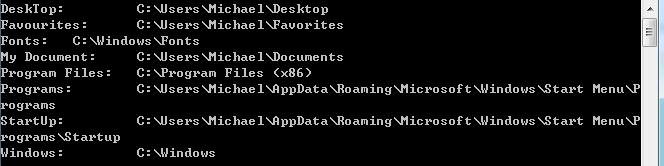
SHGetSpecialFolderPath用法的更多相关文章
- EditText 基本用法
title: EditText 基本用法 tags: EditText,编辑框,输入框 --- EditText介绍: EditText 在开发中也是经常用到的控件,也是一个比较必要的组件,可以说它是 ...
- jquery插件的用法之cookie 插件
一.使用cookie 插件 插件官方网站下载地址:http://plugins.jquery.com/cookie/ cookie 插件的用法比较简单,直接粘贴下面代码示例: //生成一个cookie ...
- Java中的Socket的用法
Java中的Socket的用法 Java中的Socket分为普通的Socket和NioSocket. 普通Socket的用法 Java中的 ...
- [转载]C#中MessageBox.Show用法以及VB.NET中MsgBox用法
一.C#中MessageBox.Show用法 MessageBox.Show (String) 显示具有指定文本的消息框. 由 .NET Compact Framework 支持. MessageBo ...
- python enumerate 用法
A new built-in function, enumerate() , will make certain loops a bit clearer. enumerate(thing) , whe ...
- [转载]Jquery中$.get(),$.post(),$.ajax(),$.getJSON()的用法总结
本文对Jquery中$.get(),$.post(),$.ajax(),$.getJSON()的用法进行了详细的总结,需要的朋友可以参考下,希望对大家有所帮助. 详细解读Jquery各Ajax函数: ...
- 【JavaScript】innerHTML、innerText和outerHTML的用法区别
用法: <div id="test"> <span style="color:red">test1</span> tes ...
- chattr用法
[root@localhost tmp]# umask 0022 一.chattr用法 1.创建空文件attrtest,然后删除,提示无法删除,因为有隐藏文件 [root@localhost tmp] ...
- 萌新笔记——vim命令“=”、“d”、“y”的用法(结合光标移动命令,一些场合会非常方便)
vim有许多命令,网上搜有一堆贴子.文章列举出各种功能的命令. 对于"="."d"."y",我在无意中发现了它们所具有的相同的一些用法,先举 ...
随机推荐
- [Done]ibatis/mybatis: java.lang.NoSuchMethodException
异常描述: Caused by: org.apache.ibatis.reflection.ReflectionException: Error instantiating interface cn. ...
- Linux命令-帮助命令:whatis,apropos
whatis可以查看命令简化版的帮助内容 whatis ls 查看简化版的ls命令的帮助内容 whatis ifconfig 查看简化版的ifconfig命令的帮助内容 apropos可以查看配置文件 ...
- AndroidStudio项目提交(更新)到github最具体步骤
在使用studio开发的项目过程中有时候我们想将项目公布到github上.曾经都是用一种比較麻烦的方式(cmd)进行提交.近期发现studio事实上是自带这样的功能的,最终能够摆脱命令行了. 由于自己 ...
- 【python下使用OpenCV实现计算机视觉读书笔记1】输入输出
说明: 该部分内容为<OpenCV Computer Vision with Python>读书笔记. 1.读入文件与保存. import cv2 image=cv2.imread('a. ...
- some issues that you should be take care of when use the plupload module
1. the config arguments 'browse_button' should not be a single element like button etc. because in i ...
- 打开office提示还有几天过期的处理办法
是多重激活了,把激活码失效的删除即可 1.以管理员权限打开cmd(必须以管理员权限,不然无法删除无效的激活码) 2.输入命令:cd C:\Program Files (x86)\Microsoft O ...
- jQuery MiniUI自定义单元格
监听处理"drawcell"事件 使用"drawcell"事件,可以自定义单元格内容.样式.行样式等. grid.on("drawcell" ...
- Sql server注入简单认识
登录界面常常会涉及到敏感关键字的注入 为了对应面试,再看一下 怎样防止注入, 可以过滤SQL需要参数中的敏感字符(忽略大小写) public static string Split(string in ...
- CYQ学习主要摘要4
http://www.cnblogs.com/cyq1162/archive/2010/11/03/1867642.html Xml的处理 http://www.cnblogs.com/cyq1162 ...
- Hadoop在线分析处理(OLAP)
数据处理与联机分析处理 ( OLAP ) 联机分析处理是那些为了支持商业智能,报表和数据挖掘与探索等业务而开展的工作.这类工作的样例有零售商按地区和季度两个维度计算门店销售额,银行按语言和月份两个维度 ...