
Web APi入门之Self-Host(二)
这篇来讲讲WebApi的自托管,WebApi可以托管到控制台/winform/服务上,并不是一定要依赖IIS才行。
1、首先新建控制台项目,在通过Nuget搜索Microsoft.AspNet.WebApi.SelfHost

2、建立实体类
     public class Product

     {

         public int Id { set; get; }

         public string Name { set; get; }

         public string Description { set; get; }

     }
3、创建WebApi控制器,继承ApiController
     public class HomeController : ApiController

     {

         static List<Product> modelList = new List<Product>()

         {

             new Product(){Id=,Name="电脑",Description="电器"},

             new Product(){Id=,Name="冰箱",Description="电器"},

         };

         //获取所有数据

         [HttpGet]

         public List<Product> GetAll()

         {

             return modelList;

         }

         //获取一条数据

         [HttpGet]

         public Product GetOne(int id)

         {

             return modelList.FirstOrDefault(p => p.Id == id);

         }

         //新增

         [HttpPost]

         public bool PostNew(Product model)

         {

             modelList.Add(model);

             return true;

         }

         //删除

         [HttpDelete]

         public bool Delete(int id)

         {

             return modelList.Remove(modelList.Find(p => p.Id == id));

         }

         //更新

         [HttpPut]

         public bool PutOne(Product model)

         {

             Product editModel = modelList.Find(p => p.Id == model.Id);

             editModel.Name = model.Name;

             editModel.Description = model.Description;

             return true;

         }

     }
4、在Program的Main方法中加上如下代码
         static void Main(string[] args)

         {

             var config = new HttpSelfHostConfiguration("http://localhost:5000"); //配置主机

             config.Routes.MapHttpRoute(    //配置路由

                 "API Default", "api/{controller}/{id}",

                 new { id = RouteParameter.Optional });

             using (HttpSelfHostServer server = new HttpSelfHostServer(config)) //监听HTTP

             {

                 server.OpenAsync().Wait(); //开启来自客户端的请求

                 Console.WriteLine("Press Enter to quit");

                 Console.ReadLine();

             }

         }
5、本人机器是win10,如果直接运行是会报错的
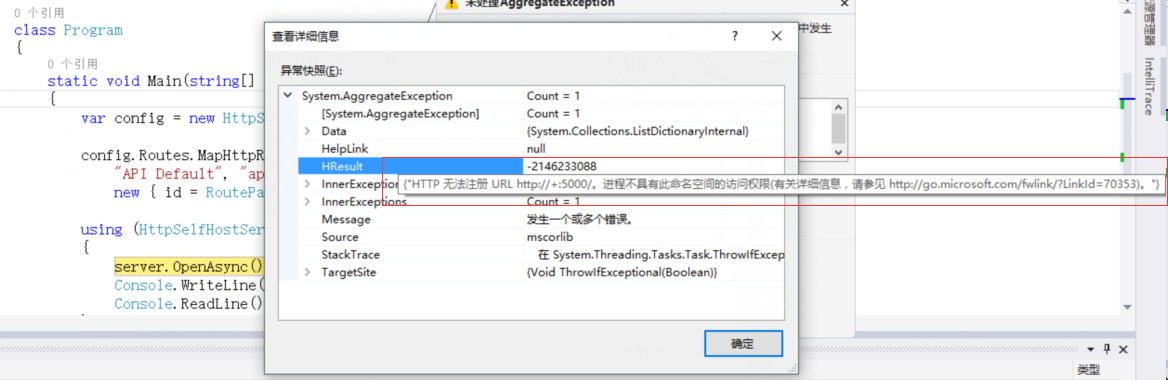
解决方法:打开项目路径找到项目名.exe文件右键以管理员身份运行
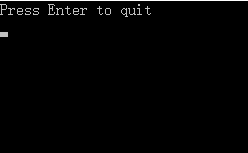
6、通过url方式访问 http://localhost:5000/api/home

通过winform、服务等方式托管的话本篇不再讲述,方式都类似,我觉得WebApi托管在IIS上是好于其他方式的,用控制台的话演示还是不错的。
下篇讲下WebApi跨域。
Web APi入门之Self-Host(二)的更多相关文章
- Web API 入门 二 媒体类型
还是拿上面 那篇 Web API 入门 一 的那个来讲 在product类中加一个时间属性
- Web API 入门指南 - 闲话安全
Web API入门指南有些朋友回复问了些安全方面的问题,安全方面可以写的东西实在太多了,这里尽量围绕着Web API的安全性来展开,介绍一些安全的基本概念,常见安全隐患.相关的防御技巧以及Web AP ...
- 转载-Web API 入门
An Introduction to ASP.NET Web API 目前感觉最好的Web API入门教程 HTTP状态码 Web API 强势入门指南 Install Mongodb Getting ...
- Web API入门指南(安全)转
安全检测的工具站点:https://www.owasp.org/index.php/Category:Vulnerability_Scanning_Tools Web API入门指南有些朋友回复问了些 ...
- Web API 入门指南
Web API 入门指南 - 闲话安全2013-09-21 18:56 by 微软互联网开发支持, 231 阅读, 3 评论, 收藏, 编辑 Web API入门指南有些朋友回复问了些安全方面的问题,安 ...
- (转)Web API 入门指南 - 闲话安全
原文地址:http://www.cnblogs.com/developersupport/p/WebAPI-Security.html Web API入门指南有些朋友回复问了些安全方面的问题,安全方面 ...
- 【ASP.NET Web API教程】1 ASP.NET Web API入门
原文 [ASP.NET Web API教程]1 ASP.NET Web API入门 Getting Started with ASP.NET Web API第1章 ASP.NET Web API入门 ...
- Web APi入门之Self-Host寄宿及路由原理(二)
前言 刚开始表面上感觉Web API内容似乎没什么,也就是返回JSON数据,事实上远非我所想,不去研究不知道,其中的水还是比较深,那又如何,一步一个脚印来学习都将迎刃而解. Self-Host 我们知 ...
- Web API入门二(实例)
学习编程的最好方法就是实例,本人用的是VS2015 1.创建ASP.NET Web空项目 点击确定后即创建了空"WebApi"项目 2.下面,我们需要使用NuGet包管理器添加最新 ...
随机推荐
- Spring MVC 向前台页面传值-ModelAndView
ModelAndView 该对象中包含了一个model属性和一个view属性 model:其实是一个ModelMap类型.其实ModelMap是一个LinkedHashMap的子类 view:包含了一 ...
- 「Linux」centos7安装uWSGI
一定要记得先安装python-devel,再安装uWSGI,否则即使安装成功也是不能使用的,切记切记
- linux中使用随机数
(1)单纯使用rand重复调用n次,就会得到一个0-RAND_MAX之间的伪随机数,如果需要调整范围,可以得到随机数序列后再进行计算.(2)单纯使用rand来得到伪随机数序列有缺陷,每次执行程序得到的 ...
- 前端PHP入门-011-可变函数
可变函数,我们也会称呼为变量函数.简单回顾一下之前的知识点: <?php $hello = 'world'; $world = '你好'; //输出的结果为:你好 echo $$hello; ? ...
- nginx 与 tomcat 组合搭建web服务
部分内容转自 http://www.cnblogs.com/naaoveGIS/ 1. Web服务 nginx是常用的web服务器,用于获取静态资源,类似的服务器还有apache. tomcat是基于 ...
- uva 557 Burger
https://vjudge.net/problem/UVA-557 题意: n个人,n/2个牛肉煲,n/2个鸡肉堡 每次抛硬币,根据正反决定每个人吃什么汉堡 如果某一个汉堡被选完了,就不抛了 问最后 ...
- PHP提取链接批量下载
2014年年初的时候,曾经受委托完成一个视频网站,那时最大的技术障碍是一个大视频比如500MB,在一个带宽环境不怎么快的服务器(比如1Mbps)上提供播放的问题. 这里会遇到两种情况,第一种情况是客户 ...
- Redis实战(五)CentOS 7上搭建Redis集群
高可用Redis(十二):Redis Cluster https://www.cnblogs.com/renpingsheng/p/9862485.html https://www.cnblogs.c ...
- CSS浏览器兼容问题集-第三部分
FF与IE 1. Div居中问题 div设置 margin-left, margin-right 为 auto 时已经居中,IE 不行,IE需要设定body居中,首先在父级元素定义text-algin ...
- Vue 子路由 与 单页面多路由 的区别
本文地址:http://www.cnblogs.com/veinyin/p/7911292.html 最近学完了基础课程,打算整理一波笔记,对基本概念梳理一遍,惊觉对子路由和单页面多路由混淆的一塌糊涂 ...