
Web APi入门之Self-Host(二)
这篇来讲讲WebApi的自托管,WebApi可以托管到控制台/winform/服务上,并不是一定要依赖IIS才行。
1、首先新建控制台项目,在通过Nuget搜索Microsoft.AspNet.WebApi.SelfHost

2、建立实体类
     public class Product

     {

         public int Id { set; get; }

         public string Name { set; get; }

         public string Description { set; get; }

     }
3、创建WebApi控制器,继承ApiController
     public class HomeController : ApiController

     {

         static List<Product> modelList = new List<Product>()

         {

             new Product(){Id=,Name="电脑",Description="电器"},

             new Product(){Id=,Name="冰箱",Description="电器"},

         };

         //获取所有数据

         [HttpGet]

         public List<Product> GetAll()

         {

             return modelList;

         }

         //获取一条数据

         [HttpGet]

         public Product GetOne(int id)

         {

             return modelList.FirstOrDefault(p => p.Id == id);

         }

         //新增

         [HttpPost]

         public bool PostNew(Product model)

         {

             modelList.Add(model);

             return true;

         }

         //删除

         [HttpDelete]

         public bool Delete(int id)

         {

             return modelList.Remove(modelList.Find(p => p.Id == id));

         }

         //更新

         [HttpPut]

         public bool PutOne(Product model)

         {

             Product editModel = modelList.Find(p => p.Id == model.Id);

             editModel.Name = model.Name;

             editModel.Description = model.Description;

             return true;

         }

     }
4、在Program的Main方法中加上如下代码
         static void Main(string[] args)

         {

             var config = new HttpSelfHostConfiguration("http://localhost:5000"); //配置主机

             config.Routes.MapHttpRoute(    //配置路由

                 "API Default", "api/{controller}/{id}",

                 new { id = RouteParameter.Optional });

             using (HttpSelfHostServer server = new HttpSelfHostServer(config)) //监听HTTP

             {

                 server.OpenAsync().Wait(); //开启来自客户端的请求

                 Console.WriteLine("Press Enter to quit");

                 Console.ReadLine();

             }

         }
5、本人机器是win10,如果直接运行是会报错的
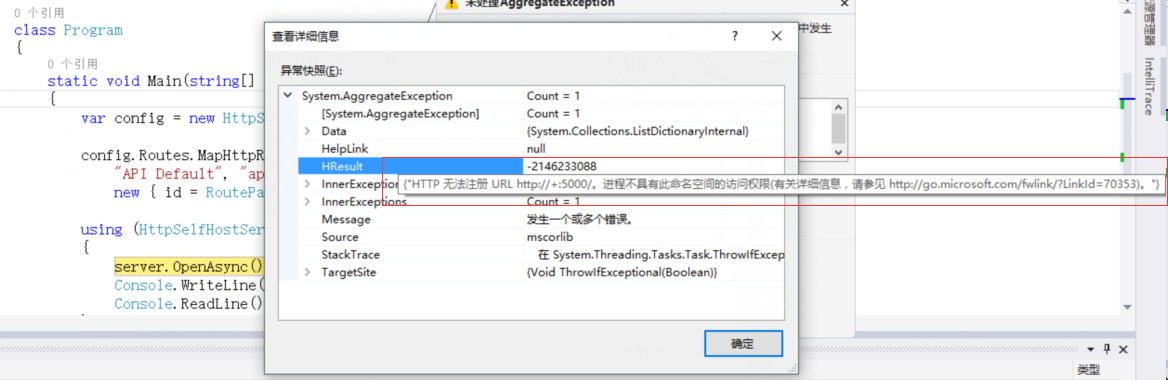
解决方法:打开项目路径找到项目名.exe文件右键以管理员身份运行
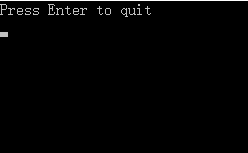
6、通过url方式访问 http://localhost:5000/api/home

通过winform、服务等方式托管的话本篇不再讲述,方式都类似,我觉得WebApi托管在IIS上是好于其他方式的,用控制台的话演示还是不错的。
下篇讲下WebApi跨域。
Web APi入门之Self-Host(二)的更多相关文章
- Web API 入门 二 媒体类型
还是拿上面 那篇 Web API 入门 一 的那个来讲 在product类中加一个时间属性
- Web API 入门指南 - 闲话安全
Web API入门指南有些朋友回复问了些安全方面的问题,安全方面可以写的东西实在太多了,这里尽量围绕着Web API的安全性来展开,介绍一些安全的基本概念,常见安全隐患.相关的防御技巧以及Web AP ...
- 转载-Web API 入门
An Introduction to ASP.NET Web API 目前感觉最好的Web API入门教程 HTTP状态码 Web API 强势入门指南 Install Mongodb Getting ...
- Web API入门指南(安全)转
安全检测的工具站点:https://www.owasp.org/index.php/Category:Vulnerability_Scanning_Tools Web API入门指南有些朋友回复问了些 ...
- Web API 入门指南
Web API 入门指南 - 闲话安全2013-09-21 18:56 by 微软互联网开发支持, 231 阅读, 3 评论, 收藏, 编辑 Web API入门指南有些朋友回复问了些安全方面的问题,安 ...
- (转)Web API 入门指南 - 闲话安全
原文地址:http://www.cnblogs.com/developersupport/p/WebAPI-Security.html Web API入门指南有些朋友回复问了些安全方面的问题,安全方面 ...
- 【ASP.NET Web API教程】1 ASP.NET Web API入门
原文 [ASP.NET Web API教程]1 ASP.NET Web API入门 Getting Started with ASP.NET Web API第1章 ASP.NET Web API入门 ...
- Web APi入门之Self-Host寄宿及路由原理(二)
前言 刚开始表面上感觉Web API内容似乎没什么,也就是返回JSON数据,事实上远非我所想,不去研究不知道,其中的水还是比较深,那又如何,一步一个脚印来学习都将迎刃而解. Self-Host 我们知 ...
- Web API入门二(实例)
学习编程的最好方法就是实例,本人用的是VS2015 1.创建ASP.NET Web空项目 点击确定后即创建了空"WebApi"项目 2.下面,我们需要使用NuGet包管理器添加最新 ...
随机推荐
- 关于EMGU CV的那些事——1.环境搭建(win8 vs2012 emgucv3.0)
http://blog.csdn.net/aptx704610875/article/details/46045689 楼主读研阶段研究图像处理,想用C#实现PTAM/PTAMM算法并用UNITY创建 ...
- Codeforces Round #410 (Div. 2)A B C D 暴力 暴力 思路 姿势/随机
A. Mike and palindrome time limit per test 2 seconds memory limit per test 256 megabytes input stand ...
- get与post请求简单理解
一般在浏览器中输入网址访问资源都是通过GET方式:在FORM提交中,可以通过Method指定提交方式为GET或者POST,默认为GET提交 Http定义了与服务器交互的不同方法,最基本的方法有4种,分 ...
- vim切换显示器乱行问题解决
http://note.youdao.com/noteshare?id=ccdad950ca154a6b1597cbe2ede07b81
- 即时通信系统Openfire分析之一:Openfire与XMPP协议
引言 目前互联网产品使用的即时通信协议有这几种:即时信息和空间协议(IMPP).空间和即时信息协议(PRIM).针对即时通讯和空间平衡扩充的进程开始协议SIP(SIMPLE)以及XMPP.PRIM与 ...
- Mac环境下SVN的配置和使用
简单记录一下在Mac环境下,SVN的配置步骤和使用相关.(Mac自带了svn的服务器和客户端功能,简单配置一下即可使用) 一.SVN的配置方法 1. 创建一个仓库目录,比如在/Users/你的用户名 ...
- c++数组遍历十种方式
int ia[3][4] = {1,2,3,4,5,6,7,8}; //下标 for (int i = 0; i < 3; i++) { for (int j = 0; j < 4 ...
- bzoj 3261: 最大异或和 (可持久化trie树)
3261: 最大异或和 Time Limit: 10 Sec Memory Limit: 512 MB Description 给定一个非负整数序列 {a},初始长度为 N. ...
- python 文字转语音包pyttsx安装出错解决方法
pyttsx的python的文字转语音的包,但是pyttsx的官方网站上资源只更新2012年,所以在py3中使用pip install pyttsx或者下载安装包进行安装时,虽然可以安装成功,但是im ...
- .net core 中 identity server 4 之Topic --定义Client
客户端指能够从id4获取Token的角色. 客户端的共性: a unique client ID a secret if needed the allowed interactions with th ...