
【IIS】IIS 7.0/7.5 无法启动 w3svc 服务
一般情况下,window IIS安装完毕后,会启动C:\inetpub\ 产生 类似C:\inetpub\temp\apppools的文件夹,如果IIS被改动过,此文件夹不会自动生成。需要手动添加。
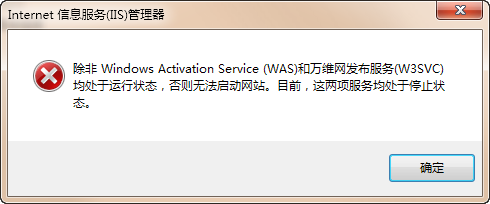
另外可以查看详细:
|
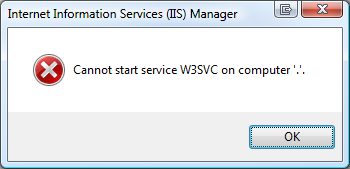
For whatever reason, last week both of my Vista 64-bit machines suddenly stopped being able to start IIS (Internet Information Server). The service just wouldn't start. I started getting this error instead "Cannot start service W3SVC on Computer '.'" which wasn't too helpful.
A visit to the System Event Log via the Event Viewer in Computer Management told me these four errors:
and
and
and
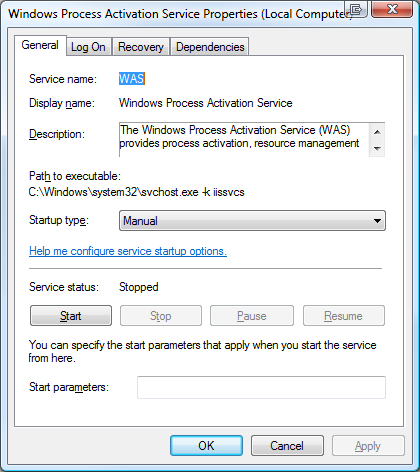
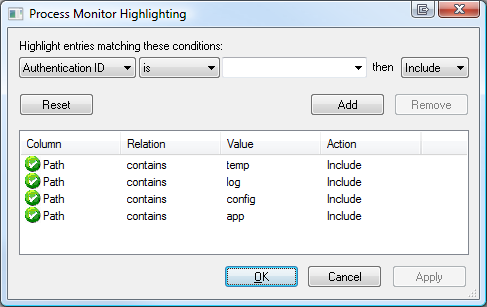
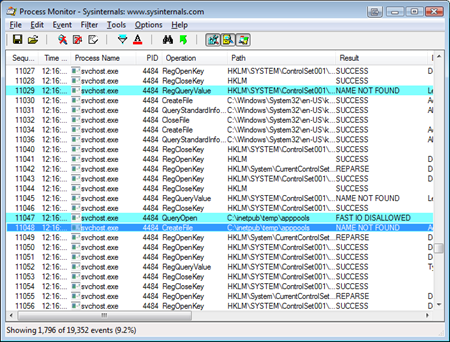
Unfortunately there's little information to go on in any of these error messages. However, it's clear (as mud) from the last error that there's a directory missing or not accessible. I'll add "anymore" to that because it worked before. That means that something changed. If IIS won't start because Windows Process Activation Service won't start, then I need to get WAS started up first. However, I don't know what directory it doesn't have access to. I can see from the Services application that WAS isn't its own executable, but rather lives inside of an instance of svchost.exe, where a lot of services live. So I'll fire up Process Monitor and set the filters (filters are VERY important if you want to avoid being overwhelmed quickly in procmon) to show only svchost.exe processes. Even still, there's a lot of svchost.exe processes out there and they will quickly fill the monitor up. I'll need to setup some strategic (read: guessed) highlighting as well. The hotkey to stop capturing in procmon.exe is Ctrl-E. Basically I'll clear the screen, hit Ctrl-E to capture, try to start WAS (pronounced WAAZ), watch it fail, the stop capture with Ctrl-E. Based on the vague message about application pools temporary files and a directory I'll make a guess and co nfigure highlighting to find paths that contain "temp," "log," "config" or "app" in Process Monitor as seen in the screenshot below.
After I run the capture, I scroll around looking for suspicious stuff. One of the nice things about Process Monitor is that you can EXCLUDE things in a given capture after that fact. For example, I saw a pile of Audio and Media related stuff that was visually confusing and cluttering the point, so I excluded it. The result is here:
It looks like there SHOULD be a folder call c:\inetpub\temp\apppools and on my Vista 64 machines, in the last two weeks to a month, it just disappeared. No idea why. I just noticed recently when I tried to move from a local web development service to IIS itself. I created the folder, started WAS, then IIS and I was back up and running. I'll pass the feedback on to the WAS team about the obscure error messages, but I thought I'd share this little ten minute debugging session to point out a few things that I think are important and possibly helpful, Dear Reader:
|
【IIS】IIS 7.0/7.5 无法启动 w3svc 服务的更多相关文章
- Python 启动本地服务
在 Linux 服务器上或安装了 Python 的机器上,Python自带了一个WEB服务器 SimpleHTTPServer,我们可以很简单的使用 python -m SimpleHTTPServ ...
- IIS和4.0安装到底有没有先后顺序解答
在很多人或许很多技术大神都会觉得IIS的安装和4.0没得先后顺序的.其错误弊端在与IIS没有注册到4.0上. 经过今天遇到了服务器安装服务端发觉报错[无法识别的属性“targetFramework”. ...
- IIS运行.NET4.0配置
IIS运行.NET4.0配置 “/CRM”应用程序中的服务器错误.配置错误说明: 在处理向该请求提供服务所需的配置文件时出错.请检查下面的特定错误详细信息并适当地修改配置文件. 分析器错误消息: 无法 ...
- iis 部署 webapi2.0 访问报错解决
本机安装的VS2013 开发环境,在IIS部署WebApi2.0时,应用程序池并没有.NET4.5的选项. 网上搜索一番得知: 1..NET 4.5本质上还是4.0,属于递增式的更新,所以对IIS 来 ...
- 解决IIS无法启动w3svc
1>:首先在CMD命令行中输入:fsutil resource setautoreset true c:\ 2>:然后在运行services.msc 3>:找到Windows Pro ...
- IIS重写2.0 IIS伪静态 下载地址
IIS重写2.0 IIS伪静态 下载地址 https://www.iis.net/downloads/microsoft/url-rewrite#additionalDownloads Downloa ...
- [IIS]IIS扫盲(八)
iis - IIS之FTP服务器 一.建立你的FTP站点 第一个FTP站点(即“默认FTP站点”)的设置方法和更多FTP站点的建立方法请参照前文Web服务器中相关操作执行.需要注意的是,如果你要用一 ...
- [IIS]IIS扫盲(五)
第二篇 IIS之FTP服务器 一.建立你的FTP站点 第一个FTP站点(即“默认FTP站点”)的设置方法和更多FTP站点的建立方法请参照前文Web服务器中相关操作执行.需要注意的是,如果你要用一个IP ...
- [IIS]IIS扫盲(三)
IIS扫盲贴 --==[精品]==-- IIS扫盲贴 --==[精品]==-- 2000对应iis5.0 xp对应iis5.1 2003对应iis6.0 作者: II ...
随机推荐
- CentOS 5.4 安装和卸载桌面
显示系统已经安装的组件,和可以安装的组件:#yum grouplist 如果系统安装之初采用最小化安装,没有安装xwindow,那么先安装:#yum groupinstall "X Wind ...
- 安卓API首页
http://developer.android.com/reference/packages.html
- c++创建一个char数组
char c[] = { 'a', 'b', 'c', '\0' }; char* cp = c; printf(cp); 所有的char类型都以'\0'结尾
- android.animation(7) - android:animateLayoutChanges属性和LayoutTransition
前篇给大家讲了LayoutAnimation的知识,LayoutAnimation虽能实现ViewGroup的进入动画,但只能在创建时有效.在创建后,再往里添加控件就不会再有动画.在API 11后,又 ...
- java中高并发和高响应解决方法
并发不高.任务执行时间长的业务要区分开看: 假如是业务时间长集中在I/O操作上,也就是I/O密集型的任务,因为I/O操作并不占用CPU,所以不要让所有的CPU闲下来,可以加大线程池中的线程数目,让CP ...
- github上搭建网站前台页面
其实就是把html页面提交到github,为了能在线演示: 1. 首先在github网站找到你的项目 2. 点击设置 3. 找到这几个选项,选择master branch打钩,然后保存 4. 然后就会 ...
- Spider Studio 新版本 (20131201) - BrowserManager / 节点选择器 / JQueryContext.Focus
2013-12-1版本更新, 包含如下改动: 1. 修复BrowserManager重复初始化的bug; 2. 大幅提高节点选择器性能: 以网页 http://data.sports.sohu.com ...
- 你有自己的Web缓存知识体系吗?
赵舜东 江湖人称赵班长,曾在武警某部负责指挥自动化的架构和运维工作,2008年退役后一直从事互联网运维工作.曾带团队负责国内某电商的运维工作,<saltstack入门与实践>作者,某学院高 ...
- linux查看端口命令和kill
1.查看 netstat -atunlp 2kill:kill -9 PID
- OGNL支持各种纷繁复杂的表达式
OGNL支持各种纷繁复杂的表达式.但是最最基本的表达式的原型,是将对象的引用值用点串联起来,从左到右,每一次表达式计算返回的结果成为当前对象,后面部分接着在当前对象上进行计算,一直到全部表达式计算完成 ...