
Error C1189: #error: Please use the /MD switch for _AFXDLL builds
在VS 2013中编译程序时出现错误:
错误提示1:
error C1189: #error : Building MFC application with /MD[d] (CRT dll version) requires MFC shared dll version. Please #define _AFXDLL or do not use /MD[d]
原因:
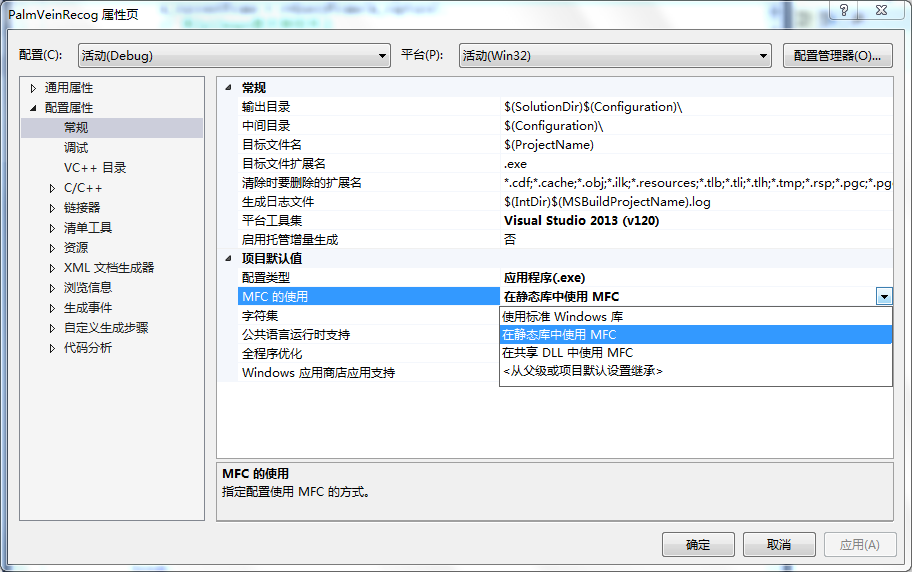
常规里面是:在静态库中使用MFC,或使用标准Windows库,此时该处可能无论是什么都会报错
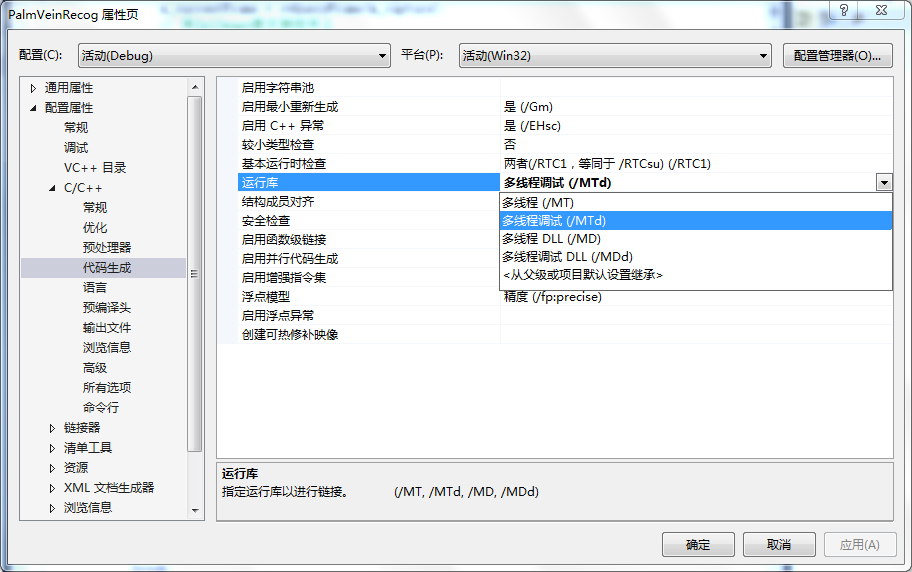
运行库中多线程调试是:MDd(多线程调试DLL)
解决方法:
将MDd改成MTd,如果改正后报错误2,按下面方法更改。
错误提示2:
error C1189: #error: Please use the /MD switch for _AFXDLL builds
原因:
常规里面是:在共享DLL中使用MFC,
运行库中多线程调试是:MTd(多线程调试)
解决方法:
将常规改成:在静态库中使用MFC,或使用标准Windows库
常规和运行库 如下图:
常规: 右击项目->属性->配置属性->常规,然后在右边的“项目默认值”中的“MFC的使用”选项中选择“在静态库中使用MFC”,
多线程调试: 右击项目-->属性->配置属性->c/c++->代码生成->运行时库->多线程调试(/MTd)
相关注释:
MFC的使用,有三种设置:
1.使用标准Windows库
2.在静态库中使用MFC:是将DLL中的相关代码写进EXE文件中,文件较大,但是可以在没有相关DLL的机器上运行;
3.在共享DLL中使用MFC:指的是打包时一些MFC的DLL的内容没有被包含在EXE文件中,所以EXE文件较小,但是运行时要求系统中要有相关的DLL文件;
多线程调试
/MD:在dll中使用多线程,创建动态链接库的release版本,需要选择。
/MT: 在exe里使用多线程,创建exe的release版本,需要选择。
/MTd:同/MT一样,不过是在Debug版本中使用。
/MDL:同/MD一样,不过是在Debug版本中使用。
如果是Debug的“在静态库中使用MFC”,不要使用MDd,改用MTd,然后编译即可通过。
如果是Debug的“在共享DLL中使用MFC”,注意不要使用MTd,改用MDd;
如果是Release版本“在静态库中使用MFC”,不要使用MD,使用MT;
如果是Release版本的“在共享DLL中使用MFC”,不要使用MT,使用MD。
Error C1189: #error: Please use the /MD switch for _AFXDLL builds的更多相关文章
- Error C1189: #error: Please use the /MD switch for _AFXDLL builds(转)
原文转自 https://www.cnblogs.com/zwh0214/p/6048360.html 在VS 2013中编译程序时出现错误: 错误提示1: error C1189: #error : ...
- VS错误:#error 指令: Please use the /MD switch for _AFXDLL builds
我在做MFC时遇到过这个问题,解决方法如下: 修改设置:工程(Project)-> 属性(Properties)-> 配置属性(Configuration Properties)-> ...
- fatal error C1189: #error : Building MFC application with /MD[d] (CRT dll version) requires MFC
出现如下错误: fatal error C1189: #error : Building MFC application with /MD[d] (CRT dll version) requires ...
- fatal error C1189: #error : Building MFC application with /MD[d] (CRT dll version) requires MFC sha
调试程序时出现以下问题:d:\program files (x86)\microsoft visual studio 10.0\vc\atlmfc\include\afx.h(24): fatal e ...
- vc/atlmfc/include/afx.h(24) : fatal error C1189: #error : Building MFC application with /MD[d] (CRT
环境:win7,64位,vs2012 1> c:/program files/microsoft visual studio 8/vc/atlmfc/include/afx.h(24) : fa ...
- 从“空项目”创建MFC项目遇到的问题error C1189,error MSB8031
在VS2013中创建了一个空项目,创建了MyApp.h, MyApp.cpp(MyApp.h使用了<afxwin.h>) build的时候报错: fatal error C1189: #e ...
- fatal error C1189: #error : WINDOWS.H already included. MFC apps must not #include <windows.h>
给对话框添加类, 报错 CalibrateMFCDlg.h(6) : error C2504: “CDialog”: 未定义基类 等多个错误 加上 #include "afxwin.h&qu ...
- VS2003转VS2010 fatal error C1189: #error
我自己的mfc的demo要转换编译环境出现以下编译错误: VS2010编译错误:fatal error C1189: #error : This file requires _WIN32_WINNT ...
- 【转】fatal error C1189: #error : missing -D__STDC_CONSTANT_MACROS / #define __STDC_CONSTANT_MACROS
转自:http://blog.csdn.net/friendan/article/details/46576699 fatal error C1189: #error : missing -D__S ...
随机推荐
- Xml转化为DataTable
/// <summary> /// XML转换为DataTable /// </summary> /// <param name="fileName" ...
- Android开发效率的小技巧
提高eclipse使用效率(二) 提高Android开发效率的小技巧 XML文件的代码提示 adt中也有xml文件的代码提示,为了让提示来的更加猛烈,我们还要设置一下 打开eclipse - Wi ...
- Lucene学习-深入Lucene分词器,TokenStream获取分词详细信息
Lucene学习-深入Lucene分词器,TokenStream获取分词详细信息 在此回复牛妞的关于程序中分词器的问题,其实可以直接很简单的在词库中配置就好了,Lucene中分词的所有信息我们都可以从 ...
- 一步一步深入spring(2)-三种方式来实例化bean
在一步一步深入spring(1)--搭建和测试spring的开发环境中提到了一种实例化bean的方式,也是最基本的使用构造器实例化bean 1.使用构造器实例化bean:这是最简单的方式,Spring ...
- mongDB
MongoDB[第一篇]MongodDB初识 NoSQL介绍 一.NoSQL简介 NoSQL,全称是”Not Only Sql”,指的是非关系型的数据库. 非关系型数据库主要有这些特点:非关系型的 ...
- 项目中出现黄色感叹号 教你去掉Myeclipse的黄色感叹号
点击Window>>Preferences>>General>>Editors>>Text Editors>>Annotations 选中右 ...
- codeforces 6A. Triangle
A. Triangle time limit per test 2 seconds memory limit per test 64 megabytes input standard input ou ...
- WebView使用input file控件打开相册上传图片
使用 WebView 直接用 控件选择相册图片 package com.moguzhuan.android.zhuan; import android.annotation.TargetApi; im ...
- USACO 4.2 The Perfect Stall(二分图匹配匈牙利算法)
The Perfect StallHal Burch Farmer John completed his new barn just last week, complete with all the ...
- 网络叠加模式VLAN、VxLAN、GRE
什么是叠加网络 1.一个数据包(或帧)封装在另一个数据包内;被封装的包转发到隧道端点后再被拆装. 2.叠加网络就是使用这种所谓"包内之包"的技术安全地将一个网络隐藏在另一个 网络中 ...