
jquery-ui-bootstrap动态添加和删除标签页封装【效果更炫】
1、效果图
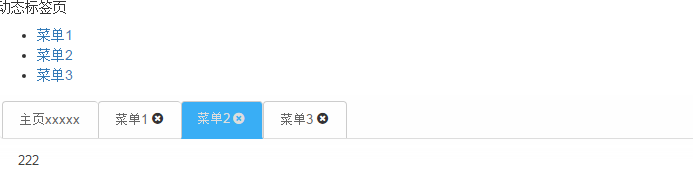
2、导入js和css
<link rel="stylesheet" href="css/bootstrap/css/bootstrap.min.css">

<link rel="stylesheet" type="text/css" href="font/Font-Awesome/css/font-awesome.css">

<link rel="stylesheet" type="text/css" href="css/jquery-ui-bootstrap/css/custom-theme/jquery-ui-1.10.0.custom.css"/>

<link rel="stylesheet" type="text/css" href="css/default.css"></head>

<script type="text/javascript" src="js/jquery-1.9.1.min.js"></script>

<script type="text/javascript" src="js/bootstrap.min.js"></script>

<script src="css/jquery-ui-bootstrap/assets/js/jquery-ui-1.10.0.custom.min.js" type="text/javascript"></script>

<script type="text/javascript" src="js/default.js"></script>
default.css是对tabs效果绘制
/*jquery-ui-bootstrap tabs*/

.tabs ul {

/* border-bottom: 3px solid #39aef5!important;*/

}

.tabs ul li:not(:first-child){

padding-right:15px!important;

}

.tabs ul li{

border-top:1px solid #ccc!important;

border-left:1px solid #ccc!important;

/*border-bottom: 1px solid #39aef5!important;*/

}

.tabs ul li a{

color:#666!important;

}

.tabs ul li span:hover{

color:#C61010!important;

}

.tabs ul li a:hover,

.tabs ul li:hover,

.tabs ul li:focus{

border-bottom: 0!important;

}

.tabs ul li:last-child{

border-right:1px solid #ccc!important;

}

.tabs ul li.ui-state-active.ui-tabs-active a,

.tabs ul li.ui-state-active.ui-tabs-active span,

.tabs ul li.ui-state-active.ui-tabs-active{

	/*border-top:3px solid red!important;*/

	background: #39aef5!important;

	border-bottom: 2px solid #39aef5!important;

	color:#ddd!important;

}

.tabs ul li.ui-state-active.ui-tabs-active a:hover,

.tabs ul li.ui-state-active.ui-tabs-active span:hover

{

	color:#fff!important;

}

.tabs ul li .fa-times-circle{

position: absolute;

top: 10px;

right:18px;

}
default.js
$(function(){

			var tabs = $( "#tabs3" ).tabs();

					   var tabTemplate = "<li><a href='#{href}'>#{label}</a> <span class='fa fa-times-circle'></span></li>";

				$('.menu li').click(function(){

					   //获取tabs下a[href]的值

                        var id="#tabs-"+this.id;

                        //tabs初始化时就有一个li,所以要减1,添加时index会返回-1,再减1变为-2,可根据实际情况而定。这里实际上是通过Id定位#id所在li的位置,然后设置active

                        var index=$("#tabs3").find(id).index()-1;

                         $( "#tabs3" ).tabs('option','active',index);

                          if(index==-2){

                             addTab(this.innerText,this.id);

                          }

				});

				function addTab(tabTitle,id) {

				        var label = tabTitle,

				            id = "tabs-" + id,

				            li = $( tabTemplate.replace( /#\{href\}/g, "#" + id ).replace( /#\{label\}/g, label ) );

				           var tabContentHtml = $("."+id).html();

				            var existing=tabs.find("[id='"+id+"']");

				            if(existing.length==0){

				            	 tabs.find( ".ui-tabs-nav" ).append( li );

						        tabs.append( "<div id='" + id + "'><p>" + tabContentHtml + "</p></div>" );

						        tabs.tabs( "refresh" );

				            }

				          var index=tabs.find('.ui-tabs-nav li').index(existing);

                          //添加时总是返回-1

				          tabs.tabs('option','active',index);

				  		  }

						// close icon: removing the tab on click

					    $( "#tabs3" ).on( "click",'span.fa-times-circle', function() {

					        var panelId = $( this ).closest( "li" ).remove().attr( "aria-controls" );

					        $( "#" + panelId ).remove();

					        tabs.tabs( "refresh" );

					    });

		})
3、html片段
<h5>动态标签页</h5>

	<ul class="menu">

		<li id="menu1">

			<a href="#" >菜单1</a>

		</li>

		<li id="menu2">

			<a href="#">菜单2</a>

		</li>

		<li id="menu3">

			<a href="#">菜单3</a>

		</li>

	</ul>

	<div id="tabs3" class="tabs">

		<ul>

			<li>

				<a href="#tabs-4">主页xxxxx</a>

			</li>

		</ul>

		<div id="tabs-4">主页内容</div>

	</div>

	<div id="tab_content" style="display: none;">

		<div class="tabs-menu1">111</div>

		<div class="tabs-menu2">222</div>

		<div class="tabs-menu3">333</div>

	</div>
jquery-ui-bootstrap动态添加和删除标签页封装【效果更炫】的更多相关文章
- js动态添加和删除标签
html代码 <h1>动态添加和删除标签</h1> <div id="addTagTest"> <table> <thead& ...
- [转] JQuery UI Tabs 动态添加页签,并跳转到新页签
[From] https://blog.csdn.net/zhangfeng2124/article/details/76672403 需求: 1.tabs默认只有一个页签,但是需要点击某按钮,动态添 ...
- jquery 动态添加和删除 ul li列表
今天需要实现一个jquery动态添加和删除 ul li列表中的li行,自己简单的实现乐一个,分享一下 <!DOCTYPE html PUBLIC "-//W3C//DTD XHTML ...
- jquery mobile Checkbox动态添加刷新及事件绑定
jquery mobile Checkbox动态添加刷新及事件绑定 在微信项目中,涉及到一个多选功能.数据来自后台数据库,需要动态加载. 项目结构:微信api+web app.使用jquery mob ...
- Unity NGUI中动态添加和删除sprite
(以后,参考链接和作者将在文章首部给出,转载请保留此部分内容) 参考链接:http://www.narkii.com/club/thread-299977-1.html,作者:纳金网 比巴卜: 参考链 ...
- 插件~使用ECharts动态在地图上标识点~动态添加和删除标识点
之前写过一个Echarts的文章,没有基础的同学可以先看这<上一篇>,对于一个地图和说,我们在初始化之后,你可能被在地图上标识出一些点,当然这根据你的业务去标识,而如果每次更新数据都加载全 ...
- [Flex] Accordion系列-动态添加或删除Accordion容器中项目
<?xml version="1.0" encoding="utf-8"?> <!--Flex中如何使用addChild()和removeCh ...
- jQuery ui背景色动态渐变导航菜单
<!DOCTYPE html PUBLIC "-//W3C//DTD XHTML 1.0 Transitional//EN" "http://www.w3.org/ ...
- 原生JS动态添加和删除类
原生JS动态添加和删除类 由于需要, 给按钮组监听点击事件(要求用事件委托),当有一个按钮被点击时,相应的给该按钮添加一个类(激活类),其他没有点击的按钮就要移出该类 添加和和删除类有三种方法 首先等 ...
随机推荐
- 辛格尔顿和Android
辛格尔顿(Singleton) .singleton.h,定义类的基本成员及接口 #ifndef SINGLETON_H_INCLUDE #define SINGLETON_H_INCLUDE cla ...
- 【Java基础】异常的简单分类与处理
Java中所有的异常都继承自Throwable类,Throwable类的已知子类有Error和Exception. Error是指系统出现的错误,这种错误出现的时候,我们的程序无能为力,所以不需要进行 ...
- 【原创】shadowebdict开发日记:基于linux的简明英汉字典(一)
全系列目录: [原创]shadowebdict开发日记:基于linux的简明英汉字典(一) [原创]shadowebdict开发日记:基于linux的简明英汉字典(二) [原创]shadowebdic ...
- C# The process cannot access the file because it is being used by another process
C# The process cannot access the file because it is being used by another process The process cann ...
- Gmail POP3设定
好几个同事在问我怎样使用ThunderBird和OE收取IT CHT的邮箱,因为IT CHT就是用Gmail的功能,因此收发邮件是跟Gmail一样,下面是Gmail的POP&SMTP的设置方法 ...
- DV工作流
- 手动安装英特尔® 凌动™ Android* x86 模拟器映像
android的模拟器实在是太慢了,慢的让人欲仙欲死,欲罢不能.猛然发现我的电脑是intel的CPU,我勒个去,换x86模拟器.然后悲剧了,伟大的gfw 我要装sdk,我要研究android开发,到底 ...
- partial 的好处
1.可以将一个类中的属 性, 方法分类来写 2.方法了可以写在多个类中, 这样可以对方法进行分类 由于项目上使用了代码生成工具, 自定义的一些按钮事件默认是不生成的,得自己定义,如果把定义的代码写 ...
- JDK5什么是新的线程锁技术(两)
一个. Lock线程同步实现互斥 Lock比传统线程模型中的synchronized方式更加面向对象,与生活中的锁类似,锁本身也是一个对象. 两个线程运行的代码片段要实现同步相互排斥的效果.他们必须用 ...
- Codeforces Round #234 (Div. 2) B. Inna and New Matrix of Candies
B. Inna and New Matrix of Candies time limit per test 1 second memory limit per test 256 megabytes i ...