
【翻译】使用Visual Studio在Azure上部署Asp.Net Core Web应用
配置运行环境
- Install the latest Azure SDK for Visual Studio. The SDK installs Visual Studio if you don't already have it.
- 安装Azure SDK for Visual Studio,如果你的Visual Studio还没有安装这个SDK的话
Verify your Azure account. You can open a free Azure account or Activate Visual Studio subscriber benefits.
验证你的Azure账号。你可以注册一个免费的Azure账号也可以激活你的Visual Studio的Azure信用额度。
创建Web应用
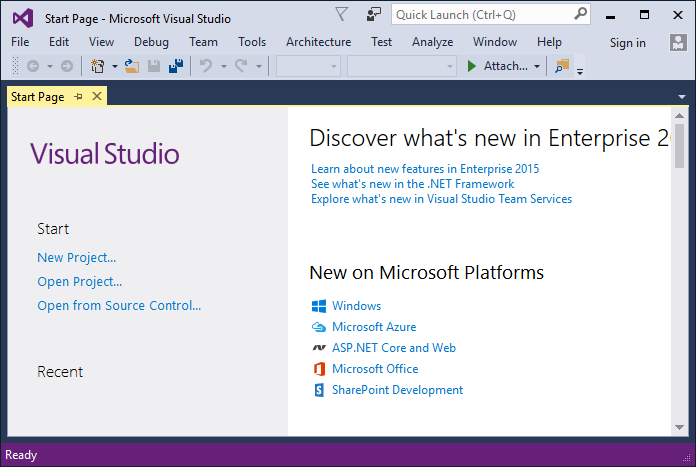
In the Visual Studio Start Page, tap New Project....
在Visual Studio启示页面,点击New Project…
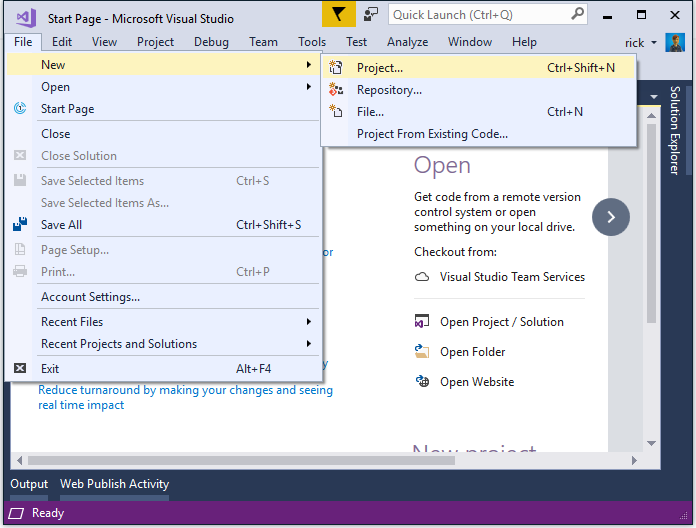
Alternatively, you can use the menus to create a new project. Tap File > New > Project....
你也可以通过菜单来创建一个新的项目。点击File > New > Project…
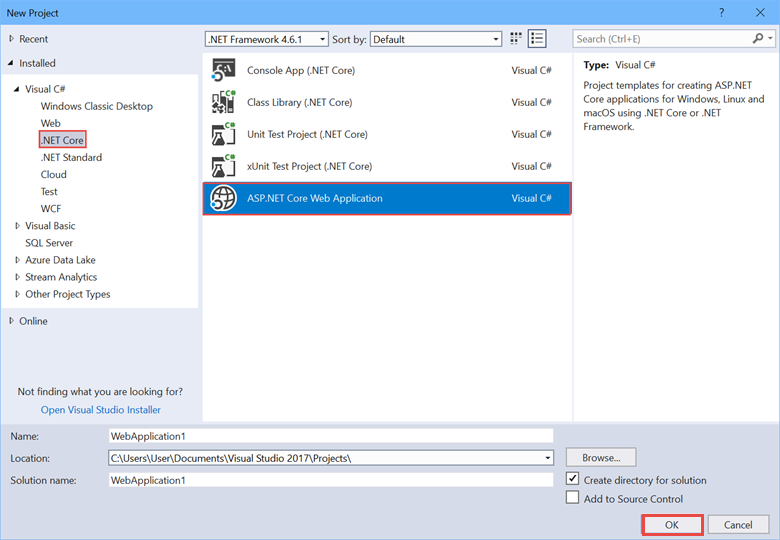
Complete the New Project dialog:
完成新项目的创建
In the left pane, tap Web
在左边面板,点击Web
In the center pane, tap ASP.NET Core Web Application (.NET Core)
在中间的面板,点击选择Asp.Net Core Web Application(.Net Core)
Tap OK
点击OK
In the New ASP.NET Core Web Application (.NET Core) dialog:
在New Asp.Net Core Web Application(.Net Core)对话框中:
Tap Web Application
点击Web Application
Verify Authentication is set to Individual User Accounts
Authentication设置成Individual User Accounts
Verify Host in the cloud is not checked
不选中Host in the Cloud
Tap OK
点击OK
在本地测试应用
Press Ctrl-F5 to run the app locally
按Ctrl+F5在本地运行应用
Tap the About and Contact links. Depending on the size of your device, you might need to tap the navigation icon to show the links
点击About和Contact链接,根据你设备分辨率的大小,你可能需要点击导航图标才能看到这些链接。
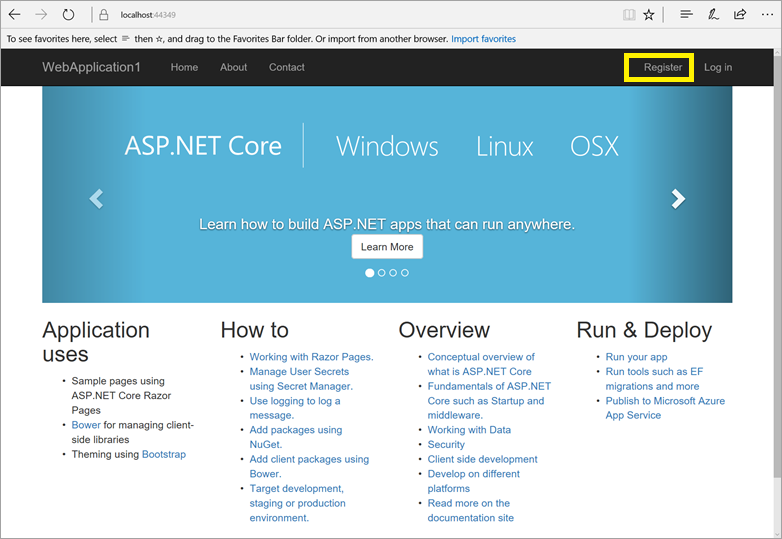
- Tap Register and register a new user. You can use a fictitious email address. When you submit, you'll get the following error:
- 点击注册链接注册一个新的用户。你可以输入虚拟的Email地址,当你点击提交的时候,你会看到错误:
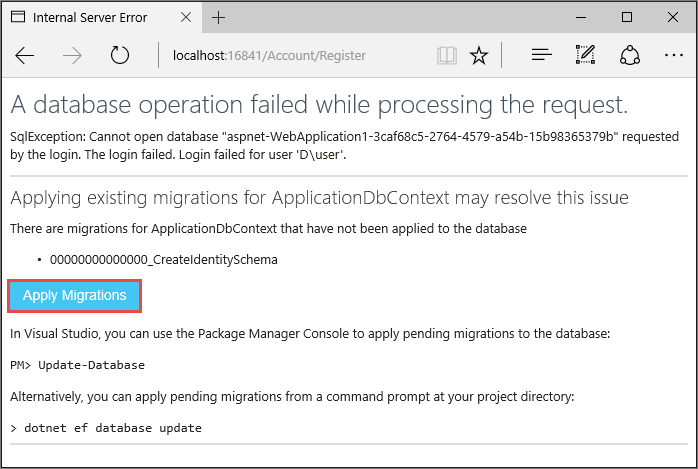
You can fix the problem in two different ways:
你可以使用以下两种方式修复问题:
Tap Apply Migrations and, once the page updates, refresh the page;
点击Apply Migrations,等待更新后,刷新页面
Run the following from a command prompt in the project's directory:
在命令终端下,到项目目录运行以下命令:
dotnet ef database update
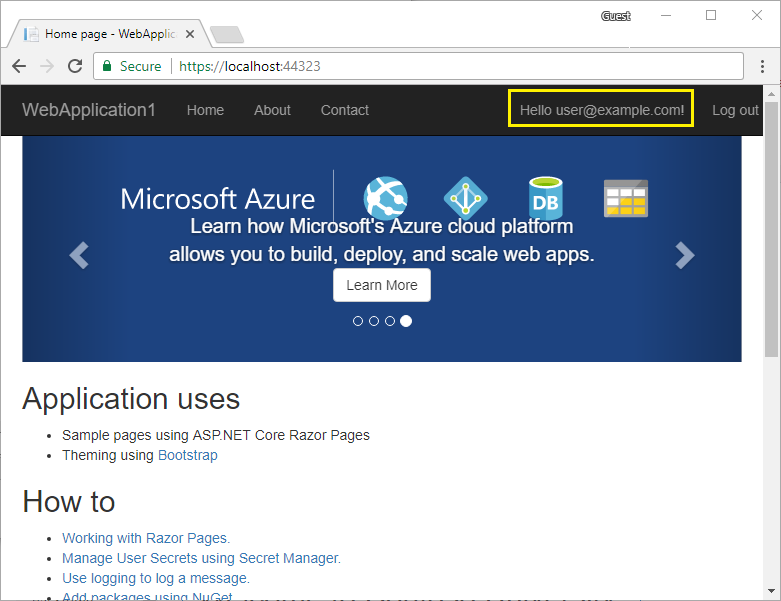
The app displays the email used to register the new user and a Log off link.
刷新页面后,页面会显示我们注册的新用户和看到一个Log off的链接。
应用部署到Azure
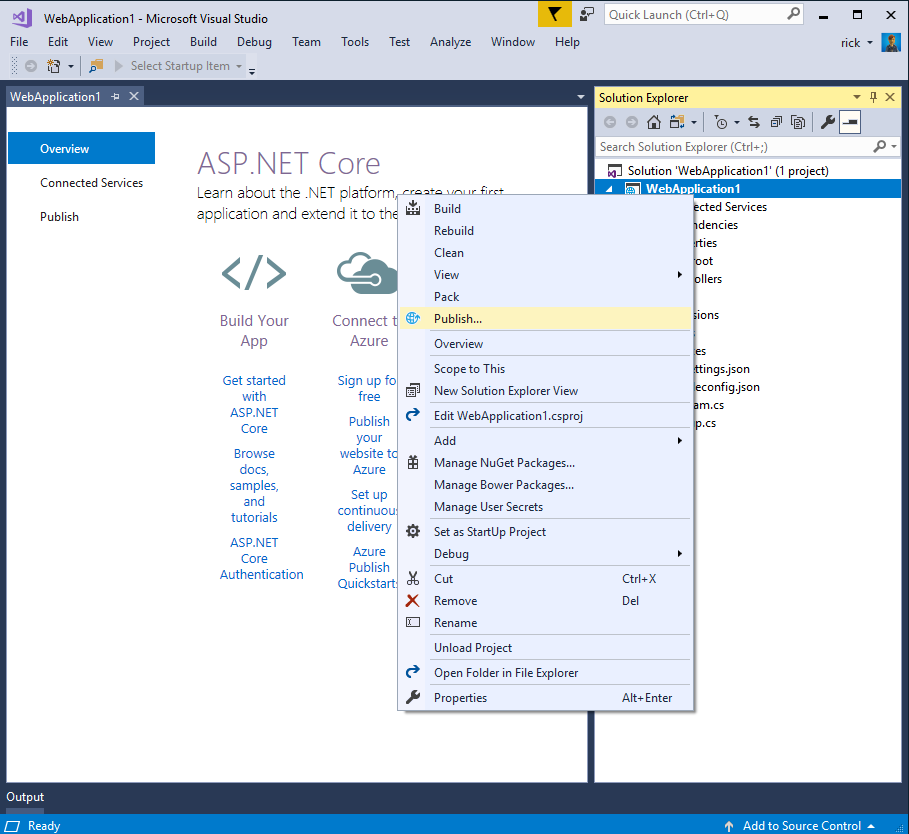
Right-click on the project in Solution Explorer and select Publish....
在Solution Explorer右键项目,点击Publish
In the Publish dialog, tap Microsoft Azure App Service.
在Publish对话框中,点击Microsoft Azure App service.
Tap New... to create a new resource group. Creating a new resource group will make it easier to delete all the Azure resources you create in this tutorial.
点击New创建一个新的资源组。创建新的资源组可以方便你删除所有在Azure上创建的范例资源。
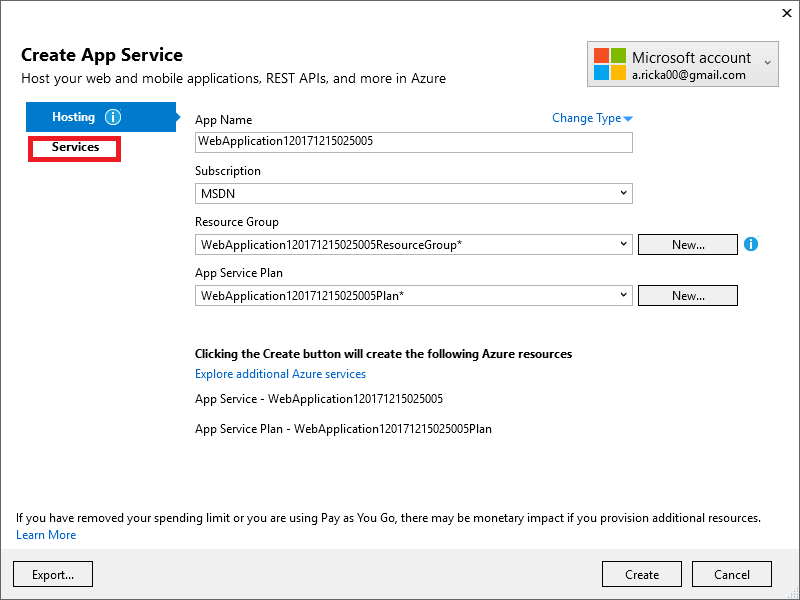
Create a new resource group and app service plan:
添加一个新的Resource group和app service plan:
Tap New... for the resource group and enter a name for the new resource group
在resource group点击New,然后为这个资源组取名
Tap New... for the app service plan and select a location near you. You can keep the default generated name
在app service plan点击New,选择一个
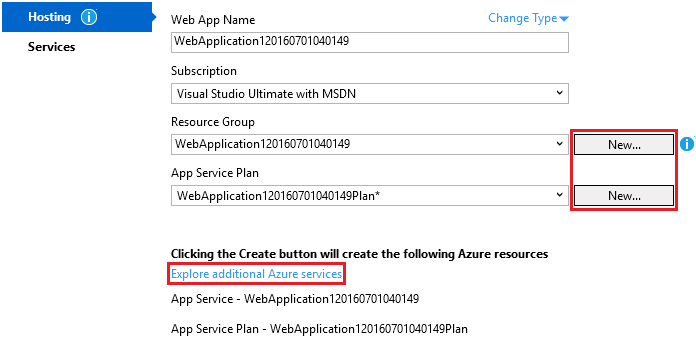
Tap Explore additional Azure services to create a new database
点击Explore additional Azure services去创建一个新的数据库
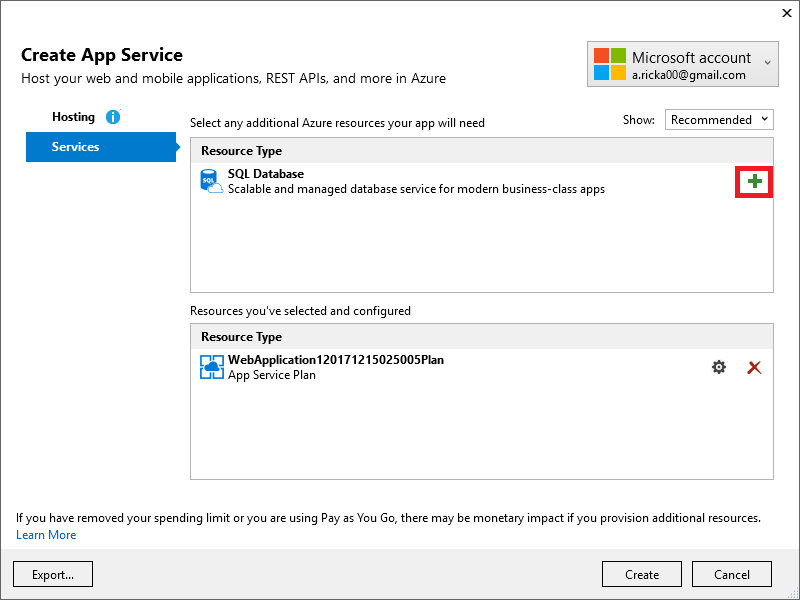
- Tap the green + icon to create a new SQL Database
- 点击绿色的加号图标创建一个新的Sql数据库
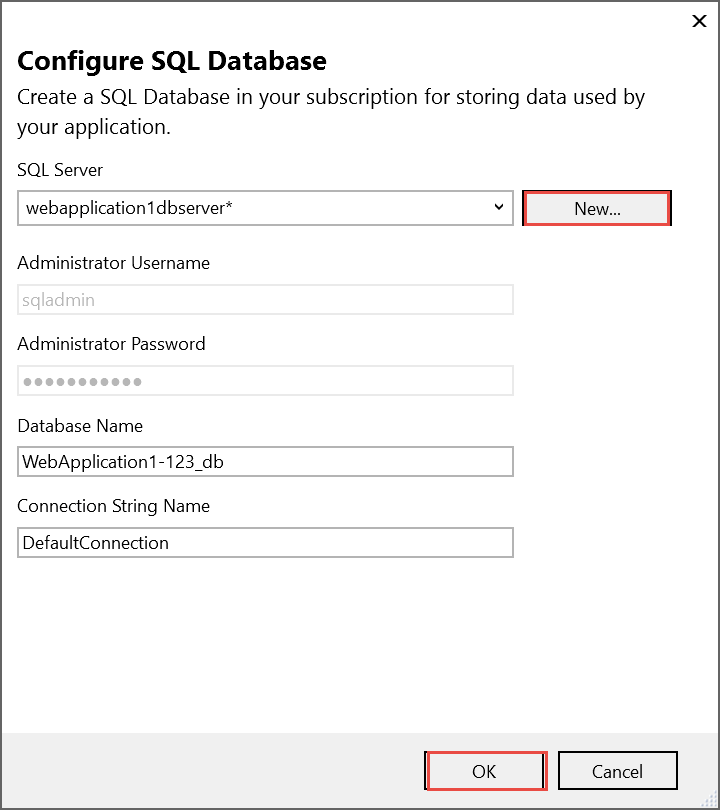
- Tap New... on the Configure SQL Database dialog to create a new database server.
- 在Configure Sql Database对话框中点击New创建一个新的数据库
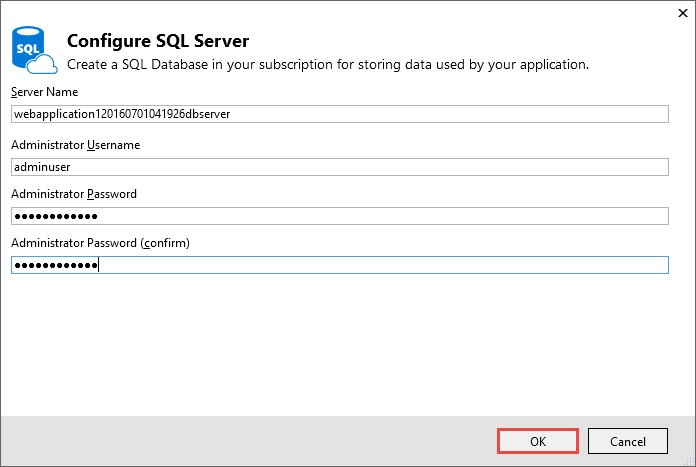
- Enter an administrator user name and password, and then tap OK. Don't forget the user name and password you create in this step. You can keep the default Server Name
- 输入一个管理员名和密码,点击OK。不要忘记你设置的用户名和密码。ServerName可以保持默认的。
- Tap OK on the Configure SQL Database dialog
- 在Configure SQL Database对话框点击OK
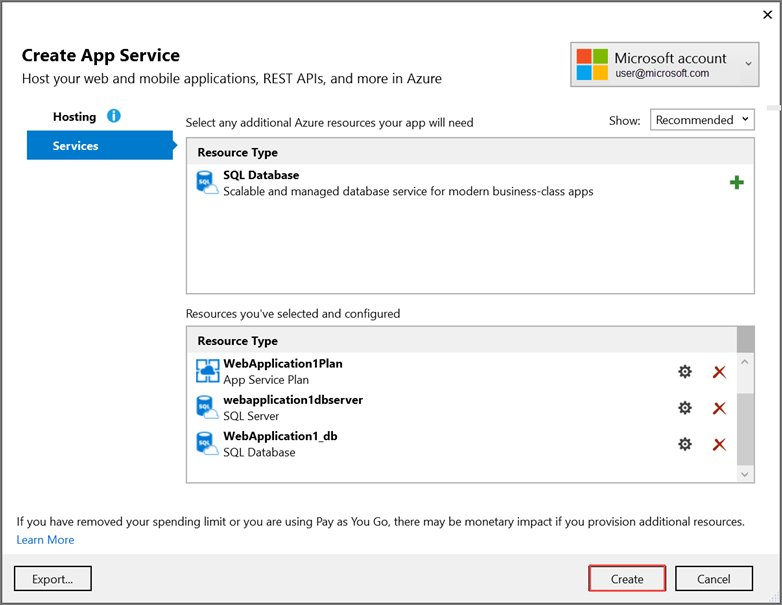
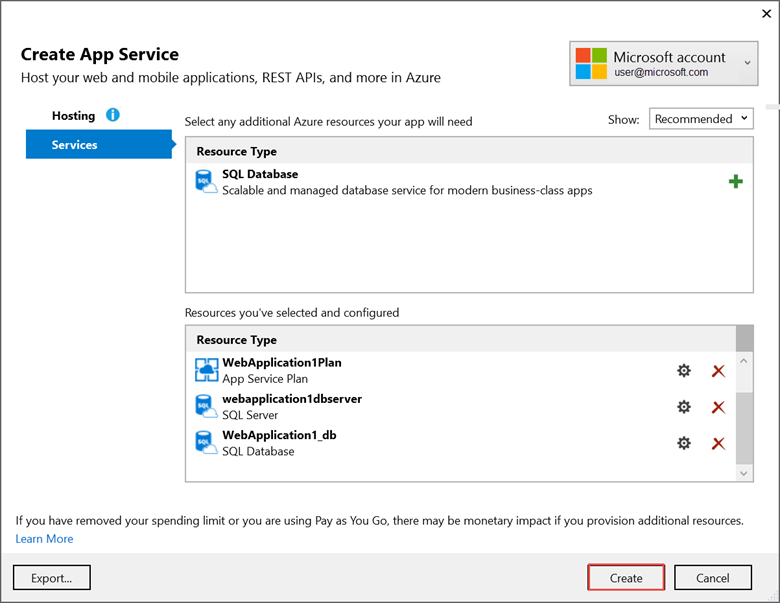
- Tap Create on the Create App Service dialog
- 在Creat App Service对话框点击Create
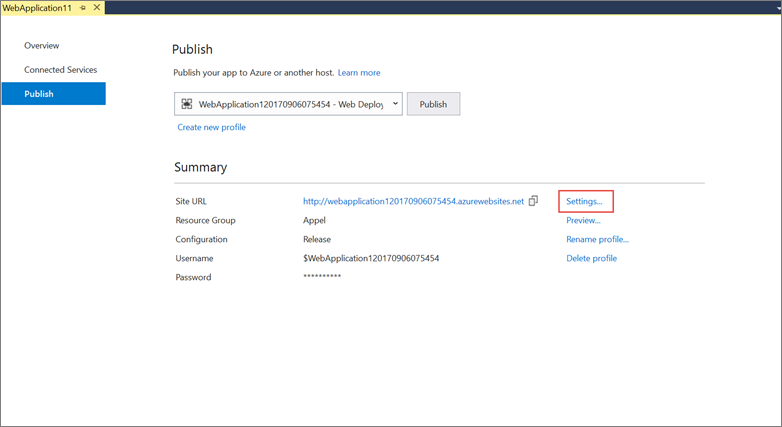
- Tap Next in the Publish dialog
- 在Publish对话框点击Next
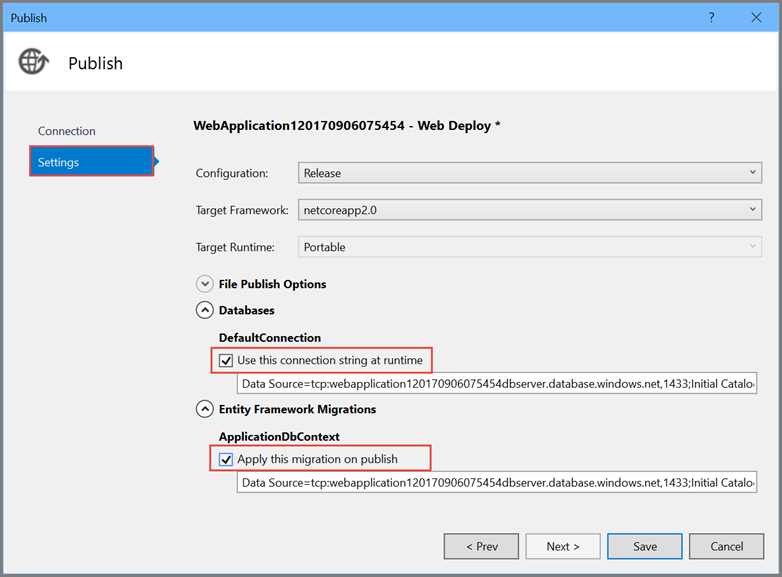
On the Settings stage of the Publish dialog:
点击Publish对话框的Settings标签
Expand Databases and check Use this connection string at runtime
扩展Databases,选中Use this connection string at runtime
Expand Entity Framework Migrations and check Apply this migration on publish
扩展Entity Framework Migrations,选中Apply this migration on publish
Tap Publish and wait until Visual Studio finishes publishing your app
点击Publish,等待Visual Studio完成发布你的应用。
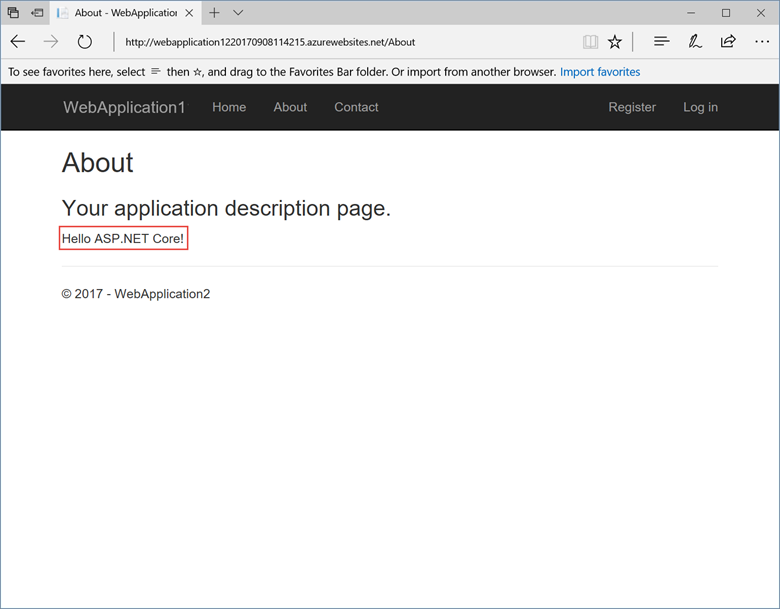
Visual Studio will publish your app to Azure and launch the cloud app in your browser.
Visual Studio会在发布到Azure后通过浏览器打开你在云端部署的应用。
在Azure上测试你的应用
Test the About and Contact links
测试About和Contact链接
Register a new user
注册一个用户
更新应用
- Edit the
Views/Home/About.cshtmlRazor view file and change its contents. For example: - 编辑Views/Home/About.cshtml文件,修改它。参考:
@{

       ViewData["Title"] = "About";

   }

   <h2>@ViewData["Title"].</h2>

   <h3>@ViewData["Message"]</h3>

   <p>My updated about page.</p>
- Right-click on the project and tap Publish... again
- 再次右键项目点击Publish
- After the app is published, verify the changes you made are available on Azure
- 发布后,检查下在Azure端的应用是否改变
清除应用
When you have finished testing the app, go to the Azure portal and delete the app.
当你完成测试后,去Azure后台删除这个应用。
- Select Resource groups, then tap the resource group you created
- 选择Resource groups,然后选中你创建的资源组
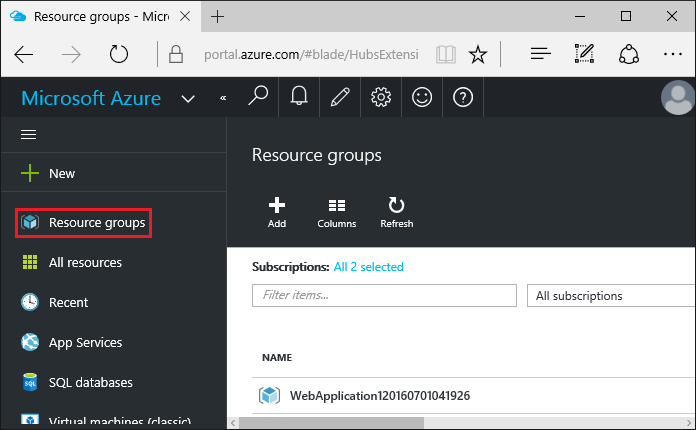
- In the Resource group blade, tap Delete
- 在Resource group选项卡中,点击Delete
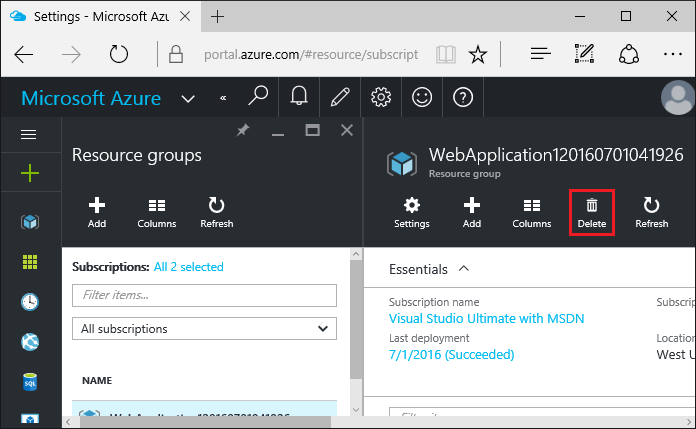
- Enter the name of the resource group and tap Delete. Your app and all other resources created in this tutorial are now deleted from Azure
- 输入资源组名点击Delete。你的应用和创建的资源在Azure中将会被删除。
原文链接
https://docs.microsoft.com/zh-cn/aspnet/core/tutorials/publish-to-azure-webapp-using-vs
【翻译】使用Visual Studio在Azure上部署Asp.Net Core Web应用的更多相关文章
- 在 Azure 上部署 Asp.NET Core Web App
在云计算大行其道的时代,当你要部署一个网站时第一选择肯定是各式各样的云端服务.那么究竟使用什么样的云端服务才能够以最快捷的方式部署一个 ASP.NET Core的网站呢?Azure 的 Web App ...
- Visual Studio Code和Docker开发asp.net core和mysql应用
Visual Studio Code和Docker开发asp.net core和mysql应用 .net猿遇到了小鲸鱼,觉得越来越兴奋.本来.net猿只是在透过家里那田子窗看外面的世界,但是看着海峡对 ...
- CentOS7上部署ASP.Net Core 2.2应用
前言 在CentOS7上部署ASP.Net Core应用是我的技术路线验证的一部分,下一个产品计划采用ASP.Net Boilerplate Framework开发.因此需要求提前进行一下技术验证,在 ...
- Web Server 在IIS上部署ASP.NET Core项目
在IIS上部署ASP.NET Core项目 一.配置应用程序池为无托管: 二.安装ASPNETCoreModule:(核心) 下载地址:https://go.microsoft.com/fwlink/ ...
- .NET开发框架(五)-IIS上部署ASP.NET Core项目教程
系列教程:从初学者到架构师的一步步蜕变 本篇经验将和大家介绍如何在IIS上部署ASP.NET Core项目,希望对初学.NET CORE的童靴入门有所帮助! 1.打开VS,创建项目,选择ASP.NET ...
- 在Azure上部署Windows Server Core
作为服务器操作系统,图形界面真心有些多余了,这也是很多人喜欢Linux服务器的原因之一.从Windows Server 2008开始,微软提供了Server Core版本,其实就是一个没有图形界面的服 ...
- Azure 部署 Asp.NET Core Web App
在云计算大行其道的时代,当你在部署一个网站时,第一选择肯定是各式各样的云端服务.那么究竟使用什么样的云端服务才能够以最快捷的方式部署一个 ASP.NET Core 的网站呢?Azure 的 Web A ...
- Gitlab CI 自动部署 asp.net core web api 到Docker容器
为什么要写这个? 在一个系统长大的过程中会经历不断重构升级来满足商业的需求,而一个严谨的商业系统需要高效.稳定.可扩展,有时候还不得不考虑成本的问题.我希望能找到比较完整的开源解决方案来解决持续集成. ...
- docker4dotnet #3 在macOS上使用Visual Studio Code和Docker开发asp.net core和mysql应用
.net猿遇到了小鲸鱼,觉得越来越兴奋.本来.net猿只是在透过家里那田子窗看外面的世界,但是看着海峡对岸的苹果园越来越茂盛,实在不想再去做一只宅猿了.于是,.net猿决定搭上小鲸鱼的渡轮到苹果园去看 ...
随机推荐
- CentOS 安装Chrome
yum install http://people.centos.org/hughesjr/chromium/6/x86_64/RPMS/chromium-31.0.1650.63-2.el6.x86 ...
- base库
/* * 跨浏览器基础库=============================================== * */ //浏览器检测 (function () { window.sys = ...
- 同时运行ecstore1.2与ecstore2.0的解决方案
解决方法: php.ini中 zend_loader.license_path指向一个目录,该目录下同时包含两个developer.zl文件,一个是1.2,一个是2.0的. 为了避免俩develope ...
- 丑数 LeeTCode
题目链接:http://www.lintcode.com/zh-cn/problem/ugly-number-ii/ 题目描述:设计一个算法,找出只含素因子2,3,5 的第 n 大的数.符合条件的数如 ...
- Hibernate---第一个helloworld程序 (XML版本, annotation版本)
Hibernate作为JPA的一种实现,jpa的注解已经是hibernate的核心,hibernate只提供了一些补充,而不是两套注解.hibernate对jpa的支持够足量,在使用hibernate ...
- andorid之摄像头驱动流程--MTK平台
原文地址:andorid之摄像头驱动流程--MTK平台 作者:守候心田 camera成像原理: 景物通过镜头生产光学图像投射到sensor表面上,然后转为模拟电信号,经过数模变成数字图像信号,在经过D ...
- 模块的_name_
模块的__name__每个模块都有一个名称,在模块中可以通过语句来找出模块的名称.这在一个场合特别有用——就如前面所提到的,当一个模块被第一次输入的时候,这个模块的主块将被运行.假如我们只想在程序本身 ...
- jquery刷新iframe页面的方法(兼容主流)
1,reload 方法,该方法强迫浏览器刷新当前页面.语法:location.reload([bForceGet]) 参数: bForceGet, 可选参数, 默认为 false,从客户端缓存里取 ...
- Ubuntu Apache2 配置简单介绍
debian系列的(如Ubuntu,本人是Ubuntu 12.04的)Apache 通过 apt-get 方式安装的是 Apache2 的,是 httpd 的 2.x 版本,名字直接叫 apache2 ...
- [Unity Quaternion]四元数Quaternion的计算方式
什么是Quaternion四元数 1843年,William Rowan Hamilton发明了四元数,但直到1985年才有一个叫Ken Shoemake的人将四元数引入计算机图形学处理领域.四元数在 ...