
FastFrameWork 快速开发框架
前言
FastFrameWork 快速开发框架是一款基于敏捷并行开发思想和Microsoft .Net构件(插件)开发技术而构建的一个快速开发应用平台。用于帮助中小型软件企业建立一条适合市场快速变化的开发团队,以达到节省开发成本、缩短开发时间,快速适应市场变化的目的。
FastFrameWork 快速开发框架是适用于小型软件的一套快速开发解决方案。基于DevExpress16.1 开发,采用Ribbon UI设计风格,插件式扩展模块,配合Agile.Net数据访问组件与Agile.Net数据报表组件,能够快速的进行小型软件产品开发。
FFW.Data.dll 是数据访问组件是支持多种主流数据库的ORM,详细介绍
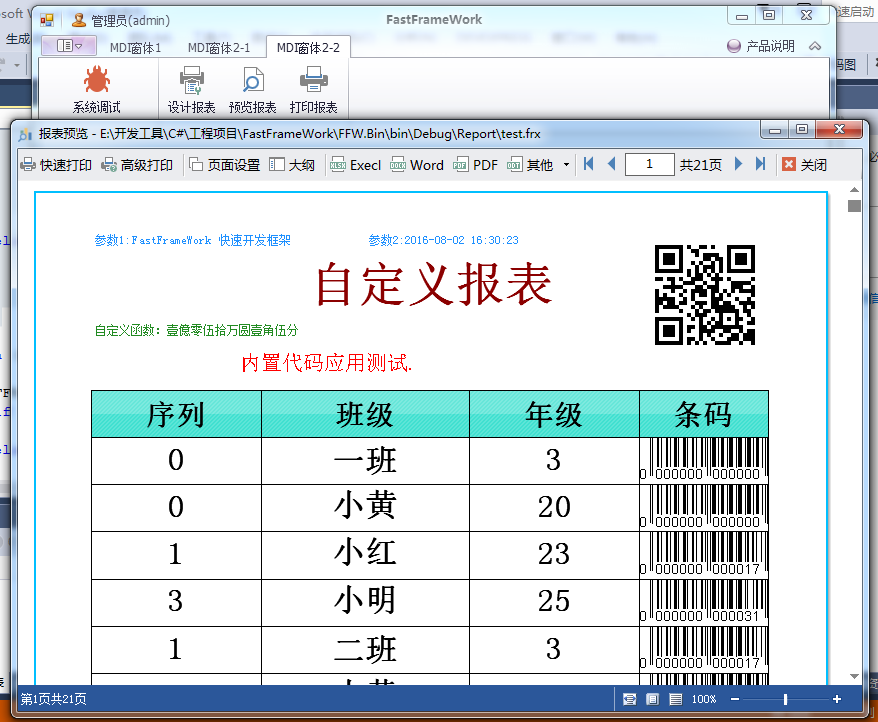
FFW.Report.dll 是数据报表组件提供报表打印、报表预览、报表设计、自定义报表数据源等二次开发功能,详细介绍
FastFrameWork 快速开发框架项目,已经托管在开源中国码云平台(http://gitee.com/MuNet/FastFrameWork)
欢迎大家提意见,使用过程中如果有疑问或者想参与框架代码维护,请加入Agile.Net QQ交流群(10062867)。
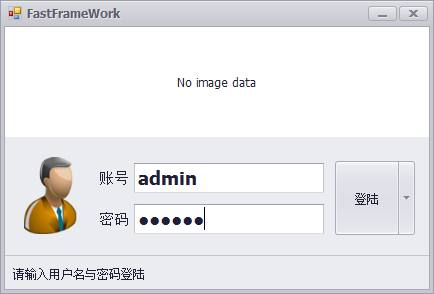
首先展示一下运行界面:


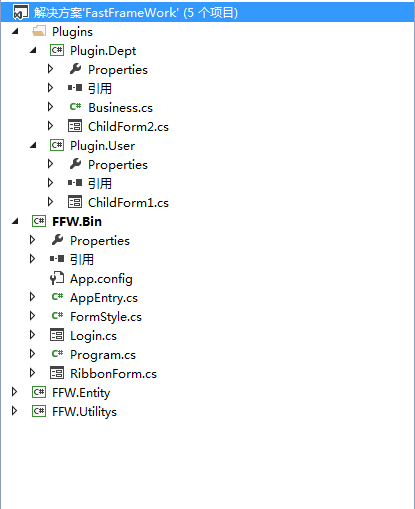
项目代码结构:
下面我们介绍一下开发案例:
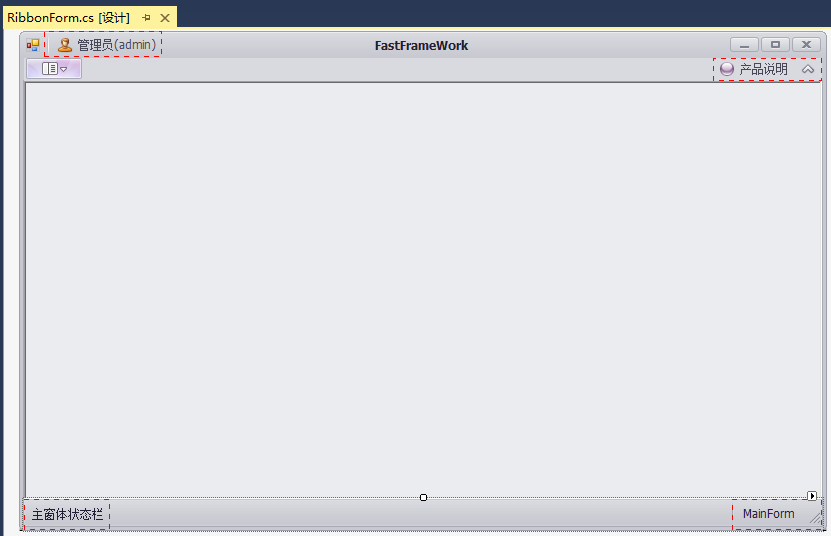
1.主界面设计
2.插件窗体设计
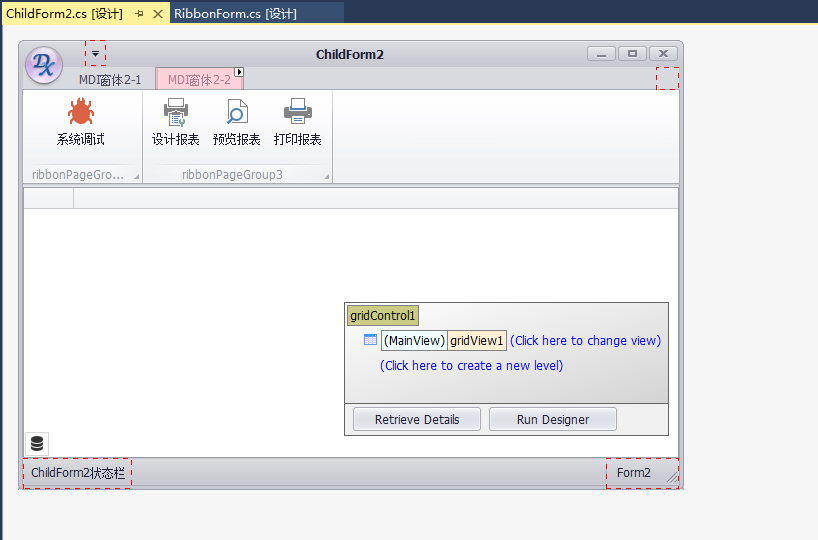
3.技术原理
主界面采用Ribbon风格,通过控制反转(IOC)将配置的插件载入框架中,并将插件窗体载入到框架容器窗体MDI区,合并插件窗体的RibbonPage与RibbonControl到框架容器窗体。
private void ribbon_Merge(object sender, DevExpress.XtraBars.Ribbon.RibbonMergeEventArgs e)

{

    RibbonControl parentRRibbon = sender as RibbonControl;

    RibbonControl childRibbon = e.MergedChild;

    parentRRibbon.StatusBar.MergeStatusBar(childRibbon.StatusBar);

}

private void ribbon_UnMerge(object sender, RibbonMergeEventArgs e)

{

    RibbonControl parentRRibbon = sender as RibbonControl;

    parentRRibbon.StatusBar.UnMergeStatusBar();

}
4.配置文件
每个插件可以包含多个窗体,每个窗体可以包含多个RibbonPage。
<?xml version="1.0" encoding="utf-8" ?>

<configuration>

  <configSections>

    <sectionGroup name="spring">

      <section name="context" type="Spring.Context.Support.ContextHandler, Spring.Core" />

      <section name="objects" type="Spring.Context.Support.DefaultSectionHandler, Spring.Core" />

    </sectionGroup>

  </configSections>

  <spring>

    <context>

      <resource uri="config://spring/objects" />

    </context>

    <objects xmlns="http://www.springframework.net">

      <description>An  example that demonstrates simple IoC features.</description>

      <!--name 必须要唯一的,type=类的全名称,所在的程序集-->

      <object name="用户管理" type="Plugin.Employee.ChildForm1,Plugin.Employee" />

      <object name="部门管理" type="Plugin.Dept.ChildForm2,Plugin.Dept" />

    </objects>

  </spring>

  <runtime>

    <assemblyBinding xmlns="urn:schemas-microsoft-com:asm.v1">

      <probing privatePath="Lib;"/>

    </assemblyBinding>

  </runtime>

  <system.data>

    <DbProviderFactories>

      <remove invariant="System.Data.SQLite"/>

      <add name="SQLite Data Provider" invariant="System.Data.SQLite" description="ADO.NET Data Provider for SQLite" type="System.Data.SQLite.SQLiteFactory, System.Data.SQLite" />

      <remove invariant="MySql.Data.MySqlClient"/>

      <add name="MySQL Data Provider" invariant="MySql.Data.MySqlClient" description=".Net Framework Data Provider for MySQL" type="MySql.Data.MySqlClient.MySqlClientFactory, MySql.Data" />

      <remove invariant="Oracle.ManagedDataAccess.Client"/>

      <add name="Oracle Data Provider" invariant="Oracle.ManagedDataAccess.Client" description=".Net Framework Data Provider for Oracle" type="Oracle.ManagedDataAccess.Client.OracleClientFactory, Oracle.ManagedDataAccess" />

      <remove invariant="IBM.Data.DB2"/>

      <add name="DB2 Data Provider" invariant="IBM.Data.DB2" description=".Net Framework Data Provider for DB2" type="IBM.Data.DB2.DB2Factory, IBM.Data.DB2" />

    </DbProviderFactories>

  </system.data>

  <!--数据库连接-->

  <connectionStrings>

    <add name="Default" providerName="Sqlite" connectionString="Data Source=|DataDirectory|Data.db;Version=3;"/>

    <!--add name="Default" providerName="SqlServer" connectionString="Data Source=localHost;Initial Catalog=Agile;Integrated Security=SSPI;"/-->

  </connectionStrings>

</configuration>
5.数据访问类库的示例
public class Business

    {

        public static DataTable GetAllGrade()

        {

            var context = new FFW.Data.DataContext();

            //方式1

            //DataTable grades = context.Select<DataTable>("ID,Class,Level").From("Grade").QuerySingle();

            //方式2

            DataTable grades = context.Script("Select ID,Class,Level From Grade").QuerySingle<DataTable>();

            return grades;

        }

        public static List<Student> GetAllStudent()

        {

            var context = new FFW.Data.DataContext();

            return context.Script("Select ID,Name,Age From Student").QueryMany<Student>();

        }

    }
6.报表组件类库的示例
var report = new FFW.Report.ReportEx();

report.DataSources.Add("",Business.GetAllGrade());

report.DataSources.Add("Student", Business.GetAllStudent());

report.Parameters.Add("参数1",  "FastFrameWork 快速开发框架");

report.Parameters.Add("参数2", DateTime.Now);

report.LoadFrom(Path.Combine(Application.StartupPath, "Report", "test.frx"));

report.Print();
结语
好了,通过以上简单的介绍后相信你对FastFrameWork 快速开发框架已经有一些认识了,如果你想对FastFrameWork 快速开发框架深入了解请下载完整源代码。
FastFrameWork 快速开发框架的更多相关文章
- CRL快速开发框架系列教程十三(嵌套查询)
本系列目录 CRL快速开发框架系列教程一(Code First数据表不需再关心) CRL快速开发框架系列教程二(基于Lambda表达式查询) CRL快速开发框架系列教程三(更新数据) CRL快速开发框 ...
- CRL快速开发框架系列教程十二(MongoDB支持)
本系列目录 CRL快速开发框架系列教程一(Code First数据表不需再关心) CRL快速开发框架系列教程二(基于Lambda表达式查询) CRL快速开发框架系列教程三(更新数据) CRL快速开发框 ...
- CRL快速开发框架系列教程十一(大数据分库分表解决方案)
本系列目录 CRL快速开发框架系列教程一(Code First数据表不需再关心) CRL快速开发框架系列教程二(基于Lambda表达式查询) CRL快速开发框架系列教程三(更新数据) CRL快速开发框 ...
- CRL快速开发框架系列教程十(导出对象结构)
本系列目录 CRL快速开发框架系列教程一(Code First数据表不需再关心) CRL快速开发框架系列教程二(基于Lambda表达式查询) CRL快速开发框架系列教程三(更新数据) CRL快速开发框 ...
- CRL快速开发框架系列教程九(导入/导出数据)
本系列目录 CRL快速开发框架系列教程一(Code First数据表不需再关心) CRL快速开发框架系列教程二(基于Lambda表达式查询) CRL快速开发框架系列教程三(更新数据) CRL快速开发框 ...
- CRL快速开发框架系列教程七(使用事务)
本系列目录 CRL快速开发框架系列教程一(Code First数据表不需再关心) CRL快速开发框架系列教程二(基于Lambda表达式查询) CRL快速开发框架系列教程三(更新数据) CRL快速开发框 ...
- CRL快速开发框架系列教程六(分布式缓存解决方案)
本系列目录 CRL快速开发框架系列教程一(Code First数据表不需再关心) CRL快速开发框架系列教程二(基于Lambda表达式查询) CRL快速开发框架系列教程三(更新数据) CRL快速开发框 ...
- CRL快速开发框架系列教程五(使用缓存)
本系列目录 CRL快速开发框架系列教程一(Code First数据表不需再关心) CRL快速开发框架系列教程二(基于Lambda表达式查询) CRL快速开发框架系列教程三(更新数据) CRL快速开发框 ...
- CRL快速开发框架系列教程三(更新数据)
本系列目录 CRL快速开发框架系列教程一(Code First数据表不需再关心) CRL快速开发框架系列教程二(基于Lambda表达式查询) CRL快速开发框架系列教程三(更新数据) CRL快速开发框 ...
随机推荐
- 《征服c指针》学习笔记-----统计文本单词数目的程序word_count
1.程序的要求:对用户指定的英文文本文件(包括标准输入),将英文单词按照字母顺序输出到用户指定的文本文件中(包括标准输出),并且在各单词后面显示单词的出现次数. 2.模块设计: 主要分为:1.从输入流 ...
- HDU2639Bone Collector II(01背包变形)
01背包,求第k大. 以前看k短路的时候看过代码以为懂了 = =结果还是跑去看了别人的代码才会.果然要自己写一遍才行啊 0.0难得1A.. 每次把可能的2k种求出来,求前k个.注意要不一样的k个数.. ...
- Windows 2003 VPN配置步骤[转]
一,服务器端:Windows 2003 VPN代理的配置方法如下: 1.关闭防火墙,用“管理工具”中的“服务”将“Windows Firewall/Internet Connection Sharin ...
- ECharts中文显示为Unicode码
后台遍历出的数据,在ECharts的js中引用为Unicode码 解决方案: <s:property>标签的escape属性默认值为true,即不解析html代码,直接将其输出. 若想要输 ...
- git 初级
以前工作中用到git,但没有总结,这次借鉴其它博客加上自己实践,总结git的简单用法 首先安装.... 打开一个文件右击git bash 弹出来一个jit界面 git config http.post ...
- 安卓问题http://blog.csdn.net/xb12369/article/details/50510302
- 《Effect Java》学习笔记1———创建和销毁对象
第二章 创建和销毁对象 1.考虑用静态工厂方法代替构造器 四大优势: i. 有名称 ii. 不必在每次调用它们的时候都创建一个新的对象: iii. 可以返回原返回类型的任何子类型的对象: JDBC ...
- SpringMVC学习系列 之 表单标签
http://www.cnblogs.com/liukemng/p/3754211.html 本篇我们来学习Spring MVC表单标签的使用,借助于Spring MVC提供的表单标签可以让我们在视图 ...
- 《机器学习实战》——K近邻算法
三要素:距离度量.k值选择.分类决策 原理: (1) 输入点A,输入已知分类的数据集data (2) 求A与数据集中每个点的距离,归一化,并排序,选择距离最近的前K个点 (3) K个点进行投票,票数最 ...
- 统一建模语言(UML) 版本 2.0
原文: http://www.ibm.com/developerworks/cn/rational/321_uml/ 简介 参考 UML 基础系列的其他文章和教程 UML基础: 统一建模语言简介 UM ...