
RHEL7安装配置TigerVNC
TigerVNC使用非加密的链接,默认会被firewalld blocked 掉,想要 vnc正常工作就需要让firewalld开放相应的端口才行。
vnc默认的端口号为5900,而每个vnc window的端口号是: 5900+window_number(or,display_number)
如:systemctl start vncserver-username@:2.service 那么这个vnc window的端口号就是 5902
1. Installing VNC Server
~]# yum install tigervnc-server
2. Configuring VNC Server
~#cp /usr/lib/systemd/system/vncserver@.service /etc/systemd/system/vncserver@:1.service |
2.1 修改配置文件vncserver@:1.service,把USER修改为root
|
[Service] |
2.2 To make the changes take effect immediately, issue the following command:
~]# systemctl daemon-reload
2.3 Set the password for the user or users defined in the configuration file.
~]$ vncpasswd Password: Verify: |
3. Starting VNC Server
~]# systemctl start vncserver@:1.service查看端口监听状态:|
[root@rusky system]# netstat -an | grep 5901 |
要关闭服务器上的防火墙。4. 使用VNCViewer客户端连接到VNC服务
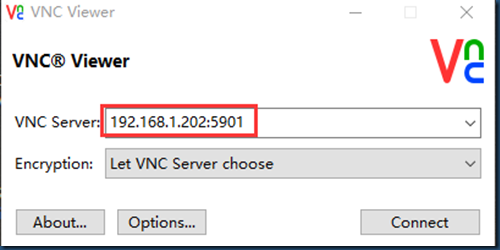
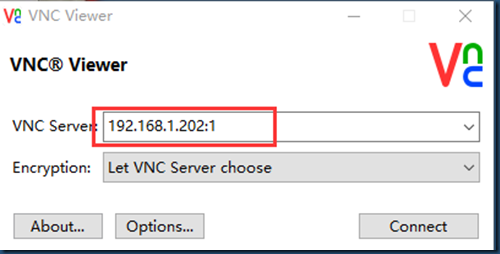
IP:端口或是IP: displayNumber
或是使用IP:displayNumber来连接
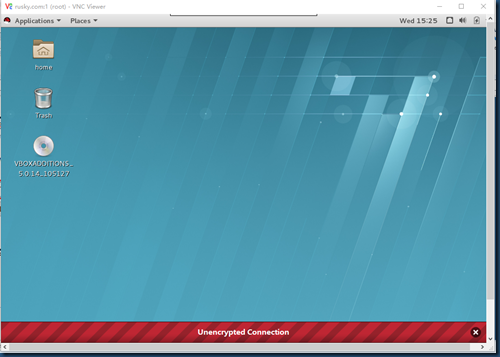
点击Connect,密码为2.3设置的密码。
二、Configuring VNC Server for Two or more Users
配置多个用户来连接到VNC服务器:
1. 复制一份配置文件:vncserver@:2.service
~]# cp vncserver@:1.service vncserver@:2.service
2. 修改配置文件:把Home修改为对应的Username:
|
[Service] [Install] |
3. 切换到rusky用户,并设置vnc密码
|
[root@rusky ~]# su - rusky |
4. 切换回root账号,启动vncserver@:2.service服务
~]# systemctl start vncserver@:2.service
|
[root@rusky ~]# netstat -an |grep 590* |
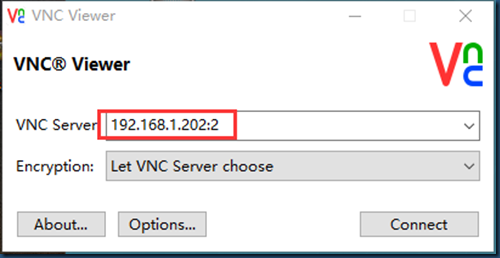
之后,可使用IP:2或IP:5902进行连接


RHEL7安装配置TigerVNC的更多相关文章
- RHEL7安装配置VNC
RHEL7安装配置VNC 作者:Eric 微信:loveoracle11g 安装配置VNC服务程序 [root@zhouwanchun yum.repos.d]# cd ~ [root@zhouwan ...
- Linux 环境下安装配置 TigerVNC Server 并启用当前会话远程服务(X0VNC)
曾经喜欢用 RealVNC Server 实现 Linux/Windows 的远程控制,因为 RealVNC 为收费商业软件,支持文件传输,性能优化方面也做得不错.但 RealVNC 从 5.0 版本 ...
- rhel7.3smb安装配置
rhel7.3smb安装配置 1.安装 yum -y install samba samba-client cifs-utils 2.配置开机自启动,覆盖原配置文件 systemctl enable ...
- KVM 虚拟机 安装配置
原创博文安装配置KVM http://www.cnblogs.com/elvi/p/7718574.htmlweb管理kvm http://www.cnblogs.com/elvi/p/7718582 ...
- OPENSTACK在RHEL7安装;admin创建虚拟机模板供demo使用
版权声明:本文为博主原创文章,未经博主同意不得转载. https://blog.csdn.net/u010026901/article/details/30965601 首先RHEL7安装.导入镜像, ...
- RHEL7-openldap安装配置二(客户端安装配置)
LDAP用户登录流程: 当在客户端输入账号登录系统时,系统根据/etc/nsswitch.conf配置文件获取账号查找顺序,然后再根据PAM配置文件调用相关模块,对账号(/etc/passwd)及密码 ...
- RHEL7-openldap安装配置一(服务器端安装配置)
LDAP的术语:entry:一个单独的单元,使用DN(distinguish name)区别attribute:entry的属性,比如,如果entry是组织机构的话,那么它的属性包括地址,电话,传真号 ...
- Graylog安装配置
ES集群健康检测:curl -sXGET http://localhost:9200/_cluster/health?pretty=true | grep "status" | a ...
- centos6.7下安装配置vnc
vnc是一款使用广泛的服务器管理软件,可以实现图形化管理,下面简单介绍一下如何在centos6.7下安装vnc. 1.安装vncserver yum install tigervnc tigervnc ...
随机推荐
- Arrays.fill方法的陷阱
昨晚调试程序时发现的,该方法不能初始化二维数组,不过当时没有报CE,提交的时候也是WA:今早上单独测试该方法,也没有CE,不过运行时异常.切记
- Delphi与Java中的日期互换
在最近做的一个项目中用到了Java和Delphi,发现它们不能正确读取对方的日期类型,如在Java中写入一个值为“2007-12-1”的日期值,通过Delphi读取却不是这个值了.通过查阅资料,发现两 ...
- mysql grant 示例
' with grant option; FLUSH PRIVILEGES;
- 如何在jasperreport自动生成序号
在导出报表时,有时候我们需要显示序号,有两种方法: 1.就是再加一个字段,就是说将序号也当做是要导出的字段来处理,然后用程序给这个字段赋值,这方面有点傻,就不说了. 2.利用jasperreport提 ...
- Git超级菜鸟学习--> 社区化协作以及分支操作
1 先将主库的url添加到本地上面, git remote add <RepoName> <URL> 2 获取主库的修改记录 git fetch --获取服务器上的修改 git ...
- HDU-1969 Pie
http://acm.hdu.edu.cn/showproblem.php?pid=1969 Pie Time Limit: 5000/1000 MS (Java/Others) Memory ...
- vaddin使用技巧
添加外部jar包的方法: 在项目目录下建立lib文件夹,把外部jar包复制到该文件夹底下.右键该jar包-构建路径-添加至构建路径即可.也可以配置构建路径-库-添加jar.
- autoit使用
autoit下载地址: http://www.autoitx.com/thread-12964-1-1.html?sid=4zMMSb 在autoit的安装目录下有个Au3Info.exe文件,该文件 ...
- 0ull 是什么意思?
unsigned long long 类型的0 同理:#define DEV_IIC1 ( (u64)1 << 7ULL) 这个作用是64位中的第7 ...
- Struts1、Struts2和SpringMVC剖析【转载】
前段框架用了不少,今天就来做个总结.网上关于Struts1.Struts2.SpringMVC的文章有很多,这里的内容就是基于它们,来做个比较. 这三个框架是按照上面的顺序,依次出现的,它们都是对MV ...