
cocos2dx 的Hello world的简单分析
Node之间的关系:
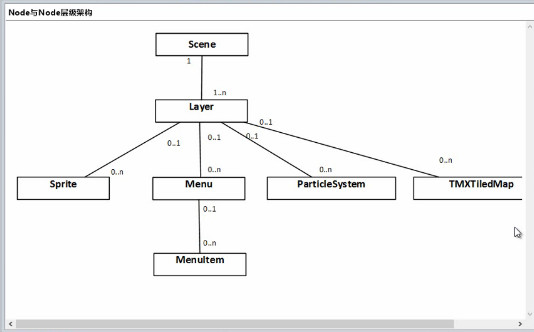
场景AppDelegate.cpp又要由导演去调用然后进行表演:
    // create a scene. it's an autorelease object

    auto scene = HelloWorld::createScene();

    // run

    director->runWithScene(scene);
这里层里面的场景HelloWorldScene.cpp里面的内容:
#include "HelloWorldScene.h"

USING_NS_CC;

Scene* HelloWorld::createScene()

{

    // 'scene' is an autorelease object

    auto scene = Scene::create();

    // 'layer' is an autorelease object

    auto layer = HelloWorld::create();

    // add layer as a child to scene

    scene->addChild(layer);

    // return the scene

    return scene;

}

// on "init" you need to initialize your instance

bool HelloWorld::init()

{

    //////////////////////////////

    // 1. super init first

    if ( !Layer::init() )

    {

        return false;

    }

    Size visibleSize = Director::getInstance()->getVisibleSize();

    Vec2 origin = Director::getInstance()->getVisibleOrigin();

    /////////////////////////////

    // 2. add a menu item with "X" image, which is clicked to quit the program

    //    you may modify it.

    //每一个addChild会创建出一个添加的层

    // add a "close" icon to exit the progress. it's an autorelease object

    auto closeItem = MenuItemImage::create(

                                           "CloseNormal.png",

                                           "CloseSelected.png",

                                           CC_CALLBACK_1(HelloWorld::menuCloseCallback, this));

    closeItem->setPosition(Vec2(origin.x + visibleSize.width - closeItem->getContentSize().width/ ,

                                origin.y + closeItem->getContentSize().height/));

    // create menu, it's an autorelease object

    auto menu = Menu::create(closeItem, NULL);

    menu->setPosition(Vec2::ZERO);

    this->addChild(menu, );

    /////////////////////////////

    // 3. add your codes below...

    // add a label shows "Hello World"

    // create and initialize a label

    auto label = Label::createWithTTF("Hello sunzhiyan", "fonts/arial.ttf", );

    // position the label on the center of the screen

    label->setPosition(Vec2(origin.x + visibleSize.width/,

                            origin.y + visibleSize.height - label->getContentSize().height));

    // add the label as a child to this layer

    this->addChild(label, );

    auto label1= Label::createWithTTF("", "fonts/arial.ttf", );

    // position the label on the center of the screen

    label1->setPosition(Vec2(origin.x + visibleSize.width / ,

        origin.y + visibleSize.height - label1->getContentSize().height));

    // add the label as a child to this layer

    this->addChild(label1, );

    //创建一个精灵

    auto sprite = Sprite::create("sun.jpg");

    //设置精灵的显示位置

    sprite->setPosition(Vec2(visibleSize.width/ + origin.x, visibleSize.height/ + origin.y));

    // 将精灵添加到层里面

    this->addChild(sprite, );

    return true;

}

void HelloWorld::menuCloseCallback(Ref* pSender)

{

    Director::getInstance()->end();

#if (CC_TARGET_PLATFORM == CC_PLATFORM_IOS)

    exit();

#endif

}
cocos2dx 的Hello world的简单分析的更多相关文章
- cocos2dx骨骼动画Armature源码分析(一)
源码分析一body { font-family: Helvetica, arial, sans-serif; font-size: 14px; line-height: 1.6; padding-to ...
- 简单分析JavaScript中的面向对象
初学JavaScript的时候有人会认为JavaScript不是一门面向对象的语言,因为JS是没有类的概念的,但是这并不代表JavaScript没有对象的存在,而且JavaScript也提供了其它的方 ...
- CSipSimple 简单分析
简介 CSipSimple是一款可以在android手机上使用的支持sip的网络电话软件,可以在上面设置使用callda网络电话.连接使用方式最好是使用wifi,或者3g这样上网速度快,打起电话来效果 ...
- C#中异常:“The type initializer to throw an exception(类型初始值设定项引发异常)”的简单分析与解决方法
对于C#中异常:“The type initializer to throw an exception(类型初始值设定项引发异常)”的简单分析,目前本人分析两种情况,如下: 情况一: 借鉴麒麟.NET ...
- 透过byte数组简单分析Java序列化、Kryo、ProtoBuf序列化
序列化在高性能网络编程.分布式系统开发中是举足轻重的之前有用过Java序列化.ProtocolBuffer等,在这篇文章这里中简单分析序列化后的byte数组观察各种序列化的差异与性能,这里主要分析Ja ...
- 简单分析Java的HashMap.entrySet()的实现
关于Java的HashMap.entrySet(),文档是这样描述的:这个方法返回一个Set,这个Set是HashMap的视图,对Map的操作会在Set上反映出来,反过来也是.原文是 Returns ...
- Ffmpeg解析media容器过程/ ffmpeg 源代码简单分析 : av_read_frame()
ffmpeg 源代码简单分析 : av_read_frame() http://blog.csdn.net/leixiaohua1020/article/details/12678577 ffmpeg ...
- FFmpeg的HEVC解码器源码简单分析:解析器(Parser)部分
===================================================== HEVC源码分析文章列表: [解码 -libavcodec HEVC 解码器] FFmpeg ...
- FFmpeg资料来源简单分析:libswscale的sws_getContext()
===================================================== FFmpeg库函数的源代码的分析文章: [骨架] FFmpeg源码结构图 - 解码 FFmp ...
随机推荐
- 如何查看Windows下端口占用
查看端口占用的PID进程号 C:\Users\yan>netstat -ano | findstr "8888" 查看是哪个进程或者程序占用了17840端口 C:\Users ...
- 【 UVALive - 5095】Transportation(费用流)
Description There are N cities, and M directed roads connecting them. Now you want to transport K un ...
- I2C总线之(一)---概述
概述: I²C 是Inter-Integrated Circuit的缩写,发音为"eye-squared cee" or "eye-two-cee" , 它是一 ...
- struts2中获取request、response,与android客户端进行交互(文件传递给客户端)
用struts2作为服务器框架,与android客户端进行交互需要得到request.response对象. struts2中获取request.response有两种方法. 第一种:利用Servle ...
- c++类型转换Type Cast)
C风格的强制类型转换(Type Cast)很简单,不管什么类型的转换统统是:TYPE b = (TYPE)a.C++风格的类型转换提供了4种类型转换操作符来应对不同场合的应用. const_cast, ...
- 重构第三天:提升方法&下移方法
如果两个子类拥有相同的方法,把它们移动到超类中来 Warning! 但是从子类到父类移动方法的时候要注意, 不要过度采用这种方法,否则会出现继承滥用的情况.如果一个父类A有多个方法,假设m1, m2方 ...
- MFS学习总结
MFS学习总结 MFS概述.特性和新版改进 MFS 工作原理和设计架构 MFS的安装.部署.配置 MFS的高级特性 MFS的性能测试 MFS集群的维护 MFS的常见问题和建议对策 一.MFS概述.特性 ...
- WordPress BackWPup插件‘tab’参数跨站脚本漏洞
漏洞名称: WordPress BackWPup插件‘tab’参数跨站脚本漏洞 CNNVD编号: CNNVD-201308-353 发布时间: 2013-08-26 更新时间: 2013-08-26 ...
- JavaScript高级程序设计18.pdf
系统对话框 alert().confirm()和prompt()调用系统对话框向用户显示消息,显示对话框的时候代码会停止执行,关闭后继续执行 alert()警告提示框 confirm()点击确认返回t ...
- JavaScript 类型判断 —— typeof 以及 instanceof 中的陷阱
JavaScript中基本类型包含Undefined.Null.Boolean.Number.String以及Object引用类型.基本类型可以通过typeof来进行检测,对象类型可以通过instan ...