
gRPC源码分析0-导读
gRPC是Google开源的新一代RPC框架,官网是http://www.grpc.io。正式发布于2016年8月,技术栈非常的新,基于HTTP/2,netty4.1,proto3。虽然目前在工程化方面gRPC还非常不足,但它也值得我们好好研究它,学习他。
1. 使用场景
按照Google的说法,使用广泛,但主要使用场景还是在移动端:
Efficiently connecting polyglot services in microservices style architecture(微服务、多语言)
Connecting mobile devices, browser clients to backend services
Generating efficient client libraries
2. HTTP/2
HTTP/2,主要是基于Google发布的SPDY协议,是自HTTP/1.1从1999年发布16年后的首次更新。Servlet4.0将完全支持HTTP/2。目前支持HTTP/2的浏览器还不多,主要也只是支持基于TLS的HTTP/2。下图是在caniuse.com网站统计的支持HTTP/2的浏览器,可以看到chrome也是在41版本后开始的,IE根本不支持。
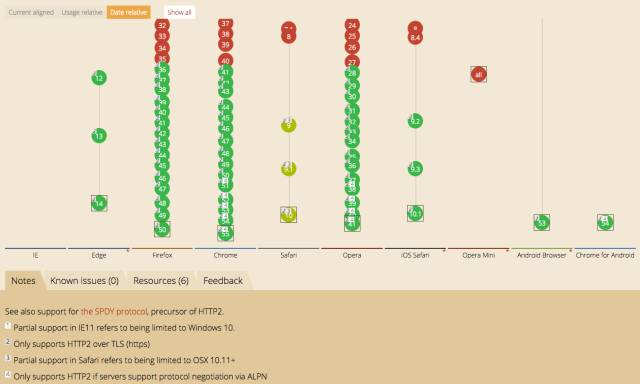
HTTP/1.1会有什么问题呢?
假设一个网页需要加载几十个资源(css、js、jpg、等等),等到html文件加载成功后,浏览器会一个一个请求这些资源,并等待服务器按顺序一个一个返回。这将会非常耗时。
与HTTP/1.1标准比较,HTTP/2带来很多功能,如:
bidirectional streaming
flow control
header compression
multiplexing requests over a single TCP connection
在此不做详解,还不清楚的同学自行Google,推荐一些入门链接
http://www.ruanyifeng.com/blog/2016/08/http.html
https://imququ.com/post/protocol-negotiation-in-http2.html
3. HTTP/2局限性
如上图,gRPC离真正可工程化的rpc框架还有一段路要走,缺的组件也很多,如
- Configuration(配置化)
- Service Discovery(服务发现)
- 服务治理等等
也就是目前gRPC想用到微服务后端,需要自己开发很多东西。
4. 使用样例
下载gRPC源码
git clone git@github.com:grpc/grpc-java.git
gRPC支持了很多平台,当然我们讲解的是Java版本,目录结构如下图:
编译
首先我们先不编译grpc code generation plugin(主要用于proto3从.proto文件编译出Java文件的,一般不用修改)。在根目录下新建gradle.properties文件,然后添加skipCodegen=true这一行到文件中。
grpc-java has a C++ code generation plugin for protoc. Since many Java developers don't have C compilers installed and don't need to modify the codegen, the build can skip it. To skip, create the file
<project-root>/gradle.propertiesand addskipCodegen=true.
Java、maven版本如下
Java版本需要1.8
maven 3.2
- 编译代码
./gradlew build
- 安装编译好的jar包到本地maven库
./gradlew install
样例
先建立maven项目,定义服务.proto文件
在此默认大家对proto的语法已经熟悉,至少是可以使用的程度。借用Google官方的例子。
syntax = "proto3";
option java_multiple_files = true;
// 生产的Java的包
option java_package = "io.grpc.examples.helloworld.generated";
// 生产的Java类名
option java_outer_classname = "HelloWorldProto";
option objc_class_prefix = "HLW";package helloworld;
// service 定义服务
service Greeter {
// 服务的一个方法
rpc SayHello (HelloRequest) returns (HelloReply) {}
}// The request message containing the user's name.
message HelloRequest {
string name = 1;
}// The response message containing the greetings
message HelloReply {
string message = 1;
}
添加依赖到pom.xml文件,使用刚才install的版本1.1.0-SNAPSHOT,build里的插件是用来由proto文件生产Java源码用的
在测试项目文件夹下,生产Java代码
$ mvn compile
生产的代码在target下,将其拷贝到自己的项目里
编写测试代码,借用Google官方代码,懒得写了。
Server
public class HelloWorldServer {

  private static final Logger logger = Logger.getLogger(HelloWorldServer.class.getName());

  private Server server;

  private void start() throws IOException {

    /* The port on which the server should run */

    int port = 50051;

    server = ServerBuilder.forPort(port)

        .addService(new GreeterImpl())

        .build()

        .start();

    logger.info("Server started, listening on " + port);

    Runtime.getRuntime().addShutdownHook(new Thread() {

      @Override

      public void run() {

        // Use stderr here since the logger may have been reset by its JVM shutdown hook.

        System.err.println("*** shutting down gRPC server since JVM is shutting down");

        HelloWorldServer.this.stop();

        System.err.println("*** server shut down");

      }

    });

  }

  private void stop() {

    if (server != null) {

      server.shutdown();

    }

  }

  /**

   * Await termination on the main thread since the grpc library uses daemon threads.

   */

  private void blockUntilShutdown() throws InterruptedException {

    if (server != null) {

      server.awaitTermination();

    }

  }

  /**

   * Main launches the server from the command line.

   */

  public static void main(String[] args) throws IOException, InterruptedException {

    final HelloWorldServer server = new HelloWorldServer();

    server.start();

    server.blockUntilShutdown();

  }

  static class GreeterImpl extends GreeterGrpc.GreeterImplBase {

    @Override

    public void sayHello(HelloRequest req, StreamObserver<HelloReply> responseObserver) {

      HelloReply reply = HelloReply.newBuilder().setMessage("Hello " + req.getName()).build();

      responseObserver.onNext(reply);

      responseObserver.onCompleted();

    }

  }

}
Client
public class HelloWorldClient {

  private static final Logger logger = Logger.getLogger(HelloWorldClient.class.getName());

  private final ManagedChannel channel;

  private final GreeterGrpc.GreeterBlockingStub blockingStub;

  /** Construct client connecting to HelloWorld server at {@code host:port}. */

  public HelloWorldClient(String host, int port) {

    this(ManagedChannelBuilder.forAddress(host, port)

        // Channels are secure by default (via SSL/TLS). For the example we disable TLS to avoid

        // needing certificates.

        .usePlaintext(true));

  }

  /** Construct client for accessing RouteGuide server using the existing channel. */

  HelloWorldClient(ManagedChannelBuilder<?> channelBuilder) {

    channel = channelBuilder.build();

    blockingStub = GreeterGrpc.newBlockingStub(channel);

  }

  public void shutdown() throws InterruptedException {

    channel.shutdown().awaitTermination(5, TimeUnit.SECONDS);

  }

  /** Say hello to server. */

  public void greet(String name) {

    logger.info("Will try to greet " + name + " ...");

    HelloRequest request = HelloRequest.newBuilder().setName(name).build();

    HelloReply response;

    try {

      response = blockingStub.sayHello(request);

    } catch (StatusRuntimeException e) {

      logger.log(Level.WARNING, "RPC failed: {0}", e.getStatus());

      return;

    }

    logger.info("Greeting: " + response.getMessage());

  }

  /**

   * Greet server. If provided, the first element of {@code args} is the name to use in the

   * greeting.

   */

  public static void main(String[] args) throws Exception {

    HelloWorldClient client = new HelloWorldClient("localhost", 50051);

    try {

      /* Access a service running on the local machine on port 50051 */

      String user = "world";

      if (args.length > 0) {

        user = args[0]; /* Use the arg as the name to greet if provided */

      }

      client.greet(user);

    } finally {

      client.shutdown();

    }

  }

}
如上可以看到,用gRPC编写服务是非常简单的。几行代码搞定。
源码分析导读
gRPC的代码与dubbo、rocketmq相比,还是很少的,主要是因为目前很多组件还没有。后面将会根据以下内容来讲解源码
通信
消息编解码
steam流
- 框架
附录
gRPC 官方文档中文版
- https://doc.oschina.net/grpc
GRPC的产生动机和设计原则
- http://www.jianshu.com/p/8cc077f6dbb9
gRPC学习笔记
- https://skyao.gitbooks.io/leaning-grpc/content/

gRPC源码分析0-导读的更多相关文章
- grpc源码分析之域名解析
环境: win7_x64,VS2015.grpc_1.3.1 场景: 在客户端中使用grpc连接服务器,在多次输入非法的地址后,再次输入正确的地址连出现连接超时的现象.侯捷先生说过“源码面前,了无秘密 ...
- Go合集,gRPC源码分析,算法合集
年初时,朋友圈见到的最多的就是新的一年新的FlAG,年末时朋友圈最多的也是xxxx就要过去了,你的FLAG实现了吗? 这个公众号2016就已经创建了,但截至今年之前从来没发表过文章,现在想想以前很忙, ...
- 精尽MyBatis源码分析 - 文章导读
该系列文档是本人在学习 Mybatis 的源码过程中总结下来的,可能对读者不太友好,请结合我的源码注释(Mybatis源码分析 GitHub 地址.Mybatis-Spring 源码分析 GitHub ...
- 精尽Spring Boot源码分析 - 文章导读
该系列文章是笔者在学习 Spring Boot 过程中总结下来的,里面涉及到相关源码,可能对读者不太友好,请结合我的源码注释 Spring Boot 源码分析 GitHub 地址 进行阅读 Sprin ...
- 精尽Spring MVC源码分析 - 文章导读
该系列文档是本人在学习 Spring MVC 的源码过程中总结下来的,可能对读者不太友好,请结合我的源码注释 Spring MVC 源码分析 GitHub 地址 进行阅读 Spring 版本:5.2. ...
- gRPC源码分析(c++)
首先需要按照grpc官网上说的办法从github上下载源码,编译,然后跑一跑对应的测试代码.我分析的代码版本为v1.20.0. 在cpp的helloworld例子中,client端,第一个函数是创建c ...
- gRPC源码分析2-Server的建立
gRPC中,Server.Client共享的Class不是很多,所以我们可以单独的分别讲解Server和Client的源码. 通过第一篇,我们知道对于gRPC来说,建立Server是非常简单的,还记得 ...
- gRPC源码分析1-SSL/TLS
引子 前几天看到微信后台团队分享了TLS相关文章,正好gRPC里TLS数据加密是很重要的一块,于是整理出了这篇文章. 在gRPC里,如果仅仅是用来做后端微服务,可以考虑不加密.本文太长,先给个大纲. ...
- 精尽Spring MVC源码分析 - MultipartResolver 组件
该系列文档是本人在学习 Spring MVC 的源码过程中总结下来的,可能对读者不太友好,请结合我的源码注释 Spring MVC 源码分析 GitHub 地址 进行阅读 Spring 版本:5.2. ...
随机推荐
- cocos2dx调用浏览器打开网址
安卓端cocos2dx/platform/android路径下CCApplication.h: virtual void openURL(const char* pszUrl); CCApplicat ...
- 使用rowid抽取数据方法以及大数据量游标卡住的应对
平时工作的时候,经常会遇到这种事情,从一个大表A中,抽取字段a在一个相对较小B的表的数据,比如,从一个详单表中,抽取几万个用户号码的话单出来.这种时候,一般来说, 做关联查询: create tabl ...
- Android使用静默安装时碰见的问题
升级时碰见的异常 private void installPackage(String appName,final File apk) { if (!apk.exists()) { setHasNew ...
- iOS:以前笔记,未整理版。太多了,先放着吧。。。。。。。
1. -(void)timetick { _d = 0; NSTimer *newtime =[NSTimer scheduledTimerWithTimeInterval:1 target:self ...
- Linux常用命令
命令格式与目录处理命令 ls 命令格式与目录处理命令 ls 命令格式:命令 [-选项][参数] 例:ls -la /etc 说明: 1)个别命令使用不遵循格式 2)当有多个选项时,可以写在一起 3)简 ...
- Openfire阶段实践总结
从3月开始研究Openfire,其实就是要做一套IM系统,也正是这个原因才了解到Openfire.之前还真没想过有这么多的开源产品可以做IM,而且也没想到XMPP这个协议竟然如何强大.看来还是标准为先 ...
- 使用LogMaster4Net实现应用程序日志的集中管理
日志在软件系统中的重要性我在此也不赘述了,几乎所有程序员每天都会更日志打交道. 那么你是否曾今为这样的一些事情而困扰过: - 远程登录到不同的服务器,找到应用程序目然后查看应用日志: - 来回切换于不 ...
- java运行时获得泛型类型
引言 众所周知,java泛型最重要的特征是泛型擦除,所有泛型在编译时会转换成Object所以在java中运行时无法获得泛型的类型. 但是其实以上的规则是针对方法的内部变量的,如果是其他形式的泛型其实是 ...
- JS对象继承篇
JS对象继承篇 ECMAScript只支持实现继承,而且其实现继承主要是依靠原型链来实现的 原型链 其基本思路是利用原型让一个引用类型继承另一个引用类型的属性和方法 function Person() ...
- 设置Debian8 光秃秃的桌面(图标,窗口样式等)
在虚拟机里按抓了Debian8, 然后进入桌面后很不习惯,最主要是桌面光秃秃的, 今天终于不小心找到办法了: 按[Win]键, 找到"优化工具"程序; 或者是在右上角的[应用程序] ...