
Mounting File Systems
1.Mounting File Systems
Just creating a partition and putting a file system on it is not enough to start using it. To use a partition, you have to mount it as well. By mounting a partition (or better, the file system on it), you make its contents accessible through a specific directory.
To mount a file system, some information is needed:
■ What to mount: This information is mandatory and specifies the name of the device that needs to be mounted.
■ Where to mount it: This is also mandatory information which specifies the directory on which the device should be mounted.
■ What file system to mount: Optionally, you can specify the file system type. In most cases, this is not necessary. The mount command will detect which file system is used on the device and make sure the correct driver is used.
■ Mount options: Many mount options can be used when mounting a device. Using options is optional and depends on the needs you may have with the file system.
Manually Mounting File Systems To manually mount a file system, the mount command is used. To disconnect a mounted file system, the umount command is used. Using these commands is relatively easy. To mount the file system that is on /dev/vda5 on the directory /mnt, use the following command:
mount /dev/vda5 /mnt
To disconnect the mount, you can use umount with either the name of the device or the name of the mount point you want to disconnect. So, both of the following commands will work: umount /dev/vda5 umount /mnt
Using Device Names, UUIDs, or Disk Labels
To mount a device, the name of the device can be used, as in the command /dev/ vda5. If your server is used in an environment where a dynamic storage topology is used, this is not always the best approach. You may today have a storage device /dev/ sda5, which after changes in the storage topology can be /dev/sdb5 after the next reboot of your server. This is why on a default RHEL 7 installation UUIDs are used instead of device names. Every file system by default has a UUID associated to it, not just file systems that are used to store files but also special file systems such as the swap file system. You can use the blkid command to get an overview of the current file systems on your system and the UUID that is used by that file system.
[root@rhel7 ~]# blkid

/dev/sda1: UUID="2f8b9056-1129-4bea-bb94-bc2f7f8de206" TYPE="xfs"

/dev/sda2: UUID="OjqvZk-KS1b-YegW-zb4b-uaNV-zGt7-npfsjU" TYPE="LVM2_member"

/dev/sdb1: UUID="f4a212cd-211f-4ddd-84ed-18ede66505ff" TYPE="ext4"

/dev/sdc1: UUID="b74fbc00-3f2e-4dea-99da-a17de3f798c3" TYPE="swap"

/dev/mapper/rhel-root: UUID="4119798b-4939-48f4-be1a-3f3de1f8e934" TYPE="xfs"

/dev/mapper/rhel-swap: UUID="8a1f616f-989d-4846-a961-ee5ea2bc32bf" TYPE="swap"
mount UUID="42f419c4-633f-4ed7-b161-519a4dadd3da" /mnt --使用uuid挂载设备
Manually mounting devices using the UUID is not exactly easier. If mounts are automated as discussed in the next section, however, it does make sense using UUIDs instead of device names.
2. Automating File System Mounts Through /etc/fstab
[root@rhel7 ~]# cat /etc/fstab

#

# /etc/fstab

# Created by anaconda on Tue Jun  ::

#

# Accessible filesystems, by reference, are maintained under '/dev/disk'

# See man pages fstab(), findfs(), mount() and/or blkid() for more info

#

/dev/mapper/rhel-root   /                       xfs     defaults

UUID=2f8b9056--4bea-bb94-bc2f7f8de206 /boot xfs     defaults

/dev/mapper/rhel-swap   swap                    swap    defaults

#added by rusky:used for testing.

/dev/sdb1       /testdisk       ext4    defaults
In the /etc/fstab file, everything is specified to mount the file system automatically. For this purpose, every line has six fields, as summarized in Table 14.5 .
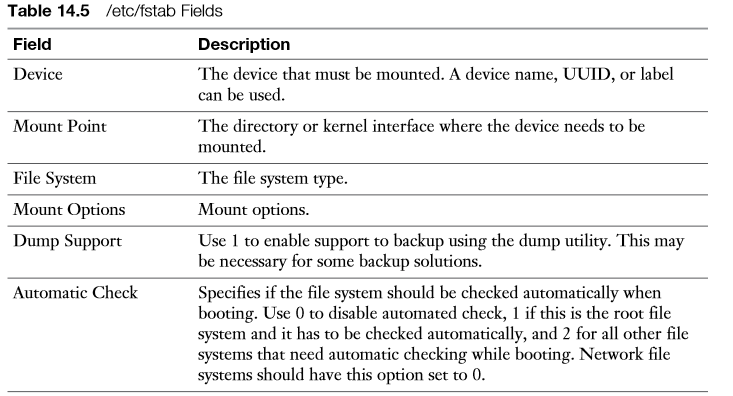
Notice that in the mount point not all file systems use a directory name. Some system devices such as swap are not mounted on a directory, but on a kernel interface. It is easy to recognize when a kernel interface is used; its name does not start with a / (and does not exist in the file system on your server). The Mount Options field defines specific mount options that can be used. If no specific options are required, this line will just read “defaults.” To offer specific functionality, a large number of mount options can be specified here. Table 14.6 gives an overview of some of the more common mount options.

The fifth column of /etc/fstab specifies support for the dump utility. This is a utility that was developed to create file system backups. It is good practice to switch this feature on by specifying a 1 for all real file systems, and switch it off by specifying 0 for all system mounts . The last column indicates if the file system integrity needs to be checked while booting. Put a 0 if you do not want to check the file system at all, a 1 if this is the root file system which needs to be checked before anything else, and a 2 if this is a nonroot file system that needs to be checked while booting.
Mounting File Systems的更多相关文章
- Introducing Microsoft Sync Framework: Sync Services for File Systems
https://msdn.microsoft.com/en-us/sync/bb887623 Introduction to Microsoft Sync Framework File Synchro ...
- centos重启报错Umounting file systems:umount:/opt:device is busy
系统重启报错: Umounting file systems:umount:/opt:device is busy 只能硬关机,回想一下最近刚安装了nod32 for linux x64的杀毒软件,开 ...
- centos 7 系统启动不了 出现报错dependency failed for /mnt , dependency failed for local file systems
阿里云一台Ecs重启后启动不了,出现报错 dependency failed for /mnt , dependency failed for local file systems , 报错的原因 ...
- Log-structured File Systems
换到博客园排版有问题,原版在这里:http://xubenbenhit.github.io/LogStructureFileSystem.html Log-structured File System ...
- 程序员的智囊库系列之3--分布式文件系统(Distributed file systems)
程序员的智囊库系列之3--分布式文件系统(Distributed file systems) 这是程序员的智囊库系列的第三篇文章.上一篇文章本来打算介绍几个搭建网站的框架,但由于这部分的内容较多,还需 ...
- enable user-defined extended attributes for ext3 file systems; 增加ext3 文件系统的扩展属性;
To enable user-defined extended attributes for ext3 file systems (i.e. device), use: tune2fs -o user ...
- “df: cannot read table of mounted file systems”.
“df: cannot read table of mounted file systems”.“df -l” returned an error: “df: cannot read table of ...
- Understanding Manycore Scalability of File Systems
多核场景下,不同文件系统,文件操作的性能评估.
- NFS(Network File System)服务配置和使用
Sun公司开发NFS (Network File System)之初就是为了在不同linux/Unix系统之间共享文件或者文件夹.可以在本地通过网络挂载远程主机的共享文件,和远程主机交互.NFS共享存 ...
随机推荐
- (转)你知道Android也有安全模式吗?(地球人都知道了吧)
使用PC时,我们习惯在安全模式下解决驱动的各种兼容性问题.而你是否又知道,Android手机同样存在安全模式,帮你解决APP的各种冲突问题. 很多Android手机用户都遇到过下面这种极端情况:因为第 ...
- Nginx源码研究五:NGINX的配置信息管理
配置信息是nginx系统重要的组成部分,配置信息的使用,实际上包含两层,一层是用户针对参数定义了值,例如下面nginx参数文件中的 keepalive_timeout 65,还有一部分是用户没有定义值 ...
- jquery easy ui 学习 (1)Basic Window
<!DOCTYPE html> <html> <head> <meta charset="UTF-8"> <title> ...
- C语言基础学习基本数据类型-浮点型
float和double 加了小数点的数都是浮点数.C语言有两种书写浮点数的方式,一种是使用常用的标准小数点表示法,如下: 0.00056 8.0 1.23 第二种表示浮点值叫做E表示法.下面是一些例 ...
- Oracle中批量插入
为了防止OracleConnection的重复打开和关闭,使用begin end:将sql语句包在里面,然后一次性执行提高插入的效率. 下面代码中要插入的数据在list集合中,如果list集合的cou ...
- 构建高可用web站点学习(三)
分布式的构建 做为网站访问的生命线(数据访问),当然也可以采用分布式的方法来减轻单台服务器的访问压力.之前有讲过Memcached的分布式,但是Memcached服务器互不通信,所以我们也提过redi ...
- 网站优化指南之数据库缓存、CDN与云存储
1 数据库缓存. 常见的做法是用内存做cache,把数据库里的内容提前取出读到内存里,用户再请求时,就不直接读数据库,而是读内存里的数据,从而缓解了数据库的压力. 过去比较常用的缓存软件是memcac ...
- cf B. Making Sequences is Fun
http://codeforces.com/contest/373/problem/B 用二分枚举长度就可以. #include <cstdio> #include <cstring ...
- DC DC降壓變換器ic 工作原理
目前DC/DC轉化器大致可分為:升壓型dc dc變化器.降壓型dc dc變化器及可升壓又可降壓dc dc變換器.我們今天主要提一下降壓型dc dc變換器的原理: 見下圖降壓變換器原理圖如圖1所示, 當 ...
- Caused by: android.content.res.Resources$NotFoundException: String resource ID #0x0
如果遇到这个问题,首先考虑以下原因: 你是否在setText()方法中设置了一个int型变量,比如setText(10). 这样Android系统就会主动去资源文件当中寻找, 但是它不是一个资源文件I ...