
阿里云学习之IOT物联网套件(客户端与服务端的后台数据传输)
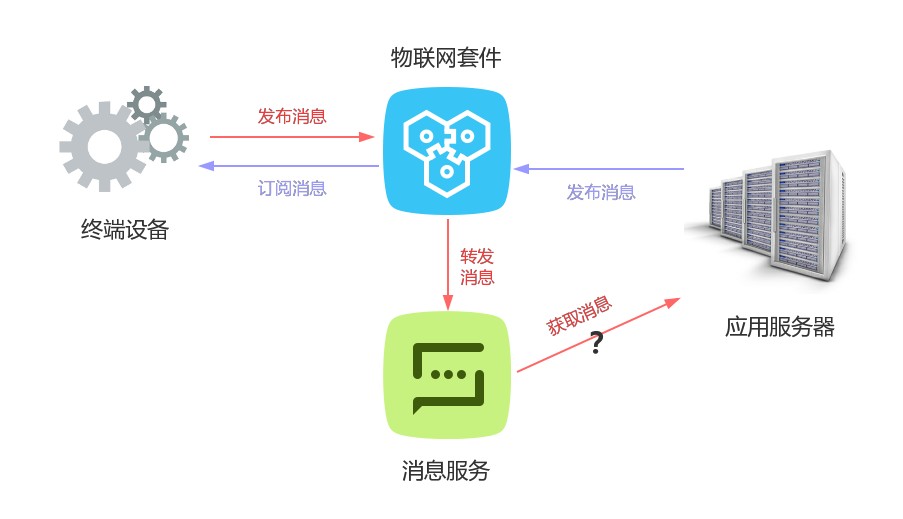
设备端代码(mqttClient):https://help.aliyun.com/document_detail/42648.html?spm=5176.doc30579.6.569.ZEgA1g
服务端代码(aliyun-java-sdk-iot):https://help.aliyun.com/document_detail/30579.html?spm=5176.doc42693.6.597.WhnZQa
消息代码(aliyun-sdk-mns-samples):https://help.aliyun.com/document_detail/27508.html?spm=5176.doc27509.6.648.9hGlrb
https://help.aliyun.com/document_detail/42693.html?spm=5176.doc50633.6.573.wlKHyi
https://help.aliyun.com/document_detail/27509.html?spm=5176.product27412.6.652.uIO9HW
一、设备端发送消息到服务端流程
1、终端发送消息到物联网套件
SimpleClient4IOT/connectMqtt:sampleClient.publish(pubTopic,message);
     String content = "客户端发送消息到服务端";

        MqttMessage message = new MqttMessage(content.getBytes("utf-8"));

        message.setQos();//消息qos 0:最多一次,1:至少一次

        sampleClient.publish(pubTopic, message);//发送数据到某个topic

        System.out.println("发送消息成功");
2、物联网套件发送消息到消息服务
通过上一篇 阿里云学习之IOT物联网套件(配置篇),讲解物联网套件和消息服务的具体配置流程和走向
规则引擎——>主题——>订阅——>队列
3、消息服务发送消息到服务端,服务端接收消息
ComsumerDemo/main:queue.popMessage();
        MNSClient client = account.getMNSClient(); //this client need only initialize once

            CloudQueue queue = client.getQueueRef("aliyun-iot-UGlr70uPYVM");// replace with your queue name

            System.out.println("开始调试...");

            for (int i = ; i < ; i++)

            {

                Message popMsg = queue.popMessage();

                System.out.println("消息为空...");

                if (popMsg != null){

                    System.out.println("message handle: " + popMsg.getReceiptHandle());

                    System.out.println("message body: " + popMsg.getMessageBodyAsString());

                    System.out.println("message id: " + popMsg.getMessageId());

                    System.out.println("message dequeue count:" + popMsg.getDequeueCount());

                    //<<to add your special logic.>>

                    //remember to  delete message when consume message successfully.

                    queue.deleteMessage(popMsg.getReceiptHandle());

                    System.out.println("delete message successfully.\n");

                }

            }
二、服务端发送消息到设备端流程
1、服务端发送消息到物联网套件
     String accessKey = "账号key";

        String accessSecret = "账号Secret";

        try {

            DefaultProfile.addEndpoint("cn-shanghai", "cn-shanghai", "Iot", "iot.cn-shanghai.aliyuncs.com");

        } catch (ClientException e) {

            e.printStackTrace();

        }

        IClientProfile profile = DefaultProfile.getProfile("cn-shanghai", accessKey, accessSecret);

        DefaultAcsClient client = new DefaultAcsClient(profile); //初始化SDK客户端

        PubRequest request = new PubRequest();

        request.setProductKey("产品key");

        request.setMessageContent(Base64.encodeBase64String("消息服务".getBytes()));

        request.setTopicFullName("topic");// /UGlr70uPYVM/bulb/get
request.setQos(); //目前支持QoS0和QoS1 PubResponse response; try { response = client.getAcsResponse(request); System.out.println(response.getSuccess()); System.out.println(response.getErrorMessage()); } catch (ServerException e) { e.printStackTrace(); } catch (ClientException e) { e.printStackTrace(); }
2、设备端接收消息
        sampleClient.setCallback(new MqttCallback() {

            @Override

            /*public void connectionLost(Throwable cause) {

                LogUtil.print("连接失败,原因:" + cause);

                cause.printStackTrace();

            }*/

            @Override

            public void messageArrived(String topic, MqttMessage message) throws Exception {

                LogUtil.print("接收到消息,来至Topic [" + topic + "] , 内容是:["

                    + new String(message.getPayload(), "UTF-8") + "],  ");

            }

            @Override

            /*public void deliveryComplete(IMqttDeliveryToken token) {

                //如果是QoS0的消息,token.resp是没有回复的

                LogUtil.print("消息发送成功! " + ((token == null || token.getResponse() == null) ? "null"

                    : token.getResponse().getKey()));

            }*/

        });
阿里云学习之IOT物联网套件(客户端与服务端的后台数据传输)的更多相关文章
- 阿里云学习之IOT物联网套件(配置篇)
文档时间:2018.-1-24 首注:此文章是参照以下文章的整合与补充: https://bbs.aliyun.com/read/309106.html?amp;displayMode=1&p ...
- zeromq学习笔记2——简单的客户端和服务端测试程序
1.前言 zeromq提供了guide,http://zguide.zeromq.org/,可以帮助新手快速上手,提供了C\C++\PHP等多种语言. 2.测试程序 使用zeromq给的hwserve ...
- 在OneThink(ThinkPHP3.2.3)中整合阿里云OSS的PHP-SDK2.0.4,实现Web端直传,服务端签名直传并设置上传回调的实现流程
在OneThink(ThinkPHP3.2.3)中整合阿里云OSS的PHP-SDK2.0.4,实现本地文件上传流程 by shuijingwan · 2016/01/13 1.SDK安装 github ...
- TCP学习之五:客户端、服务端异步传输字符串
参考学习张子阳大神的博客:http://www.cnblogs.com/JimmyZhang/category/101698.html 消息发送接口: 消息接收接口: 客户端: 服务端: 消息发送类: ...
- TCP学习之三:客户端、服务端同步传输字符串
参考学习张子阳大神的博客:http://www.cnblogs.com/JimmyZhang/category/101698.html 一个客户端.发送一条消息 客户端: 服务端: 注意:Networ ...
- 【阿里云产品公测】结构化数据服务OTS之JavaSDK初体验
[阿里云产品公测]结构化数据服务OTS之JavaSDK初体验 作者:阿里云用户蓝色之鹰 一.OTS简单介绍 OTS 是构建在阿里云飞天分布式系统之上的NoSQL数据库服务,提供海量结构化数据的存储和实 ...
- 【阿里云产品公测】高大上的搜索服务OpenSearch,你值得拥有!
[阿里云产品公测]高大上的搜索服务OpenSearch,你值得拥有! 作者:阿里云用户trcher 一.前言: 在OpenSearch没出来之前,就一直想给网站做个搜索功能,虽然网站本身自带搜索功 ...
- Docker学习笔记 - Docker客户端和服务端
学习内容: Docker客户端和服务端的通讯方式:client和自定义程序 Docker客户端和服务端的连接方式:socket 演示Docker客户端和服务端之间用remote-api通讯:nc ...
- Netty4 学习笔记之二:客户端与服务端心跳 demo
前言 在上一篇Netty demo 中,了解了Netty中的客户端和服务端之间的通信.这篇则介绍Netty中的心跳. 之前在Mina 中心跳的使用是通过继承 KeepAliveMessageFacto ...
随机推荐
- hbase伪分布式安装(单节点安装)
hbase伪分布式安装(单节点安装) http://hbase.apache.org/book.html#quickstart 1. 前提配置好java,环境java变量 上传jdk ...
- 邓_thinkphp口试
描述php框架开发 通过提供一个开发Web程序的基本架构,PHP开发框架把PHPWeb程序开发摆到了流水线上.换句话说,PHP开发框架有助于促进快速软件开发(RAD),这节约了你的时间,有助于创建更为 ...
- CSS3总结学习(一):CSS3用户界面
在CSS3中,新的用户界面属性有很多,本文重点介绍resize,box-sizing,offset. 浏览器支持,如下图,图片源于W3school 1.CSS Resizing 在css3,resiz ...
- MySQL 查询最近几天的记录 最近7天的记录 本周内的记录
本周内:select * from wap_content where week(created_at) = week(now) 查询一天:select * from table where to_d ...
- linux_NFS
NFS是什么? 网络文件系统,又叫共享存储,通过网络连接让不同主机之间实现共享存储. 应用于存放图片.附件.视频等用户上传文件 相关同类应用:大型网站nfs有压力,使用moosefs(mfs),Ghu ...
- linux如何自动获取ip地址
第一步:激活网卡 系统装好后默认的网卡是eth0,用下面的命令将这块网卡激活. # ifconfig eth0 up 第二步:设置网卡进入系统时启动 想要每次开机就可以自动获取IP地址上网,就要设置网 ...
- scrapy_图片下载
需要安装第三方库: 安装 pillow库 pip install -i https://pypi.doubanio.com/simple pillow 如何对图片进行自动下载? 首先明白,图片去哪下? ...
- Springboot中使用AOP统一处理Web请求日志
title: Springboot中使用AOP统一处理Web请求日志 date: 2017-04-26 16:30:48 tags: ['Spring Boot','AOP'] categories: ...
- HotSpot 虚拟机的算法实现
- 关键字final整理
关键字final整理 由于语境(应用环境)不同,final 关键字的含义可能会稍微产生一些差异.但它最一般的意思就是声明"这个东西不能改变".之所以要禁止改变,可能是考虑到两方面的 ...