
Oracle-11g 中使用表空间透明数据加密(TDE)
Oracle-11g 中使用表空间透明数据加密(TDE)的限制
a.创建 wallet 目录(oracle,每个节点)
例如:创建 wallet 目录于 $ORACLE_BASE/admin/SID 下。
$> mkdir /u01/app/oracle/admin/zszracdb/wallet
b.指定 wallet 路径(oracle,每个节点)
在 $ORACLE_HOME/network/admin 下的 sqlnet.ora 中设置 ENCRYPTION_WALLET_LOCATION 参数,指定软件 wallet 路径。其中,在 sqlnet.ora 文件中添加的条目如下。
ENCRYPTION_WALLET_LOCATION=
(SOURCE=
(METHOD=FILE)
(METHOD_DATA=
(DIRECTORY=/u01/app/oracle/admin/zszracdb/wallet)
)
)
c.检查 sqlnet.ora 信息读取状态(oracle,任一节点)
SQL> select * from v$encryption_wallet;
select * from gv$encryption_wallet;
注意:确保 v$encryption_wallet 与 gv$encryption_wallet 的 wallet location 是一致的。
注意:对于 wallet 分别在不同节点的情况以及 sqlnet.ora 在加入 ENCRYPTION_WALLET_LOCATION 参数前已经被数据库各实例读取的情况,需要重启各个实例以初始化 wallet 的状态,从而更新 gv$encryption_wallet 的 wallet location。
(In the case of RAC environments, if a separate wallet is being used for each node and if the changes to the sqlnet.ora file are applied on all instances of a running RAC system, restarting the individual instances one by one is necessary to initially synchronize the wallet status and to update the view gv$encryption_wallet with the DIRECTORY entry from sqlnet.ora.)
d.创建主密钥(oracle,任一节点)
注意:TDE 列加密与 TDE 表空间加密使用一个统一的主密钥。
例如:创建密码为 password 的主密钥语句如下所示。
SQL> ALTER SYSTEM SET ENCRYPTION KEY IDENTIFIED BY "password";
注意:对于 RAC 环境而言,需要在执行语句的节点上,将创建出来的主密钥文件拷贝至其他节点的对应目录下。
2.打开 Oracle wallet(oracle,任一节点)

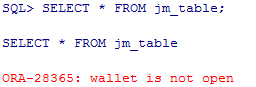
a.创建测试表例如:创建加密表空间 JM_ZSZ_DATA 以及非加密表空间 BJM_ZSZ_DATA。随后分别在两个表空间内创建表 JM_TABLE 以及非加密表 BJM_DATA,语句类似如下。SQL> create table jm_table(col1 number, col2 varchar2(30)) tablespace jm_zsz_data;create table bjm_table(col1 number, col2 varchar2(30)) tablespace bjm_zsz_data;创建后分别插入测试数据。SQL> insert into jm_table values (1,'secret data');insert into bjm_table values (1,'no secret data');b.测试 Oracle wallet 不打开时的读取状态若 Oracle wallet 不打开,则无法读取加密表空间中的表,类似如下结果。
而非加密表读取正常,类似如下结果。c.测试数据文件保存形式通过 string 直接查看数据文件内容,如果非加密则可直接查见数据内容。对于加密数据文件,查询结果如下。 注意:可见非以明文方式保存数据于 TDE 表空间加密的数据文件中。对于非加密数据文件,查询结果如下。
注意:可见正常的数据文件中,以明文形式保存数据。


参考文档:
<wiz_tmp_tag id="wiz-table-range-border" contenteditable="false" style="display: none;">
html,body { font-size: 15px }
body { font-family: Helvetica, "Hiragino Sans GB", "微软雅黑", "Microsoft YaHei UI", SimSun, SimHei, arial, sans-serif; line-height: 1.6; margin: 0; padding: 1.33rem 1rem }
h1,h2,h3,h4,h5,h6 { margin: 1.33rem 0 0.667rem; padding: 0; font-weight: bold }
h1 { font-size: 1.4rem }
h2 { font-size: 1.33rem }
h3 { font-size: 1.2rem }
h4 { font-size: 1.13rem }
h5 { font-size: 1rem }
h6 { font-size: 1rem; color: #777777; margin: 1rem 0 }
div,p,ul,ol,dl,li { margin: 0 }
blockquote,table,pre,code { margin: 8px 0 }
ul,ol { padding-left: 2.13rem }
blockquote { padding: 0 0.8rem }
blockquote>:first-child { margin-top: 0 }
blockquote>:last-child { margin-bottom: 0 }
img { border: 0; max-width: 100%; height: auto !important; margin: 2px 0 }
table { border-collapse: collapse; border: 1px solid #bbbbbb }
td,th { padding: 4px 8px; border-collapse: collapse; border: 1px solid #bbbbbb }
html,body { font-size: 15px }
body { font-family: Arial, Helvetica, "Hiragino Sans GB", 微软雅黑, "Microsoft YaHei UI", SimSun, SimHei, arial, sans-serif; line-height: 1.5; color: ; background-color: ; margin: 0; padding: 1.33rem 1rem }
img { max-width: 100% }
html { height: 100% }
body { min-height: 100% }
a { }
.wiz-img-resize-handle { position: absolute; z-index: 1000; border: 1px solid black; background-color: white }
.wiz-img-resize-handle { width: 5px; height: 5px }
.wiz-img-resize-handle.lt { cursor: nw-resize }
.wiz-img-resize-handle.tm { cursor: n-resize }
.wiz-img-resize-handle.rt { cursor: ne-resize }
.wiz-img-resize-handle.lm { cursor: w-resize }
.wiz-img-resize-handle.rm { cursor: e-resize }
.wiz-img-resize-handle.lb { cursor: sw-resize }
.wiz-img-resize-handle.bm { cursor: s-resize }
.wiz-img-resize-handle.rb { cursor: se-resize }
.wiz-table-body.wiz-table-moving *,.wiz-table-body.wiz-table-moving *::before,.wiz-table-body.wiz-table-moving *::after { cursor: default !important }
td,th { position: relative }
#wiz-table-range-border { display: none; width: 0; height: 0; position: absolute; top: 0; left: 0; z-index: 105 }
#wiz-table-col-line,#wiz-table-row-line { display: none; background-color: #448aff; position: absolute; z-index: 120 }
#wiz-table-col-line { width: 1px; cursor: col-resize }
#wiz-table-row-line { height: 1px; cursor: row-resize }
#wiz-table-range-border_start,#wiz-table-range-border_range { display: none; width: 0; height: 0; position: absolute }
#wiz-table-range-border_start_top,#wiz-table-range-border_range_top { height: 2px; background-color: #448aff; position: absolute; top: 0; left: 0 }
#wiz-table-range-border_range_top { height: 1px }
#wiz-table-range-border_start_right,#wiz-table-range-border_range_right { width: 2px; background-color: #448aff; position: absolute; top: 0 }
#wiz-table-range-border_range_right { width: 1px }
#wiz-table-range-border_start_bottom,#wiz-table-range-border_range_bottom { height: 2px; background-color: #448aff; position: absolute; top: 0 }
#wiz-table-range-border_range_bottom { height: 1px }
#wiz-table-range-border_start_left,#wiz-table-range-border_range_left { width: 2px; background-color: #448aff; position: absolute; top: 0; left: 0 }
#wiz-table-range-border_range_left { width: 1px }
#wiz-table-range-border_start_dot,#wiz-table-range-border_range_dot { width: 5px; height: 5px; border: 2px solid rgb(255, 255, 255); background-color: #448aff; cursor: crosshair; position: absolute; z-index: 110 }
.wiz-table-tools { display: block; background-color: #fff; position: absolute; left: 0px; border: 1px solid #ddd; z-index: 130 }
.wiz-table-tools ul { list-style: none; padding: 0 }
.wiz-table-tools .wiz-table-menu-item { position: relative; float: left; margin: 5px 2px 5px 8px }
.wiz-table-tools .wiz-table-menu-item .wiz-table-menu-button { font-size: 15px; width: 20px; height: 20px; line-height: 20px; cursor: pointer; position: relative }
.wiz-table-tools i.editor-icon { font-size: 15px; color: #455a64 }
.wiz-table-tools .wiz-table-menu-item .wiz-table-menu-button i#wiz-menu-bg-demo { position: absolute; top: 1px; left: 0 }
.wiz-table-tools .wiz-table-menu-sub { position: absolute; display: none; width: 125px; padding: 5px 0; background: #fff; border: 1px solid #E0E0E0; top: 28px; left: -9px }
.wiz-table-tools .wiz-table-menu-sub>div { font-size: 15px }
.wiz-table-tools .wiz-table-menu-item.active .wiz-table-menu-sub { display: block }
.wiz-table-tools .wiz-table-menu-sub::before,.wiz-table-tools .wiz-table-menu-sub::after { position: absolute; content: " "; border-style: solid; border-color: transparent; border-bottom-color: #cccccc; left: 22px; margin-left: -14px; top: -8px; border-width: 0 8px 8px 8px; z-index: 10 }
.wiz-table-tools .wiz-table-menu-sub::after { border-bottom-color: #ffffff; top: -7px }
.wiz-table-tools .wiz-table-menu-sub-item { padding: 4px 12px; font-size: 14px }
.wiz-table-tools .wiz-table-menu-sub-item.split { border-top: 1px solid #E0E0E0 }
.wiz-table-tools .wiz-table-menu-sub-item:hover { background-color: #ececec }
.wiz-table-tools .wiz-table-menu-sub-item.disabled { color: #bbbbbb; cursor: default }
.wiz-table-tools .wiz-table-menu-sub-item.disabled:hover { background-color: transparent }
.wiz-table-tools .wiz-table-menu-item.wiz-table-cell-bg:hover .wiz-table-color-pad { display: block }
.wiz-table-tools .wiz-table-color-pad { display: none; padding: 10px; width: 85px; height: 88px; background-color: #fff; cursor: default }
.wiz-table-tools .wiz-table-color-pad>div { font-size: 15px }
.wiz-table-tools .wiz-table-color-pad .wiz-table-color-pad-item { display: inline-block; width: 15px; height: 15px; margin-right: 9px; position: relative }
.wiz-table-tools .wiz-table-color-pad .wiz-table-color-pad-item i.pad-demo { position: absolute; top: 3px; left: 0 }
.wiz-table-tools .wiz-table-color-pad .wiz-table-color-pad-item .icon-oblique_line { color: #cc0000 }
.wiz-table-tools .wiz-table-color-pad .wiz-table-color-pad-item:last-child { margin-right: 0 }
.wiz-table-tools .wiz-table-color-pad .wiz-table-color-pad-item.active i.editor-icon.icon-box { color: #448aff }
.wiz-table-tools .wiz-table-cell-align { display: none; padding: 10px; width: 85px; height: 65px; background-color: #fff; cursor: default }
.wiz-table-tools .wiz-table-cell-align .wiz-table-cell-align-item { display: inline-block; width: 15px; height: 15px; margin-right: 9px; position: relative }
.wiz-table-tools .wiz-table-cell-align .wiz-table-cell-align-item:last-child { margin-right: 0 }
.wiz-table-tools .wiz-table-cell-align .wiz-table-cell-align-item i.valign { position: absolute; top: 3px; left: 0; color: #d2d2d2 }
.wiz-table-tools .wiz-table-cell-align-item.active i.editor-icon.valign { color: #a1c4ff }
.wiz-table-tools .wiz-table-cell-align-item.active i.editor-icon.icon-box,.wiz-table-tools .wiz-table-cell-align-item.active i.editor-icon.align { color: #448aff }
.wiz-table-tools .wiz-table-color-pad .wiz-table-color-pad-item:last-child,.wiz-table-tools .wiz-table-cell-align .wiz-table-cell-align-item:last-child { margin-right: 0 }
th.wiz-selected-cell-multi,td.wiz-selected-cell-multi { background: rgba(0,102,255,.05) }
th::before,td::before,#wiz-table-col-line::before,#wiz-table-range-border_start_right::before,#wiz-table-range-border_range_right::before { content: " "; position: absolute; top: 0; bottom: 0; right: -5px; width: 9px; cursor: col-resize; background: transparent; z-index: 100 }
th::after,td::after,#wiz-table-row-line::before,#wiz-table-range-border_start_bottom::before,#wiz-table-range-border_range_bottom::before { content: " "; position: absolute; left: 0; right: 0; bottom: -5px; height: 9px; cursor: row-resize; background: transparent; z-index: 100 }
.wiz-table-container { }
.wiz-table-body { position: relative; padding: 0 0 10px }
.wiz-table-body table { margin: 0; outline: none }
td,th { height: 28px; outline: none }
body pre.prettyprint { padding: 0 }
body pre.prettyprint code { white-space: pre }
body pre.prettyprint.linenums { overflow: auto }
body pre.prettyprint.linenums ol.linenums { padding: 10px 10px 10px 40px !important }
Oracle-11g 中使用表空间透明数据加密(TDE)的更多相关文章
- Oracle数据安全解决方案(1)——透明数据加密TDE
Oracle数据安全解决方案(1)——透明数据加密TDE2009年09月23日 22:49:00 华仔爱技术 阅读数:7991原文地址: http://www.oracle.com/technolog ...
- 透明数据加密 (TDE)常见问题解答
透明数据加密 (TDE)常见问题解答问题任何人只要有权访问加密数据就能对其进行解密吗?TDE 会带来哪些开销?哪些加密算法可与 TDE 一同使用?可以使用第三方加密算法代替 TDE 提供的算法吗?可以 ...
- SQLServer · 最佳实践 · 透明数据加密TDE在SQLServer的应用
转:https://yq.aliyun.com/articles/42270 title: SQLServer · 最佳实践 · 透明数据加密TDE在SQLServer的应用 author: 石沫 背 ...
- 盘点 Oracle 11g 中新特性带来的10大性能影响
Oracle的任何一个新版本,总是会带来大量引人瞩目的新特性,但是往往在这些新特性引入之初,首先引起的是一些麻烦,因为对于新技术的不了解.因为对于旧环境的不适应,从Oracle产品到技术服务运维,总是 ...
- oracle 11g中的自动维护任务管理
因为人员紧缺,最近又忙着去搞性能优化的事情,有时候真的是不想再搞这个事情,只是没办法,我当前的绩效几乎取决于这个项目的最终成绩,所以不管是人的事还是事的事,都得去让他顺利推进. 前段时间发生还有几台服 ...
- Oracle 11g中修改默认密码过期天数和锁定次数
Oracle 11g中修改默认密码过期天数和锁定次数 密码过期的原因一般有两种可能: 一.由于Oracle中默认在default概要文件中设置了"PASSWORD_LIFE_TIME=180 ...
- Oracle 11g中的snapshot standby特性
在Oracle 11g中,data guard最吸引人的,除了active data guard的实时查询特性(即可以以只读方式打开物理standby数据库的同时MRP进程能继续做recover),快 ...
- oracle 11g 中 (oracle 10g) crsctl 的 替换命令
oracle 11g 中 (oracle 10g) crsctl 的 替换命令 Deprecated Command Replacement Commands crs_stat ---集群状态 ...
- Oracle 11g 中SQL性能优化新特性之SQL性能分析器(SQLPA)
Oracle11g中,真实应用测试选项(the Real Application Testing Option)提供了一个有用的特点,叫SQL性能分析器(SQL Performance Analyze ...
随机推荐
- visual studio添加lib库
方法1: 通过设置工程配置来添加lib库. A.添加工程的头文件目录:工程---属性---配置属性---c/c++---常规---附加包含目录:加上头文件存放目录. B.添加文件引用的lib静态库路径 ...
- [学习OpenCV攻略][007][缩小图片]
cvPryDown(输入图片,输出图片) 根据输出图片的大小,把输入图片进行压缩 cvPryUp(输入图片,输出图片) 根据输出图片的大小,把输入图片进行放大 #include "cv.h& ...
- PLSQL 注册码
注册码:Product Code:4t46t6vydkvsxekkvf3fjnpzy5wbuhphqzserial Number:601769 password:xs374ca 本人版本 Versio ...
- 更改sql多条数据,更新替换字符串中固定的字符串
需求产生的背景: 数据库里建库时插入了字典数据,可是这个字典数据,有一些是不准确的,所以就需要把一些固定的数据查出来替换掉. 问题解决逻辑: 大体逻辑是,首先把固定需要替换的字符串提取出来,赋值给变量 ...
- JavaScript URL传值过程中遇到的问题及知识点总结
JavaScript URL传值过程中遇到的问题及知识点总结 Web系统开发过程中经常用到URL进行传值,刚刚接触时不太会解析,会出现中文乱码问题等. 1.父子页面之间的传值(在一个页面中以加载ifr ...
- Django 发送邮件
问题: 对于一些错误信息或用户注册账号的时候,需要给用户发送邮件进行验证. 以用户注册发邮件为例子,用户向后端提起注册,后端收到用户邮箱,对邮箱格式进行验证,然后发送邮件,邮件内容中包括邮件标题.邮件 ...
- jsp中 scope="application" 表示
jsp中 <jsp:useBean id="countbean" scope="application" class="count.counte ...
- PHP如何读取json数据
1的 <?php $json = '{"a":1,"b":2,"c":3,"d":4,"e": ...
- wamp图标为黄色(非端口号问题)
1.Win键+R 输入:services.msc 进入服务,找到wamp,看哪个服务没有启动 2.手动启动apache服务失败,弹出以下错误 3.然后在cmd命令行中切换到你的apache的bin目 ...
- awk数组结合+=统计题
awk增加统计列值为增加列数或进行运行结果统计,使用符号 + =.增加的结果赋给符号左边变量值,增加到变量的域在符号右边.例如将 $ 1加入变量total,表达式为toatl+=$1.列值增加很有用. ...