
Binding笔记
Binding基础
绑定某个对象的属性值到控制上,写法如下:
public class Order : INotifyPropertyChanged//只要实现此接口

    {

        public event PropertyChangedEventHandler PropertyChanged;

        private string orderNo;

        public string OrderNo

        {

            get

            {

                return orderNo;

            }

            set

            {

                orderNo = value;

                if (PropertyChanged != null)

                {

                    //通知变化,OrderNo变化后控件就会自动更新值了

                   //OrderNo为对应的属性名

                    PropertyChanged.Invoke(this, new PropertyChangedEventArgs("OrderNo"));称

                }

            }

        }

}
绑定方法: textBox.SetBinding(TextBox.TextProperty, new Binding("OrderNo") { Source = new Order() });
以其他控制作为源的写法:
<TextBox x:Name="textBox" Text="{Binding Path =Value,ElementName =slider}" V Width="120"/>
<Slider x:Name="slider" Width="179" Minimum="1" Maximum="100"/>
Binding的path,source灵活使用:
->path没有指定值代表是数据源的本身,如数据源本身为string int decimal类型时
->path一般是数据源对象的属性值, 如属性是集合多次层,如一国多省,省又多市,可这样写path=”/ProvinceList/CityList”
->source不写则会往控制的外层找DataContext的值作为它的Source
集合对象作为列表控制的ItemSource
只需要显示集合单个属性的写法
<ListBox x:Name="listBox" />
<TextBox x:Name="textBox" />
listBox.ItemsSource = students;
listBox.DisplayMemberPath = "Name";
textBox.SetBinding(TextBox.TextProperty, new Binding("SelectedItem.Id") { Source=listBox });
显示多个字段方法
<ListBox x:Name="listBox" >
<ListBox.ItemTemplate>
<DataTemplate> <!--固定写法-->
<StackPanel Orientation="Horizontal">
<TextBlock Text="{Binding Id}"></TextBlock>
<TextBlock Text="{Binding Name}"></TextBlock>
</StackPanel>
</DataTemplate>
</ListBox.ItemTemplate>
</ListBox>
listBox.ItemsSource = students;
使用集合类作为列表控制的ItemSource时一般考虑使用ObservableCollection<T>代表List<T>,因为ObservableCollection<T>实现了INotifyCollectionChanged接口,集合变化能立刻通知列表控制
ADO.NET对象作为数据源
如像DataTable DataSet对象直接用来绑定
用于显示数据源单个字段
DataTable dt = new DataTable();
listView.DisplayMemberPath = "Name";//要显示的字段
listView.ItemsSource = dt.DefaultView;//必须使用DefaultView,因为其实现了IEnumberable
用于显示数据源多个字段
<ListView x:Name="listView" >
<ListView.View>
<GridView>
<GridViewColumn Header="序号" DisplayMemberBinding="{Binding Id}" Width="120"/>
<GridViewColumn Header="姓名" DisplayMemberBinding="{Binding Name}" />
</GridView>
</ListView.View>
</ListView>
listView.ItemsSource = dt.DefaultView;
如果不想使用DefaultView则可以把对象赋给ListView的DataContext属性
DataTable dt = new DataTable();
listView.DataContext = dt;
//使用是个空的Binding,没有指定Source则会往外找DataContext
listView.SetBinding(ListView.ItemsSourceProperty, new Binding());
XML数据源
以xml格式的资源或xml文件作数据源
<ListView x:Name="listView" >
<ListView.View>
<GridView>
<GridViewColumn Header="序号" DisplayMemberBinding="{Binding XPath =@Id}" />
<GridViewColumn Header="姓名" DisplayMemberBinding="{Binding XPath =@Name}" />
</GridView>
</ListView.View>
</ListView>
上面使用的是XPath,且@代表是xml的元素的属性值,不加则是其子元素
var xdoc = new XmlDocument();
xdoc.Load(AppDomain.CurrentDomain.BaseDirectory+"student2.xml");
XmlDataProvider xpd = new XmlDataProvider();
xpd.Document = xdoc;
xpd.XPath = @"/StudentList/Student";//指定要暴漏出去的数据
//使用DataContext而非ItemsSource
listView.DataContext = xpd;
//这是一个没path,没source的binding则会直接使用DataContext
listView.SetBinding(ListView.ItemsSourceProperty, new Binding());
以下为窗体resource方式绑定,但没有通过测试
<Window.Resources>
<XmlDataProvider x:Key="xmlsource" XPath="/StudentList/Student">
<x:XData>
<StudentList>
<Student Id="1" Name="奥巴马2"></Student>
<Student Id="2" Name="库里"></Student>
</StudentList>
</x:XData>
</XmlDataProvider>
</Window.Resources>
<Grid>
<ListView x:Name="listView" DataContext="{StaticResource xmlsource}" >
<ListView.View>
<GridView>
<GridViewColumn Header="序号" DisplayMemberBinding="{Binding XPath=@Id}" Width="120"/>
<GridViewColumn Header="姓名" DisplayMemberBinding="{Binding XPath=@Name}" />
</GridView>
</ListView.View>
</ListView>
</Grid>
Linq数据源
通过linq方式提供数据源
<ListView x:Name="listView" >
<ListView.View>
<GridView>
<GridViewColumn Header="序号" DisplayMemberBinding="{Binding Path=Id}" Width="120"/>
<GridViewColumn Header="姓名" DisplayMemberBinding="{Binding Path=Name}" />
</GridView>
</ListView.View>
</ListView>
常见的集合方式
var students = new List<Student>()
{
new Student() { Id=1,Name="奥巴马"},
new Student() { Id=1,Name="库里"},
};
//这里只要指定ItemsSource,xaml的bing即可以获取数据
listView.ItemsSource = from t in students select t;
通过DataTable方式
DataTable dt = new DataTable();
listView.ItemsSource = from row in dt.Rows.Cast<DataRow>())//转成实现了IEnumerable的DataRow
select new Student
{
Id=int.Parse(row["id"].ToString()),
Name=row["name"].ToString()
};
通过XML文件方式
<?xml version="1.0" encoding="utf-8" ?>
<StudentList>
<Class>
<Student Id="1" Name="奥巴马"></Student>
<Student Id="2" Name="库里"></Student>
</Class>
</StudentList>
//注意不是使用XmlDocument
XDocument xd = XDocument.Load(AppDomain.CurrentDomain.BaseDirectory + "student.xml");
listView.ItemsSource = from ele in xd.Descendants("Student")//Descendants可直接获取其下所有层次的student节点
select new Student
{
Id = int.Parse(ele.Attribute("Id").Value),
Name = ele.Attribute("Name").Value
};
ObjectDataProvider数据源
通常source都是来自对象的属性,但有时需要用到方法体返回值则用ObjectDataProvider
public class test
{
public int Add(int a, int b)
{
return a + b;
}
}
xaml
<TextBox x:Name="textBox1" />
<TextBox x:Name="textBox2" />
<TextBox x:Name="textBox3" />
cs代码
var odp = new ObjectDataProvider();
odp.ObjectInstance = new test();
odp.MethodName = "Add";
odp.MethodParameters.Add(1);
odp.MethodParameters.Add(2);
var bing1 = new Binding("MethodParameters[0]")//路径就是属性MethodParameters
{
Source =odp,
BindsDirectlyToSource =true,//UI收集的值直接写到source
UpdateSourceTrigger =UpdateSourceTrigger.PropertyChanged//一有更新立即回传到source
};
var bing2 = new Binding("MethodParameters[1]")
{
Source = odp,
BindsDirectlyToSource = true,
UpdateSourceTrigger = UpdateSourceTrigger.PropertyChanged
};
var bing3 = new Binding(".") { Source = odp };//.数据源的本身
textBox1.SetBinding(TextBox.TextProperty, bing1);
textBox2.SetBinding(TextBox.TextProperty, bing2);
textBox3.SetBinding(TextBox.TextProperty, bing3);
RelativeSource数据源
用于指定窗体其他UI元素或自身的属性等作为数据源。
<DockPanel Name="KKK">
<DockPanel Name="HHH">
<Canvas Name="GGGG">
<TextBox x:Name="textBox22" />
</Canvas>
</DockPanel>
通过自身偏移量查找元素并作为数据源
var rela = new RelativeSource(RelativeSourceMode.FindAncestor);//查找方式:目标元素上级的方式
rela.AncestorLevel = 2;//以目标元素向外查找,符合指定类型的第2个元素作为数据源
rela.AncestorType = typeof(DockPanel);//元素类型
textBox22.SetBinding(TextBox.TextProperty, new Binding("Name") { RelativeSource = rela });//得到值"KKK"
XAML写法
<TextBox x:Name="textBox22" Text="{Binding RelativeSource={RelativeSource Mode=FindAncestor,AncestorLevel=2,AncestorType={x:Type DockPanel}},Path=Name}" />
自身属性作为数据源
var rela = new RelativeSource(RelativeSourceMode.Self);//查找方式:自身
textBox22.SetBinding(TextBox.TextProperty, new Binding("Name") { RelativeSource = rela });//得到值"textBox22"
XAML写法
<TextBox x:Name="textBox22" Text="{Binding RelativeSource={RelativeSource Mode=Self},Path=Name}" >
Binding数据验证
<TextBox x:Name="textBox" />
<Slider x:Name="slider" Minimum="1" Maximum="100"/>
<Label x:Name="label" Content="Label" />
public va()
{
InitializeComponent();
var binding = new Binding("Value");
binding.Source = slider;//数据源为silder元素
//文本框输入值会更新slider
binding.UpdateSourceTrigger = UpdateSourceTrigger.PropertyChanged;
var vr = new TxtValidation();//此规则限制值为5才更新到slider
vr.ValidatesOnTargetUpdated = true;//值属性为true则双像都要验证,不加则只验证目标变化
binding.ValidationRules.Add(vr); //使用Add可以加N多规则
binding.NotifyOnValidationError = true;//true则由本元素向外传递验证错误信息,直到有接收错误的元素
textBox.SetBinding(TextBox.TextProperty, binding);
//用于接收验证错误信息
textBox.AddHandler(Validation.ErrorEvent, new RoutedEventHandler(ValidaError));
}
private void ValidaError(object sender, RoutedEventArgs e)
{
var errors = Validation.GetErrors(textBox);
if (errors.Any())
{
//显示错误信息
label.Content = textBox.ToolTip = Validation.GetErrors(textBox)[0].ErrorContent.ToString();
}
}
//验证规则类
public class TxtValidation: ValidationRule
{
//主要是继承ValidationRule,并重写ValidationResult
public override ValidationResult Validate(object value, CultureInfo cultureInfo)
{
int i = 0;
if (int.TryParse(value.ToString(), out i))
{
if(i!=5)
return new ValidationResult(false, "不是预期值");
}
else
{
return new ValidationResult(false, "格式不正确");
}
return new ValidationResult(true,"验证通过");
}
}
Binding数据转换
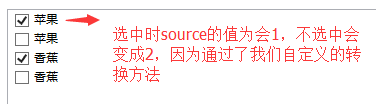
转换主要是写对应的转换类,通常需要用到转换的地方多为控制与绑定的字段类型不一致才需要转,可以双向转。主要是需在我们定义转换器,并实现 IValueConverter接口.如示例通过ListBox显示水果集合
//水果类
public class Fruits
{
/// <summary>
/// 分类
/// </summary>
public Category Category { get; set; }
/// <summary>
/// 选中状态 1=选中 2=不选中
/// </summary>
public int SelectState { get; set; }
}
public enum Category
{
Apple,
Banana
}
//水果种类转换器
public class CategoryConverter : IValueConverter
{
// 数据源转向目标时使用
public object Convert(object value, Type targetType, object parameter, CultureInfo culture)
{
var category = (Category)value;
if (category == Category.Apple)
return "苹果";
else if (category == Category.Banana)
return "香蕉";
return "未知";
}
//目标转向数据源使用,当前转正不需要
public object ConvertBack(object value, Type targetType, object parameter, CultureInfo culture)
{
throw new NotImplementedException();
}
}
//是否选中转换器
public class SelectStateConverter : IValueConverter
{
// 数据源转向目标时使用
public object Convert(object value, Type targetType, object parameter, CultureInfo culture)
{
var selectState = (int)value;
if (selectState ==1)
return true;
return false;
}
//目标转向数据源使用
public object ConvertBack(object value, Type targetType, object parameter, CultureInfo culture)
{
var selectState = (bool)value;
if (selectState)
return 1;
return 2;
}
}
XAML代码
<Window.Resources>
<!--通过资源的方式定义转换-->
<local:CategoryConverter x:Key="cc" />
<local:SelectStateConverter x:Key="sc" />
</Window.Resources>
<Grid>
<ListBox.ItemTemplate>
<DataTemplate>
<StackPanel x:Name="sp" Orientation="Horizontal">
<CheckBox x:Name="checkBox" Content="{Binding Path=Category,Converter={StaticResource cc}}" IsChecked="{Binding Path=SelectState,Converter={StaticResource sc},UpdateSourceTrigger=PropertyChanged}" />
</StackPanel>
</DataTemplate>
</ListBox.ItemTemplate>
</ListBox>
<Label x:Name="label1" Content="Label" />
<Button x:Name="button" Content="保存" H Click="button_Click"/>
</Grid>
C#代码:
var list = new List<Fruits>();
list.Add(new Fruits() { Category = Category.Apple, SelectState = 1 });
list.Add(new Fruits() { Category = Category.Apple, SelectState = 2 });
list.Add(new Fruits() { Category = Category.Banana, SelectState = 1 });
list.Add(new Fruits() { Category = Category.Banana, SelectState = 2 });
lb.ItemsSource = list;
多路Binding
即多个数据源或多个属性值组合起来满足自定义组合条件绑定到一个目标上。如两个文本框的值相等按钮才可用:
<TextBox x:Name="textBox" />
<TextBox x:Name="textBox1" />
<Button x:Name="button" IsEnabled="False"/>
public partial class MultiBinding2 : Window
{
public MultiBinding2()
{
InitializeComponent();
var binding1 = new Binding("Text") { Source = textBox };
var binding2 = new Binding("Text") { Source = textBox1 };
var mb = new MultiBinding() { Mode=BindingMode.OneWay};
//添加顺序是敏感的
mb.Bindings.Add(binding1);
mb.Bindings.Add(binding2);
mb.Converter = new EnableBtnConverter();
button.SetBinding(Button.IsEnabledProperty, mb);
}
}
public class EnableBtnConverter : IMultiValueConverter
{
public object Convert(object[] values, Type targetType, object parameter, CultureInfo culture)
{
return values[0].ToString() == values[1].ToString();//不加ToString()居然不相等,为毛???
}
public object[] ConvertBack(object value, Type[] targetTypes, object parameter, CultureInfo culture)
{
throw new NotImplementedException();
}
}
Binding笔记的更多相关文章
- WPF的Binding学习笔记(二)
原文: http://www.cnblogs.com/pasoraku/archive/2012/10/25/2738428.htmlWPF的Binding学习笔记(二) 上次学了点点Binding的 ...
- WPF笔记 ( xmlns引用,Resource、Binding 前/后台加载,重新绑定) 2013.6.7更新
原文:WPF笔记 ( xmlns引用,Resource.Binding 前/后台加载,重新绑定) 2013.6.7更新 1.xmlns Mapping URI的格式是 clr-namespace:&l ...
- WPF的Binding学习笔记(一)
原文: http://www.cnblogs.com/pasoraku/archive/2012/10/20/2732427.html 一.binding的一般步骤 1,准备数据源 数据源需要 ...
- 【ASP.NET MVC 学习笔记】- 16 Model Binding(模型绑定)
本文参考:http://www.cnblogs.com/willick/p/3424188.html. 1.Model Binding是Http请求和Action方法之间的桥梁,是MVC框架根据Htt ...
- MyBatis笔记----报错Exception in thread "main" org.apache.ibatis.binding.BindingException: Invalid bound statement (not found): com.ij34.model.UserMapper.selectUser
信息: Refreshing org.springframework.context.support.ClassPathXmlApplicationContext@41cf53f9: startup ...
- MyBatis笔记----报错:Exception in thread "main" org.apache.ibatis.binding.BindingException: Invalid bound statement (not found)解决方法
报错 Exception in thread "main" org.apache.ibatis.binding.BindingException: Invalid bound st ...
- RabbitMQ笔记四:Binding,Queue,Message概念
Binding详解 黄线部分就是binding Exchange与Exchange,Queue之间的虚拟连接,Binding中可以包含Routing key或者参数 创建binding 注意: ...
- WPF基础学习笔记整理 (七) Binding绑定
基础知识: 数据绑定是一种关系,该关系告诉WPF从源对象提取一些信息,并用这些信息设置目标对象的属性:目标对象始终是依赖属性,而源对象则可以是任何内容. BindingOperations类,提供静态 ...
- Mybatis笔记二:org.apache.ibatis.binding.BindingException: Invalid bound statement (not found)
错误异常:org.apache.ibatis.binding.BindingException: Invalid bound statement (not found): com.test.dao.N ...
随机推荐
- CSS布局 - 三栏布局
CSS布局技术可谓是前端技术中最基础的技术,就是因为基础,所以我认为要更加熟练,深入的去掌握,去梳理. 一. 传统 ---> 浮动实现的三栏布局 采用浮动实现的三栏布局有以下特点及注意事项: · ...
- STM32F746的RTC使用
1.RTC模块采用低速晶振外接始终:32.768KHz,如下图所示 2.配置RTC模块: 其中,Fck_apre.Fck_spre始终上配置不容易理解, 如果想得到1Hz的始终频率,则需要将PERDI ...
- Qt 拷贝文件目录
bool copyDir(const QString &source, const QString &destination, bool override) { QDir direct ...
- 【C#】给无窗口的进程发送消息
注:本文适用.net2.0+的winform程序 一个winform程序,我希望它不能多开(但是如何防多开不是本文要讲的),那么在用户启动第二个实例的时候,作为第二个实例来说,大概可以有这么几种做法: ...
- hibernate.cfg.xml
<!DOCTYPE hibernate-configuration PUBLIC "-//Hibernate/Hibernate Configuration DTD 3.0//EN&q ...
- java多线程解读二(内存篇)
线程的内存结构图 一.主内存与工作内存 1.Java内存模型的主要目标是定义程序中各个变量的访问规则.此处的变量与Java编程时所说的变量不一样,指包括了实例字段.静态字段和构成数组对象的元素,但是不 ...
- $_SERVER
$_SERVER[‘HTTP_X_REWRITE_URL’] 和$_SERVER[‘REQUEST_URI’]的区别 php4.4.0不支持 $_SERVER[‘REQUEST_URI’],php5. ...
- 用css隐藏元素的5种方法
.green { width: 100px; height: 100px; background-color: #a0ee00; text-align: center; float: left; ma ...
- React Native 之 TextInput使用
前言 学习本系列内容需要具备一定 HTML 开发基础,没有基础的朋友可以先转至 HTML快速入门(一) 学习 本人接触 React Native 时间并不是特别长,所以对其中的内容和性质了解可能会有所 ...
- freeswitch嵌入python脚本
操作系统:debian8.5_x64 freeswitch 版本 : 1.6.8 python版本:2.7.9 开启python模块 安装python lib库 apt-get install pyt ...