
Oracle 11g全表扫描以Direct Path Read方式执行
在Oracle Database 11g中有一个新特性,全表扫描可以通过直接路径读的方式来执行(Direct Path Read),这是一个合理的变化,如果全表扫描的大量数据读取是偶发性的,则直接路径读可以避免大量数据对于Buffer Cache的冲击。
当然对于小表来说,Oracle允许通过Buffer Cache来进行全表扫描,因为这可能更快,也对性能影响不大。
小表受到隐含参数:_small_table_threshold 影响。如果表大于 5 倍的小表限制,则自动会使用DPR替代FTS。
可以设置初始化参数: _serial_direct_read 来禁用串行直接路径读。
当然,Oracle通过一个内部的限制,来决定执行DPR的阈值。
可以通过设置10949事件屏蔽这个特性,返回到Oracle 11g之前的模式上:
alter session set events '10949 trace name context forever, level 1';
还有一个参数 _very_large_object_threshold 用于设定(MB单位)使用DPR方式的上限,这个参数需要结合10949事件共同发挥作用。
10949 事件设置任何一个级别都将禁用DPR的方式执行FTS,但是仅限于小于 5 倍 BUFFER Cache的数据表,同时,如果一个表的大小大于 0.8 倍的 _very_large_object_threshold 设置,也会执行DPR。
这些限定的目标在于:
对于大表的全表扫描,必须通过Direct Path Read方式执行,以减少对于Buffer Cache的冲击和性能影响。
但是我们可以通过参数调整来决定执行DPR的上限和下限。
Event 10949 可以在线设置,但对现有session可能不会生效,新登录的会话会执行新的设置:
在实例级别修改参数设置:
- ALTER SYSTEM SET EVENTS '10949 TRACE NAME CONTEXT FOREVER';
增加参数到SPFILE中:
- alter system set event='10949 TRACE NAME CONTEXT FOREVER' scope=spfile;
对当前会话设置:
- ALTER SESSION SET EVENTS '10949 TRACE NAME CONTEXT FOREVER';
隐含参数"_serial_direct_read" 可以达到类似的限制,其默认值为AUTO,设置为NEVER时禁用 11g 的自动direct path read的特性。该参数可以动态在实例或会话级别修改,而无需重启实例。
- SQL> alter system set "_serial_direct_read"=auto;
- SQL> alter system set "_serial_direct_read"=never;
以下的AWR信息是典型的DPR症状: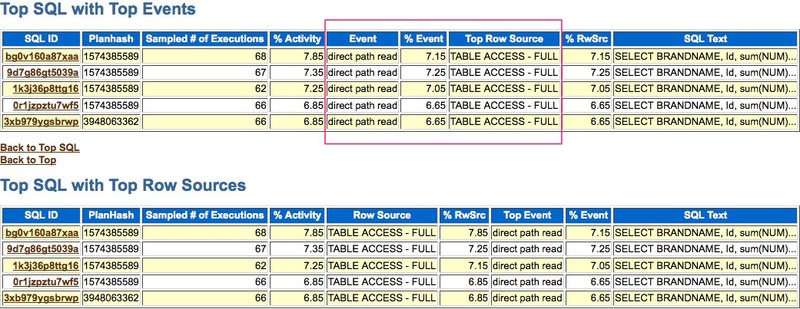
http://sai-oracle.blogspot.com/2010/06/full-table-scan-behavior-in-11g.html
Before 11gr2, full table scan access path read all the blocks of a table (or index fast full scan) under high water mark into the buffer cache unless either "_serial_direct_read" hidden parameter is set to true or the table/index have default parallelism set.
In 11gR2, Oracle will automatically decide whether to use direct path reads bypassing buffer cache for serial full table scans.
For using direct path reads, Oracle first has to write any dirty blocks of the table to disk by issuing object level checkpoint and then read all the blocks from disk into the PGA of server process. If it has to undo any uncommitted transactions to provide read consistency or to do delayed block clean out, Oracle will use server process PGA to construct read consistent block buffers.
If block clean out has to be performed by the server process using direct path reads for full table scans, it won't write those modified blocks back to disk, so every time you perform full table scan using direct path reads it'd have to keep doing the same work of cleaning out the blocks for every execution. For this reason, it is recommended to manually clean out those blocks by performing full table scan without using direct path reads.
Following behavior was observed with my testing on 11.2.0.1:
Hidden parameter "_small_table_threshold" defines the number of blocks to consider a table as small. Any table having more blocks (about 5 times the value of "_small_table_threshold" if you leave it at default value) will automatically use direct path reads for serial full table scans (FTS).
Hidden parameter "_very_large_object_threshold" defines the upper limit of object size in MB for using direct path reads. There is no effect on FTS behavior just by setting this parameter alone.
Event 10949 set to any level will disable direct path reads for serial scans only if the size of an object is less then 5 times the size of buffer cache.
Combination of event 10949 and "_very_large_object_threshold" parameter will disable direct path reads for serial scans if the size of an object is less than 5 times the size of buffer cache or the value of "_very_large_object_threshold" is less than about 0.8 times the size of an object.
So, if you want to disable direct path reads for serial scans for any object, then set event 10949 at any level and set "_very_large_object_threshold" to greater than the size of largest object in MB.
Hidden parameter "_serial_direct_read" (or event 10355 set at any level) set to TRUE will enable direct path reads for all serial scans, unless the table is considered as small table and it's caching attribute is set (by issuing alter table xxxx cache). Remember that any sql statement already parsed and not using direct path reads will continue to do so unless hard parse is forced after setting these parameters. For this reason, it is better not to set these parameters.
It is not recommended to set any of the above mentioned hidden parameters if you want direct path reads to be used for serial scans, let Oracle decide dynamically based on the size of an object.
Oracle 11g全表扫描以Direct Path Read方式执行的更多相关文章
- Oracle查找全表扫描的SQL语句
原文链接:http://blog.itpub.net/9399028/viewspace-678358/ 对于SQL的执行计划,一般尽量避免TABLE ACCESS FULL的出现,那怎样去定位,系统 ...
- 数据库全表扫描的SQL种类
1.所查询的表的条件列没有索引: 2.需要返回所有的行: 3.对索引主列有条件限制,但是使用了函数,则Oracle 使用全表扫描,如: where upper(city)=’TOKYO’; 这样的语 ...
- Oracle收集对表收集统计信息导致全表扫描直接路径读?
direct path read深入解析 前言 最近碰到一件很奇葩的事情,因为某条SQL执行缓慢,原因是走了笛卡尔(两组大数据结果集),而且笛卡尔还是NL的一个部分,要循环31M次. 很容易发现是统计 ...
- Oracle的大表,小表与全表扫描
大小表区分按照数据量的大小区分: 通常对于小表,Oracle建议通过全表扫描进行数据访问,对于大表则应该通过索引以加快数据查询,当然如果查询要求返回表中大部分或者全部数据,那么全表扫描可能仍然是最好的 ...
- Oracle列操作引起的全表扫描
首先是一种比较明显的情况: select * from table where column + 1 = 2 这里对column进行了列操作,加1以后,与column索引里的内容对不上,导致colum ...
- Oracle 表的访问方式(1) ---全表扫描、通过ROWID访问表
1.Oracle访问表的方式 全表扫描.通过ROWID访问表.索引扫描 2.全表扫描(Full Table Scans, FTS) 为实现全表扫描,Oracle顺序地访问表中每条记录,并检查每一条记录 ...
- Oracle全表扫描
优化器在形成执行计划时需要做的一个重要选择——如何从数据库查询出需要的数据.对于SQL语句存取的任何表中的任何行,可能存在许多存取路径(存取方法),通过它们可以定位和查询出需要的数据.优化器选择其中自 ...
- Oracle 高水位线和全表扫描
--Oracle 高水位线和全表扫描--------------------------2013/11/22 高水位线好比水库中储水的水位线,用于描述数据库中段的扩展方式.高水位线对全表扫描方式有着至 ...
- oracle优化:避免全表扫描(高水位线)
如果我们查询了一条SQL语句,这条SQL语句进行了全表扫描,那到底是扫描了多少个数据块呢?是表有多少数据,就扫描多少块吗?不是的.而是扫描高水位线一下的所有块.有的时候有人经常说,我的表也不大呀,怎么 ...
随机推荐
- 接触新的项目,构建时候报错:Failure to find io.netty:netty-tcnative:jar:${os.detected.classifier}:2.0.7.Final in
详细信息如下: Failure to find io.netty:netty-tcnative:jar:${os.detected.classifier}:2.0.7.Final in http:// ...
- 每日分享!~ JavaScript(js数组如何在指定的位置插入一个元素)
这个想法是在一个面试题中看到的: 题目是这样的: // 一个数组,在指定的index 位置插入一个元素,返回一个新的数组,不改变原来的数组 <script> function inse ...
- qml demo分析(maskedmousearea-异形窗口)
一.效果展示 如本文的标题所示,这篇文章分析的demo是一个异形窗口,主要展示鼠标在和异形区域交互的使用,效果如图1所示,当鼠标移动到白云或者月亮上时,相应的物体会高亮,当鼠标按下时,物体会有一个放大 ...
- Asp.Net Core WebApi中接入Swagger组件(初级)
开发WebApi时通常需要为调用我们Api的客户端提供说明文档.Swagger便是为此而存在的,能够提供在线调用.调试的功能和API文档界面. 环境介绍:Asp.Net Core WebApi + S ...
- 使用 ASP.NET Core MVC 创建 Web API(二)
使用 ASP.NET Core MVC 创建 Web API 使用 ASP.NET Core MVC 创建 Web API(一) 六.添加数据库上下文 数据库上下文是使用Entity Framewor ...
- Chrome浏览器下自动填充的输入框背景
记录下从张鑫旭老师的微博中看到关于input输入框的属性 1.autocomplete="off" autocomplete 属性规定输入字段是否应该启用自动完成功能 自动完成允许 ...
- confd+etcd实现高可用自动发现
Confd是什么 Confd是一个轻量级的配置管理工具. 通过查询后端存储,结合配置模板引擎,保持本地配置最新,同时具备定期探测机制,配置变更自动reload. 对应的后端存储可以是etcd,redi ...
- MySQL优化小建议
背景 "那啥,你过来一下!" "怎么了?我代码都单元测试了的,没出问题啊!"我一脸懵逼跑到运维大佬旁边. "你看看!你看看!多少条报警,赶快优化一下! ...
- List去重的实现
List<T> 当T为值类型的时候 去重比较简单,当T为引用类型时,一般根据业务需要,根据T的中几个属性来确定是否重复,从而去重. 查看System.Linq下的Enumerable存在一 ...
- 数据结构——Java实现单链表
一.分析 单链表是一种链式存取的数据结构,用一组地址任意的存储单元存放线性表中的数据元素.链表中的数据是以结点来表示的,每个结点由元素和指针构成.在Java中,我们可以将单链表定义成一个类,单链表的基 ...