
使用Java API连接和操作HBase数据库
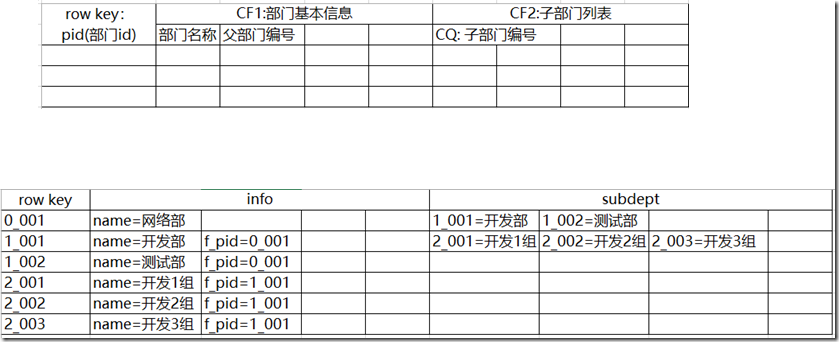
创建的数据库存储如下数据
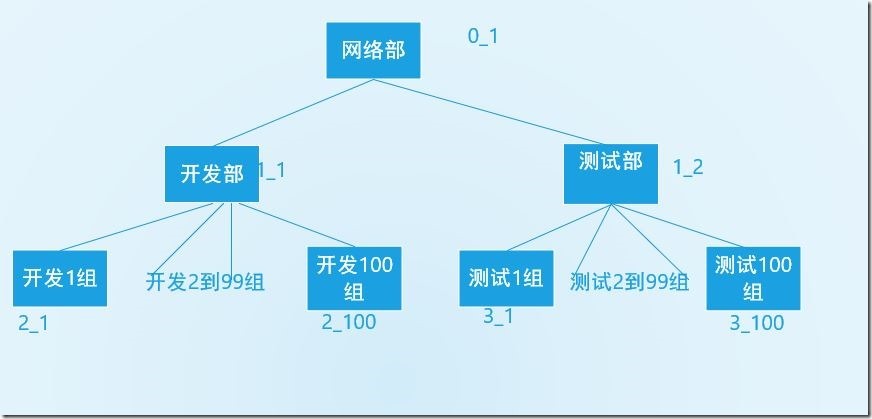
表结构
java代码
  1

  2 public class HbaseTest {

  3

  4 	/**

  5 	 * 配置ss

  6 	 */

  7 	static Configuration config = null;

  8 	private Connection connection = null;

  9 	private Table table = null;

 10

 11 	@Before

 12 	public void init() throws Exception {

 13 		config = HBaseConfiguration.create();// 配置

 14 		config.set("hbase.zookeeper.quorum", "192.168.33.61");// zookeeper地址

 15 		config.set("hbase.zookeeper.property.clientPort", "2181");// zookeeper端口

 16 		connection = ConnectionFactory.createConnection(config);

 17 		table = connection.getTable(TableName.valueOf("dept"));

 18 	}

 19

 20 	/**

 21 	 * 创建数据库表dept,并增加列族info和subdept

 22 	 *

 23 	 * @throws Exception

 24 	 */

 25 	@Test

 26 	public void createTable() throws Exception {

 27 		// 创建表管理类

 28 		HBaseAdmin admin = new HBaseAdmin(config); // hbase表管理

 29 		// 创建表描述类

 30 		TableName tableName = TableName.valueOf("dept"); // 表名称

 31 		HTableDescriptor desc = new HTableDescriptor(tableName);

 32 		// 创建列族的描述类

 33 		HColumnDescriptor family = new HColumnDescriptor("info"); // 列族

 34 		// 将列族添加到表中

 35 		desc.addFamily(family);

 36 		HColumnDescriptor family2 = new HColumnDescriptor("subdept"); // 列族

 37 		// 将列族添加到表中

 38 		desc.addFamily(family2);

 39 		// 创建表

 40 		admin.createTable(desc); // 创建表

 41 		System.out.println("创建表成功!");

 42 	}

 43

 44 	/**

 45 	 * 向hbase中插入前三行网络部、开发部、测试部的相关数据,

 46 	 * 即加入表中的前三条数据

 47 	 *

 48 	 * @throws Exception

 49 	 */

 50 	@SuppressWarnings({ "deprecation", "resource" })

 51 	@Test

 52 	public void insertData() throws Exception {

 53 		table.setAutoFlushTo(false);

 54 		table.setWriteBufferSize(534534534);

 55 		ArrayList<Put> arrayList = new ArrayList<Put>();

 56

 57 		Put put = new Put(Bytes.toBytes("0_1"));

 58 		put.add(Bytes.toBytes("info"), Bytes.toBytes("name"), Bytes.toBytes("网络部"));

 59 		put.add(Bytes.toBytes("subdept"), Bytes.toBytes("subdept1"), Bytes.toBytes("1_1"));

 60 		put.add(Bytes.toBytes("subdept"), Bytes.toBytes("subdept2"), Bytes.toBytes("1_2"));

 61 		arrayList.add(put);

 62

 63 		Put put1 = new Put(Bytes.toBytes("1_1"));

 64 		put1.add(Bytes.toBytes("info"), Bytes.toBytes("name"), Bytes.toBytes("开发部"));

 65 		put1.add(Bytes.toBytes("info"), Bytes.toBytes("f_pid"), Bytes.toBytes("0_1"));

 66

 67 		Put put2 = new Put(Bytes.toBytes("1_2"));

 68 		put2.add(Bytes.toBytes("info"), Bytes.toBytes("name"), Bytes.toBytes("测试部"));

 69 		put2.add(Bytes.toBytes("info"), Bytes.toBytes("f_pid"), Bytes.toBytes("0_1"));

 70

 71 		for (int i = 1; i <= 100; i++) {

 72

 73 			put1.add(Bytes.toBytes("subdept"), Bytes.toBytes("subdept"+i), Bytes.toBytes("2_"+i));

 74 			put2.add(Bytes.toBytes("subdept"), Bytes.toBytes("subdept"+i), Bytes.toBytes("3_"+i));

 75 		}

 76 		arrayList.add(put1);

 77 		arrayList.add(put2);

 78 		//插入数据

 79 		table.put(arrayList);

 80 		//提交

 81 		table.flushCommits();

 82 		System.out.println("数据插入成功!");

 83 	}

 84

 85 	/**

 86 	 * 向hbase中插入开发部、测试部下的所有子部门数据

 87 	 * @throws Exception

 88 	 */

 89 	@Test

 90 	public void insertOtherData() throws Exception {

 91 		table.setAutoFlushTo(false);

 92 		table.setWriteBufferSize(534534534);

 93 		ArrayList<Put> arrayList = new ArrayList<Put>();

 94 		for (int i = 1; i <= 100; i++) {

 95 			Put put_development = new Put(Bytes.toBytes("2_"+i));

 96 			put_development.add(Bytes.toBytes("info"), Bytes.toBytes("name"), Bytes.toBytes("开发"+i+"组"));

 97 			put_development.add(Bytes.toBytes("info"), Bytes.toBytes("f_pid"), Bytes.toBytes("1_1"));

 98 			arrayList.add(put_development);

 99

100 			Put put_test = new Put(Bytes.toBytes("3_"+i));

101 			put_test.add(Bytes.toBytes("info"), Bytes.toBytes("name"), Bytes.toBytes("测试"+i+"组"));

102 			put_test.add(Bytes.toBytes("info"), Bytes.toBytes("f_pid"), Bytes.toBytes("1_2"));

103 			arrayList.add(put_test);

104 		}

105

106 		//插入数据

107 		table.put(arrayList);

108 		//提交

109 		table.flushCommits();

110 		System.out.println("插入其他数据成功!");

111 	}

112

113 	/**

114 	 * 查询所有一级部门(没有上级部门的部门)

115 	 * @throws Exception

116 	 */

117 	@Test

118 	public void scanDataStep1() throws Exception {

119

120 		// 创建全表扫描的scan

121 		Scan scan = new Scan();

122 		System.out.println("查询到的所有一级部门如下:");

123 		// 打印结果集

124 		ResultScanner scanner = table.getScanner(scan);

125 		for (Result result : scanner) {

126 			if (result.getValue(Bytes.toBytes("info"), Bytes.toBytes("f_pid")) == null) {

127 				for (KeyValue kv : result.raw()) {

128 				     System.out.print(new String(kv.getRow()) + " ");

129 				     System.out.print(new String(kv.getFamily()) + ":");

130 				     System.out.print(new String(kv.getQualifier()) + " = ");

131 				     System.out.print(new String(kv.getValue()));

132 				     System.out.print(" timestamp = " + kv.getTimestamp() + "\n");

133 				}

134 		}

135 		}

136 	}

137

138 	/**

139 	 * 已知rowkey,查询该部门的所有(直接)子部门信息 rowkey=1_1

140 	 * @throws Exception

141 	 */

142 	@Test

143 	public void scanDataStep2() throws Exception {

144 		Get g = new Get("1_1".getBytes());

145 		g.addFamily("subdept".getBytes());

146 		// 打印结果集

147 		Result result = table.get(g);

148 		for (KeyValue kv : result.raw()) {

149 		     Get g1 = new Get(kv.getValue());

150 		     Result result1 = table.get(g1);

151 		     for (KeyValue kv1 : result1.raw()) {

152 			     System.out.print(new String(kv1.getRow()) + " ");

153 			     System.out.print(new String(kv1.getFamily()) + ":");

154 			     System.out.print(new String(kv1.getQualifier()) + " = ");

155 			     System.out.print(new String(kv1.getValue()));

156 			     System.out.print(" timestamp = " + kv1.getTimestamp() + "\n");

157 			}

158 		}

159 	}

160

161 	/**

162 	 * 已知rowkey,向该部门增加一个子部门

163 	 * rowkey:0_1

164 	 * 增加的部门名:我增加的部门

165 	 * @throws Exception

166 	 */

167 	@Test

168 	public void scanDataStep3() throws Exception {

169 		//新增一个部门

170 		Put put = new Put(Bytes.toBytes("4_1"));

171 		put.add(Bytes.toBytes("info"), Bytes.toBytes("name"), Bytes.toBytes("我增加的部门"));

172 		put.add(Bytes.toBytes("info"), Bytes.toBytes("f_pid"), Bytes.toBytes("0_1"));

173 		//插入数据

174 		table.put(put);

175 		//提交

176 		table.flushCommits();

177

178 		//更新网络部

179 		Put put1 = new Put(Bytes.toBytes("0_1"));

180 		put1.add(Bytes.toBytes("subdept"), Bytes.toBytes("subdept3"), Bytes.toBytes("4_1"));

181 		//插入数据

182 		table.put(put1);

183 		//提交

184 		table.flushCommits();

185 	}

186

187 	/**

188 	 * 已知rowkey(且该部门存在子部门),删除该部门信息,该部门所有(直接)子部门被调整到其他部门中

189 	 * @throws Exception

190 	 */

191 	@Test

192 	public void scanDataStep4() throws Exception {

193 		/**

194 		 * 向部门"我增加的部门"添加两个子部门"

195 		 */

196 		table.setAutoFlushTo(false);

197 		table.setWriteBufferSize(534534534);

198 		ArrayList<Put> arrayList = new ArrayList<Put>();

199 		Put put1 = new Put(Bytes.toBytes("5_1"));

200 		put1.add(Bytes.toBytes("info"), Bytes.toBytes("name"), Bytes.toBytes("新增子部门1"));

201 		put1.add(Bytes.toBytes("info"), Bytes.toBytes("f_pid"), Bytes.toBytes("4_1"));

202 		Put put2 = new Put(Bytes.toBytes("5_2"));

203 		put2.add(Bytes.toBytes("info"), Bytes.toBytes("name"), Bytes.toBytes("新增子部门2"));

204 		put2.add(Bytes.toBytes("info"), Bytes.toBytes("f_pid"), Bytes.toBytes("4_1"));

205

206 		arrayList.add(put1);

207 		arrayList.add(put2);

208 		//插入数据

209 		table.put(arrayList);

210 		//提交

211 		table.flushCommits();

212

213 		/**

214 		 * 目的:删除"我增加的部门"的部门信息,该部门所有(直接)子部门被调整到其他部门中

215 		 * 使用策略:更新部门名就可以了,也就是说一个部门可能有多个rowkey

216 		 */

217 		Put put = new Put(Bytes.toBytes("4_1"));

218 		put.add(Bytes.toBytes("info"), Bytes.toBytes("name"), Bytes.toBytes("开发部"));

219 		//插入数据

220 		table.put(put);

221 		//提交

222 		table.flushCommits();

223 	}

224

225 	@After

226 	public void close() throws Exception {

227 		table.close();

228 		connection.close();

229 	}

230

231 }
使用Java API连接和操作HBase数据库的更多相关文章
- 本地eclipse java api连接远程虚拟机HBase
1.本地与远程连通 无论是域名或者ip都可以,另外需保证HBase在虚拟机集群上正常运行. 2.本地要有一个跟远程相同的hadoop环境 当然不相同,只要兼容也可以,现采用hadoop-2.5.0-c ...
- Java java jdbc thin远程连接并操作Oracle数据库
JAVA jdbc thin远程连接并操作Oracle数据库 by:授客 QQ:1033553122 测试环境 数据库:linux 下Oracle_11g_R2 编码工具:Eclipse 编码平台:W ...
- Java连接并操作SQLServer数据库
本人只需在项目中引入sqljdbc4.jar 包即可 ----------------------------------------- 在JAVA中如何连接SQL Server数据库 - hangh ...
- loadrunner 脚本开发-调用java jar文件远程操作Oracle数据库测试
调用java jar文件远程操作Oracle数据库测试 by:授客 QQ:1033553122 测试环境 数据库:linux 下Oracle_11g_R2 Loadrunner:11 备注:想学ora ...
- Python 使用Python远程连接并操作InfluxDB数据库
使用Python远程连接并操作InfluxDB数据库 by:授客 QQ:1033553122 实践环境 Python 3.4.0 CentOS 6 64位(内核版本2.6.32-642.el6.x86 ...
- JAVA API连接HDFS HA集群
使用JAVA API连接HDFS时我们需要使用NameNode的地址,开启HA后,两个NameNode可能会主备切换,如果连接的那台主机NameNode挂掉了,连接就会失败. HDFS提供了names ...
- robot_framewok自动化测试--(9)连接并操作 MySql 数据库
连接并操作 MySql 数据库 1.mysql数据库 1.1安装mysql数据库 请参考我的另一篇文章:MYSQL5.7下载安装图文教程 1.2.准备测试数据 请参考我的另一篇文章:Mysql基础教程 ...
- HBase的Java Api连接失败的问题及解决方法
分布式方式部署的HBase,启动正常,Shell操作正常,使用HBase的Java Api操作时总是连接失败,信息如下: This server is in the failed servers li ...
- java API连接虚拟机上的hbase
今天用本地的eclipse连接虚拟机上的hbase数据库,代码如下: public static void main(String[] args) throws Exception{ Configur ...
随机推荐
- Android数据库Realm实践
Android开发中常用的数据库有5个: 1. OrmLite OrmLite 不是 Android 平台专用的ORM框架,它是Java ORM.支持JDBC连接,Spring以及Android平台. ...
- (二十四)监听键盘的通知和键盘弹出隐藏的View移动
让控制器监听键盘的通知,注意谁监听,谁的dealloc方法中就要remove,如果非ARC还要调用父类的dealloc方法. //监听键盘的操作: [[NSNotificationCenter def ...
- Ubuntu 14 安装WPS
在32位Ubuntu 14.04 安装 WPS,WPS For Linux版除延续Windows版相同体验外,更加尊重Linux用户特定的使用习惯:深度兼容:自带方正字体集:在线模板和素材使文档创作更 ...
- Java进阶(十一)部分数据类型取值范围
java整型byte,short,int,long取值范围大小 在项目开发中,需要用到随机数的生成方法,代码如下: public static String randomizeNumber(int n ...
- OC语言(二)
十.匿名对象 即不将对象赋给指针,而是直接使用 注意new对象的时候要用[ ]嵌套 例如:[[Car new] run]; 十一.枚举书写规范 注意空格 //注视 typedef enum { } X ...
- [转]smail语法 详解
大家都应该知道APK文件其实就是一个MIME为ZIP的压缩包,我们修改ZIP后缀名方式可以看到内部的文件结构,例如修改后缀后用RAR打开鳄鱼小顽皮APK能看到的是(Google Play下载的完整版版 ...
- Learning ROS forRobotics Programming Second Edition学习笔记(八)indigo rviz gazebo
中文译著已经出版,详情请参考:http://blog.csdn.net/ZhangRelay/article/category/6506865 Learning ROS forRobotics Pro ...
- 关于hashCode与equals
首先我得说明,在我们自己写得类中你可以复写这两个方法,此时从语法的角度来说,他们没关系. 在object中 public native int hashCode(); public boolean e ...
- 销售行业ERP数据统计分析都有哪些维度?
场景描述 当前的企业信息化建设主要包括ERP系统.OA系统等.企业希望实现信息系统数据的整合,对企业资源进行分析汇总,方便对企业相关数据的掌控从而便于对业务流程进行及时调整监控. 但是由于系统间数据的 ...
- 使用“万能数据库查询分析器”的Windows 7、Windows 8、Windows 10的用户须知
与以前的Windows操作系统版本(包括WinXP/VISTA/Windows2000/WindowsNt/Win98)不同,Windows 7.Windows 8.Windows 10短日期采用的分 ...