
SpringAOP(5)
2019-03-08/14:22:58
演示:登陆核心业务类与日志周边功能实现AOP面向切面思想
jar包:https://share.weiyun.com/5GOFouP
1.AOP
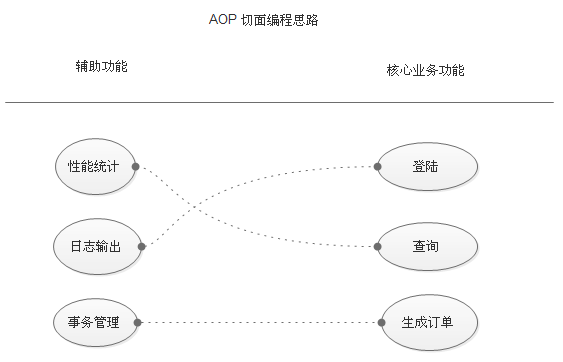
Spring(1)中有讲过什么是AOP,这里就放一个原理图看一下
1. 功能分两大类,辅助功能和核心业务功能
2. 辅助功能和核心业务功能彼此独立进行开发
3. 比如登陆功能,即便是没有性能统计和日志输出,也可以正常运行
4. 如果有需要,就把"日志输出" 功能和 "登陆" 功能 编织在一起,这样登陆的时候,就可以看到日志输出了
5. 辅助功能,又叫做切面,这种能够选择性的,低耦合的把切面和核心业务功能结合在一起的编程思想,就叫做切面编程
2.准备业务类ProductService
 package service;

 public class ProductService {

     public void doSomeService(){

         System.out.println("doSomeService");

     }

 }
ProductService.java
3.引入切面之前调用业务类
 package test;

 import org.springframework.context.ApplicationContext;
 import org.springframework.context.support.ClassPathXmlApplicationContext;

 import com.how2java.service.ProductService;

 public class TestSpring {

     public static void main(String[] args) {
         ApplicationContext context = new ClassPathXmlApplicationContext(new String[] { "applicationContext.xml" });
         ProductService s = (ProductService) context.getBean("s");
         s.doSomeService();
     }
 }
TestSpring.java
运行之前需要在配置文件中加一个扫描
 <?xml version="1.0" encoding="UTF-8"?>
 <beans xmlns="http://www.springframework.org/schema/beans"
     xmlns:xsi="http://www.w3.org/2001/XMLSchema-instance"
     xmlns:aop="http://www.springframework.org/schema/aop"
     xmlns:tx="http://www.springframework.org/schema/tx"
     xmlns:context="http://www.springframework.org/schema/context"
     xsi:schemaLocation="
    http://www.springframework.org/schema/beans
    http://www.springframework.org/schema/beans/spring-beans-3.0.xsd
    http://www.springframework.org/schema/aop
    http://www.springframework.org/schema/aop/spring-aop-3.0.xsd
    http://www.springframework.org/schema/tx
    http://www.springframework.org/schema/tx/spring-tx-3.0.xsd
    http://www.springframework.org/schema/context
    http://www.springframework.org/schema/context/spring-context-3.0.xsd">

     <bean name="s" class="service.ProductService">   //声明业务对象
     </bean>
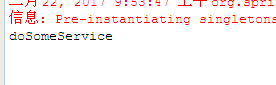
运行结果
4.准备日志切面 LoggerAspect
该日志切面的功能是 在调用核心功能之前和之后分别打印日志,切面就是原理图中讲的那些辅助功能。
下面是切面要执行的函数 log,log函数有一个形参 joinPoint 这个可以理解为断点
第8行代码可以理解为就是将来与某个核心功能编织之后,用于执行核心功能的代码
getSignature 获取切点的签名
proceed() 执行切点本来的业务
 package aspect;
 import org.aspectj.lang.ProceedingJoinPoint;

 public class LoggerAspect {

     public Object log(ProceedingJoinPoint joinPoint) throws Throwable {
         System.out.println("start log:" + joinPoint.getSignature().getName());    //开始
         Object object = joinPoint.proceed();   //监视
         System.out.println("end log:" + joinPoint.getSignature().getName());  //执行切面,结束
         return object;
     }
 }
5.AOP配置文件详解
17-20行:详情见注释
23-25行: 指定右边的核心业务功能 看原理图的实现
这一句是声明切入点,切入点的 id 叫 loggerCutPoint ,用来标记这个切入点,这个expression表示:满足expression中的方法调用之后,就会去进行切面操作,类似于触发了切面
第一个 * 代表返回任意类型 service.ProductService.* 表示包名以 service.ProductService 开头的类的任意方法(第二个*表示任意方法,通配符的意思)(..) 表示方法的参数是任意数量和类型
简单说就是,只要service这个包中的ProductService类的任意一个函数被调用,不管返回值是什么,都会触发开关,我就会去执行切面,也就是辅助功能,但是辅助功能是什么呢,就是下面两句:
27-29行: 指定左边的辅助功能 看原理图的实现
这两句是定义了一个切面,上面说只要触发开关,就会去执行切面,就是指的这里的切面,所谓切面,就是一个类中的方法...
id代表这个切面的名字,ref就是指的方法所在的类,method代表的就是方法的名字,
pointcut-ref="loggerCutpoint" 这个就是表示这个切面是和上面的切点关联起来的(一个切点是可以关联多个切面的,一个切面只能关联一个方法),只要上面的切点被触发,就会到这里来执行一些辅助功能
after表示在切入点触发之后来执行我这个中断,当然也有before,一共有五个before,after,After-returning ,After-throwing,Around。具体的AOP术语单独用一篇博客细讲一下
在 method 参数后面,还可以加上参数列表。
<aop:config/>:把业务对象与辅助功能编织在一起。
 <?xml version="1.0" encoding="UTF-8"?>
 <beans xmlns="http://www.springframework.org/schema/beans"
     xmlns:xsi="http://www.w3.org/2001/XMLSchema-instance"
     xmlns:aop="http://www.springframework.org/schema/aop"
     xmlns:tx="http://www.springframework.org/schema/tx"
     xmlns:context="http://www.springframework.org/schema/context"
     xsi:schemaLocation="
    http://www.springframework.org/schema/beans
    http://www.springframework.org/schema/beans/spring-beans-3.0.xsd
    http://www.springframework.org/schema/aop
    http://www.springframework.org/schema/aop/spring-aop-3.0.xsd
    http://www.springframework.org/schema/tx
    http://www.springframework.org/schema/tx/spring-tx-3.0.xsd
    http://www.springframework.org/schema/context
    http://www.springframework.org/schema/context/spring-context-3.0.xsd">

     <bean name="s" class="service.ProductService">
     </bean>    //声明业务类

     <bean id="loggerAspect" class="aspect.LoggerAspect"/>   //声明日志切面

     <aop:config>
         <aop:pointcut id="loggerCutpoint"
             expression=
             "execution(* service.ProductService.*(..)) "/>

         <aop:aspect id="logAspect" ref="loggerAspect">
             <aop:around pointcut-ref="loggerCutpoint" method="log"/>
         </aop:aspect>
     </aop:config>

 </beans>
6.测试代码
 package test;

 import org.springframework.context.ApplicationContext;
 import org.springframework.context.support.ClassPathXmlApplicationContext;

 import service.ProductService;

 public class TestSpring {

     public static void main(String[] args) {
         ApplicationContext context = new ClassPathXmlApplicationContext(
                 new String[] { "applicationContext.xml" });
         ProductService s = (ProductService) context.getBean("s");
         s.doSomeService();
     }
 }
TestSpring.java
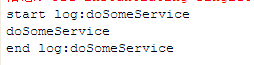
运行测试,可以发现在编织之后,业务方法运行之前和之后分别会打印日志
SpringAOP(5)的更多相关文章
- Spring-AOP实践 - 统计访问时间
公司的项目有的页面超级慢,20s以上,不知道用户会不会疯掉,于是老大说这个页面要性能优化.于是,首先就要搞清楚究竟是哪一步耗时太多. 我采用spring aop来统计各个阶段的用时,其中计时器工具为S ...
- Spring-Aop入门
(一)Aop术语定义 1.通知(advice) 通知定义了切面要做什么工作,即调用的方法,同时定义了什么时候做这些工作,即以下五种类型 (1)前置通知(Before) :在目标方法调用之前执行切面方法 ...
- 转-springAOP基于XML配置文件方式
springAOP基于XML配置文件方式 时间 2014-03-28 20:11:12 CSDN博客 原文 http://blog.csdn.net/yantingmei/article/deta ...
- SpringAOP详解(转载大神的)
AOP(Aspect-Oriented Programming)这个东西,名字与 OOP 仅差一个字母,其实它是对 OOP 编程方式的一种补充,并非是取而代之.翻译过来就是"面向方面编程&q ...
- spring-aop学习
SpringAOP学习 author:luojie 1. AOP中的基本概念 AOP的通用术语,并非spring java所特有.很遗憾AOP的术语不是特别的直观.但如果让Spring java来 ...
- SpringAOP之静态代理
一.SpringAOP: ⒈AOP:Aspect Oriented Programming 面向切面编程, 实现的是核心业务和非核心业务之间的的分离,让核心类只做核心业务,代理类只做非核心业务. ⒉ ...
- springaop实现登陆验证
1.首先配置好springmvc和springaop 2.先写好登陆方法,通过注解写代理方法 通过代理获得登陆方法的参数方法名,然后再aop代理方法内进行登陆验证 贴出代码 package com.h ...
- spring-aop示例
具体案例放在github上,主要是jar包在上面 https://github.com/guoyansi/spring-aop-example knights.xml <?xml version ...
- 使用SpringAop 验证方法参数是否合法
(原文地址:http://blog.csdn.net/is_zhoufeng/article/details/7683194) 1.依赖包 aspectjweaver.jar 其中Maven的配 ...
- 关于SpringAOP的XML方式的配置
AOP(XML)[理解][应用][重点] 1.AOP基础实例 A.导入jar包 核心包(4个) 日志(2个) AOP(4个) Spring进行AOP开发(1个) ...
随机推荐
- Python-炫酷二维码
一.环境 首先是安装python环境,如果没有安装python环境看此处 二.myqr myqr 其实是一个 python 的脚本,可以生产二维码图片,作者也对python脚本进行了打包,在 ...
- SpringBoot进阶教程(二十七)整合Redis之分布式锁
在之前的一篇文章(<Java分布式锁,搞懂分布式锁实现看这篇文章就对了>),已经介绍过几种java分布式锁,今天来个Redis分布式锁的demo.redis 现在已经成为系统缓存的必备组件 ...
- FreeSql 如何实现 Sqlite 跨库查询
FreeSql 是 .NetFramework 4.6+..NetCore 下的 ORM 功能库,提供了丰富的功能,支持五种流行数据库 MySql/SqlServer/PostgreSQL/Oracl ...
- 使用PixiJS做一个小游戏
PixiJS PixiJS使用WebGL,是一个超快的HTML5 2D渲染引擎.作为一个Javascript的2D渲染器,Pixi.js的目标是提供一个快速的.轻量级而且是兼任所有设备的2D库. 官方 ...
- JDK和Tomcat安装和配置过程
Jdk: 第一步:在下载JDK 第二步:安装 更改安装路径 *JDK配置: JAVA_HOME 环境变量 D:\jdk1.7.0 CLASSPATH 环境变量 .,%JAVA_HOME%\lib ...
- 解决Android编译时出现aapt.exe finished with non-zero exit value 1
当出现这个错误的时候,说明了你的资源文件出错了.然而AS能给你提供的信息实在太少,看了半天没看出个所以然,也没有说明是哪个资源文件出错,一头雾水. 这时候就可以用 Gradlew 来调试. 而grad ...
- 运维DBA要不要学python
运维DBA要不要学python 我个人认为是:要 现在python在运维数据库的工作中主要用在 1.编写一些运维脚本 2.编写运维管理平台 3.研究互联网大厂的运维脚本/工具并应有 特别是运维开源数据 ...
- 2018-08-20 中文代码之Spring Boot集成H2内存数据库
续前文: 中文代码之Spring Boot添加基本日志, 源码库地址相同. 鉴于此项目中的数据总量不大(即使万条词条也在1MB之内), 当前选择轻量级而且配置简单易于部署的H2内存数据库比较合理. 此 ...
- sql sever insert into混合嵌套插入
如果你想插入的字段取值方式不同,既有自己设定的值,又想插入某个表中的某个字段数据,下面就举例说明 insert into Meters(metertypeid, meternumber, consta ...
- C++基础——类继承中方法重载
一.前言 在上一篇C++基础博文中讨论了C++最基本的代码重用特性——类继承,派生类可以在继承基类元素的同时,添加新的成员和方法.但是没有考虑一种情况:派生类继承下来的方法的实现细节并不一定适合派生类 ...