
SpringBoot——配置及原理
更多内容,前往IT-BLOG
一、Spring Boot全局配置文件
application.properties 与 application.yml 配置文件的作用:可以覆盖 SpringBoot 配置的默认值。
YML(is not a Markup Language:不仅仅是一个标记语言):以前的配置文件,大多是xx.xml文件,而 YAML是以数据为中心,比 json、xml等更适合做配置文件。
 1 #普通配置文件.properties的语法

 2 #server.port=80

 3

 4 #XML的写法

 5 #<server>

 6 #   <port>8080<port/>

 7 #<server/>

 8

 9 #yml 以数据为中心的语法

10 server:

11   port: 8080
YML语法:基本语法:k:(空格)v--->表示一对键值对。(以空格缩进来控制层级关系;只要是左对齐的一列数据,都是同一层级)属性和值也是大小写敏感。
1 server:

2   port: 8080

3   path: /hello

4 spring:

5   profiles: dev
值的写法:【1】字面量:普通的值(数字、字符串、布尔),字符串默认是不用加上单引号或者双引号,但也可以加,但是有区别:双引号,不会转义字符串里面的特殊字符,特殊字符会作为本身想表达的意思。单引号,会转义特殊字符,特殊字符最终只是一个普通的字符串数据。
【2】对象(属性和值)或者Map(键值对)的表达[k: v]形式,对象也是[k: v]的方式。比较抽象,我们举个栗子看看:
1 #yml正常写法

2 friends:

3     lastName: zhangsan

4     age: 20

5

6 #行内写法

7 friends: {lastName: zhangsan,age: 20}
【3】数组(List、Set)用 [- 值]表示数组中的一个元素,也举一个栗子:
1 # yml正常写法 -值 形式

2 pets:

3    - cat

4    - dog

5 #行内写法

6 pets: [cat,dog]
配置文件注入:测试上面数据赋值是否正确。
【1】准备配置文件:application.yml
 1 person:

 2   lastName: zhangsan

 3   age: 20

 4   boss: false

 5   birth: 2018/8/20

 6   map: {k1: v1,k2: v2}

 7   lists: [listi,zhaoliu]

 8   dog:

 9     name: gou

10     age: 2
【2】准备 JavaBean:@ConfigurationProperties(prefix ="person") 表示将配置文件中的 person的每一个属性映射到这个组件中,但只有这个组件是容器中的组件,才能提供功能。需要使用 @Component标注才能成为容器组件。
 1 @Component

 2 @ConfigurationProperties(prefix ="person")

 3 public class Person {

 4     private String lastName;

 5     private Integer age;

 6     private boolean boss;

 7     private Date birth;

 8     private Map<String,String> map;

 9     private List lists;

10     private Dog dog;

11 }
【3】优化:当准备2中的文件,会提示我们 “Spring Boot Configuration Annotation ...” 点击去后会发现如下 starters信息,那么我们将此配置于 pom文件中,作用:当我们在配置文件中,给带有 @ConfigurationProperties的实体类赋值时会有属性提示。
<dependency>

    <groupId>org.springframework.boot</groupId>

    <artifactId>spring-boot-configuration-processor</artifactId>

    <optional>true</optional>

</dependency>
【4】测试: 进入 test目录底下的类目录,直接导入 person输入,查看是否已赋值即可。
 1 //使用Spring的驱动器,不用再使用JUnit的驱动器了

 2 @RunWith(SpringRunner.class)

 3 @SpringBootTest

 4 public class HellowordQuickStartApplicationTests {

 5         //在测试期间可以类似编码一样进行自动注入

 6     @Autowired

 7     Person person;

 8

 9         @Test

10     public void testPersion(){

11         System.out.println(person);

12     }

13 }
【5】properties 中的语句与 yml不同,以下是 properties的配置语句。
 1 #person.lastName=张三 也是可以的

 2 person.last-name=张三

 3 person.age=18

 4 person.birth=2013/04/23

 5 person.boss=false

 6 person.map.key1=v1

 7 person.map.key2=v2

 8 person.lists=a,b,c

 9 person.dog.name=dog

10 person.dog.age=2
【6】测试的时候可能会出现乱码,设置如下。properties 默认的编码时ASK码,我们需要将其设置为UTF-8来解决乱码问题。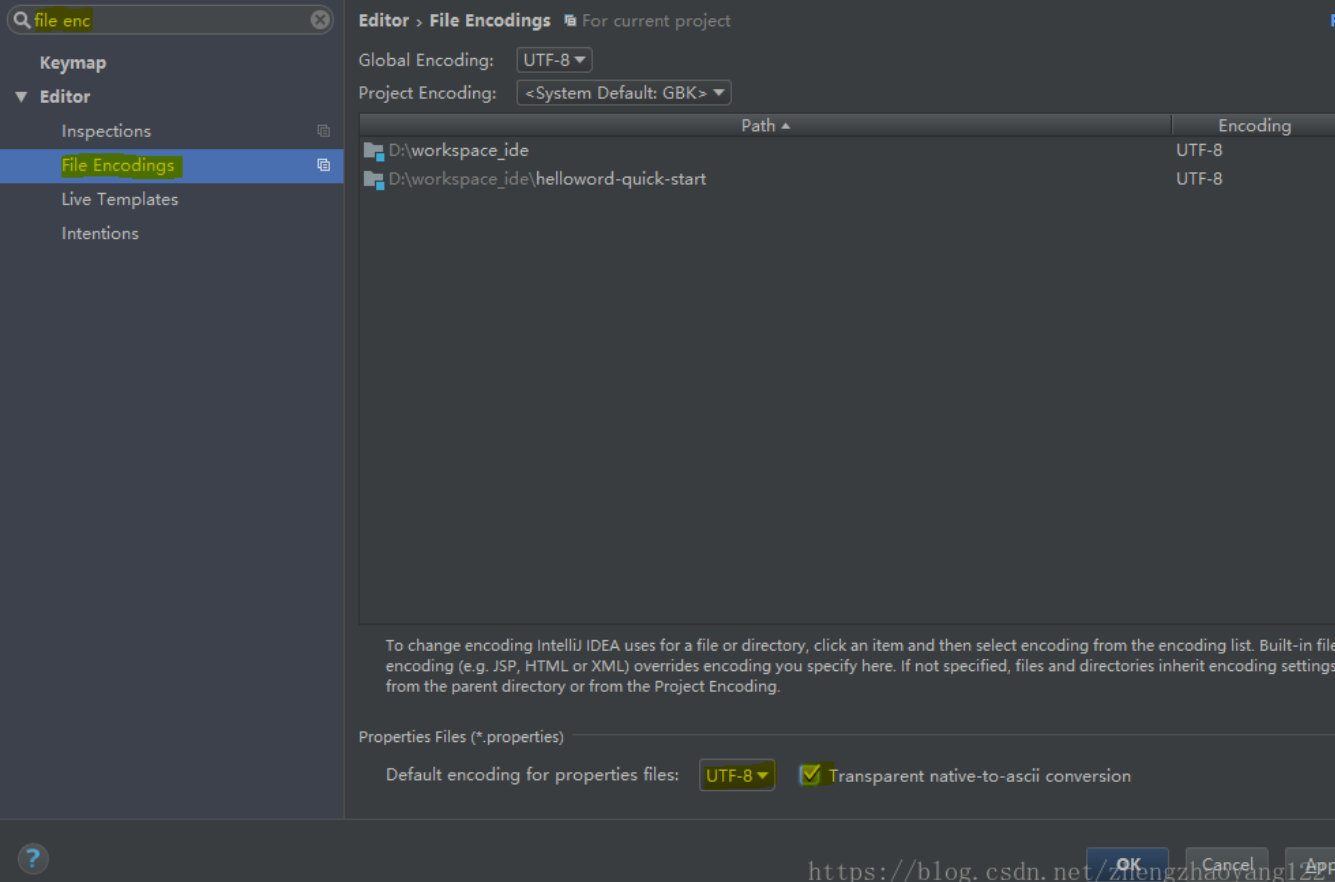
【7】第二种赋值方式:@Value(“字面量/${key}从环境变量、配置文件中获取值/#{SpEL}”)---三种传值方式
 1 @Component

 2 //@ConfigurationProperties(prefix ="person")

 3 public class Person {

 4     //@email @Value不支持校验(JSR303数据校验)

 5     @Value("${person.last-name}")

 6     private String lastName;

 7     //SPEL

 8     @Value("#{22*3}")

 9     private Integer age;

10     @Value("true")

11     private boolean boss;
● @Vaule与@ConfigurationProperties两者的区别如下:(其实@Value最多用在获取单个值的时候使用)
| @configuration | @value | |
| 功能 | 批量注入配置文件中的属性 | 每个属性单独配置 |
| 松散绑定(松散语法) | 支持(大小写不敏感) | 不支持(与配置文件保持一致) |
| SpEL | 不支持(不能用于逻辑计算) | 支持#{逻辑计算} |
| JSR303数据校验 | 支持@validated | 不支持 |
| 复杂类型封装 | 支持 | 不支持(map对象) |
二、@PropertySource 与 @ConfigurationProperties之间的区别
@ConfigurationProperties:默认从全局配置文件中加载值。
● @PropertySource:指向自己定义的 properties配置文件,新建 person.properties配置文件(省略),如下获取值。
1 //优先级高于@ConfigurationProperties(prefix ="person")

2 @PropertySource(value = {"classpath:person.properties"})

3 @Component

4 //@ConfigurationProperties(prefix ="person")

5 //@Validated

6 public class Person {
● @ImportResource:导入 Spring的配置文件,让配置文件里面的内容生效 。
1)、定义配置文件bean.xml(以前的配置,SpringBoot不这么用)
1 <?xml version="1.0" encoding="UTF-8"?>

2 <beans xmlns="http://www.springframework.org/schema/beans"

3        xmlns:xsi="http://www.w3.org/2001/XMLSchema-instance"

4        xsi:schemaLocation="http://www.springframework.org/schema/beans

5        http://www.springframework.org/schema/beans/spring-beans.xsd">

6

7     <bean id="helloService" class="com.atguigu.Servers.HelloService"></bean>

8 </beans>
2)、在主程序中使用@ImportResource注解导入bean.xml配置文件
@ImportResource(locations={"classpath:bean.xml"})

@SpringBootApplication

public class HellowordQuickStartApplication {
● SpringBoot中(配置类====配置文件xml)推荐使用配置类,如下创建:
 1 //@Configuration指明当前类是一个配置类 替代配置文件

 2 @Configuration

 3 public class MyAppConfig {

 4     //@bean注解就相当于<bean></bean>标签

 5     @Bean

 6     //方法名就相当于xml中的id , 项目启动时就会将组件加入容器中

 7     public HelloService helloService(){

 8         System.out.println("@Bean给容器中添加组件");

 9         return new HelloService();

10     }

11 }
三、配置文件占位符
【1】随机数(了解即期)
${random.value}、${random.int}、${random.log}、${random.int(10)}
【2】占位符(当属性不存在时,可以给一个默认值,例如下面age属性值得获取)
persion.last-name=张三

persion.dog.name=${persion.last_name}_dog

perdion.dog.age=${persion.noexistage:20}
四、Profile:是 Spring对不同环境提供不同配置功能的支持,可以通过激活、指定参数等方式快速切换环境
【1】多 profile文件形式(了解一下,我们使用更多的是2中的yml形式):我们可以编写多个配置文件,对应多个场景(开发、测试、生产等),文件名可以是 application-{profile}.properties/yml的形式命名,例如:application-dev.properties

项目启动时默认使用application.properties的配置,如果要激活开发配置文件,在application.properties中输入如下激活信息。
#激活dev开发模式的配置文件,就不用application.properties文件的配置了

spring.profiles.active=dev
【2】yml 支持多文档块方式(推荐使用):通过“---”来划分文档块,Document表示所处模块的位置/总块 。
 1 # --- 称为多文档快 , 简写1中的形式

 2 ---

 3 server:

 4   port: 8080

 5   path: /hello

 6 # 如下为激活profiles ,如果不激活则默认为Document1中的配置

 7 spring:

 8   profiles:

 9     active: dev

10 ---

11 server:

12   port: 8084

13 spring:

14   profiles: prod

15 ---

16 server:

17   port: 8081

18 spring:

19   profiles:

20     active: dev
【3】激活指定 profile方式,上面用的都是第一种:
1)在默认配置 application.properties 中设置spring.profiles.active属性
spring.profiles.active=dev
2)命令行:--spring.profiles.active=dev
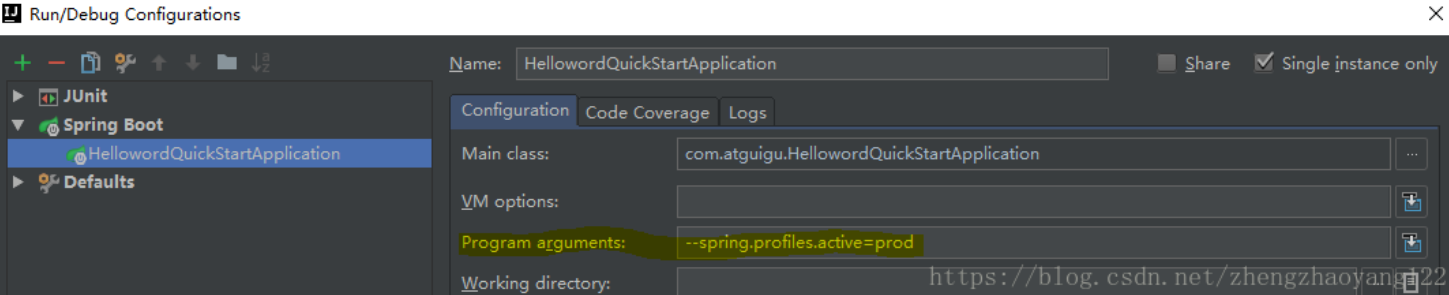
命令行运行 jar包的方式:java -jar xxx.jar --spring.profiles.active=dev;
3)虚拟机参数:-Dspring.profiles.active=prod;

五、配置文件加载位置:也就优先级
SpringBoot 启动时会扫描以下位置的application.properties 或者 application.yml 文件作为 SpringBoot 的默认配置文件:
【1】file:./config/ (项目底下的config目录)
【2】file:./ (直接位于项目底下的配置文件)
【3】classpath:/config/ (config文件默认没生成,需要自己创建)
【4】classpath:/ (项目创建后,配置文件默认位置)
以上是按照优先级从高到低的顺序,所有位置的文件都会被加载,高优先级配置内容会覆盖低优先级配置的相同内容。
我们也可以通过 spring.config.location 来改变默认配置(项目打包成功以后,我们可以使用命令行参数的形式,启动项目来指定配置文件的新位置;指定的配置文件会共同起作用,形成互补作用),这个优先级肯定最高了。而且我们要知道,打jar包的时候只包含src底下的main和resource文件,1、2中的不会被打包进去。其实将jar包与配置文件*.yml等放在同一个目录下的情况也比较多常见,因为灵活。项目启动时可以自动加载同目录下的*.yml等配置文件。且优先级高于内部的配置文件,之间互补配置。
#命令行添加配置,优先级最高

java -jar xxx.jar --spring.config.location=d:\xxx.properties
六、自动配置原理
【1】SpringBoot 启动的时候加载主配置类,@SpringBootApplication下开启了主配置功能@EnableAutoConfiguration
【2】@EnableAutoConfiguration作用:①、利用EnableAutoConfigurationImportSelector给容器导入一些组件。
②、可以查看 selectImports() 方法的内容:List configurations = getCandidateConfigurations(annotationMetadata, attributes);获取候选的配置。SpringFactoriesLoader.loadFactoryNames()扫描所有jar包类路径下 META‐INF/spring.factories 把扫描到的这些文件的内容包装成properties对象从properties中获取到EnableAutoConfiguration.class 类(类名)对应的值,然后把他们添加在容器中。
【3】将类路径下 META-INF/spring.factories 里面配置的所有 EnableAutoConfiguration的值加入到了容器中;
# EnableAutoConfiguration  对应 @EnableAutoConfiguration

org.springframework.boot.autoconfigure.EnableAutoConfiguration=\

org.springframework.boot.autoconfigure.admin.SpringApplicationAdminJmxAutoConfiguration,\

org.springframework.boot.autoconfigure.aop.AopAutoConfiguration,\

org.springframework.boot.autoconfigure.amqp.RabbitAutoConfiguration,\

org.springframework.boot.autoconfigure.batch.BatchAutoConfiguration,\

org.springframework.boot.autoconfigure.cache.CacheAutoConfiguration,\

org.springframework.boot.autoconfigure.cassandra.CassandraAutoConfiguration,\

org.springframework.boot.autoconfigure.cloud.CloudAutoConfiguration,\

org.springframework.boot.autoconfigure.context.ConfigurationPropertiesAutoConfiguration,\

org.springframework.boot.autoconfigure.context.MessageSourceAutoConfiguration,\

org.springframework.boot.autoconfigure.context.PropertyPlaceholderAutoConfiguration,\

org.springframework.boot.autoconfigure.couchbase.CouchbaseAutoConfiguration,\

org.springframework.boot.autoconfigure.dao.PersistenceExceptionTranslationAutoConfiguration,\

org.springframework.boot.autoconfigure.data.cassandra.CassandraDataAutoConfiguration,\

org.springframework.boot.autoconfigure.data.cassandra.CassandraReactiveDataAutoConfiguration,\
每一个这样的 xxxAutoConfiguration 类都是容器中的一个组件,都加入到容器中。用他们来做自动配置;
【4】每一个自动配置类进行自动配置功能,以 HttpEncodingAutoConfiguration(Http编码自动配置)为例解释自动配置原理;
 1 @Configuration //表示这是一个配置类,以前编写的配置文件一样,也可以给容器中添加组件

 2 @EnableConfigurationProperties(HttpEncodingProperties.class) //启动指定类的

 3 //ConfigurationProperties功能;将配置文件中对应的值和HttpEncodingProperties绑定起来;并把

 4 //HttpEncodingProperties加入到ioc容器中

 5 @ConditionalOnWebApplication //Spring底层@Conditional注解(Spring注解版),根据不同的条件,如果

 6 //满足指定的条件,整个配置类里面的配置就会生效; 判断当前应用是否是web应用,如果是,当前配置类生效

 7 @ConditionalOnClass(CharacterEncodingFilter.class) //判断当前项目有没有这个类

 8 //CharacterEncodingFilter;SpringMVC 中进行乱码解决的过滤器;

 9 //判断配置文件中是否存在某个配置 spring.http.encoding.enabled;如果不存在,判断也是成立的

10 @ConditionalOnProperty(prefix = "spring.http.encoding", value = "enabled", matchIfMissing = true)

11 //即使我们配置文件中不配置pring.http.encoding.enabled=true,也是默认生效的;

12 public class HttpEncodingAutoConfiguration {

13     //他已经和SpringBoot的配置文件映射了

14     private final HttpEncodingProperties properties;

15     //只有一个有参构造器的情况下,参数的值就会从容器中拿

16     public HttpEncodingAutoConfiguration(HttpEncodingProperties properties) {

17         this.properties = properties;

18     }

19

20     @Bean //给容器中添加一个组件,这个组件的某些值需要从properties中获取

21     @ConditionalOnMissingBean(CharacterEncodingFilter.class) //判断容器没有这个组件?

22     public CharacterEncodingFilter characterEncodingFilter() {

23         CharacterEncodingFilter filter = new OrderedCharacterEncodingFilter();

24         filter.setEncoding(this.properties.getCharset().name());

25         filter.setForceRequestEncoding(this.properties.shouldForce(Type.REQUEST));

26         filter.setForceResponseEncoding(this.properties.shouldForce(Type.RESPONSE));

27         return filter;

28     }
根据当前不同的条件判断,决定这个配置类是否生效?一但这个配置类生效;这个配置类就会给容器中添加各种组件;这些组件的属性是从对应的properties类中获取的,这些类里面的每一个属性又是和配置文件绑定的;
【5】所有在配置文件中能配置的属性都是在 xxxxProperties类中封装;配置文件能配置什么就可以参照某个功能对应的属性类
@ConfigurationProperties(prefix = "spring.http.encoding") //从配置文件中获取指定的值和bean的属性进行绑定

public class HttpEncodingProperties {

public static final Charset DEFAULT_CHARSET = Charset.forName("UTF‐8");
精髓:【1】SpringBoot 启动会加载大量的自动配置类;
【2】我们看我们需要的功能有没有SpringBoot默认写好的自动配置类;
【3】我们再来看这个自动配置类中到底配置了哪些组件;(只要我们要用的组件有,我们就不需要再来配置了)
【4】给容器中自动配置类添加组件的时候,会从properties类中获取某些属性。我们就可以在配置文件中指定这些属性的值;
xxxxAutoConfigurartion:自动配置类,给容器中添加组件。xxxxProperties:封装配置文件中相关属性;
七、@ConditionalOnxxx 中的 @Conditional 派生注解(Spring注解版原生的@Conditional作用)作用
必须是 @Conditional 指定的条件成立,才给容器中添加组件,配置配里面的所有内容才生效。

● 自动配置类必须在一定的条件下才能生效,那么我们如何知道哪些配置类生效哪些没有生效,其实我们可以通过在配置文件启用 debug=true属性,就可以查看哪些配置类生效。
debug=true
通过控制台打印自动配置报告,我们就可以知道哪些自动配置类生效(Positive matches:匹配成功的自动配置类)
Positive matches:

-----------------

   CodecsAutoConfiguration matched:

      - @ConditionalOnClass found required class 'org.springframework.http.codec.CodecConfigurer'; @ConditionalOnMissingClass did not find unwanted class (OnClassCondition)

   CodecsAutoConfiguration.JacksonCodecConfiguration matched:

      - @ConditionalOnClass found required class 'com.fasterxml.jackson.databind.ObjectMapper'; @ConditionalOnMissingClass did not find unwanted class (OnClassCondition)

   CodecsAutoConfiguration.JacksonCodecConfiguration#jacksonCodecCustomizer matched:

      - @ConditionalOnBean (types: com.fasterxml.jackson.databind.ObjectMapper; SearchStrategy: all) found bean 'jacksonObjectMapper' (OnBeanCondition)

   DispatcherServletAutoConfiguration matched:

      - @ConditionalOnClass found required class 'org.springframework.web.servlet.DispatcherServlet'; @ConditionalOnMissingClass did not find unwanted class (OnClassCondition)

      - found ConfigurableWebEnvironment (OnWebApplicationCondition)
自动配置未生效类(Negative matches:匹配失败的自动配置类)
Negative matches:

-----------------

   ActiveMQAutoConfiguration:

      Did not match:

         - @ConditionalOnClass did not find required classes 'javax.jms.ConnectionFactory', 'org.apache.activemq.ActiveMQConnectionFactory' (OnClassCondition)

   AopAutoConfiguration:

      Did not match:

         - @ConditionalOnClass did not find required classes 'org.aspectj.lang.annotation.Aspect', 'org.aspectj.lang.reflect.Advice', 'org.aspectj.weaver.AnnotatedElement' (OnClassCondition)

   ArtemisAutoConfiguration:

      Did not match:

         - @ConditionalOnClass did not find required classes 'javax.jms.ConnectionFactory', 'org.apache.activemq.artemis.jms.client.ActiveMQConnectionFactory' (OnClassCondition)

----关注公众号,获取更多内容----
SpringBoot——配置及原理的更多相关文章
- SpringBoot学习(六)-->SpringBoot的自动配置的原理
Spring Boot的自动配置的原理 Spring Boot在进行SpringApplication对象实例化时会加载META-INF/spring.factories文件,将该配置文件中的配置载入 ...
- springboot之启动原理解析
前言 SpringBoot为我们做的自动配置,确实方便快捷,但是对于新手来说,如果不大懂SpringBoot内部启动原理,以后难免会吃亏.所以这次博主就跟你们一起一步步揭开SpringBoot的神秘面 ...
- springboot配置详解
springboot配置详解 Author:SimpleWu properteis文件属性参考大全 springboot默认加载配置 SpringBoot使用两种全局的配置文件,全局配置文件可以对一些 ...
- SpringBoot 配置 Servlet、Filter、Listener
SpringBoot 配置 Servlet.Filter.Listener 在SpringBoot应用中,嵌入式的 Servlet 3.0+ 容器不会直接使用 ServletContainerInit ...
- SpringBoot配置(1) 配置文件application&yml
SpringBoot配置(1) 配置文件application&yml 一.配置文件 1.1 配置文件 SpringBoot使用一个全局的配置文件,配置文件名是固定的. application ...
- springboot之启动原理解析及源码阅读
前言 SpringBoot为我们做的自动配置,确实方便快捷,但是对于新手来说,如果不大懂SpringBoot内部启动原理,以后难免会吃亏.所以这次博主就跟你们一起一步步揭开SpringBoot的神秘面 ...
- SpringBoot启动过程原理
最近这两年springboot突然火起来了,那么我们就来看看springboot的运行原理. 一.springboot的三种启动方式: 1.运行带有main方法的2.通过命令 Java -jar命令3 ...
- SpringBoot启动流程分析(五):SpringBoot自动装配原理实现
SpringBoot系列文章简介 SpringBoot源码阅读辅助篇: Spring IoC容器与应用上下文的设计与实现 SpringBoot启动流程源码分析: SpringBoot启动流程分析(一) ...
- 浅谈SpringBoot核心注解原理
SpringBoot核心注解原理 今天跟大家来探讨下SpringBoot的核心注解@SpringBootApplication以及run方法,理解下springBoot为什么不需要XML,达到零配置 ...
- springboot4自动配置的原理(浅层)
自动配置的原理(浅层) @Configuration //这是一个配置类 @EnableConfigurationProperties(HttpProperties.class)//启用Configu ...
随机推荐
- redis数据类型常用方法
一.String set:添加String类型数据 get:获取String类型数据 del:删除数据 append:在原基础上追加数据,假如原来k1值是v1,执行append k1 ddd,那么值就 ...
- JRAT远控
JRAT java写的一款远控 可以控制mac os Windows linux 系统 https://share.weiyun.com/21b56e3e5cab4b3f145d7c2330d107 ...
- git常用命令查询手册
默认已经连接到远程仓库的情况下 本地文件夹初始化成git仓库.提交本地仓库并添加注释 git init git add 文件1(文件夹1) 文件2(文件夹2)... git commit -m &qu ...
- HTML——VSCODE配置笔记
# 使用VSCODE编辑前端代码 ### 1.问题一:无法根据!快速生成html标准代码 (1).首先看文件命名是否出错,即文件名后缀名.html (2).第一步没出错,就在新建文件的编辑状态下拨动C ...
- yii 自定义form样式适应现成模板
需求:想使用下边的样式但是使用yii中的表单样式会 <?= $form->field($model, 'attribute_code')->textInput()->label ...
- mysql-列拆分
tableA id warehouse_id 1 1,2 想要的结果: id warehouse_id 1 1 2 2 select *(其他的字段), substring_index(substri ...
- 移动APP测试要点
一. UI测试 (1) 页面布局 ① 页面布局合理且友好,符合用户习惯 ② 列表型界面有滚动条 ③ 功能入口明显,容易找到 (2) 图形测试 ① 图片大小合适且清晰 ② 页面字体与风格一致 ③ 背景颜 ...
- java pta第二次阶段性总结
一.前言 经过这三次的pta训练,我对java再一次有了一个新的认识,这三次比起之前难度更大,所涉及的知识点更多.第4.5次作业是在前几次作业上的再次拓展,由三角形拓展到四边形,再由四边形拓展到五边形 ...
- MySQL核心知识
MySQL常用的命令 启动:net start mySql; 进入:mysql -u root -p/mysql -h localhost -u root -p databaseName; 列出数据库 ...
- k8s 部署单点 rabbitmq
创建pvc vim rabbitmq-pvc.yaml kind: PersistentVolumeClaim apiVersion: v1 metadata: name: rabbitmq-data ...