
Mysql 一主一从
1. 主从原理
1.1 主从介绍
所谓 mysql 主从就是建立两个完全一样的数据库,其中一个为主要使用的数据库,另一个为次要的数据库,一般在企业中,存放比较重要的数据的数据库服务器需要配置主从,这样可以防止因数据库服务器宕机导致数据丢失,还能保证业务量太多、数据太多和访问人数太多时服务的质量(服务器响应速度),还能提供故障切换、读写分离、和备份等等功能
1.2 主从作用
- 实时灾备,用于故障切换
- 读写分离,提供查询服务
- 备份,避免影响业务
1.3 主从形式
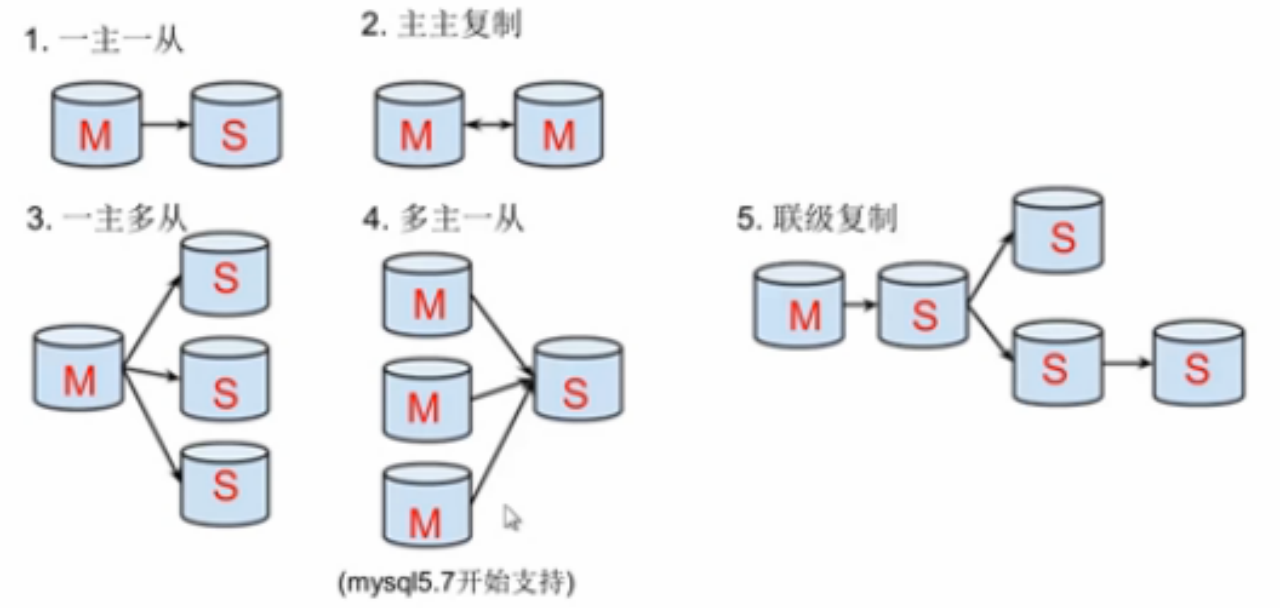
一主一从
主主复制:当作备份使用,当主服务器出现故障时,另一个主服务器会自动顶上。
一主多从:用来实现读写分离,当写操作较少时,读操作较多时使用,主服务器用来实现写操作,从服务器用来实现读操作。
多主一从:用来实现读写分离,当写操作较多时,读操作较少时使用,主服务器用来实现写操作,从服务器用来实现读操作。5.7 开始支持
联级复制:是指从主场地复制过来的又从该场地再次复制到其他场地,即 A 场地把数据复制到 B 场地,B 场地又把这些数据或其中部分数据再复制到其他场地。
1.4 主从复制原理
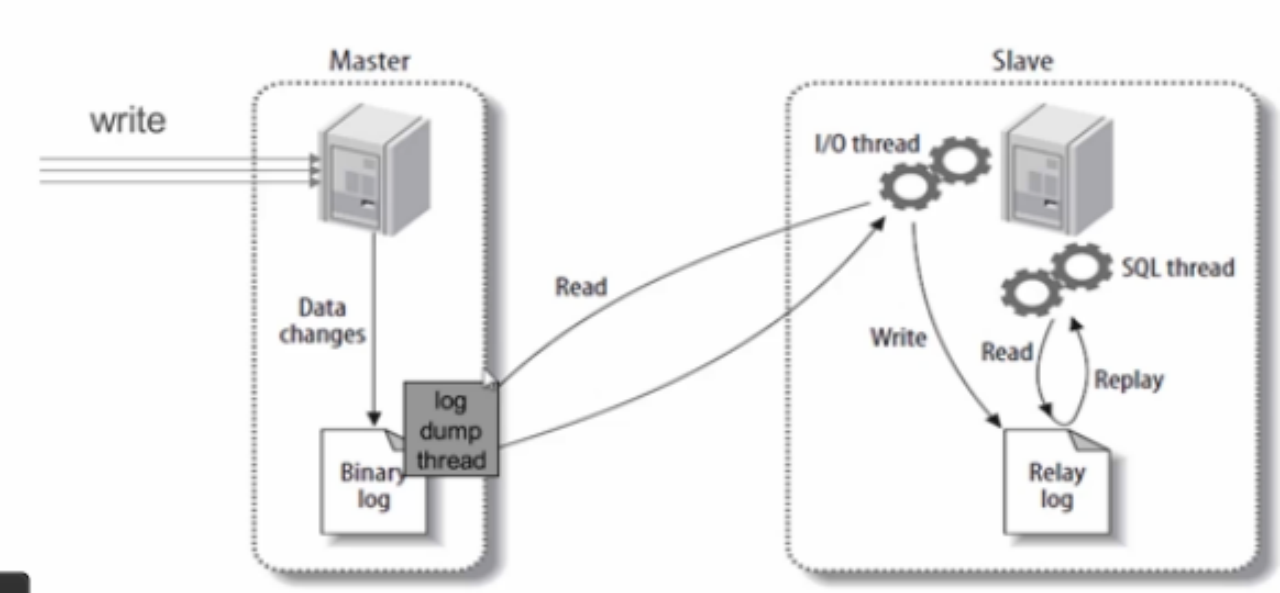
主从复制步骤:
- 主库将所有的写操作记录到 binlog 日志中并生成一个 log dump 线程,将 binlog 日志传给从库的 I/O 线程
- 从库生成两个线程,一个 I/O 线程,一个 SQL 线程
- I/O 线程去请求主库的 binlog,并将得到的 binlog 日志写到 relay log(中继日志) 文件中
- SQL 线程,会读取 relay log 文件中的日志,并解析成具体操作,来实现主从的操作一致,达到最终数据一致的目的
2. 主从复制配置
主从复制配置步骤:
确保从数据库与主数据库里的数据一样
在主数据库里创建一个同步账号授权给从数据库使用
配置主数据库(修改配置文件)
配置从数据库(修改配置文件)
需求:
搭建两台 MySQL 服务器,一台作为主服务器,一台作为从服务器,主服务器进行写操作,从服务器进行读操作
环境说明:
数据库角色	IP	应用与系统版本	有无数据

主数据库	192.168.23.4	Centos7.8 mysql-5.7	有数据

从数据库 192.168.23.5 Centos7.8 mysql-5.7 无数据2.1Mysql安装
注意:需把安装包分别上传到两台服务器上分别执行下列命令进行安装
[root@localhost soft]# yum remove mysql-libs

[root@localhost soft]# rpm -qa | grep mariadb
进行安装
将下载好的mysql-5.7.22-1.el7.x86_64.rpm-bundle.tar上传
安装相应软件

[root@localhost soft]# yum install -y openssl-devel.x86_64 openssl.x86_64 yum install -y libaio.x86_64 libaio-devel.x86_64 yum install -y perl.x86_64 perl-devel.x86_64 yum install -y perl-JSON.noarch yum install -y autoconf yum install -y wget yum install -y net-tools

关闭防火墙

[root@localhost soft]# systemctl stop firewalld

[root@localhost soft]# systemctl disable firewalld

解压软件包:

[root@localhost soft]# tar -xvf mysql-5.7.22-1.el7.x86_64.rpm-bundle.tar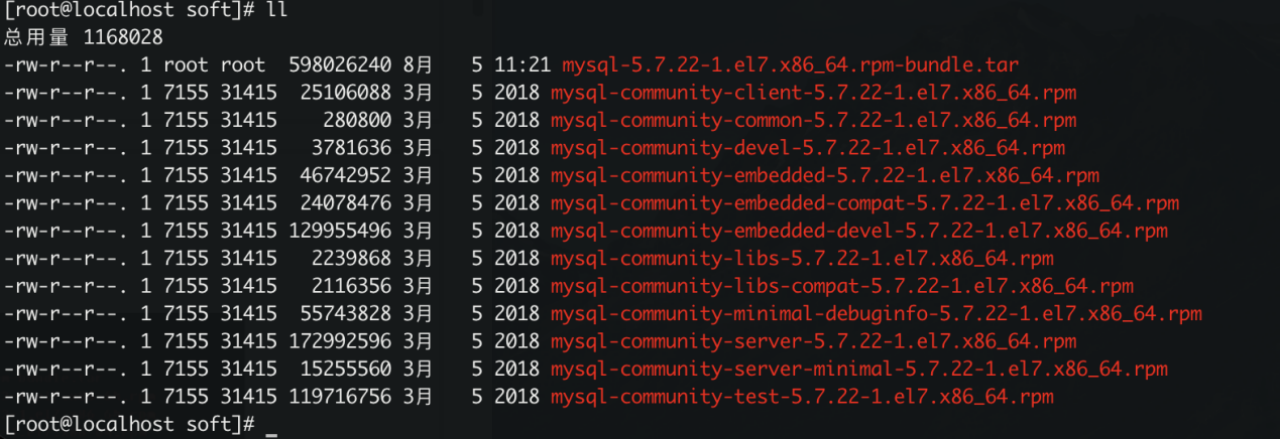
[root@localhost soft]# rpm -ivh mysql-community-common-5.7.22-1.el7.x86_64.rpm

[root@localhost soft]# rpm -ivh mysql-community-libs-5.7.22-1.el7.x86_64.rpm

[root@localhost soft]# rpm -ivh mysql-community-client-5.7.22-1.el7.x86_64.rpm

[root@localhost soft]# rpm -ivh mysql-community-server-5.7.22-1.el7.x86_64.rpm

[root@localhost soft]# rpm -ivh mysql-community-libs-compat-5.7.22-1.el7.x86_64.rpm

[root@localhostsoft]#rpm -ivh mysql-community-embedded-compat-5.7.22-1.el7.x86_64.rpm

[root@localhost soft]# rpm -ivh mysql-community-devel-5.7.22-1.el7.x86_64.rpm

[root@localhost soft]# rpm -ivh mysql-community-test-5.7.22-1.el7.x86_64.rpm

查看安装版本:

[root@localhost soft]# mysql -V
编辑配置文件
vim /etc/my.cnf
#跳过登录验证 无需密码即可登录mysql
skip-grant-tables
# 设置默认字符集UTF-8
character_set_server=utf8
collation-server=utf8_general_ci
# 设置默认字符集UTF-8
init_connect='SET NAMES utf8'
# 设置数据库日志过期天数为14天
server_id=1
expire_logs_days=14
[client]
default-character-set=utf8
##添加

skip-grant-tables

character_set_server=utf8

collation-server=utf8_general_ci

init_connect='SET NAMES utf8'

server_id=1

expire_logs_days=14

[client]

default-character-set=utf8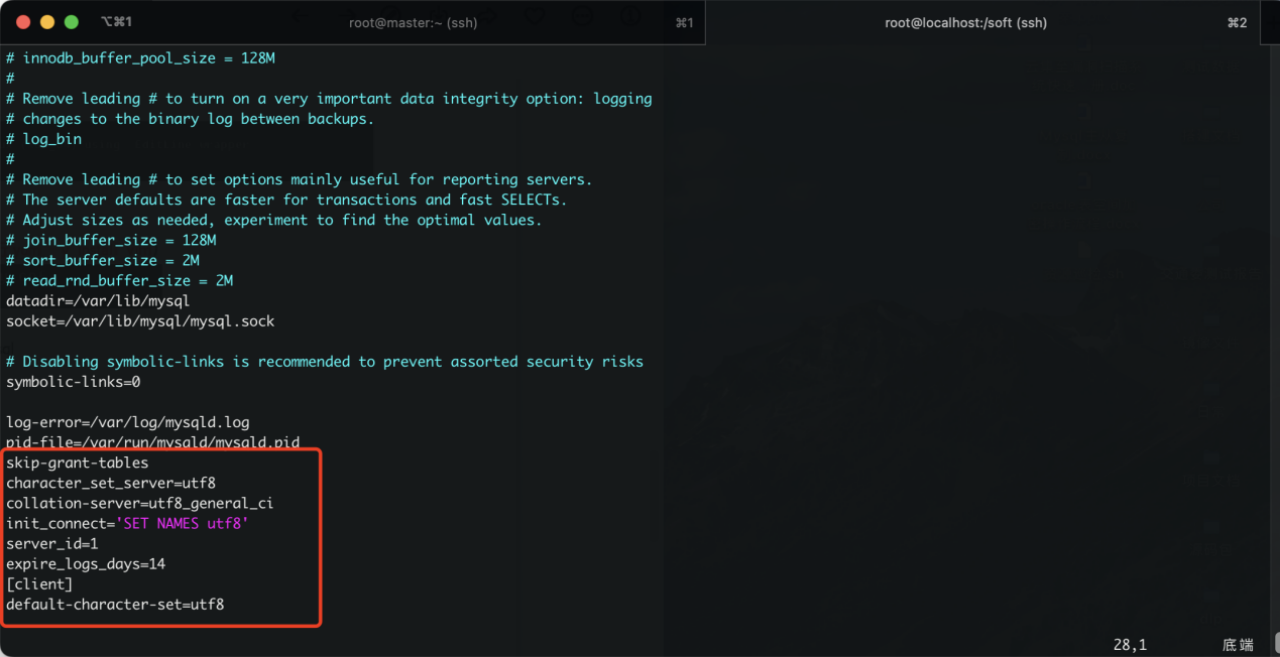
启动mysql

[root@localhost soft]# systemctl start mysqld.service

[root@localhost soft]# systemctl status mysqld
获取mysql的root用户的初始密码

[root@localhost soft]# grep 'temporary password' /var/log/mysqld.log
以获取mysql的root用户的初始密码登录数据库

[root@localhost soft]# mysql -u root -pAcqWlI64o:kG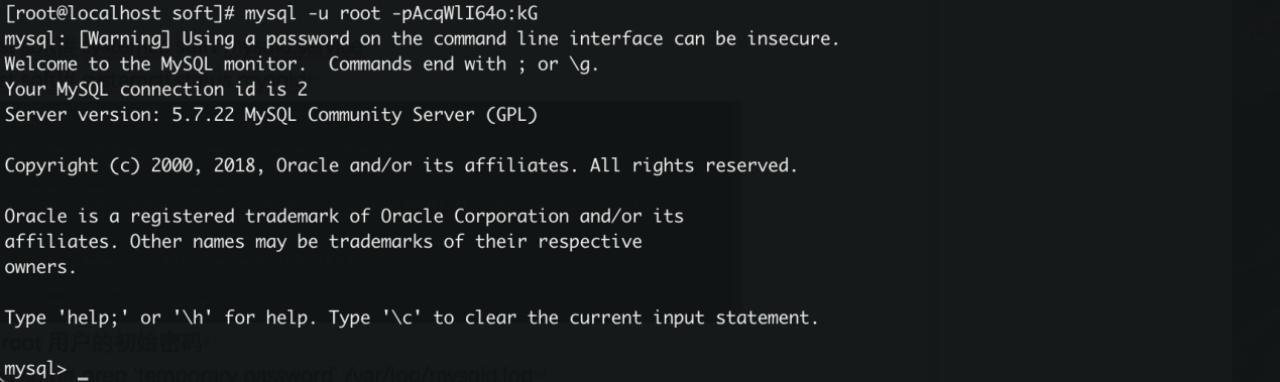
修改root密码

mysql> flush privileges;

mysql> set password for root@localhost=password('123456');

使密码即时生效

mysql> flush privileges;

允许以root身份远程登录mysql

mysql> grant all privileges on *.* to root@'%' identified by "123456";

mysql> flush privileges;
2.2 mysql 主从配置
2.2.1 确保从数据库于主数据库的数据一样
为确保从数据库与主数据库里的数据一样,先全备主数据库并还原到从数据库中
//主库为master

[root@localhost ~]# hostnamectl set-hostname master

[root@localhost ~]# bash

[root@master ~]# 
//从库为slave

[root@localhost ~]# hostnamectl set-hostname slave

[root@localhost ~]# bash

[root@slave ~]# 
//先查看主库有哪些库

[root@master soft]# mysql -uroot -p123456 -e‘show databases;'

mysql: [Warning] Using a password on the command line interface can be insecure.

+--------------------+

| Database           |

+--------------------+

| information_schema |

| mysql              |

| performance_schema |

| sys                |

| test               |

+--------------------+

//在查看从库

[root@slave soft]# mysql -uroot -p123456 -e‘show databases;'

mysql: [Warning] Using a password on the command line interface can be insecure.

+--------------------+

| Database           |

+--------------------+

| information_schema |

| mysql              |

| performance_schema |

| sys                |

+--------------------+
//全备主库 //全备主库时需要另开一个终端,给数据库加上读锁,避免在备份期间有其他人在写入导致数据不一致
mysql> flush tables with read lock;

Query OK, 0 rows affected (0.00 sec)

//此锁表的终端必须在备份完成以后才能退出
//备份主库并将备份文件传送到从库
[root@master soft]# mysqldump -uroot -p123456 --all-databases > /opt/acc-2022.sql;
mysqldump: [Warning] Using a password on the command line interface can be insecure.
[root@master ~]# ls /opt/
[root@master soft]# scp /opt/acc-2022.sql root@192.168.23.5:/opt/ 
//解除主库的锁表状态,直接退出交互式界面即可

mysql> quit

Bye

[root@master ~]#

//在从库上恢复主库的备份并查看从库有哪些库,确保与主库一致

[root@slave ~]# mysql -uroot -p123456 < /opt/acc-2022.sql

mysql: [Warning] Using a password on the command line interface can be insecure.

[root@slave ~]# mysql -uroot -p123456 -e'show databases';

mysql: [Warning] Using a password on the command line interface can be insecure.

+--------------------+

| Database           |

+--------------------+

| information_schema |

| mysql              |

| performance_schema |

| sys                |

| test               |

+--------------------+

[root@slave ~]#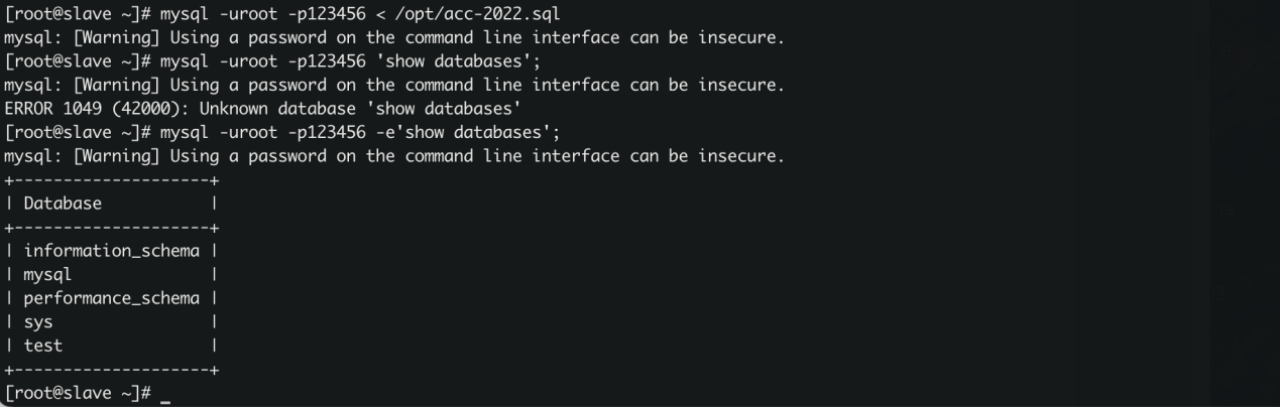
2.2.3 配置主数据库
[root@master soft]# vim /etc/my.cnf

//在[mysql]这段后面添加

datadir=/var/lib/mysql

socket=/var/lib/mysql/mysql.sock

log-bin=mysql-bin //添加 启用binlog日志

server-id=1  //添加 数据库服务器唯一标识符,主库的server-id值必须比从库的小

# Disabling symbolic-links is recommended to prevent assorted security risks symbolic-links=0

log-error=/var/log/mysqld.log

pid-file=/var/run/mysqld/mysqld.pid 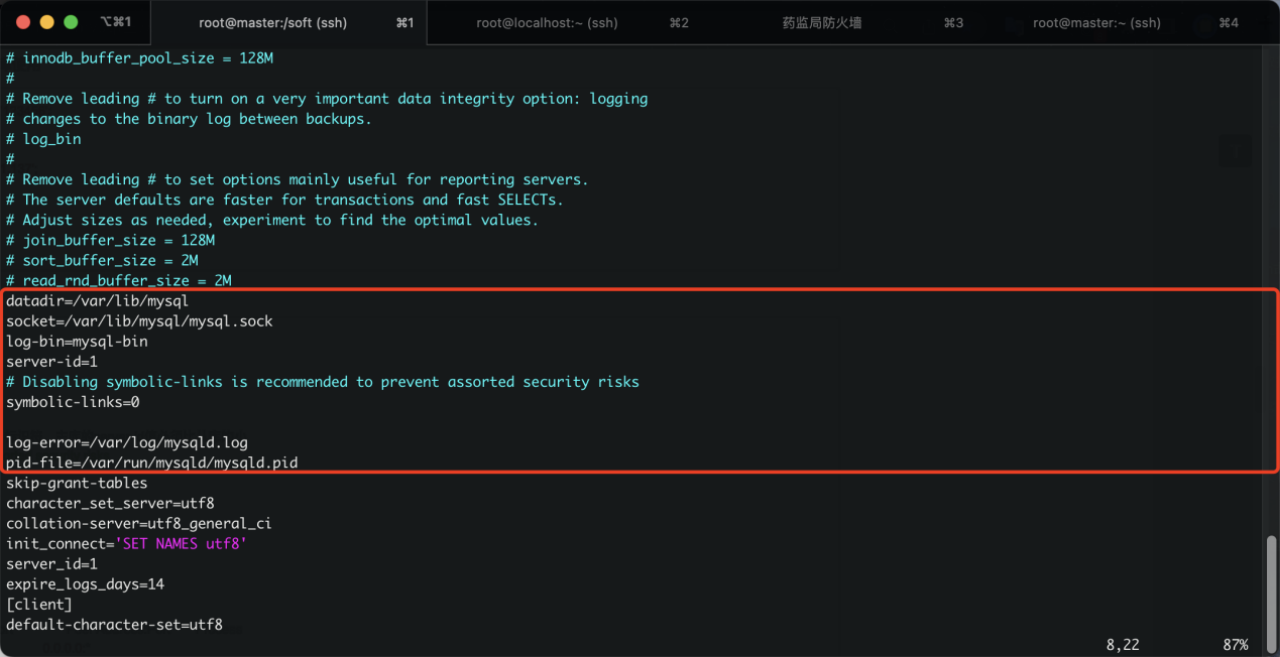
//重启数主库的mysql服务

[root@master soft]# systemctl restart mysqld

[root@master soft]# ss -anlt

State      Recv-Q Send-Q                              Local Address:Port                                             Peer Address:Port

LISTEN     0      128                                             *:22                                                          *:*

LISTEN     0      128                                          [::]:22                                                       [::]:*

LISTEN     0      80                                           [::]:3306                                                     [::]:*

[root@master soft]#

//查看主库状态

[root@master soft]# mysql -uroot -p123456

mysql: [Warning] Using a password on the command line interface can be insecure.

Welcome to the MySQL monitor.  Commands end with ; or \g.

Your MySQL connection id is 2

Server version: 5.7.22-log MySQL Community Server (GPL)

Copyright (c) 2000, 2018, Oracle and/or its affiliates. All rights reserved.

Oracle is a registered trademark of Oracle Corporation and/or its

affiliates. Other names may be trademarks of their respective

owners.

Type 'help;' or '\h' for help. Type '\c' to clear the current input statement.

mysql> show master status;

+------------------+----------+--------------+------------------+-------------------+

| File             | Position | Binlog_Do_DB | Binlog_Ignore_DB | Executed_Gtid_Set |

+------------------+----------+--------------+------------------+-------------------+

| mysql-bin.000001 |      154 |              |                  |                   |

+------------------+----------+--------------+------------------+-------------------+

1 row in set (0.00 sec)

mysql>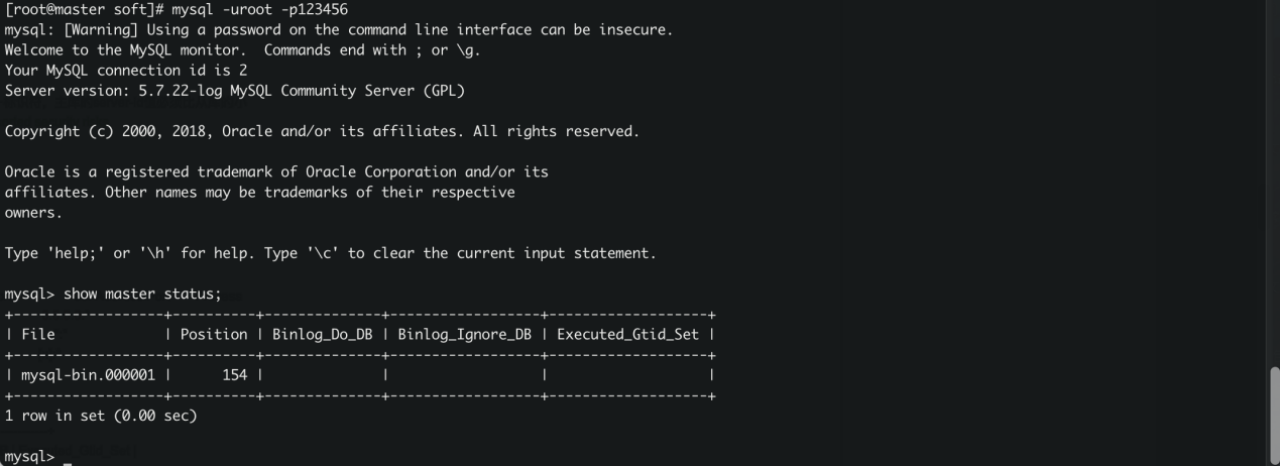
2.2.4 配置从数据库
[root@slave ~]# vim /etc/my.cnf

//在[mysql]这段后面添加

datadir=/var/lib/mysql

socket=/var/lib/mysql/mysql.sock

server-id=2  //添加 从库的server-id比主库的大

relay-log=mysql-relay-bin  //添加

# Disabling symbolic-links is recommended to prevent assorted security risks

symbolic-links=0

log-error=/var/log/mysqld.log

pid-file=/var/run/mysqld/mysqld.pid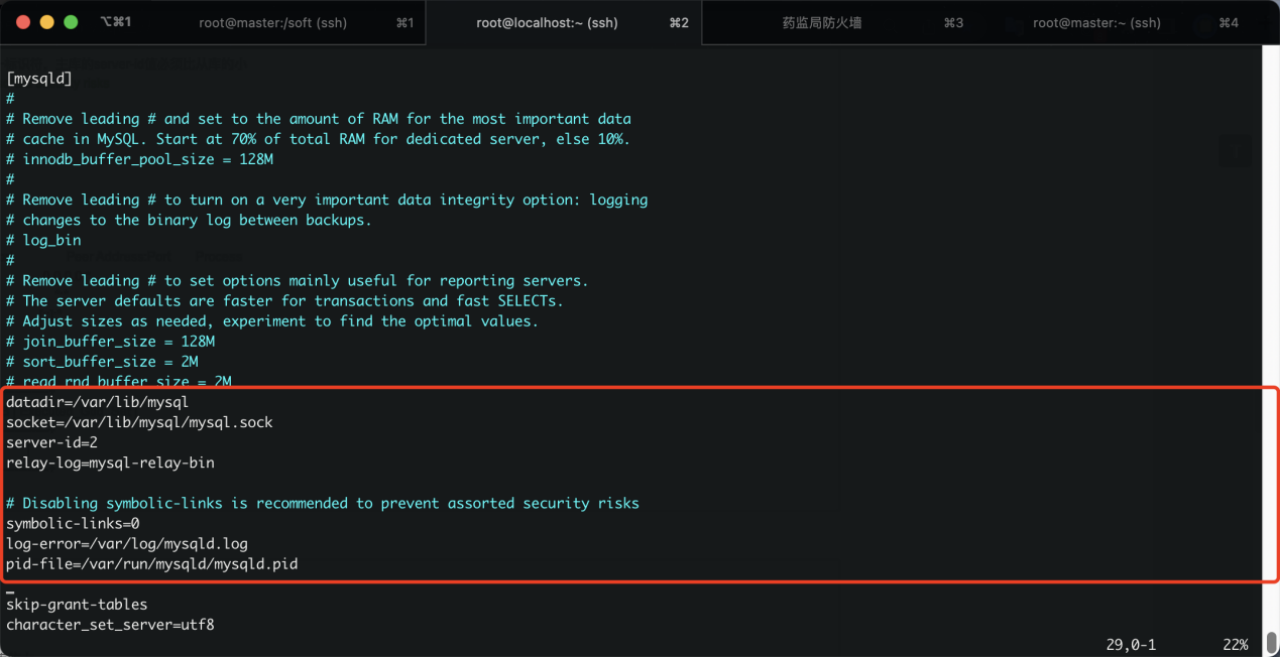
//重启mysql服务

[root@slave ~]# systemctl restart mysqld

[root@slave ~]# ss -anlt

State      Recv-Q Send-Q                              Local Address:Port                                             Peer Address:Port

LISTEN     0      128                                             *:22                                                          *:*

LISTEN     0      128                                          [::]:22                                                       [::]:*

LISTEN     0      80                                           [::]:3306                                                     [::]:*

[root@slave ~]#

//配置并启动主从复制

[root@slave ~]# mysql -u root -p123456

mysql: [Warning] Using a password on the command line interface can be insecure.

Welcome to the MySQL monitor.  Commands end with ; or \g.

Your MySQL connection id is 2

Server version: 5.7.22 MySQL Community Server (GPL)

Copyright (c) 2000, 2018, Oracle and/or its affiliates. All rights reserved.

Oracle is a registered trademark of Oracle Corporation and/or its

affiliates. Other names may be trademarks of their respective

owners.

Type 'help;' or '\h' for help. Type '\c' to clear the current input statement.

mysql> change master to

    -> master_host='192.168.23.4',

    -> master_user='hqd',

    -> master_password='123456',

    -> master_log_file='mysql-bin.000001',

    -> master_log_pos=154;

Query OK, 0 rows affected, 2 warnings (0.03 sec)

mysql> start slave;

Query OK, 0 rows affected (0.00 sec)

mysql>

//查看服务器状态

mysql> show slave status \G

*************************** 1. row ***************************

               Slave_IO_State: Waiting for master to send event

                  Master_Host: 192.168.23.4

                  Master_User: hqd

                  Master_Port: 3306

                Connect_Retry: 60

              Master_Log_File: mysql-bin.000002

          Read_Master_Log_Pos: 154

               Relay_Log_File: mysql-relay-bin.000004

                Relay_Log_Pos: 367

        Relay_Master_Log_File: mysql-bin.000002

             Slave_IO_Running: Yes

            Slave_SQL_Running: Yes

              Replicate_Do_DB:

          Replicate_Ignore_DB: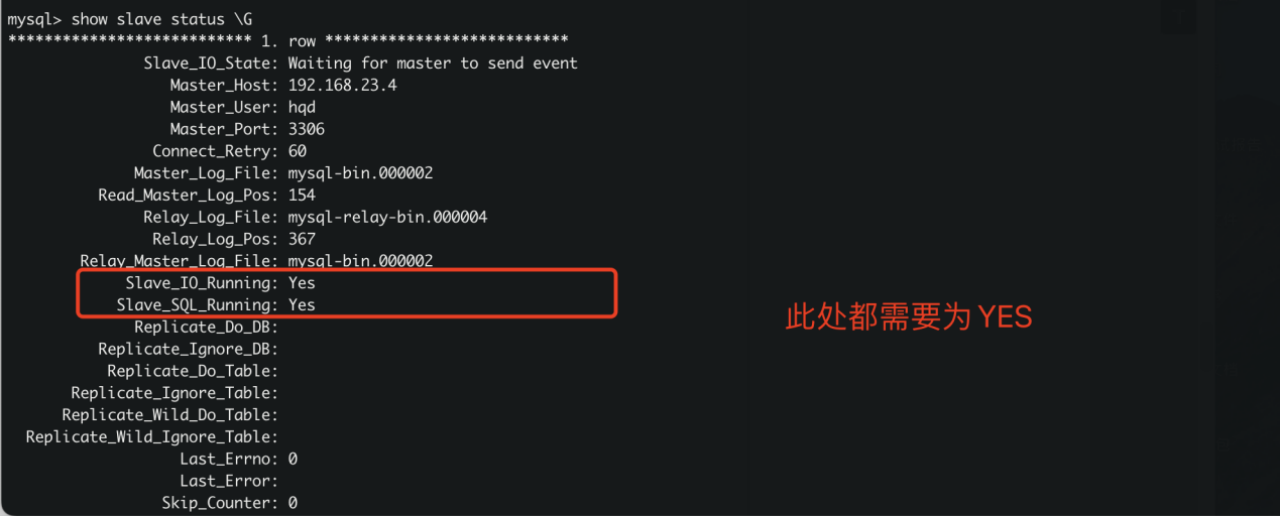
3 测试验证
在主服务器创建‘hqd’名称的库 查看从服务器是否同步

mysql> create database hqd;

Query OK, 1 row affected (0.00 sec)

mysql> show databases;

+--------------------+

| Database           |

+--------------------+

| information_schema |

| hqd                |

| mysql              |

| performance_schema |

| sys                |

| test               |

+--------------------+

6 rows in set (0.00 sec)

mysql>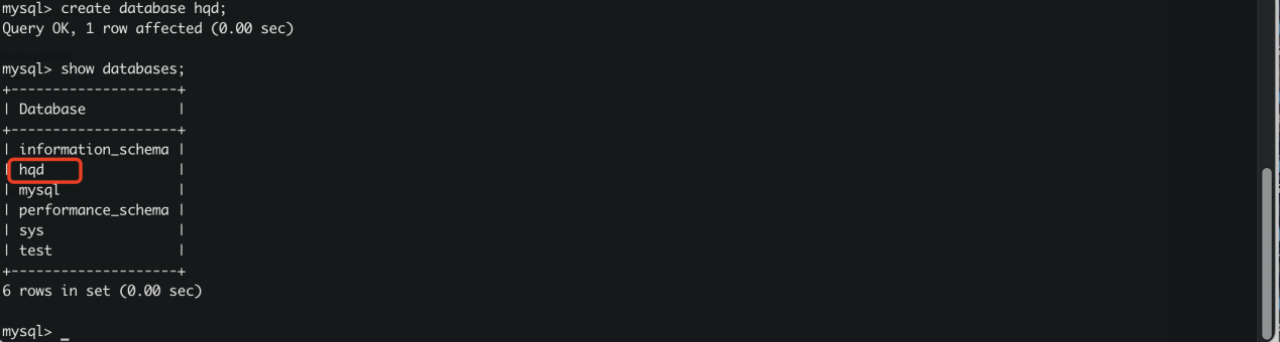
在从数据库中查看数据是否同步

[root@slave ~]# mysql -uroot -p123456

mysql: [Warning] Using a password on the command line interface can be insecure.

Welcome to the MySQL monitor.  Commands end with ; or \g.

Your MySQL connection id is 5

Server version: 5.7.22 MySQL Community Server (GPL)

Copyright (c) 2000, 2018, Oracle and/or its affiliates. All rights reserved.

Oracle is a registered trademark of Oracle Corporation and/or its

affiliates. Other names may be trademarks of their respective

owners.

Type 'help;' or '\h' for help. Type '\c' to clear the current input statement.

mysql> show databases;

+--------------------+

| Database           |

+--------------------+

| information_schema |

| hqd                |

| mysql              |

| performance_schema |

| sys                |

| test               |

+--------------------+

6 rows in set (0.00 sec)

mysql>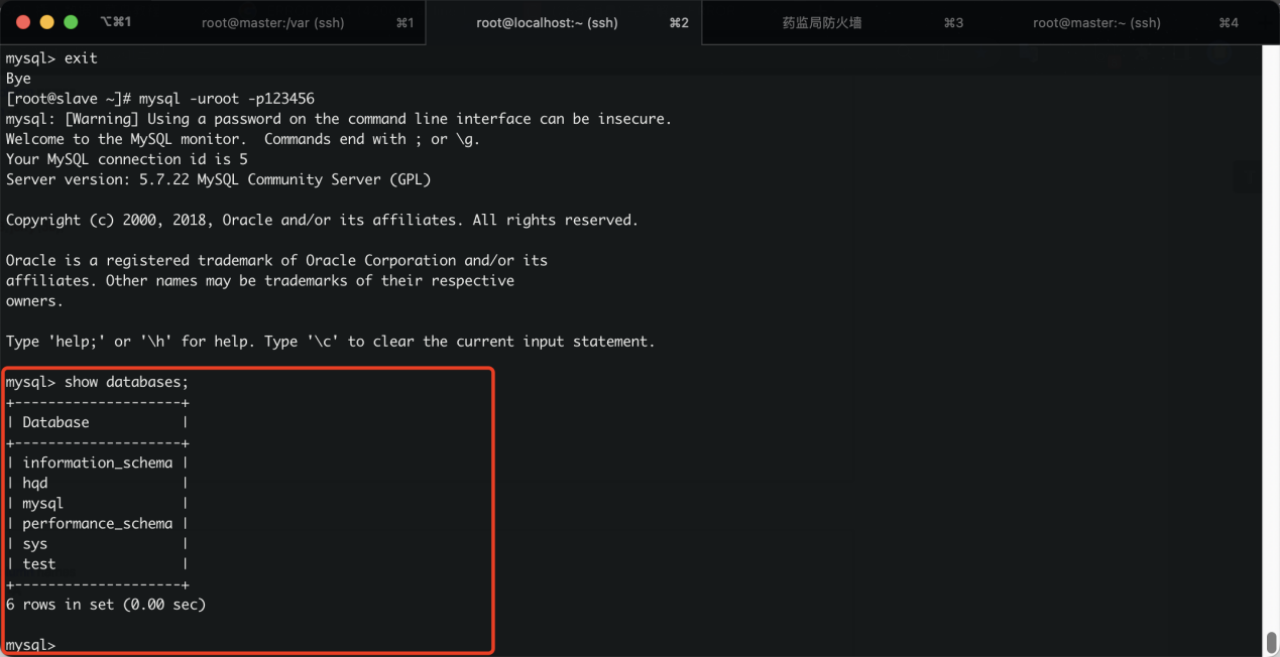
Mysql 一主一从的更多相关文章
- Mysql 多主一从数据备份
Mysql 多主一从数据备份 概述 对任何一个数据库的操作都自动应用到另外一个数据库,始终保持两个数据库中的数据一致. 这样做有如下几点好处: 可以做灾备,其中一个坏了可以切换到另一个. 可以做负载均 ...
- MHA+Atlas+mysql一主一从开启gtid安装配置与实验
各节点架构 (说明:生产环境有两个节点可以组成一套完整集群,我是测试环境,因此对于manager以及atlas和binlog server都是单点,如果生产环境,相应的将manager以及atlas和 ...
- Linux 部署MySQL 一主一从一备
主服务器搭建 准备三台服务器,一主一从一备 在主服务器(master)下找到mysql配置文件. Window下为my.ini(一般在C:\ProgramData\MySQL\MySQL Server ...
- mysql 两主一从环境搭建(5.7.24)
搭建说明 两主一从,从本质上说,只不过是机器 master-a 和 master-b 互为主从机(热备),然后通过 keepalived 进行高可用配置,使得在同一时间内只会有一台对外提供服务,实现单 ...
- Mysql一个主一备
Mysql主从复制 -- 一主一备 主从复制原理: Mysql的主从复制是mysql本身自带的一个功能,不需要额外的第三方软件可以实现,其复制功能并不是copy文件实现的,而是借助binlog日志文件 ...
- mysql 多主一从
一.主服务器准备 1.1.环境准备 两台主机器ip分别为 100.100.100.105 (主1) 100.100.100.106(主2) 安装 mysql [root@centos ~]# yum ...
- MySQL 5.7 多主一丛同步的数据库配置(将多处数据源合并到一点)
工作需要,笔记之用.文章很长,倒一杯茶慢慢看. 数据库的应用场景颇多,如 数据库双机同步,一主多从,多主多从,多主一从等:下文记录多主一从的配置及测试. 大多数复制场景中是一主或者一主多从.这种拓扑用 ...
- 一台MySQL服务器启动多个端口
一台MySQL服务器启动多个端口 在测试Mysql多主一从服务器,即一个从服务器多端口同步不同主库.本文记录了开启不同端口的操作. 详细步骤: 1.首先要先把my.cnf配置文件复制一份,开几个端口要 ...
- 一个mysql开启多个端口
在测试Mysql多主一从服务器,即一个从服务器多端口同步不同主库.本文记录了开启不同端口的操作. 详细步骤: 1.首先要先把my.cnf配置文件复制一份,开几个端口要复制几份当然要重新命名. 如: c ...
随机推荐
- React项目实现导出PDF的功能
在做web项目中,有时候会遇到pdf导出的需求,现根据之前在公司的React项目中遇到的导出PDF需求,整理一个demo出来. 导出PDF需要用到两个依赖包:html2canvas.jspdf 1.安 ...
- 构建基于React18的电子表格程序
背景 2022年3月29日,React正式发布18.0.0.本次升级内容包括开箱即用的改进,如自动批处理.新的API(如startTransition)和支持Suspense 的流式服务器端渲染.关于 ...
- node环境下怎样优化引入多文件(实现自动化)
const mocks = [];function getJsonFiles(jsonPath) {function findJsonFile(path) {let files = fs.readdi ...
- SAP APO-部署选项
SAP SCM Server安装提供SAP APO功能模块的所有功能. 在SAP APO的附加部署模型中,以下组件可用作SAP APO工具的一部分- OTE-在附加部署模型中,无法通过SAP SCM服 ...
- Docker 与 K8S学习笔记(二十四)—— 工作负载的使用
我们前面讲了很多关于Pod的使用,但是在实际应用中,我们不会去直接创建Pod,我们一般通过Kubernetes提供的工作负载(Deployment.DeamonSet.StatefulSet.Job等 ...
- Spring jdbctemplate和事务管理器 全注解配置 不使用xml
/** * spring的配置类,相当于bean.xml */@Configuration//@Configuration标注在类上,相当于把该类作为spring的xml配置文件中的<beans ...
- UiPath条件判断活动Flow Decision的介绍与使用
一.Flow Decision介绍 FlowDecision节点是一个条件节点,它根据指定条件是否成立来控制流程的两个分支. 当条件为True时,流程执行一个分支 当条件为False时,流程执行另外一 ...
- centos系统和Ubuntu系统命令区别以及常见操作
目录 一.前言 二.系统环境 三.命令区别 3.1 使用习惯和命令区别 3.2 服务管理的区别 3.3 软件包信息区别 四.Ubuntu系统常见操作 4.1 Ubuntu系统apt和apt-get的区 ...
- Python使用腾讯云-短信服务发送手机短信
目前[腾讯云短信]为客户提供[国内短信].[国内语音]和[海外短信]三大服务,腾讯云短信SDK支持以下操作: 国内短信 国内短信支持操作: • 指定模板单发短信 • 指定模板群发短信 • 拉取短信回执 ...
- Java封装Get/Post类
封装的类: package pers.hmi.translate; import java.io.BufferedReader; import java.io.IOException; import ...