
ansible 一 简介和部署
一、Ansible的介绍
Ansible是新出现的自动化运维工具,基于Python开发,集合了众多运维工具(puppet、cfengine、chef、func、fabric)的优点。实现了批量系统配置、批量程序部署、批量运行命令等功能。Ansible是基于模块工作的,本身没有批量部署的能力。真正具有批量部署的是Ansible所运行的模块,Ansible只是提供一种框架。
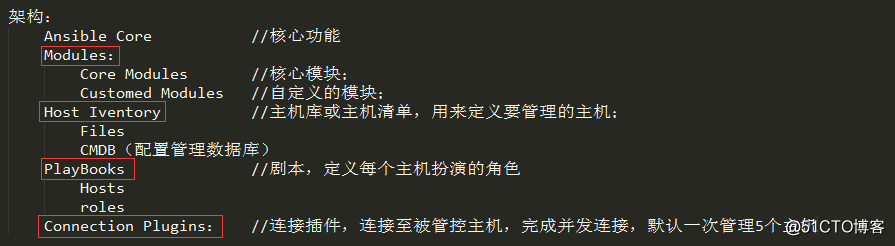
1、Ansible框架
- 连接插件connection plugins:负责和被监控端实现通信;
- host inventory:指定操作的主机,是一个配置文件里面定义监控的主机;
- 各种模块核心模块、command模块、自定义模块;
- 借助于插件完成记录日志邮件等功能;
- playbook:剧本执行多个任务时,非必需可以让节点一次性运行多个任务。
2、Ansible架构图
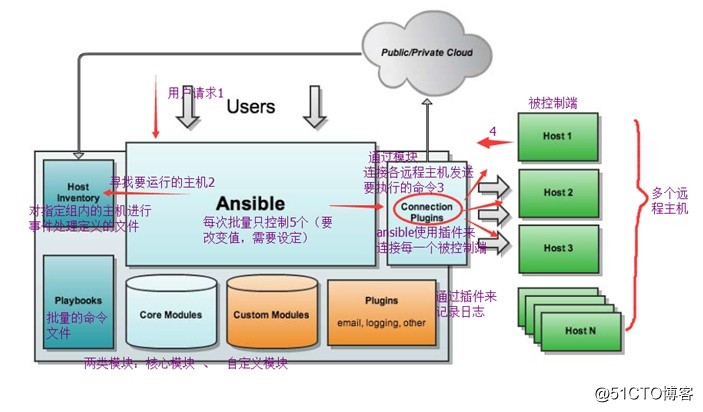
- Ansible核心组件说明
- Ansible:Ansible的核心程序;
- Host Lnventory:记录了每一个由Ansible管理的主机信息,信息包括ssh端口,root帐号密码,ip地址等等。可以通过file来加载,可以通过CMDB加载;
- Playbooks:YAML格式文件,多个任务定义在一个文件中,使用时可以统一调用,“剧本”用来定义那些主机需要调用那些模块来完成的功能;
- Core Modules:Ansible执行任何管理任务都不是由Ansible自己完成,而是由核心模块完成;Ansible管理主机之前,先调用core Modules中的模块,然后指明管理Host Lnventory中的主机,就可以完成管理主机;
- Custom Modules:自定义模块,完成Ansible核心模块无法完成的功能,此模块支持任何语言编写;
- Connection Plugins:连接插件,Ansible和Host通信使用。
3、Ansible基本特性
no agents:不需要在被管控主机上安装任何客户端;
no server:无服务器端,使用时直接运行命令即可;
modules in any languages:基于模块工作,可使用任意语言开发模块;
yaml,not code:使用yaml语言定制剧本playbook;
ssh by default:基于SSH工作;
strong multi-tier solution:可实现多级指挥。
4、Ansible的优点
轻量级,无需在客户端安装agent,更新时,只需在操作机上进行一次更新即可;
批量任务执行可以写成脚本,而且不用分发到远程就可以执行;
使用python编写,维护更简单,ruby语法过于复杂;
支持sudo。
5、Ansible任务执行流程
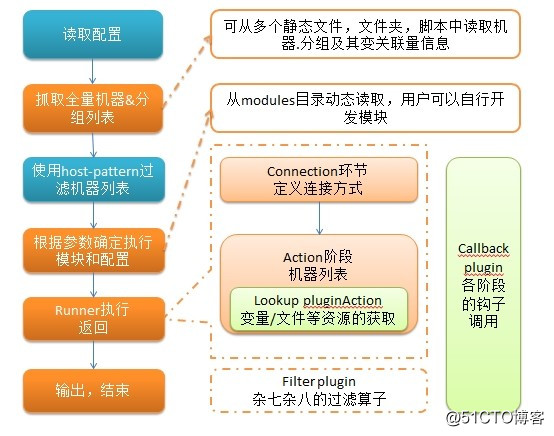
说明:以上内容大多是基于他人分享的基础上总结而来,学习借鉴之用;
三、Ansible的安装
1、系统环境
系统平台: CentOS 7.3
Ansible Server: 192.168.8.55
Ansible Client: 192.168.8.66
(1)写hosts记录
[root@Ansible ~]# echo "192.168.8.55 Ansible" >> /etc/hosts

[root@Ansible ~]# echo "192.168.8.66 Client" >> /etc/hosts
(2)关闭firewalld和selinux
[root@Ansible ~]# systemctl stop firewalld && systemctl disable firewalld

Removed symlink /etc/systemd/system/multi-user.target.wants/firewalld.service.

Removed symlink /etc/systemd/system/dbus-org.fedoraproject.FirewallD1.service.
(3)关闭selinux
[root@Ansible ~]# setenforce 0

[root@Ansible ~]# sed -i 's/SELINUX=enforcing/SELINUX=disabled/g' /etc/selinux/config
2、yum源安装
(1)配置好epel yum源安装相应的基础模块,可以使用yum直接安装
[root@Ansible ~]# yum -y install python PyYAML python-paramiko python-jinja2 python-simplejson
(2)安装Ansible
[root@Ansible ~]# yum -y install ansible
3、源码包安装(推荐使用)
Ansible安装所依赖插件较多,所以首先安装插件
[root@Ansible ~]# yum -y install gcc zlib zlib-devel openssl openssl-devel libffi-devel
(1)python3.6安装
Ansible是用Python开发的,使用Ansible需要操作系统有Python,建议Python版本2.6以上。
[root@Ansible ~]# wget https://www.python.org/ftp/python/3.6.4/Python-3.6.4.tgz

[root@Ansible ~]# tar xvzf Python-3.6.4.tgz -C /usr/src/

[root@Ansible ~]# cd /usr/src/Python-3.6.4/

[root@Ansible Python-3.6.4]# ./configure --prefix=/usr/local

[root@Ansible Python-3.6.4]# make

[root@Ansible Python-3.6.4]# make install
将python头文件拷贝到标准目录,以避免编译ansible时,找不到所需的头文件
[root@Ansible Python-3.6.4]# cd /usr/local/include/python3.6m/

[root@Ansible python3.6m]# cp -a ./* /usr/local/include/
备份旧版本的python,并符号链接新版本的python
[root@Ansible python3.6m]# cd /usr/bin/

[root@Ansible bin]# mv python python.old

[root@Ansible bin]# ln -s /usr/local/bin/python3.6 /usr/local/bin/python

[root@Ansible bin]# rm -rf /usr/bin/python

[root@Ansible bin]# cp /usr/local/bin/python3.6 /usr/bin/python
修改yum脚本,使其指向旧版本的python,已避免其无法运行
[root@Ansible bin]# vim /usr/bin/yum
将#!/usr/bin/python修改为#!/usr/bin/python2.7

[root@Ansible bin]# vim /usr/libexec/urlgrabber-ext-down
将#!/usr/bin/python修改为#!/usr/bin/python2.7

[root@Ansible bin]# python   --测试安装版本是否为Python 3.6.4

Python 3.6.4 (default, Apr 17 2018, 11:03:21)

[GCC 4.8.5 20150623 (Red Hat 4.8.5-11)] on linux

Type "help", "copyright", "credits" or "license" for more information.

>>> exit()   --退出python
(2)setuptools模块安装
[root@Ansible ~]# wget https://files.pythonhosted.org/packages/72/c2/c09362ab29338413ab687b47dab03bab4a792e2bbb727a1eb5e0a88e3b86/setuptools-39.0.1.zip

[root@Ansible ~]# unzip setuptools-39.0.1.zip -d /usr/src/

[root@Ansible ~]# cd /usr/src/setuptools-39.0.1/

[root@Ansible setuptools-39.0.1]# python setup.py install
安装好setuptools后就可以利用easy_install这个工具安装下面的python模块了,但我的电脑是虚拟机,配置太低了,所以基本无法安装,所以只好一个一个下载下来再安装了。
(3)pycrypto模块安装
[root@Ansible ~]# wget https://pypi.python.org/packages/source/p/pycrypto/pycrypto-2.6.1.tar.gz

[root@Ansible ~]# tar xvzf pycrypto-2.6.1.tar.gz -C /usr/src/

[root@Ansible ~]# cd /usr/src/pycrypto-2.6.1/

[root@Ansible pycrypto-2.6.1]# python setup.py install
(4) PyYAML模块安装
[root@Ansible ~]# wget http://pyyaml.org/download/libyaml/yaml-0.1.7.tar.gz

[root@Ansible ~]# tar xvzf yaml-0.1.7.tar.gz -C /usr/src/

[root@Ansible ~]# cd /usr/src/yaml-0.1.7/

[root@Ansible yaml-0.1.7]# ./configure --prefix=/usr/local

[root@Ansible yaml-0.1.7]# make --jobs=`grep processor /proc/cpuinfo | wc -l`

[root@Ansible yaml-0.1.7]# make install

[root@Ansible ~]# wget http://pyyaml.org/download/pyyaml/PyYAML-3.12.tar.gz

[root@Ansible ~]# tar xvzf PyYAML-3.12.tar.gz -C /usr/src/

[root@Ansible ~]# cd /usr/src/PyYAML-3.12/

[root@Ansible PyYAML-3.12]# python setup.py install
(5)Jinja2模块安装
[root@Ansible ~]# wget https://pypi.python.org/packages/source/M/MarkupSafe/MarkupSafe-0.9.3.tar.gz

[root@Ansible ~]# tar xvzf MarkupSafe-0.9.3.tar.gz -C /usr/src/

[root@Ansible ~]# cd /usr/src/MarkupSafe-0.9.3/

[root@Ansible MarkupSafe-0.9.3]# python setup.py install

[root@Ansible ~]# wget https://files.pythonhosted.org/packages/56/e6/332789f295cf22308386cf5bbd1f4e00ed11484299c5d7383378cf48ba47/Jinja2-2.10.tar.gz

[root@Ansible ~]# tar xvzf Jinja2-2.10.tar.gz -C /usr/src/

[root@Ansible ~]# cd /usr/src/Jinja2-2.10/

[root@Ansible Jinja2-2.10]# python setup.py install
(6)paramiko模块安装
[root@Ansible ~]# wget https://files.pythonhosted.org/packages/f9/e5/99ebb176e47f150ac115ffeda5fedb6a3dbb3c00c74a59fd84ddf12f5857/ecdsa-0.13.tar.gz

[root@Ansible ~]# tar xvzf ecdsa-0.13.tar.gz -C /usr/src/

[root@Ansible ~]# cd /usr/src/ecdsa-0.13/

[root@Ansible ecdsa-0.13]# python setup.py install

[root@Ansible ~]# https://files.pythonhosted.org/packages/29/65/83181630befb17cd1370a6abb9a87957947a43c2332216e5975353f61d64/paramiko-2.4.1.tar.gz

[root@Ansible ~]# tar xvzf paramiko-2.4.1.tar.gz -C /usr/src/

[root@Ansible ~]# cd /usr/src/paramiko-2.4.1/

[root@Ansible paramiko-2.4.1]# python setup.py install
(7)simplejson模块安装
[root@Ansible ~]# wget https://files.pythonhosted.org/packages/0d/3f/3a16847fe5c010110a8f54dd8fe7b091b4e22922def374fe1cce9c1cb7e9/simplejson-3.13.2.tar.gz

[root@Ansible ~]# tar xvff simplejson-3.13.2.tar.gz -C /usr/src/

[root@Ansible src]# cd /usr/src/simplejson-3.13.2/

[root@Ansible simplejson-3.13.2]# python setup.py install
(8) ansible安装
[root@Ansible ~]# wget https://files.pythonhosted.org/packages/4a/3b/9d98e132074bb6a3f18fd811db2819fbde6fc8a26fad9a40b49e53cb2455/ansible-2.5.0.tar.gz

[root@Ansible ~]# tar xf ansible-2.5.0.tar.gz -C /usr/src/

[root@Ansible ~]# cd /usr/src/ansible-2.5.0/

[root@Ansible ansible-2.5.0]# python setup.py install
三、Ansible的配置
1、Ansible配置
注:centos7.0安装Ansible后发现找不到ansible.cfg,配置文件的路径如下图,并将配置文件拷贝过去
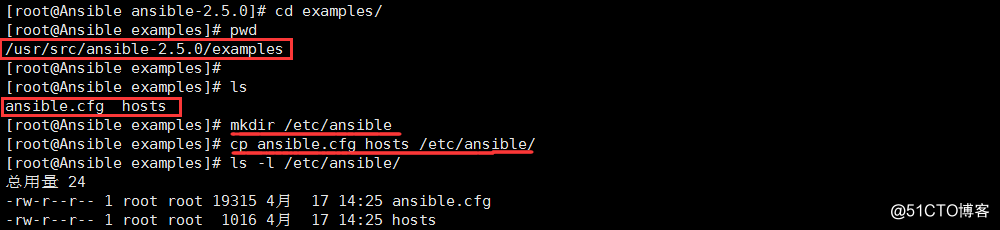
[root@Ansible ansible-2.5.0]# cd examples/

[root@Ansible examples]# pwd        --注意路径

/usr/src/ansible-2.5.0/examples

[root@Ansible examples]# ls

ansible.cfg  hosts

[root@Ansible examples]# mkdir /etc/ansible        --创建ansible目录

[root@Ansible examples]# cp ansible.cfg hosts /etc/ansible/      --拷贝文件

[root@Ansible examples]# ls -l /etc/ansible/

总用量 24

-rw-r--r-- 1 root root 19315 4月  17 14:25 ansible.cfg

-rw-r--r-- 1 root root  1016  4月  17 14:25 hosts
2、配置ssh免密登录(只在控制端使用)
[root@Ansible ~]# ssh-keygen -t rsa  --直接回车即可,不用设置密钥密码。

Generating public/private rsa key pair.

Enter file in which to save the key (/root/.ssh/id_rsa):

Enter passphrase (empty for no passphrase):

Enter same passphrase again:

Your identification has been saved in /root/.ssh/id_rsa.

Your public key has been saved in /root/.ssh/id_rsa.pub.

The key fingerprint is:

bc:4e:4e:5f:61:a3:37:08:b0:c4:00:98:90:5b:c6:9f root@Ansible.01.com

The key's randomart image is:

+--[ RSA 2048]----+

|o=...            |

|+ +  o           |

| + . .+          |

|.   E. +         |

|      . S   +    |

|         o + o   |

|        + o +    |

|       = . o .   |

|        o .      |

+-----------------+

[root@Ansible ~]# cat /root/.ssh/id_rsa.pub >> /root/.ssh/authorized_keys

[root@Ansible ~]# chmod 600 /root/.ssh/authorized_keys
将公钥传给被管理的机器节点
[root@Ansible ~]# scp /root/.ssh/authorized_keys 192.168.8.66:/root/.ssh/

root@192.168.8.66's password:

authorized_keys                      100%  401     0.4KB/s   00:00
3、远程连接测试
[root@Ansible ~]# vim /etc/ansible/hosts       --文件末尾添加以下内容

[web]

192.168.8.55

[root@Ansible ~]# ansible web -m command -a 'uptime'

192.168.8.55 | SUCCESS | rc=0 >>

14:56:03 up 12:53,  4 users,  load average: 0.00, 0.01, 0.05
至此,Ansible的安装配置已经完成,接下来进行模块的讲解。
ansible 一 简介和部署的更多相关文章
- Jenkins+Git+Gitlab+Ansible实现持续集成自动化部署静态网站(一)--技术流ken
前言 在之前已经写了关于Git,Gitlab以及Ansible的两篇博客<Git+Gitlab+Ansible剧本实现一键部署Nginx--技术流ken>,<Git+Gitlab+A ...
- Git+Gitlab+Ansible剧本实现一键部署动态网站(二)--技术流ken
项目前言 之前已经写了一篇关于git和ansible的博客<Git+Gitlab+Ansible剧本实现一键部署Nginx--技术流ken>.关于git,gitliab,ansible在我 ...
- 深入详解美团点评CAT跨语言服务监控(一) CAT简介与部署
前言: CAT是一个实时和接近全量的监控系统,它侧重于对Java应用的监控,除了与点评RPC组件融合的很好之外,他将会能与Spring.MyBatis.Dubbo 等框架以及Log4j 等结合,支持P ...
- Jenkins+Git+Gitlab+Ansible实现持续集成自动化部署静态网站(一)
在之前已经写了关于Git,Gitlab以及Ansible的两篇博客<Git+Gitlab+Ansible剧本实现一键部署Nginx--技术流ken>,<Git+Gitlab+Ansi ...
- Jenkins+Git+Gitlab+Ansible实现持续集成自动化部署静态网站(6)
前言 在之前已经写了关于Git,Gitlab以及Ansible的两篇博客<Git+Gitlab+Ansible剧本实现一键部署Nginx–技术流ken>,<Git+Gitlab+An ...
- Git+Gitlab+Ansible剧本实现一键部署动态网站(5)
项目前言 之前已经写了一篇关于git和ansible的博客<Git+Gitlab+Ansible剧本实现一键部署Nginx–技术流ken>.关于git,gitliab,ansible在我以 ...
- ansible批量管理软件部署及剧本
服务器版本信息: Centos6.9 [root@db02 ~]# uname -a Linux db02 -.el6.x86_64 # SMP Tue Mar :: UTC x86_64 x86_6 ...
- apigateway-kong(一)简介及部署
时隔三年,本人重出江湖,哈哈哈 浏览之前写的博客,有些深度还不是太够.篇幅太短,并且很多专题没有坚持写下去,部分技(dai)术(ma)没有从业务中抽离出来,本人感觉好遗憾--为此,痛下决心,重拾博客, ...
- Jenkins+Git+Gitlab+Ansible实现持续集成自动化部署动态网站(二)--技术流ken
项目前言 在上一篇博客<Jenkins+Git+Gitlab+Ansible实现持续化集成一键部署静态网站(一)--技术流ken>中已经详细讲解了如何使用这四个工具来持续集成自动化部署一个 ...
随机推荐
- 联邦学习:按Dirichlet分布划分Non-IID样本
我们在<Python中的随机采样和概率分布(二)>介绍了如何用Python现有的库对一个概率分布进行采样,其中的dirichlet分布大家一定不会感到陌生.该分布的概率密度函数为 \[P( ...
- 框架5--nginx安装部署 上(web服务)
目录 框架5--nginx安装部署(web服务) 1.练习 2.昨日问题 3.今日内容 4.什么是web服务 5.web服务器软件 6.部署Nginx 7.平滑增加Nginx模块 8.Nginx的命令 ...
- Solution -「COCI 2014-2015 #2」「洛谷 P6406」Norma
\(\mathcal{Description}\) Link. 给定 \(\{a_n\}\),求: \[\sum_{i=1}^n\sum_{j=i}^n(j-i+1)\min_{k=i}^j\ ...
- Word 模板注入
要实现word模板注入,需要一个被注入的文档,以及一个注入用的模板. 1.创建一个启用宏的模板 打开word,alt+f8创建编辑宏,在Project->Microsoft Word对象 ...
- Go语言程序调试
1. Go语言二进制程序分析 在分析一些使用GOlang语言进行编译的恶意程序时,由于程序在被打包成二进制程序时会打包诸多引用的库,并且作者对二进制程序进行了去符号化,导致在动态或是静态分析时函 ...
- 如何使用IDEA工具右边栏的Database模块
理解Spring Boot自动配置数据源相关代码进行测试时总是无法链接数据库,但是其他方式链接又是没有问题.不知道哪里出现问题了,后来搜资料无意中看到idea提供了Database模块可以测试,就是用 ...
- WPF + Winform 解决管理员权限下无法拖放文件的问题
wpf,winform混合解决管理员权限无法拖放文件的问题 学习自: https://zhuanlan.zhihu.com/p/343369663 https://zhuanlan.zhihu.com ...
- wireshark-1
wireshark-1题目来源: 广西首届网络安全选拔赛题目描述:黑客通过wireshark抓到管理员登陆网站的一段流量包(管理员的密码即是答案). flag提交形式为flag{XXXX}附件解压后, ...
- 【基础知识】CPU 指令执行的五个阶段,cpu就是用来执行指令的
IF(Instruction fetch) 取指:从 Instruction-Memory 中读取指令,并在下一个时钟上升沿到来时把指令送到 ID 级的指令缓冲器 id_ir 中.该级控制信号决定下一 ...
- 【C#反射】Type的用法
Type属性的应用 Type type = typeof(MyClass); Console.Write("$类型名:{ type.Name}"); Console.Write(& ...