
老板加薪!看我做的WPF Loading!!!
老板加薪!看我做的WPF Loading!!!
控件名:RingLoading
作者:WPFDevelopersOrg
原文链接: https://github.com/WPFDevelopersOrg/WPFDevelopers.Minimal
框架使用大于等于
.NET40;Visual Studio 2022;项目使用 MIT 开源许可协议;
老板觉得公司系统等待动画转圈太简单,所以需要做一个稍微好看点的,就有这篇等待RingLoading动画
最外层使用Viewbox为父控件内部嵌套创建三组
Grid -> Ellipse 、 Border
分别给它们指定不同的Angle从左侧开始-135 225 54,做永久 Angle 动画;PART_Ring1.RotateTransform.Angle从
From -135到-495;PART_Ring2.RotateTransform.Angle从
From 225到-585;PART_Ring3.RotateTransform.Angle从
From -54到-315;如何绘制;
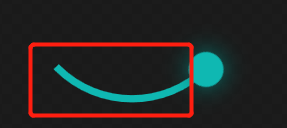
对Ellipse的StrokeDashArray进行设置23 100就能达到效果;
Border 做为圆设置 Effect 可实现阴影效果;
1)RingLoading.cs代码如下;
using System.Windows;

using System.Windows.Controls;

namespace WPFDevelopers.Controls

{

    public class RingLoading : Control

    {

        // Using a DependencyProperty as the backing store for IsStart.  This enables animation, styling, binding, etc...

        public static readonly DependencyProperty IsStartProperty =

            DependencyProperty.Register("IsStart", typeof(bool), typeof(RingLoading), new PropertyMetadata(default));

        // Using a DependencyProperty as the backing store for ProgressValue.  This enables animation, styling, binding, etc...

        public static readonly DependencyProperty ProgressValueProperty =

            DependencyProperty.Register("ProgressValue", typeof(double), typeof(RingLoading),

                new PropertyMetadata(0d, OnProgressValueChangedCallBack));

        // Using a DependencyProperty as the backing store for Progress.  This enables animation, styling, binding, etc...

        internal static readonly DependencyProperty ProgressProperty =

            DependencyProperty.Register("Progress", typeof(string), typeof(RingLoading), new PropertyMetadata(default));

        // Using a DependencyProperty as the backing store for Maximum.  This enables animation, styling, binding, etc...

        public static readonly DependencyProperty MaximumProperty =

            DependencyProperty.Register("Maximum", typeof(double), typeof(RingLoading),

                new PropertyMetadata(100d, OnMaximumPropertyChangedCallBack));

        // Using a DependencyProperty as the backing store for Description.  This enables animation, styling, binding, etc...

        public static readonly DependencyProperty DescriptionProperty =

            DependencyProperty.Register("Description", typeof(string), typeof(RingLoading),

                new PropertyMetadata(default));

        static RingLoading()

        {

            DefaultStyleKeyProperty.OverrideMetadata(typeof(RingLoading),

                new FrameworkPropertyMetadata(typeof(RingLoading)));

        }

        public bool IsStart

        {

            get => (bool)GetValue(IsStartProperty);

            set => SetValue(IsStartProperty, value);

        }

        public double ProgressValue

        {

            get => (double)GetValue(ProgressValueProperty);

            set => SetValue(ProgressValueProperty, value);

        }

        internal string Progress

        {

            get => (string)GetValue(ProgressProperty);

            set => SetValue(ProgressProperty, value);

        }

        public double Maximum

        {

            get => (double)GetValue(MaximumProperty);

            set => SetValue(MaximumProperty, value);

        }

        public string Description

        {

            get => (string)GetValue(DescriptionProperty);

            set => SetValue(DescriptionProperty, value);

        }

        private static void OnProgressValueChangedCallBack(DependencyObject d, DependencyPropertyChangedEventArgs e)

        {

            if (!(d is RingLoading control))

                return;

            if (!double.TryParse(e.NewValue?.ToString(), out var value))

                return;

            var progress = value / control.Maximum;

            control.SetCurrentValue(ProgressProperty, progress.ToString("P0"));

        }

        private static void OnMaximumPropertyChangedCallBack(DependencyObject d, DependencyPropertyChangedEventArgs e)

        {

            if (!(d is RingLoading control))

                return;

            if (!double.TryParse(e.NewValue?.ToString(), out var maxValue))

                return;

            if (maxValue <= 0)

                return;

            var progress = control.ProgressValue / maxValue;

            control.SetCurrentValue(ProgressProperty, progress.ToString("P0"));

        }

    }

}
2)RingLoading.xaml代码如下;
 <Style TargetType="controls:RingLoading" BasedOn="{StaticResource ControlBasicStyle}">

        <Setter Property="Template">

            <Setter.Value>

                <ControlTemplate TargetType="controls:RingLoading">

                    <ControlTemplate.Resources>

                        <Storyboard x:Key="PART_Resource_Storyboard" RepeatBehavior="Forever">

                            <DoubleAnimation To="-495" Duration="0:0:1.5" Storyboard.TargetName="PART_Ring1"  Storyboard.TargetProperty="(UIElement.RenderTransform).(TransformGroup.Children)[2].(RotateTransform.Angle)"/>

                            <DoubleAnimation To="585" Duration="0:0:1.5" Storyboard.TargetName="PART_Ring2"  Storyboard.TargetProperty="(UIElement.RenderTransform).(TransformGroup.Children)[2].(RotateTransform.Angle)"/>

                            <DoubleAnimation To="-315" Duration="0:0:1.5" Storyboard.TargetName="PART_Ring3"  Storyboard.TargetProperty="(UIElement.RenderTransform).(TransformGroup.Children)[2].(RotateTransform.Angle)"/>

                        </Storyboard>

                    </ControlTemplate.Resources>

                    <Grid>

                        <Grid.RowDefinitions>

                            <RowDefinition Height="*"/>

                            <RowDefinition Height="Auto"/>

                        </Grid.RowDefinitions>

                        <Viewbox HorizontalAlignment="Center" VerticalAlignment="Center" >

                            <Border Padding="10" Width="100" Height="100" >

                                <Grid>

                                    <Grid x:Name="PART_Ring1" Width="60" Height="60" HorizontalAlignment="Center" VerticalAlignment="Top" RenderTransformOrigin="0.5,0.5">

                                        <Grid.RenderTransform>

                                            <TransformGroup>

                                                <ScaleTransform/>

                                                <SkewTransform/>

                                                <RotateTransform Angle="-135"/>

                                                <TranslateTransform/>

                                            </TransformGroup>

                                        </Grid.RenderTransform>

                                        <Ellipse Stroke="Red" StrokeThickness="2" StrokeDashArray="23 100" RenderTransformOrigin="0.5,0.5"/>

                                        <Border Width="10" Height="10" CornerRadius="10" Background="Red" HorizontalAlignment="Right" Margin="0,0,-4,0">

                                            <Border.Effect>

                                                <DropShadowEffect BlurRadius="10" ShadowDepth="0" Color="Red"/>

                                            </Border.Effect>

                                        </Border>

                                    </Grid>

                                    <Grid x:Name="PART_Ring2" Width="60" Height="60" HorizontalAlignment="Left" VerticalAlignment="Bottom" RenderTransformOrigin="0.5,0.5">

                                        <Grid.RenderTransform>

                                            <TransformGroup>

                                                <ScaleTransform/>

                                                <SkewTransform/>

                                                <RotateTransform Angle="225"/>

                                                <TranslateTransform/>

                                            </TransformGroup>

                                        </Grid.RenderTransform>

                                        <Ellipse Stroke="Purple" StrokeThickness="2" StrokeDashArray="23 100"/>

                                        <Border Width="10" Height="10" CornerRadius="10" Background="Purple" VerticalAlignment="Bottom" HorizontalAlignment="Center" Margin="0,0,0,-4">

                                            <Border.Effect>

                                                <DropShadowEffect BlurRadius="10" ShadowDepth="0" Color="Purple"/>

                                            </Border.Effect>

                                        </Border>

                                    </Grid>

                                    <Grid x:Name="PART_Ring3" Width="60" Height="60" HorizontalAlignment="Right" VerticalAlignment="Bottom" RenderTransformOrigin="0.5,0.5">

                                        <Grid.RenderTransform>

                                            <TransformGroup>

                                                <ScaleTransform/>

                                                <SkewTransform/>

                                                <RotateTransform Angle="45"/>

                                                <TranslateTransform/>

                                            </TransformGroup>

                                        </Grid.RenderTransform>

                                        <Ellipse Stroke="#0fb8b2" StrokeThickness="2" StrokeDashArray="23 100"/>

                                        <Border Width="10" Height="10" CornerRadius="10" Background="#0fb8b2" HorizontalAlignment="Right" Margin="0,0,-4,0">

                                            <Border.Effect>

                                                <DropShadowEffect BlurRadius="10" ShadowDepth="0" Color="#0fb8b2"/>

                                            </Border.Effect>

                                        </Border>

                                    </Grid>

                                </Grid>

                            </Border>

                        </Viewbox>

                        <StackPanel Grid.Row="1" Grid.ColumnSpan="2" Margin="10">

                            <TextBlock HorizontalAlignment="Center" Text="Loading..." Margin="0,0,0,15"/>

                            <TextBlock HorizontalAlignment="Center" Text="{TemplateBinding Description}" Margin="0,0,0,15"/>

                            <TextBlock HorizontalAlignment="Center" Text="{TemplateBinding Progress}" FontSize="{StaticResource TitleFontSize}"

                                       FontWeight="Bold"/>

                        </StackPanel>

                    </Grid>

                    <ControlTemplate.Triggers>

                        <Trigger Property="IsStart" Value="True">

                            <Trigger.EnterActions>

                                <BeginStoryboard Storyboard="{StaticResource PART_Resource_Storyboard}" x:Name="PART_BeginStoryboard"/>

                            </Trigger.EnterActions>

                            <Trigger.ExitActions>

                                <StopStoryboard BeginStoryboardName="PART_BeginStoryboard"/>

                            </Trigger.ExitActions>

                        </Trigger>

                    </ControlTemplate.Triggers>

                </ControlTemplate>

            </Setter.Value>

        </Setter>

    </Style>
3)RingLoadingExample.xaml代码如下;
<UserControl x:Class="WPFDevelopers.Samples.ExampleViews.RingLoadingExample"

             xmlns="http://schemas.microsoft.com/winfx/2006/xaml/presentation"

             xmlns:x="http://schemas.microsoft.com/winfx/2006/xaml"

             xmlns:mc="http://schemas.openxmlformats.org/markup-compatibility/2006"

             xmlns:d="http://schemas.microsoft.com/expression/blend/2008"

             xmlns:wpfdev="https://github.com/WPFDevelopersOrg/WPFDevelopers"

             xmlns:local="clr-namespace:WPFDevelopers.Samples.ExampleViews"

             mc:Ignorable="d"

             d:DesignHeight="450" d:DesignWidth="800">

    <Grid>

        <wpfdev:RingLoading IsStart="true"

                            Width="400" Height="400"

                            Description="WPFDevelopers" Foreground="Black" ProgressValue="50"/>

    </Grid>

</UserControl>
RingLoading|Github
RingLoading|码云
RingLoading.xaml|Github
RingLoading.xaml|码云
老板加薪!看我做的WPF Loading!!!的更多相关文章
- WPF loading遮罩层 LoadingMask
原文:WPF loading遮罩层 LoadingMask 大家可能很纠结在异步query数据的时候想在wpf程序中显示一个loading的遮罩吧 今天就为大家介绍下遮罩的制作 源码下载 点击此处 先 ...
- 利用@keyframe及animation做一个页面Loading时的小动画
前言 利用@keyframe规则和animation常用属性做一个页面Loading时的小动画. 1 @keyframe规则简介 @keyframes定义关键帧,即动画每一帧执行什么. 要使用关键帧 ...
- WPF loading加载动画库
原文:WPF loading加载动画库 1. 下载Dll https://pan.baidu.com/s/1wKgv5_Q8phWo5CrXWlB9dA 2.在项目中添加引用 ...
- 【炫丽】从0开始做一个WPF+Blazor对话小程序
大家好,我是沙漠尽头的狼. .NET是免费,跨平台,开源,用于构建所有应用的开发人员平台. 本文演示如何在WPF中使用Blazor开发漂亮的UI,为客户端开发注入新活力. 注 要使WPF支持Blazo ...
- 武汉软件开发:一看就会的wpf入门教程
据了解,目前武汉软件开发市场关于PC端桌面开发的技术主要有两块:winform和wpf.wpf是微软既winform之后推出的一套新的桌面开发技术.采用数据驱动的方式可以轻松编写出非常炫的界面. 1. ...
- 举个栗子看如何做MySQL 内核深度优化
本文由云+社区发表 作者介绍:简怀兵,腾讯云数据库高级工程师,负责腾讯云CDB内核及基础设施建设:先后供职于Thomson Reuters和YY等公司,PTimeDB作者,曾获一项发明专利:从事MyS ...
- 各种加载效果,适合做加载loading动画效果 Eclipse版
Animation.rar 链接: http://pan.baidu.com/s/1c0QkOz2 密码: kd57
- 为什么DIY报价----走出软件作坊:三五个人十来条枪 如何成为开发正规军(十二)[转]
前段时间,写了一个开发.实施.服务费用计算三部曲. 水清则无鱼--走出软件作坊:三五个人十来条枪 如何成为开发正规军(八) 实施费用也能DIY--走出软件作坊:三五个人十来条枪 如何成为开发正规军(九 ...
- 单机c/s软件如何让老板在异地看销售营业报表
单机软件,让人的感觉就只能在本地使用. 单机版c/s软件,数据存放在本机上,老板想要查看销售报表的话,需要跑到公司的那台电脑上才能查看,这对于在外面四处跑业务的老板来说,基本上是不可能做到的.但每天的 ...
随机推荐
- forms组件补充与ModelForm简单使用与cookie与session
目录 forms组件钩子函数 forms组件字段参数 字段参数 validators详解 choices详解 widget详解 forms组件字段类型 ModelForm简单使用 cookie与ses ...
- 负载均衡之DR实验
实验环境 本实验搭建在虚拟机中.一台服务器作为DR两台作为RS,还有一台为后续内容会用到的备用机. 实验环境示意图: 1. 修改网络层VIP 修改DR,添加VIP 修改前: 修改后: 修改RS,修改A ...
- 图解MySQL逻辑备份的实现流程
1. 摘要 数据作为一家公司的重要资产,其重要程度不言而喻.数据库为数据提供存取服务,担任着重要的角色,如果因数据误删.服务器故障.病毒入侵等原因导致数据丢失或服务不可用,会对公司造成重大损失,所以数 ...
- BitBlt()函数实现带数字百分比进度条控件、静态文本(STATIC)控件实现的位图进度条、自定义进度条控件实现七彩虹颜色带数字百分比
Windows API BitBlt()函数实现带数字百分比进度条控件. 有两个例子:一用定时器实现,二用多线程实现. 带有详细注解. 此例是本人原创,绝对是网上稀缺资源(本源码用Windows AP ...
- 【Azure 应用服务】NodeJS Express + MSAL 实现API应用Token认证(AAD OAuth2 idToken)的认证实验 -- passport.authenticate('oauth-bearer', {session: false})
问题描述 在前两篇博文中,对NodeJS Express应用 使用MSAL + AAD实现用户登录并获取用户信息,获取Authorization信息 ( ID Token, Access Token) ...
- Javaweb-Servlet学习
1.Servlet简介 Servlet就是sun公司开发动态web的一门技术 Sun在这些API中提供一个借口叫做:Servlet,如果你想开发一个Servlet程序,只需要完成两个小步骤: 编写一个 ...
- Python基础学习笔记_01
Python的介绍 1989年圣诞节创造,1991年正真出生,目前更新到3.0版本 具有最庞大的"代码库",人称"胶水语言",无所不能 一种跨平台的计算机程序设 ...
- Vue回炉重造之三次封装axios
源码目录 在src目录下建立一个request文件夹.里面建立两个文件: http.js api.js 源码内容 http.js import axios from 'axios' // 引入axio ...
- WPF第三方控件,只能输入数字型数据
话不多说,根据最近项目需求,为了减少输入验证等相关代码量,需要此控件 先上效果图 默认样式是这样,自己可以根据需求修改外形,但我更喜欢它自带的简洁版 有人可能会问怎么实现的呢?其实很简单,我们设置它的 ...
- PowerDesigner安装
1.双击安装包进行安装 2.选择PRC 3.一路往下就行 4.将下图文件夹中的内容覆盖安装的内容 ----------------------------------------分割线 5.安装成功 ...