
老板加薪!看我做的WPF Loading!!!
老板加薪!看我做的WPF Loading!!!
控件名:RingLoading
作者:WPFDevelopersOrg
原文链接: https://github.com/WPFDevelopersOrg/WPFDevelopers.Minimal
框架使用大于等于
.NET40;Visual Studio 2022;项目使用 MIT 开源许可协议;
老板觉得公司系统等待动画转圈太简单,所以需要做一个稍微好看点的,就有这篇等待RingLoading动画
最外层使用Viewbox为父控件内部嵌套创建三组
Grid -> Ellipse 、 Border
分别给它们指定不同的Angle从左侧开始-135 225 54,做永久 Angle 动画;PART_Ring1.RotateTransform.Angle从
From -135到-495;PART_Ring2.RotateTransform.Angle从
From 225到-585;PART_Ring3.RotateTransform.Angle从
From -54到-315;如何绘制;
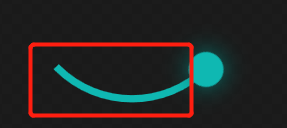
对Ellipse的StrokeDashArray进行设置23 100就能达到效果;
Border 做为圆设置 Effect 可实现阴影效果;
1)RingLoading.cs代码如下;
using System.Windows;

using System.Windows.Controls;

namespace WPFDevelopers.Controls

{

    public class RingLoading : Control

    {

        // Using a DependencyProperty as the backing store for IsStart.  This enables animation, styling, binding, etc...

        public static readonly DependencyProperty IsStartProperty =

            DependencyProperty.Register("IsStart", typeof(bool), typeof(RingLoading), new PropertyMetadata(default));

        // Using a DependencyProperty as the backing store for ProgressValue.  This enables animation, styling, binding, etc...

        public static readonly DependencyProperty ProgressValueProperty =

            DependencyProperty.Register("ProgressValue", typeof(double), typeof(RingLoading),

                new PropertyMetadata(0d, OnProgressValueChangedCallBack));

        // Using a DependencyProperty as the backing store for Progress.  This enables animation, styling, binding, etc...

        internal static readonly DependencyProperty ProgressProperty =

            DependencyProperty.Register("Progress", typeof(string), typeof(RingLoading), new PropertyMetadata(default));

        // Using a DependencyProperty as the backing store for Maximum.  This enables animation, styling, binding, etc...

        public static readonly DependencyProperty MaximumProperty =

            DependencyProperty.Register("Maximum", typeof(double), typeof(RingLoading),

                new PropertyMetadata(100d, OnMaximumPropertyChangedCallBack));

        // Using a DependencyProperty as the backing store for Description.  This enables animation, styling, binding, etc...

        public static readonly DependencyProperty DescriptionProperty =

            DependencyProperty.Register("Description", typeof(string), typeof(RingLoading),

                new PropertyMetadata(default));

        static RingLoading()

        {

            DefaultStyleKeyProperty.OverrideMetadata(typeof(RingLoading),

                new FrameworkPropertyMetadata(typeof(RingLoading)));

        }

        public bool IsStart

        {

            get => (bool)GetValue(IsStartProperty);

            set => SetValue(IsStartProperty, value);

        }

        public double ProgressValue

        {

            get => (double)GetValue(ProgressValueProperty);

            set => SetValue(ProgressValueProperty, value);

        }

        internal string Progress

        {

            get => (string)GetValue(ProgressProperty);

            set => SetValue(ProgressProperty, value);

        }

        public double Maximum

        {

            get => (double)GetValue(MaximumProperty);

            set => SetValue(MaximumProperty, value);

        }

        public string Description

        {

            get => (string)GetValue(DescriptionProperty);

            set => SetValue(DescriptionProperty, value);

        }

        private static void OnProgressValueChangedCallBack(DependencyObject d, DependencyPropertyChangedEventArgs e)

        {

            if (!(d is RingLoading control))

                return;

            if (!double.TryParse(e.NewValue?.ToString(), out var value))

                return;

            var progress = value / control.Maximum;

            control.SetCurrentValue(ProgressProperty, progress.ToString("P0"));

        }

        private static void OnMaximumPropertyChangedCallBack(DependencyObject d, DependencyPropertyChangedEventArgs e)

        {

            if (!(d is RingLoading control))

                return;

            if (!double.TryParse(e.NewValue?.ToString(), out var maxValue))

                return;

            if (maxValue <= 0)

                return;

            var progress = control.ProgressValue / maxValue;

            control.SetCurrentValue(ProgressProperty, progress.ToString("P0"));

        }

    }

}
2)RingLoading.xaml代码如下;
 <Style TargetType="controls:RingLoading" BasedOn="{StaticResource ControlBasicStyle}">

        <Setter Property="Template">

            <Setter.Value>

                <ControlTemplate TargetType="controls:RingLoading">

                    <ControlTemplate.Resources>

                        <Storyboard x:Key="PART_Resource_Storyboard" RepeatBehavior="Forever">

                            <DoubleAnimation To="-495" Duration="0:0:1.5" Storyboard.TargetName="PART_Ring1"  Storyboard.TargetProperty="(UIElement.RenderTransform).(TransformGroup.Children)[2].(RotateTransform.Angle)"/>

                            <DoubleAnimation To="585" Duration="0:0:1.5" Storyboard.TargetName="PART_Ring2"  Storyboard.TargetProperty="(UIElement.RenderTransform).(TransformGroup.Children)[2].(RotateTransform.Angle)"/>

                            <DoubleAnimation To="-315" Duration="0:0:1.5" Storyboard.TargetName="PART_Ring3"  Storyboard.TargetProperty="(UIElement.RenderTransform).(TransformGroup.Children)[2].(RotateTransform.Angle)"/>

                        </Storyboard>

                    </ControlTemplate.Resources>

                    <Grid>

                        <Grid.RowDefinitions>

                            <RowDefinition Height="*"/>

                            <RowDefinition Height="Auto"/>

                        </Grid.RowDefinitions>

                        <Viewbox HorizontalAlignment="Center" VerticalAlignment="Center" >

                            <Border Padding="10" Width="100" Height="100" >

                                <Grid>

                                    <Grid x:Name="PART_Ring1" Width="60" Height="60" HorizontalAlignment="Center" VerticalAlignment="Top" RenderTransformOrigin="0.5,0.5">

                                        <Grid.RenderTransform>

                                            <TransformGroup>

                                                <ScaleTransform/>

                                                <SkewTransform/>

                                                <RotateTransform Angle="-135"/>

                                                <TranslateTransform/>

                                            </TransformGroup>

                                        </Grid.RenderTransform>

                                        <Ellipse Stroke="Red" StrokeThickness="2" StrokeDashArray="23 100" RenderTransformOrigin="0.5,0.5"/>

                                        <Border Width="10" Height="10" CornerRadius="10" Background="Red" HorizontalAlignment="Right" Margin="0,0,-4,0">

                                            <Border.Effect>

                                                <DropShadowEffect BlurRadius="10" ShadowDepth="0" Color="Red"/>

                                            </Border.Effect>

                                        </Border>

                                    </Grid>

                                    <Grid x:Name="PART_Ring2" Width="60" Height="60" HorizontalAlignment="Left" VerticalAlignment="Bottom" RenderTransformOrigin="0.5,0.5">

                                        <Grid.RenderTransform>

                                            <TransformGroup>

                                                <ScaleTransform/>

                                                <SkewTransform/>

                                                <RotateTransform Angle="225"/>

                                                <TranslateTransform/>

                                            </TransformGroup>

                                        </Grid.RenderTransform>

                                        <Ellipse Stroke="Purple" StrokeThickness="2" StrokeDashArray="23 100"/>

                                        <Border Width="10" Height="10" CornerRadius="10" Background="Purple" VerticalAlignment="Bottom" HorizontalAlignment="Center" Margin="0,0,0,-4">

                                            <Border.Effect>

                                                <DropShadowEffect BlurRadius="10" ShadowDepth="0" Color="Purple"/>

                                            </Border.Effect>

                                        </Border>

                                    </Grid>

                                    <Grid x:Name="PART_Ring3" Width="60" Height="60" HorizontalAlignment="Right" VerticalAlignment="Bottom" RenderTransformOrigin="0.5,0.5">

                                        <Grid.RenderTransform>

                                            <TransformGroup>

                                                <ScaleTransform/>

                                                <SkewTransform/>

                                                <RotateTransform Angle="45"/>

                                                <TranslateTransform/>

                                            </TransformGroup>

                                        </Grid.RenderTransform>

                                        <Ellipse Stroke="#0fb8b2" StrokeThickness="2" StrokeDashArray="23 100"/>

                                        <Border Width="10" Height="10" CornerRadius="10" Background="#0fb8b2" HorizontalAlignment="Right" Margin="0,0,-4,0">

                                            <Border.Effect>

                                                <DropShadowEffect BlurRadius="10" ShadowDepth="0" Color="#0fb8b2"/>

                                            </Border.Effect>

                                        </Border>

                                    </Grid>

                                </Grid>

                            </Border>

                        </Viewbox>

                        <StackPanel Grid.Row="1" Grid.ColumnSpan="2" Margin="10">

                            <TextBlock HorizontalAlignment="Center" Text="Loading..." Margin="0,0,0,15"/>

                            <TextBlock HorizontalAlignment="Center" Text="{TemplateBinding Description}" Margin="0,0,0,15"/>

                            <TextBlock HorizontalAlignment="Center" Text="{TemplateBinding Progress}" FontSize="{StaticResource TitleFontSize}"

                                       FontWeight="Bold"/>

                        </StackPanel>

                    </Grid>

                    <ControlTemplate.Triggers>

                        <Trigger Property="IsStart" Value="True">

                            <Trigger.EnterActions>

                                <BeginStoryboard Storyboard="{StaticResource PART_Resource_Storyboard}" x:Name="PART_BeginStoryboard"/>

                            </Trigger.EnterActions>

                            <Trigger.ExitActions>

                                <StopStoryboard BeginStoryboardName="PART_BeginStoryboard"/>

                            </Trigger.ExitActions>

                        </Trigger>

                    </ControlTemplate.Triggers>

                </ControlTemplate>

            </Setter.Value>

        </Setter>

    </Style>
3)RingLoadingExample.xaml代码如下;
<UserControl x:Class="WPFDevelopers.Samples.ExampleViews.RingLoadingExample"

             xmlns="http://schemas.microsoft.com/winfx/2006/xaml/presentation"

             xmlns:x="http://schemas.microsoft.com/winfx/2006/xaml"

             xmlns:mc="http://schemas.openxmlformats.org/markup-compatibility/2006"

             xmlns:d="http://schemas.microsoft.com/expression/blend/2008"

             xmlns:wpfdev="https://github.com/WPFDevelopersOrg/WPFDevelopers"

             xmlns:local="clr-namespace:WPFDevelopers.Samples.ExampleViews"

             mc:Ignorable="d"

             d:DesignHeight="450" d:DesignWidth="800">

    <Grid>

        <wpfdev:RingLoading IsStart="true"

                            Width="400" Height="400"

                            Description="WPFDevelopers" Foreground="Black" ProgressValue="50"/>

    </Grid>

</UserControl>
RingLoading|Github
RingLoading|码云
RingLoading.xaml|Github
RingLoading.xaml|码云
老板加薪!看我做的WPF Loading!!!的更多相关文章
- WPF loading遮罩层 LoadingMask
原文:WPF loading遮罩层 LoadingMask 大家可能很纠结在异步query数据的时候想在wpf程序中显示一个loading的遮罩吧 今天就为大家介绍下遮罩的制作 源码下载 点击此处 先 ...
- 利用@keyframe及animation做一个页面Loading时的小动画
前言 利用@keyframe规则和animation常用属性做一个页面Loading时的小动画. 1 @keyframe规则简介 @keyframes定义关键帧,即动画每一帧执行什么. 要使用关键帧 ...
- WPF loading加载动画库
原文:WPF loading加载动画库 1. 下载Dll https://pan.baidu.com/s/1wKgv5_Q8phWo5CrXWlB9dA 2.在项目中添加引用 ...
- 【炫丽】从0开始做一个WPF+Blazor对话小程序
大家好,我是沙漠尽头的狼. .NET是免费,跨平台,开源,用于构建所有应用的开发人员平台. 本文演示如何在WPF中使用Blazor开发漂亮的UI,为客户端开发注入新活力. 注 要使WPF支持Blazo ...
- 武汉软件开发:一看就会的wpf入门教程
据了解,目前武汉软件开发市场关于PC端桌面开发的技术主要有两块:winform和wpf.wpf是微软既winform之后推出的一套新的桌面开发技术.采用数据驱动的方式可以轻松编写出非常炫的界面. 1. ...
- 举个栗子看如何做MySQL 内核深度优化
本文由云+社区发表 作者介绍:简怀兵,腾讯云数据库高级工程师,负责腾讯云CDB内核及基础设施建设:先后供职于Thomson Reuters和YY等公司,PTimeDB作者,曾获一项发明专利:从事MyS ...
- 各种加载效果,适合做加载loading动画效果 Eclipse版
Animation.rar 链接: http://pan.baidu.com/s/1c0QkOz2 密码: kd57
- 为什么DIY报价----走出软件作坊:三五个人十来条枪 如何成为开发正规军(十二)[转]
前段时间,写了一个开发.实施.服务费用计算三部曲. 水清则无鱼--走出软件作坊:三五个人十来条枪 如何成为开发正规军(八) 实施费用也能DIY--走出软件作坊:三五个人十来条枪 如何成为开发正规军(九 ...
- 单机c/s软件如何让老板在异地看销售营业报表
单机软件,让人的感觉就只能在本地使用. 单机版c/s软件,数据存放在本机上,老板想要查看销售报表的话,需要跑到公司的那台电脑上才能查看,这对于在外面四处跑业务的老板来说,基本上是不可能做到的.但每天的 ...
随机推荐
- 使用acme.sh自动申请、续期、部署免费的SSL证书
参考文档:https://github.com/acmesh-official/acme.sh 一个使用纯shell操作的免费SSL证书申请部署工具. 免费的SSL证书由以下CA机构提供: ZeroS ...
- K8S 使用Kubeadm搭建单个Master节点的Kubernetes(K8S)~本文仅用于测试学习
01.集群规划 系统版本:CentOS Linux release 7.6.1810 (Core) 软件版本:kubeadm.kubernetes-1.15.docker-ce-18.09 硬件要求: ...
- 第24章 Java 数据类型转换
每日一句 井底点灯深烛伊,共郎长行莫围棋. 每日一句 What we call "failure" is not falling down, but the staying dow ...
- 项目下载依赖后面加 -S -D -g 分别代表什么意思
npm install name -S此依赖是在package的dependencies中,不仅在开发中,也在打包上线后的生产环境中,比如vue npm install name -D此依赖是在pac ...
- 腾讯产品快速尝鲜,蓝鲸智云社区版V6.1灰度测试开启
这周小鲸悄悄推送了社区版V6.1(二进制部署版本,包含基础套餐.监控日志套餐),没过一天就有用户来问6.1的使用问题了.小鲸大吃一鲸,原来你还是爱我的. --Numpy中的相关性函数
摘要:NumPy中包含大量的函数,这些函数的设计初衷是能更方便地使用,掌握解这些函数,可以提升自己的工作效率.这些函数包括数组元素的选取和多项式运算等.下面通过实例进行详细了解. 前述通过对某公司股票 ...
- 以字节跳动内部 Data Catalog 架构升级为例聊业务系统的性能优化
背景 字节跳动 Data Catalog 产品早期,是基于 LinkedIn Wherehows 进行二次改造,产品早期只支持 Hive 一种数据源.后续为了支持业务发展,做了很多修修补补的工作,系统 ...
- VMware虚拟机基于contos 7 搭建lnmp环境全过程
这个环境也整了几次了,由于本人比较懒,没有记住.找资料很麻烦,就自己动手咯 1.下载VMware虚拟机 (有注册码) 地址:http://www.zdfans.com/5928.html ...
- 使用Node.js还可以发邮件
前言 今天,我们给大家开发一个小效果.篇幅比较短,主要给大家展示效果.实战 首先我们初始化一个Node项目 npm init -y 创建一个app.js文件 'use strict'; const n ...
- Mysql安装配置以及解决重装Mysql时忘记root password问题
目录 1.Mysql安装以及环境变量配置 重装Mysql时忘记root password问题 1.Mysql安装以及环境变量配置 官网安装:https://www.mysql.com/ 按 ...