
ui-router参数传递
基本参数:
‘/user/:id'
'/user/{id}'
'/user/{id:int}'
使用正则表达式:
'/user/{id:[0-9]{1,8}'
'/user/{id:.*}'
'/user/*id
匹配所有以user开始的url 并将剩余参数传给id
多个参数:
‘/user?id1&id2'
$StateParams service
// If you had a url on your state of:

url: '/users/:id/details/{type}/{repeat:[0-9]+}?from&to'

// Then you navigated your browser to:

'/users/123/details//0'

// Your $stateParams object would be

{ id:'123', type:'', repeat:'0' }

// Then you navigated your browser to:

'/users/123/details/default/0?from=there&to=here'

// Your $stateParams object would be

{ id:'123', type:'default', repeat:'0', from:'there', to:'here' }
$StateParams仅包含注册在当前状态下的参数,不包含其他状态下的参数,即使是上级的url参数也获取不到
$stateProvider.state('contacts.detail', {

   url: '/contacts/:contactId',

   controller: function($stateParams){

      $stateParams.contactId  //*** Exists! ***//

   }

}).state('contacts.detail.subitem', {

   url: '/item/:itemId',

   controller: function($stateParams){

      $stateParams.contactId //*** Watch Out! DOESN'T EXIST!! ***//

      $stateParams.itemId //*** Exists! ***//

   }

})
若想让下级获取到当前状态的参数,需使用resolve()。该函数会在画面渲染出来前先执行完成。
$stateProvider.state('contacts.detail', {

   url: '/contacts/:contactId',

   controller: function($stateParams){

      $stateParams.contactId  //*** Exists! ***//

   },

   resolve:{

      contactId: ['$stateParams', function($stateParams){

          return $stateParams.contactId;

      }]

   }

}).state('contacts.detail.subitem', {

   url: '/item/:itemId',

   controller: function($stateParams, contactId){

      contactId //*** Exists! ***//

      $stateParams.itemId //*** Exists! ***//

   }

})
1 ui-sref、$state.go 的区别
ui-sref 一般使用在 <a>...</a>;
<a ui-sref="message-list">消息中心</a>
$state.go('someState')一般使用在 controller里面;
.controller('firstCtrl', function($scope, $state) {

      $state.go('login');

 });
这两个本质上是一样的东西,我们看ui-sref的源码:
...

element.bind("click", function(e) {

    var button = e.which || e.button;

    if ( !(button > 1 || e.ctrlKey || e.metaKey || e.shiftKey || element.attr('target')) ) {

      var transition = $timeout(function() {

        // HERE we call $state.go inside of ui-sref

        $state.go(ref.state, params, options);

      });
ui-sref最后调用的还是$state.go()方法
2 如何传递参数
首先,要在目标页面定义接受的参数:
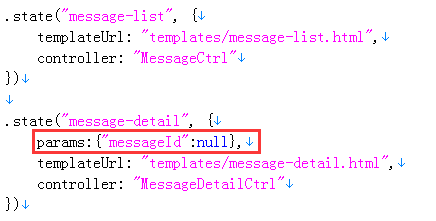
传参,
ui-sref:
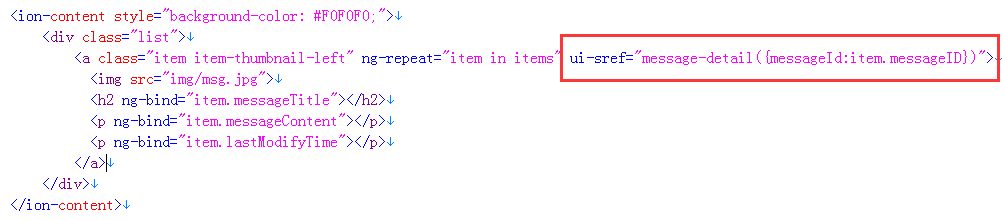
$state.go:

接收参数,
在目标页面的controller里注入$stateParams,然后 "$stateParams.参数名" 获取

ui-router参数传递的更多相关文章
- 【原创】ui.router源码解析
Angular系列文章之angular路由 路由(route),几乎所有的MVC(VM)框架都应该具有的特性,因为它是前端构建单页面应用(SPA)必不可少的组成部分. 那么,对于angular而言,它 ...
- angular : $location & $state(UI router)的关系
次序:angular 的 location会先跑 $rootScope.$on("$locationChangeStart", function (scope, newUrl, o ...
- angularjs ngRoute和ui.router对比
ngRoute模块是angularjs自带的路由模块,ui.router是一个第三方路由模块,接下来将对两者进行一个对比: ng-router(angular-router.js) ng-view n ...
- angular ui.router 路由传参数
angular已经用了一段时间了,最近在做路由,做一下笔记. 路由跳转的时候进行穿参 ui.router方式 <a ui-sref="edit({id:5})"> 编辑 ...
- ngRoute 与ui.router区别
angular路由 路由 (route) ,几乎所有的 MVC(VM) 框架都应该具有的特性,因为它是前端构建单页面应用 (SPA) 必不可少的组成部分. 那么,对于 angular 而言,它自然也有 ...
- AngularJS 使用 UI Router 实现表单向导
Today we will be using AngularJS and the great UI Router and the Angular ngAnimate module to create ...
- ngRoute 和 ui.router 的使用方法和区别
在单页面应用中要把各个分散的视图给组织起来是通过路由机制来实现的.本文主要对 AngularJS 原生的 ngRoute 路由模块和第三方路由模块 ui.router 的用法进行简单介绍,并做一个对比 ...
- [转]AngularJS 使用 UI Router 实现表单向导
本文转自:http://www.oschina.net/translate/angularjs-multi-step-form-using-ui-router 今天我们将使用AngularJs和伟大的 ...
- [转]AngularJS+UI Router(1) 多步表单
本文转自:https://www.zybuluo.com/dreamapplehappy/note/54448 多步表单的实现 在线demo演示地址https://rawgit.com/dream ...
- angularJS ui router 多视图单独刷新问题
场景:视图层级如下 view1 --view11 --view111 需求:view11的一个动作过后,单独刷新view12 解决方式:修改层级设计 view1 --view11 --view111 ...
随机推荐
- 错误:Caused by:org.apache.spark.SparkException: Kryo serialization failed: Buffer overflow.Available: 0, required: 21. To avoid this,
这个是写入Redis时用的序列化器,然后错误提示是超过了大小限制,把配置调大即可. .set("spark.kryoserializer.buffer.max","128 ...
- android源码包下载
http://rgruet.free.fr/public/ 其他下载地址:http://cid-b50f9d5897331c44.office.live.com/browse.aspx/Android ...
- 查看Ubuntu服务器的版本信息
第一种: uname -a 第二种: cat/etc/issue 第三种: lsb_release -a 这个查看的信息更加详细 使用命令:cat /proc/version 查看 proc目录下记录 ...
- zend 环境
js智能提示: 安装APTANA组件,最新3.0版本 安装地址:http://download.aptana.com/studio3/plugin/install Aptana 3 不能装 2 的 J ...
- string c++ 转义序列
std::string shaderVS = "\struct PSInput \{ \float4 position : SV_POSITION;\float4 color : COLOR ...
- app store 注册账号生成证书上传app完整的教程
app store为开发者提供四种类型的申请: 个人ios开发者计划$99/年 公司ios开发者计划$99/年 企业ios开发者计划$299/年 高校ios开发者计划免费 在这里主要介绍一下公司ios ...
- Lidgren Network Library
Lidgren Network Library Classes Class Description NetAESEncryption AES encryption NetBitVector Fix ...
- JVM性能调优监控工具jps、jstack、jmap、jhat、jstat等使用详解
转载:http://blog.csdn.net/tzs_1041218129/article/details/61630981 javap 和 javac javap -help javac -hel ...
- 网页图表控件Highcharts选项配置参数
Highcharts提供大量的选项配置参数,您可以轻松定制符合用户要求的图表,目前官网只提供英文版的开发配置说明文档,而中文版的文档网上甚少,且零散不全.这里,我把Highcharts常用的最核心的参 ...
- Django 学习记录
这是我自己理解并自己画的,django 请求示意图,表示了它的组织方式. project manage.py: 主要工具文件 settings.py: 配置文件 urls.py: url 定义及其指向 ...