
ui-router参数传递
基本参数:
‘/user/:id'
'/user/{id}'
'/user/{id:int}'
使用正则表达式:
'/user/{id:[0-9]{1,8}'
'/user/{id:.*}'
'/user/*id
匹配所有以user开始的url 并将剩余参数传给id
多个参数:
‘/user?id1&id2'
$StateParams service
// If you had a url on your state of:

url: '/users/:id/details/{type}/{repeat:[0-9]+}?from&to'

// Then you navigated your browser to:

'/users/123/details//0'

// Your $stateParams object would be

{ id:'123', type:'', repeat:'0' }

// Then you navigated your browser to:

'/users/123/details/default/0?from=there&to=here'

// Your $stateParams object would be

{ id:'123', type:'default', repeat:'0', from:'there', to:'here' }
$StateParams仅包含注册在当前状态下的参数,不包含其他状态下的参数,即使是上级的url参数也获取不到
$stateProvider.state('contacts.detail', {

   url: '/contacts/:contactId',

   controller: function($stateParams){

      $stateParams.contactId  //*** Exists! ***//

   }

}).state('contacts.detail.subitem', {

   url: '/item/:itemId',

   controller: function($stateParams){

      $stateParams.contactId //*** Watch Out! DOESN'T EXIST!! ***//

      $stateParams.itemId //*** Exists! ***//

   }

})
若想让下级获取到当前状态的参数,需使用resolve()。该函数会在画面渲染出来前先执行完成。
$stateProvider.state('contacts.detail', {

   url: '/contacts/:contactId',

   controller: function($stateParams){

      $stateParams.contactId  //*** Exists! ***//

   },

   resolve:{

      contactId: ['$stateParams', function($stateParams){

          return $stateParams.contactId;

      }]

   }

}).state('contacts.detail.subitem', {

   url: '/item/:itemId',

   controller: function($stateParams, contactId){

      contactId //*** Exists! ***//

      $stateParams.itemId //*** Exists! ***//

   }

})
1 ui-sref、$state.go 的区别
ui-sref 一般使用在 <a>...</a>;
<a ui-sref="message-list">消息中心</a>
$state.go('someState')一般使用在 controller里面;
.controller('firstCtrl', function($scope, $state) {

      $state.go('login');

 });
这两个本质上是一样的东西,我们看ui-sref的源码:
...

element.bind("click", function(e) {

    var button = e.which || e.button;

    if ( !(button > 1 || e.ctrlKey || e.metaKey || e.shiftKey || element.attr('target')) ) {

      var transition = $timeout(function() {

        // HERE we call $state.go inside of ui-sref

        $state.go(ref.state, params, options);

      });
ui-sref最后调用的还是$state.go()方法
2 如何传递参数
首先,要在目标页面定义接受的参数:
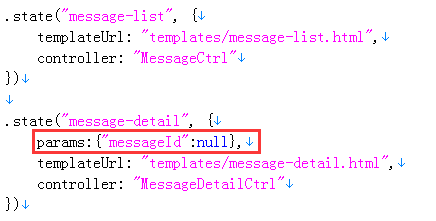
传参,
ui-sref:
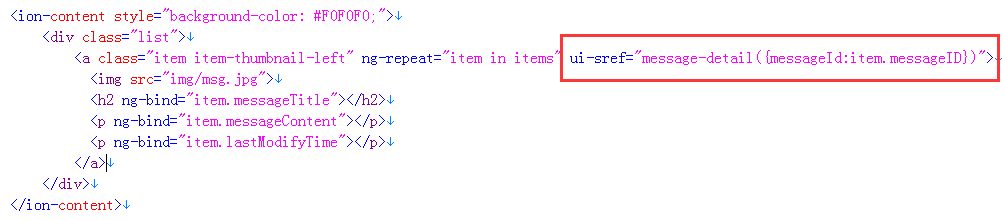
$state.go:

接收参数,
在目标页面的controller里注入$stateParams,然后 "$stateParams.参数名" 获取

ui-router参数传递的更多相关文章
- 【原创】ui.router源码解析
Angular系列文章之angular路由 路由(route),几乎所有的MVC(VM)框架都应该具有的特性,因为它是前端构建单页面应用(SPA)必不可少的组成部分. 那么,对于angular而言,它 ...
- angular : $location & $state(UI router)的关系
次序:angular 的 location会先跑 $rootScope.$on("$locationChangeStart", function (scope, newUrl, o ...
- angularjs ngRoute和ui.router对比
ngRoute模块是angularjs自带的路由模块,ui.router是一个第三方路由模块,接下来将对两者进行一个对比: ng-router(angular-router.js) ng-view n ...
- angular ui.router 路由传参数
angular已经用了一段时间了,最近在做路由,做一下笔记. 路由跳转的时候进行穿参 ui.router方式 <a ui-sref="edit({id:5})"> 编辑 ...
- ngRoute 与ui.router区别
angular路由 路由 (route) ,几乎所有的 MVC(VM) 框架都应该具有的特性,因为它是前端构建单页面应用 (SPA) 必不可少的组成部分. 那么,对于 angular 而言,它自然也有 ...
- AngularJS 使用 UI Router 实现表单向导
Today we will be using AngularJS and the great UI Router and the Angular ngAnimate module to create ...
- ngRoute 和 ui.router 的使用方法和区别
在单页面应用中要把各个分散的视图给组织起来是通过路由机制来实现的.本文主要对 AngularJS 原生的 ngRoute 路由模块和第三方路由模块 ui.router 的用法进行简单介绍,并做一个对比 ...
- [转]AngularJS 使用 UI Router 实现表单向导
本文转自:http://www.oschina.net/translate/angularjs-multi-step-form-using-ui-router 今天我们将使用AngularJs和伟大的 ...
- [转]AngularJS+UI Router(1) 多步表单
本文转自:https://www.zybuluo.com/dreamapplehappy/note/54448 多步表单的实现 在线demo演示地址https://rawgit.com/dream ...
- angularJS ui router 多视图单独刷新问题
场景:视图层级如下 view1 --view11 --view111 需求:view11的一个动作过后,单独刷新view12 解决方式:修改层级设计 view1 --view11 --view111 ...
随机推荐
- <摘录>cocos2d-x 从环境搭建到win32项目移植android平台
软件:cocos2d-x-2.2.3:android-ndk-r9d:adt-bundle-windows-x86_64-20131030:python-2.7.6: 1安装配置python 安装没什 ...
- php中文件上传需要注意的几点
1.首先要开启php.ini中的文件上传,打开php.ini 配置文件,查找 File Uploads ,在这个区域有以下3个选项: ;;;;;;;;;;;;;;;; ; File Uploads ; ...
- C#开源框架整理
Json.NET http://json.codeplex.com/ Json.Net 是一个读写Json效率比较高的.Net框架.Json.Net 使得在.Net环境下使用Json更加简单.通过Li ...
- cas协议,以及tomcat搭建cas服务器
1. CAS 简介 1.1. What is CAS ? CAS ( Central Authentication Service ) 是 Yale 大学发起的一个企业级的.开源的项目,旨 ...
- c++类模板template中的typename使用方法-超级棒
转载:https://blog.csdn.net/vanturman/article/details/80269081 如有问题请联系我删除: 目录 起因 typename的常见用法 typename ...
- metal &object c
https://developer.apple.com/documentation/metal/mtlcommandencoder/1458041-pushdebuggroup PushDebugGr ...
- 使用airdrop进行文件共享
使用airdrop进行文件共享 学习了: https://support.apple.com/zh-cn/HT203106 https://zh.wikihow.com/%E5%9C%A8Mac%E4 ...
- 极客技术专题【011期】:EasyUI初级教程
来源:GBin1.com 技术专题:EasyUI初级教程 分享人:极客标签技术编辑 - html580(请站内关注分享人) 资深Web前端工程师,HTML580创始人,目前就职于广州一间软件公司.多年 ...
- Android异步载入全解析之大图处理
Android异步载入全解析之大图处理 异步载入中很重要的一部分就是对图像的处理,这也是我们前面用异步载入图像做示例的原因. 一方面是由于图像处理不好的话会很占内存,并且easyOOM,还有一方面,图 ...
- Linux中查看jdk安装目录、Linux卸载jdk、rpm命令、rm命令参数
一.查看jdk安装目录 [root@node001 ~]# whereis java java: /usr/bin/java /usr/local/java #java执行路径 [root@node0 ...