
spring注解方式注入bean
用注解的方式注入bean,spring的配置文件也要增加一些约束和导入注解所在的包
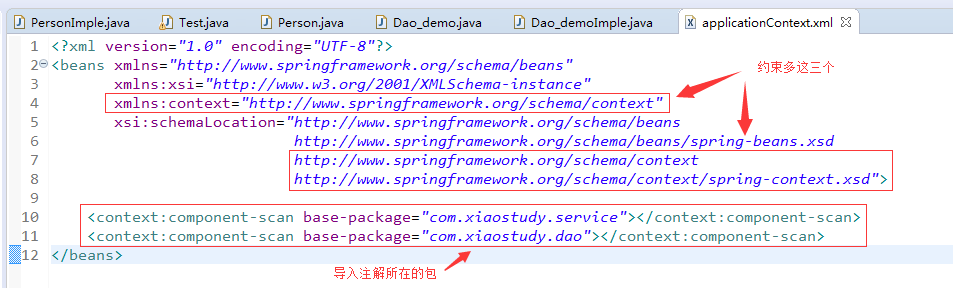
applicationContext.xml
 <?xml version="1.0" encoding="UTF-8"?>

 <beans xmlns="http://www.springframework.org/schema/beans"

        xmlns:xsi="http://www.w3.org/2001/XMLSchema-instance"

        xmlns:context="http://www.springframework.org/schema/context"

        xsi:schemaLocation="http://www.springframework.org/schema/beans

                               http://www.springframework.org/schema/beans/spring-beans.xsd

                               http://www.springframework.org/schema/context

                               http://www.springframework.org/schema/context/spring-context.xsd">

     <context:component-scan base-package="com.xiaostudy.service"></context:component-scan>

     <context:component-scan base-package="com.xiaostudy.dao"></context:component-scan>

 </beans>
用注解注入的bean类PersonImple.java
 package com.xiaostudy.service;

 import javax.annotation.PostConstruct;

 import javax.annotation.PreDestroy;

 import javax.annotation.Resource;

 import org.springframework.beans.factory.annotation.Value;

 import org.springframework.context.annotation.Scope;

 import org.springframework.stereotype.Component;

 /*

  * bean注入

  * 1、@Component("id")

  * 2、WEB:

  *             @Controller("id")    web

  *             @Service("id")        service

  *            @Repository("id")    dao

  */

 @Component("person")

 /*

  * bean作用域

  * @Scope("singleton")        单例(也是默认)

  * @Scope("prototype")        每new一次都是新的对象

  */

 @Scope("prototype")

 public class PersonImple implements Person {

     /*

      * bean参数注入

      * 1、普通参数(也就是说那些基本数据类型)

      *         在参数上面或者在相应的set方法    @Value("值")

      * 2、引用参数

      *         2.1按照类型注入:@Autowired

      *         2.2按照名称注入:@Autowired    @Qualifier("id")

      *         2.3按照名称注入:@Resource

      *

      */

     //@Resource

     private Dao_demoImple dao_demo;

     @Value("xiaostudy")

     private String name;

     public String getName() {

         return name;

     }

     public void setName(String name) {

         this.name = name;

     }

     public Dao_demoImple getDao_demo() {

         return dao_demo;

     }

     @Resource

     public void setDao_demo(Dao_demoImple dao_demo) {

         this.dao_demo = dao_demo;

     }

     /*

      * bean初始化方法注解

      *         @PostConstruct

      */

     @PostConstruct

     public void init() {

         System.out.println("init()>>>>>>");

     }

     /*

      * bean销毁注解

      *         @PreDestroy

      */

     @PreDestroy

     public void destroy() {

         System.out.println("destroy()>>>>>");

     }

 }
Person接口
 package com.xiaostudy.service;

 public interface Person {

 }
Dao_demo接口
 package com.xiaostudy.dao;

 public interface Dao_demo {

 }
Dao_demoImple.java
 package com.xiaostudy.service;

 import org.springframework.beans.factory.annotation.Value;

 import org.springframework.stereotype.Component;

 import com.xiaostudy.dao.Dao_demo;

 @Component("dao_demo")

 public class Dao_demoImple implements Dao_demo {

     private String name;

     public String getName() {

         return name;

     }

     @Value("demo")

     public void setName(String name) {

         this.name = name;

     }

     public void add() {

         System.out.println("add>>>>>>");

     }

 }
测试类Test.java
 package com.xiaostudy.service;

 import org.springframework.context.ApplicationContext;

 import org.springframework.context.support.AbstractApplicationContext;

 import org.springframework.context.support.ClassPathXmlApplicationContext;

 import com.xiaostudy.dao.Dao_demo;

 import com.xiaostudy.service.Person;

 public class Test {

     public static void main(String[] args) {

         ApplicationContext ac = new ClassPathXmlApplicationContext("applicationContext.xml");

         Person person = ac.getBean("person", Person.class);

         System.out.println(person);

         PersonImple pi = (PersonImple)person;

         System.out.println(pi.getName());

         Dao_demoImple dao_demo = pi.getDao_demo();

         System.out.println(dao_demo);

         dao_demo.add();

         System.out.println(dao_demo.getName());

         /*Person person1 = ac.getBean("person", Person.class);

         Person person2 = ac.getBean("person", Person.class);

         System.out.println(person1);

         System.out.println(person2);

         ((AbstractApplicationContext) ac).close();*/

     }

 }
spring注解方式注入bean的更多相关文章
- spring注解方式注入
1.通过Resource注入 1.在属性上注入 1.默认注入 即不指定spring容器里面的名字 匹配规则:先通过属性的名字查找 再通过属性类型与实现类类型匹配查找 当有两个实现类会报错 2.通过指定 ...
- spring 注解方式配置Bean
Spring能够从classpath下自动扫描,侦测和实例化具有特定注解的组件特定组件包括: @Component:基本注解,标示了一个受Spring管理的Bean组件 @Respository:标识 ...
- spring注解方式在一个普通的java类里面注入dao
spring注解方式在一个普通的java类里面注入dao @Repositorypublic class BaseDaoImpl implements BaseDao {这是我的dao如果在servi ...
- Spring中基于注解方式管理bean
操作步骤 第一步:导入相关jar包 spring IoC的基本包 Spring支持注解的Jar包 第二步:创建Spring配置文件,ApplicationContext.xml 引入约束和开启注解扫描 ...
- 跟着刚哥学习Spring框架--通过注解方式配置Bean(四)
组件扫描:Spring能够从classpath下自动扫描,侦测和实例化具有特定注解的组件. 特定组件包括: 1.@Component:基本注解,识别一个受Spring管理的组件 2.@Resposit ...
- spring学习笔记 星球日two - 注解方式配置bean
注解要放在要注解的对象的上方 @Autowired private Category category; <?xml version="1.0" encoding=" ...
- Spring框架学习(6)使用ioc注解方式配置bean
内容源自:使用ioc注解方式配置bean context层 : 上下文环境/容器环境 applicationContext.xml 1 ioc注解功能 注解 简化xml文件配置 如 hibernate ...
- Spring 注解方式 实现 IOC 和 DI
注:以下所有测试案例(最后一个除外)的测试代码都是同一个: package cn.tedu.test; import org.junit.Test; import org.springframewor ...
- EJB通过注解方式注入并使用其他EJB或者服务、配置JBoss数据源
通过注解方式注入并使用其他EJB或者服务 真实项目EJB对象很多,EJB之间也可以互相调用, 在项目HelloWorld下新建接口Other在cn.hqu.ejb3下: public interfac ...
随机推荐
- src与href的异同
相同点: 在跨域中,src,href,这些发送的请求都是get请求: 不同点: 1, 概念:href (Hypertext Reference)指定网络资源的位置: 理解:href 用作 " ...
- 160624、Spark读取数据库(Mysql)的四种方式讲解
目前Spark支持四种方式从数据库中读取数据,这里以Mysql为例进行介绍. 一.不指定查询条件 这个方式链接MySql的函数原型是: 1 def jdbc(url: String, table: S ...
- ubuntu16.04搭建jdk1.8运行环境
搭建环境:Ubuntu 16.04 ×64 JDK :jdk-8u171-linux-x64.tar.gz 首先下载linux对应的安装包下载地址:http://www.oracle.com/tech ...
- 安装Vmware ESX Server5.5 ——hardware virtualization is not a feature of the cpu or is not enabled in the BIOS
Error信息: hardware virtualization is not a feature of the cpu or is not enabled in the BIOS 解决方案: F2进 ...
- iOS核心动画详解(一)
前言 这篇文章主要是针对核心动画(Core Animation)的讲解,不涉及UIView的动画.因为内容较多,这篇文章会分为几个章节来进行介绍.本文主要是介绍核心动画的几个类之间的关系和CAAnim ...
- shell脚本杂
1.sh -x 跟踪shell脚本中的每个命令 [root@master shellexer]# cat bash.sh #!/bin/bash var=$ echo $var [root@maste ...
- Making the Grade---poj3666(类似离散化+dp)
题目链接:http://poj.org/problem?id=3666 题意是给出一组数,每个数代表当前位置的地面高度,问把路径修成非递增或者非递减,需要花费的最小代价? ///用dp[i][j]表示 ...
- 2016 安全行业全景图——By 安全牛
2014年有幸在北京办公室与安全牛的创办人刘朝阳见过一面,从那以后一直关注这安全牛(http://www.aqniu.com/)以及IT经理网(http://www.ctocio.com/).今年初看 ...
- 【Navicat连接Oracle数据库】-Navicat连接Oracle数据库设置
1.navicat连接数据配置信息如下图所示: 点击"确定"按钮,进入到软件 按照图中所画的步骤顺序操作,最后重新启动navicat就可. 关于里面的这个文件夹 insta ...
- CAS单点登录实践(spring cas client配置)
前言: 最近的项目需要将多个站点统一登录,查阅了资料Jasig cas(Central Authentication Service)(官方站点:http://www.jasig.org/cas)使用 ...