
Python的.py文件打包成exe可执行文件
前几天做了几个简单的爬虫python程序,于是就想做个窗口看看效果。
首先是,窗口的话,以前没怎么接触过,就先考虑用Qt制作简单的ui。这里用前面sinanews的爬虫脚本为例,制作一个获取当天sina头条新闻的窗口。
生成py文件后,运行该py文件,这里窗口我只是随便拖了几个组件进去,主要的text browser用于显示获取到的sinanews。
首先贴一下我的配置(点击即可官方下载):Python 3.3.3
PyQt5-5.2.1 for Py3.3(当安装完Python3.3后,安装对应PyQt,其会找到Python安装目录,不用更改安装目录)
Python3.3默认是没有安装pip的,需要下载get-pip.py运行之后,提示安装成功。
接下来就要安装一些必要的组件了。为了安装方便,先把pip添加进环境变量。下面我们就可以用pip命令安装组件了。
先把sina_news.py贴出来,观察需要哪些组件。
import requests

from bs4 import BeautifulSoup

res = requests.get('http://news.sina.com.cn/china/')

res.encoding = 'utf-8'

soup = BeautifulSoup(res.text,'html.parser')

for news in soup.select('.news-item'):

    if len(news.select('h2')) > 0:

        h2 = news.select('h2')[0].text

        a = news.select('a')[0]['href']

        time = news.select('.time')[0].text

        print(time,h2,a)
发现import requests,import BeautifulSoup 所以先来安装这些组件
pip install requests

pip install BeautifulSoup4
当我们把这段代码贴进窗口代码后:
x.py
# -*- coding: utf-8 -*-

# Form implementation generated from reading ui file 'x.ui'

#

# Created by: PyQt5 UI code generator 5.8.1

#

# WARNING! All changes made in this file will be lost!

import sys

import requests

from PyQt5 import QtCore, QtGui, QtWidgets

from bs4 import BeautifulSoup

class Ui_x(object):

    def getNews():

        res = requests.get('http://news.sina.com.cn/china/')

        res.encoding = 'utf-8'

        soup = BeautifulSoup(res.text,'html.parser')

        title = []

        for news in soup.select('.news-item'):

            if len(news.select('h2')) > 0:

                h2 = news.select('h2')[0].text

                title.append(h2)

                a = news.select('a')[0]['href']

                time = news.select('.time')[0].text

        return '\n'.join(title)

    def setupUi(self, x):

        x.setObjectName("x")

        x.resize(841, 749)

        self.timeEdit = QtWidgets.QTimeEdit(x)

        self.timeEdit.setGeometry(QtCore.QRect(310, 10, 141, 31))

        self.timeEdit.setObjectName("timeEdit")

        self.dateEdit = QtWidgets.QDateEdit(x)

        self.dateEdit.setGeometry(QtCore.QRect(100, 10, 191, 31))

        self.dateEdit.setObjectName("dateEdit")

        self.textBrowser = QtWidgets.QTextBrowser(x)

        self.textBrowser.setGeometry(QtCore.QRect(60, 80, 701, 641))

        self.textBrowser.setObjectName("textBrowser")

        self.retranslateUi(x)

        QtCore.QMetaObject.connectSlotsByName(x)

    def retranslateUi(self, x):

        _translate = QtCore.QCoreApplication.translate

        x.setWindowTitle(_translate("x", "x"))

if __name__ == '__main__':

    app = QtWidgets.QApplication(sys.argv)

    Form = QtWidgets.QWidget()

    ui = Ui_x()

    ui.setupUi(Form)

    Form.show()

    ui.textBrowser.setText(Ui_x.getNews())

    sys.exit(app.exec_())
如果前面顺利的话,现在用python运行x.py应该能看到显示的窗口。
下面就是打包的过程了,这里笔者用的Pyinstaller,没有安装的话,要安装一下:
pip install pyinstaller
安装完成后,cmd路径cd到x.py所在目录。打包命令:
Pyinstaller -w x.py
此时,在x.py便生成dist文件夹,打包的x.exe就在此文件夹下。双击x.exe显示效果:
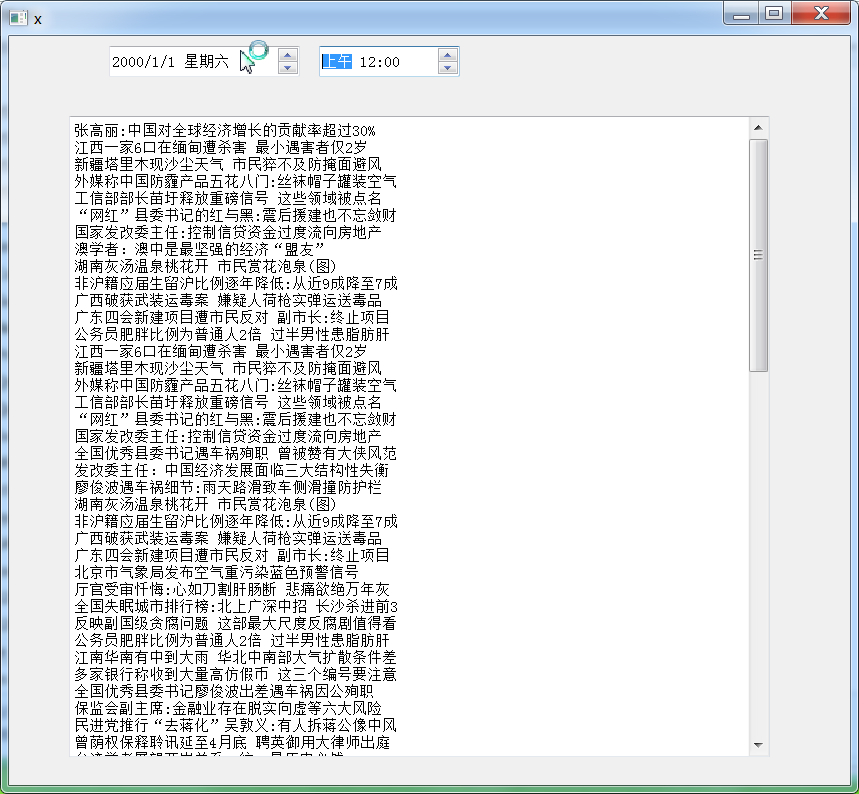
当然还有许多改进的地方,比如在上面选择日期,获得指定日期的头条新闻。
笔者在这片博文主要介绍py文件的打包过程。
可能遇到的问题:
打开打包后的程序无法运行
显示:
ImportError: No module named 'queue'
During handling of the above exception, another exception occurred:
Traceback (most recent call last):
File "test.py", line 2, in <module>
File "c:\users\hasee\appdata\local\programs\python\python35-32\lib\site-packages\PyInstaller\loader\pyimod03_importers.py", line 389, in load_module
exec(bytecode, module.__dict__)
File "site-packages\requests\__init__.py", line 63, in <module>
File "c:\users\hasee\appdata\local\programs\python\python35-32\lib\site-packages\PyInstaller\loader\pyimod03_importers.py", line 389, in load_module
exec(bytecode, module.__dict__)
File "site-packages\requests\utils.py", line 24, in <module>
File "c:\users\hasee\appdata\local\programs\python\python35-32\lib\site-packages\PyInstaller\loader\pyimod03_importers.py", line 389, in load_module
exec(bytecode, module.__dict__)
File "site-packages\requests\_internal_utils.py", line 11, in <module>
File "c:\users\hasee\appdata\local\programs\python\python35-32\lib\site-packages\PyInstaller\loader\pyimod03_importers.py", line 389, in load_module
exec(bytecode, module.__dict__)
File "site-packages\requests\compat.py", line 11, in <module>
File "c:\users\hasee\appdata\local\programs\python\python35-32\lib\site-packages\PyInstaller\loader\pyimod03_importers.py", line 389, in load_module
exec(bytecode, module.__dict__)
File "site-packages\requests\packages\__init__.py", line 29, in <module>
ImportError: No module named 'urllib3'
Failed to execute script test
当然这个错误代码,当时我没有保留,这是版本不匹配造成的:
我的Pyinstaller为3.2

Python的.py文件打包成exe可执行文件的更多相关文章
- 如何把py文件打包成exe可执行文件
如何把py文件打包成exe可执行文件 1.安装 pip install pyinstaller 或者 pip install -i https://pypi.douban.com/simple pyi ...
- python的py文件打包成exe
一.首先需要安装Pyinstaller-- 使用pip来安装模块 (我电脑上装的是python的一个编译环境Anaconda,如果电脑上装的是python自带的IDE的话,就直接进入python的安装 ...
- 将python项目.py文件打包成.exe文件
安装pyinstaller包 pip3 install pyinstaller 如果不行 pip3 install pyinstaller -i https://pypi.doubanio.com/s ...
- Windows下将Python源代码.py文件封装成exe可执行文件方法
安装pyinstaller cmd中使用pip安装 pip install pyinstaller 同时会自动安装pywin32(pip真慢50M这里就走20KB),可以进行切换为国内源进行提速. 就 ...
- windows下如何将Python文件打包成.exe可执行文件
在使用Python做开发的时候,时不时会给自己编写了一些小工具辅助自己的工作,但是由于开发依赖环境问题,多数只能在自己电脑上运行,拿到其它电脑后就没法运行了.这显得很不方便,不符合我们的初衷,那么有没 ...
- PyQt(Python+Qt)学习随笔:windows下使用pyinstaller将PyQt文件打包成exe可执行文件
专栏:Python基础教程目录 专栏:使用PyQt开发图形界面Python应用 专栏:PyQt入门学习 老猿Python博文目录 在<windows下使用pyinstaller将多个目录的Pyt ...
- 如何将python3.6软件的py文件打包成exe程序
在我们完成一个Python项目或一个程序时,希望将Python的py文件打包成在Windows系统下直接可以运行的exe程序.在浏览网上的资料来看,有利用pyinstaller和cx_Freeze进行 ...
- webService接口的py文件打包成exe
(一)webService接口的py文件打包成exe,在python3.5版本.pyInstaller3.2版本.pywin32-219.win-amd64-py3.5版本打包时报错,原因可能是pyi ...
- 小白学习Python之路---py文件转换成exe可执行文件
一.背景 今天闲着无事,写了一个小小的Python脚本程序,然后给同学炫耀的时候,发现每次都得拉着其他人过来看着自己的电脑屏幕,感觉不是很爽,然后我想着网上肯定有关于Python脚本转换成可执行文件的 ...
随机推荐
- 我为什么不看好微信小程序
我自认为对新技术还是比较有热情的,可对于小程序这个“新技术”,我却完全是被动的.去年9月份的时候,微信小程序开始内测,瞬间引爆朋友圈.知乎等一众分享平台.当时我大概了解了一下,觉得从技术角度上来说没啥 ...
- KB奇遇记(2):缘起
最早听到这家公司的名字,大概还是在好几年前. 正是2012年,之前的在一起灿坤待过的同事LY在这家公司当高层,正好公司规模大了,要上ERP项目.苦于公司没有这方面的人才,而内部IT又太差劲支撑不起来. ...
- 用php进行md5解密的源码,亲测可用
<?php $md5 = "c1c95b382230eb9e27a60c4baceb5f2e"; $uid = "hhp-ImZRY"; $token = ...
- Linux 菜鸟学习笔记--系统分区
硬盘分区 常识 主分区:最多只能有4个 扩展分区:用于突破主分区最多4个的限制 *最多只能有1个 *主分区+扩展分区最多有4个 *不能写入数据,只能包含逻辑分区 逻辑分区 格式化:实际是写入文件系统, ...
- java基础知识点---equal,==,hashcode
1.==比较对象之间的地址是否相同 student a=new student(1); student b=new student(1); a==b false b=a; a==b true ...
- iOS Plist 文件的 增 删 改
一:Plist 文件的创建 Plist 文件作为我们IOS开发的一种数据存储文件,还是经常会用到的.在看<X-code江湖录>的时候,看到了这一点.自己就写了一下,把写的东西分享出来!先看 ...
- 【吐血整理】SVN命令行,Subversion的正确使用姿势,让版本控制更简单~
一.写在前面 前面一直博主一直用svn的桌面版本,但看项目经理一直都用的命令行方式,不为性能,还能直接装逼呀!在这里先感谢赵哥,也把它分享给感兴趣的你们~ 二.直接上干货 1. svn checkou ...
- 搭建Eclipse开发和调试环境(真机)
由于工作原因,最近开始了Android开发.之前接触过一段时间Android,还是在2.x时代. 那个时候搭建开发环境还是挺麻烦的.又是Eclipse,又是ADT的,不同的版本还要安装对应开发包.现在 ...
- Redis 学习数据类型
该文使用centos6.5 64位 redis-3.2.8 [root@localhost bin]# netstat -tunpl |grep 6379 查看redis 是否启动成功 一.Stri ...
- windows下使用命令行给通过genymotion创建的虚拟机配制IP地址
1.先用genymotion创建2个虚拟机,GoogleNexus7-1,GoogleNexus7-2. 2.在命令行执行 vBoxManage dhcpserver modify --ifname ...