
Ioc和Ao使用扩展
一、Bean作用域
spring容器创建的时候,会将所有配置的bean对象创建出来,默认bean都是单例的。代码通过getBean()方法从容器获取指定的bean实例,容器首先会调用Bean类的无参构造器,创建实例对象
那么?我们如何说明出bean是单例的呢?
构建出两份学生对象,执行,发现两个对象的内存地址相同,内存中只有一份
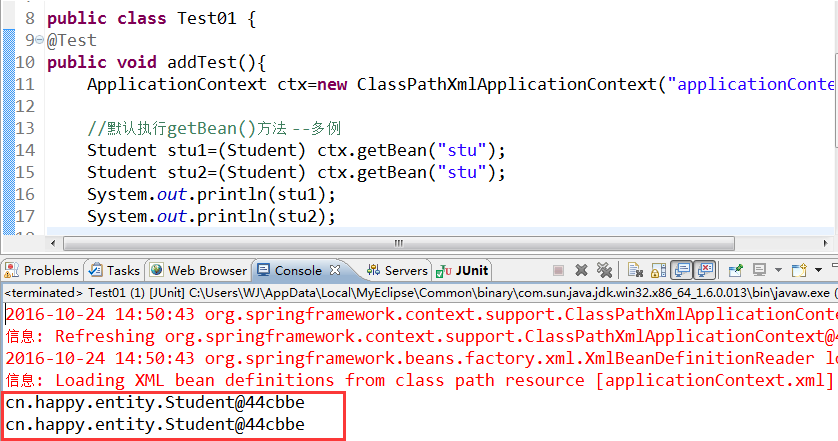
如何使它成为多例的呢?那么则需要在配置文件中添加scope="prototype"该属性即可!
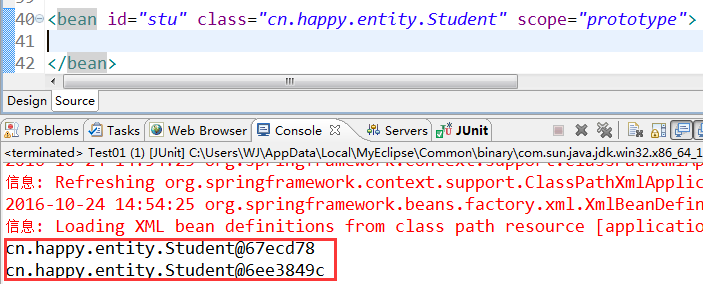
scope="prototype" 原型模式(N个对象):真正使用时才会创建,每获取一次,都会创建不同对象
scope="singleton" 单例模式:容器初始化时需要使用name建,每次获取的都是同一个对象,默认值
使用Spring通过getter访问器实现了对属性赋值,这种做法被称为设值注入。除此之外Spring还提供了通过构造方法赋值的能力,成为构造注入。
下面我们通过一个例子来深入了解一下
首先创建一个Car类
package cn.entity;

public class Car {

    private String color;

    private String brand;

    public String toString() {

        return "Car [color=" + color + "]";

    }

    public String getColor() {

        return color;

    }

    public void setColor(String color) {

        this.color = color;

    }

    public String getBrand() {

        return brand;

    }

    public void setBrand(String brand) {

        this.brand = brand;

    }

}
再书写Student类
package cn.entity;

public class Student {

    private String name;

    private String age;

    private Car car;

    public String getAge() {

        return age;

    }

    public void setAge(String age) {

        this.age = age;

    }

    @Override

    public String toString() {

        return "Student [name=" + name + ", age=" + age + ", myCar=" +car

                + "]";

    }

    public Car getCar() {

        return car;

    }

    public void setCar(Car car) {

        this.car = car;

    }

    public String getName() {

        return name;

    }

    public void setName(String name) {

        this.name = name;

    }

}
1.1设值注入(set方法注入):本质上是调用了Bean的setXXX()进行值的注入。分为普通属性和域属性
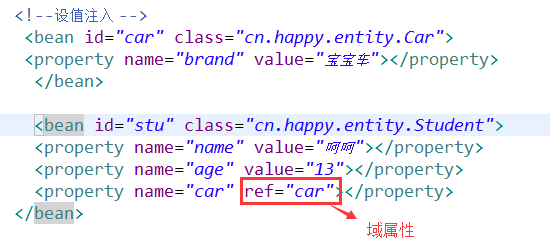
测试类:
|
1
2
3
4
5
6
7
8
|
public class Test01 {@Testpublic void addTest(){ ApplicationContext ctx=new ClassPathXmlApplicationContext("applicationContext.xml"); Student student=(Student) ctx.getBean("stu"); System.out.println(student);} |
实现效果:

三、集合属性注入[List、Set、Map]
package cn.entity;

import java.util.List;

import java.util.Map;

import java.util.Set;

public class CollectionBean {

    private List<String> list;

       private Set<String> set;

       private  Map<String,String> map;

    public List<String> getList() {

        return list;

    }

    public void setList(List<String> list) {

        this.list = list;

    }

    public Set<String> getSet() {

        return set;

    }

    public void setSet(Set<String> set) {

        this.set = set;

    }

    public Map<String, String> getMap() {

        return map;

    }

    public void setMap(Map<String, String> map) {

        this.map = map;

    }

}
applicationContext.xml配置文件书写
<?xml version="1.0" encoding="UTF-8"?>

<beans xmlns="http://www.springframework.org/schema/beans"

    xmlns:p="http://www.springframework.org/schema/p"

    xmlns:xsi="http://www.w3.org/2001/XMLSchema-instance"

    xsi:schemaLocation="

        http://www.springframework.org/schema/beans http://www.springframework.org/schema/beans/spring-beans.xsd

        ">

     <bean id="stu" class="cn.entity.Student" scope="prototype">

           <property name="color" value="红色"></property>

     </bean>

     <bean id="cars" class="cn.entity.Car" scope="prototype">

           <property name="color" value="红色"></property>

     </bean>

     <bean id="stu1" class="cn.entity.Student" scope="prototype">

           <property name="name" value="章撒"></property>

           <property name="age" value="12"></property>

           <property name="car" value="cars"></property>

     </bean>

     <bean id="car" class="cn.entity.Car">

           <property name="color" value="红色"></property>

        </bean>

     <bean id="stu2" class="cn.entity.Student">

          <property name="name" value="张三"></property>

          <property name="age" value="18"></property>

          <property name="car" ref="car"></property>

      </bean>

     <bean id="stu3" class="cn.entity.Student" p:name="李四" p:age="13" p:car-ref="car"/>

     <bean id="list" class="cn.entity.CollectionBean">

         <property name="list">

             <list>

                 <value>张三</value>

                 <value>李四</value>

             </list>

         </property>

     </bean>

     <bean id="set" class="cn.entity.CollectionBean">

         <property name="set">

             <set>

                 <value>张三1</value>

                 <value>李四1</value>

             </set>

         </property>

     </bean>

     <bean id="map" class="cn.entity.CollectionBean">

         <property name="map">

             <map>

                 <entry key="dq">

                     <value>张三2</value>

                 </entry>

                 <entry key="eq">

                     <value>李四2</value>

                 </entry>

             </map>

         </property>

     </bean>

 </beans>
测试类
package cn.test;

import org.junit.Test;

import org.springframework.context.ApplicationContext;

import org.springframework.context.support.ClassPathXmlApplicationContext;

import cn.entity.CollectionBean;

import cn.entity.HappyService;

import cn.entity.Student;

public class MyTest {

    public void listTest(){

        ApplicationContext ctx=new ClassPathXmlApplicationContext("applicationContext.xml");

        CollectionBean bean=(CollectionBean)ctx.getBean("list");

        System.out.println(bean.getList());

    }

    @Test

    public void setTest(){

        ApplicationContext ctx=new ClassPathXmlApplicationContext("applicationContext.xml");

        CollectionBean bean=(CollectionBean)ctx.getBean("set");

        System.out.println(bean.getSet());

    }

    @Test

    public void mapTest(){

        ApplicationContext ctx=new ClassPathXmlApplicationContext("applicationContext.xml");

        CollectionBean bean=(CollectionBean)ctx.getBean("map");

        System.out.println(bean.getMap());

    }

}
list()

set()
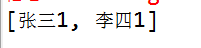
map()

四、基于注解的DI
注:在项目中添加Spring AOP相关的JAR文件以及xsd约束文件。
由于是基于注解的DI,所以无需再Spring配置文件中进行节点配置,只需配置包扫描器即可!
配置包扫描器用途:
该包下以及子包中的类才可以被Spring扫描,去寻找被注解的类和属性,让Spring容器管理赋值
<?xml version="1.0" encoding="UTF-8"?>

<beans xmlns="http://www.springframework.org/schema/beans"

    xmlns:context="http://www.springframework.org/schema/context"

    xmlns:p="http://www.springframework.org/schema/p"

    xmlns:xsi="http://www.w3.org/2001/XMLSchema-instance"

    xsi:schemaLocation="

        http://www.springframework.org/schema/beans http://www.springframework.org/schema/beans/spring-beans.xsd

         http://www.springframework.org/schema/context http://www.springframework.org/schema/context/spring-context.xsd

        ">

                                             指定包名

       <context:component-scan base-package="cn.entitys"></context:component-scan>

</beans>
Student类:
指定@Component中的value即可在测试类中的getBean()中植入即可。
@Value为该属性赋值
等价于@Component的注解:
@Component[不分层的情况下]
@Repository() [Dao层]
@Service() [Biz层]
@Controller() [Action类]
@Component(value="stu")

public class Student {

@Value("呵呵")

private String name;

@Value("13")

private String age;

/*

 * JDK注解 @Resource(name="car2")

 */

/*

 * Spring注解

 */

@Autowired

@Qualifier(value="car2")

private Car car;

@Override

public String toString() {

    return "Student [name=" + name + ", age=" + age + ", car=" + car + "]";

}
Car类:
@Component(value="car2")

public class Car {

@Value("黑色")

private String color;

@Value("奥迪")

private String brand;

@Override

public String toString() {

    return "Car [color=" + color + ", brand=" + brand + "]";

}
测试类:
public class Test01 {

@Test

public void addTest(){

    ApplicationContext ctx=new ClassPathXmlApplicationContext("applicationContext.xml");

    Student student=(Student) ctx.getBean("stu");

    System.out.println(student);

}

}
效果展示

Ioc和Ao使用扩展的更多相关文章
- IOC和AOP使用扩展 多种方式实现依赖注入
多种方式实现依赖注入 1.Spring 使用setter访问器实现对属性的赋值, 2.Spring 构造constructor方法赋值, 3.接口注入 4.Spring P命名空间注入直接量 sett ...
- Spring IoC和AOP使用扩展
Spring提供了设值注入,构造注入等依赖注入方式. 使用p命令空间可以简化属性注入的配置. Spring提供的增强处理类型包括前置增强,异常抛出增强,环绕增强,最终增强等. 通过Schema形式将P ...
- IoC和AOP使用扩展。。。
实现依赖的多种方式. 1.理解构造注入. 2.掌握使用p命名空间实现属性注入. 3.理解不同的数据类型的注入方式. 4.如何通过构造注入为业务类注入所依赖的数据访问层对象,实现保存用户数据功能. 5. ...
- IOC和AOP使用扩展之AOP详解实现类
摘要: “Depend on yourself” is what nature says to every man. Parents can help you. Teachers can hel ...
- .NET MVC4 实训记录之一(引入Unity3.0 Ioc框架)
一直在做维护项目,没有机会接触完整的架构,于是自学.NET MVC.自今日起,将自学的过程.遇到的问题以及解决方案记录下来. 在WebApp项目中右键,使用NuGet引入Unity3.0.
- 轻量级IoC框架Ninject.NET搭建
说在之前的话 IOC的概念相信大家比较熟悉了,习惯性称之为依赖注入或控制反转,园子里对基于MVC平台IOC设计模式已经相当多了,但大家都只知道应该怎么应用一个IOC模式,比如Ninject, Unit ...
- Dubbo源码解析之SPI(一):扩展类的加载过程
Dubbo是一款开源的.高性能且轻量级的Java RPC框架,它提供了三大核心能力:面向接口的远程方法调用.智能容错和负载均衡,以及服务自动注册和发现. Dubbo最早是阿里公司内部的RPC框架,于 ...
- Spring(IOC、AOP和事务)
目录 Spring介绍 Spring IOC 传统代码对象管理的弊端 实现过程 bean标签属性介绍 对象创建方式 工厂bean bean的作用域 SpringBean的生命周期*** 依赖注入 注解 ...
- 【SOE】 ArcGIS Server对象扩展(SOE)开发注意事项
ArcGIS Server对象扩展(SOE)开发注意事项 1.SOE介绍 在ArcGIS 10.1中ArcGIS Server不在支持DCOM方式的连接,这也就意味着我们不能通过本地方式的连接使用A ...
随机推荐
- img.width一直是0的问题--记录(二)
var img=new Image(); img.src="图片路径"; 然后调用 img.width img.height 你会发现值是0: 这是因为页面在加载的时候图片是最后的 ...
- 【原】SDWebImage源码阅读(一)
[原]SDWebImage源码阅读(一) 本文转载请注明出处 —— polobymulberry-博客园 1. 前言 一直没有系统地读过整套源码,就感觉像一直看零碎的知识点,没有系统读过一本专业经典书 ...
- 用原始方法解析复杂字符串,json一定要用JsonMapper么?
经常采集数据,肯定会碰到解析字符串,包括整个页面的html,或者json以及一些不标准的json格式... 以前用json序列化,有时候需要实体类,有的时候没有,比较麻烦,听说可以用JsonMappe ...
- 初步认识Node 之Web框架
上一篇我们认识了Node是什么之后,这一篇我们主要了解的就是它的框架了.而它的框架又分为两大类,Web框架和全栈框架,接下来我们一个一个的来了解. Web框架 Web框架可以细分为Web应用程序 ...
- Android5.0以下出现NoClassDefFoundError
事发起因 大周末的,突然接到老大的电话说很多用户无法安装新上线的APK,让我紧急Fix(现Android项目就我一己之力).但奇怪的是也没有Bug Reporter,而且开发过程中也一直没问题.根据上 ...
- 深入学习jQuery描述文本内容的3个方法
× 目录 [1]html() [2]text() [3]val()[4]总结 前面的话 在javascript中,描述元素内容有5个属性,分别是innerHTML.outerHTML.innerTex ...
- 怎么调试lua性能
怎么调试lua性能 我们的游戏使用的是Cocos2dx-lua 3.9的项目,最近发现我们的游戏.运行比较缓慢.想做一次性能优化了.其实主要分为GPU.CPU的分别优化.GPU部分的优化.网上有很多优 ...
- Entity Framework实现多列排序
aList.OrderBy(a => a.WIndex).ThenBy(a=>a.KIndex) 类似sql:order by WIndex,KIndex
- jquery禁用文本框
禁用文本框 //文本框禁用 $("input[type='text']").each(function () { $("#" + this.id).attr(& ...
- 手机端访问web调用数字键盘。
转自 http://www.webkfa.com/one4/w1937.html 最近在做手机页面时,遇到数字输入的键盘的问题,之前的做法只是一刀切的使用 type="tel", ...