
老男孩python作业9-简单的商城页面布局
利用HTML相关知识编写下面的网页:
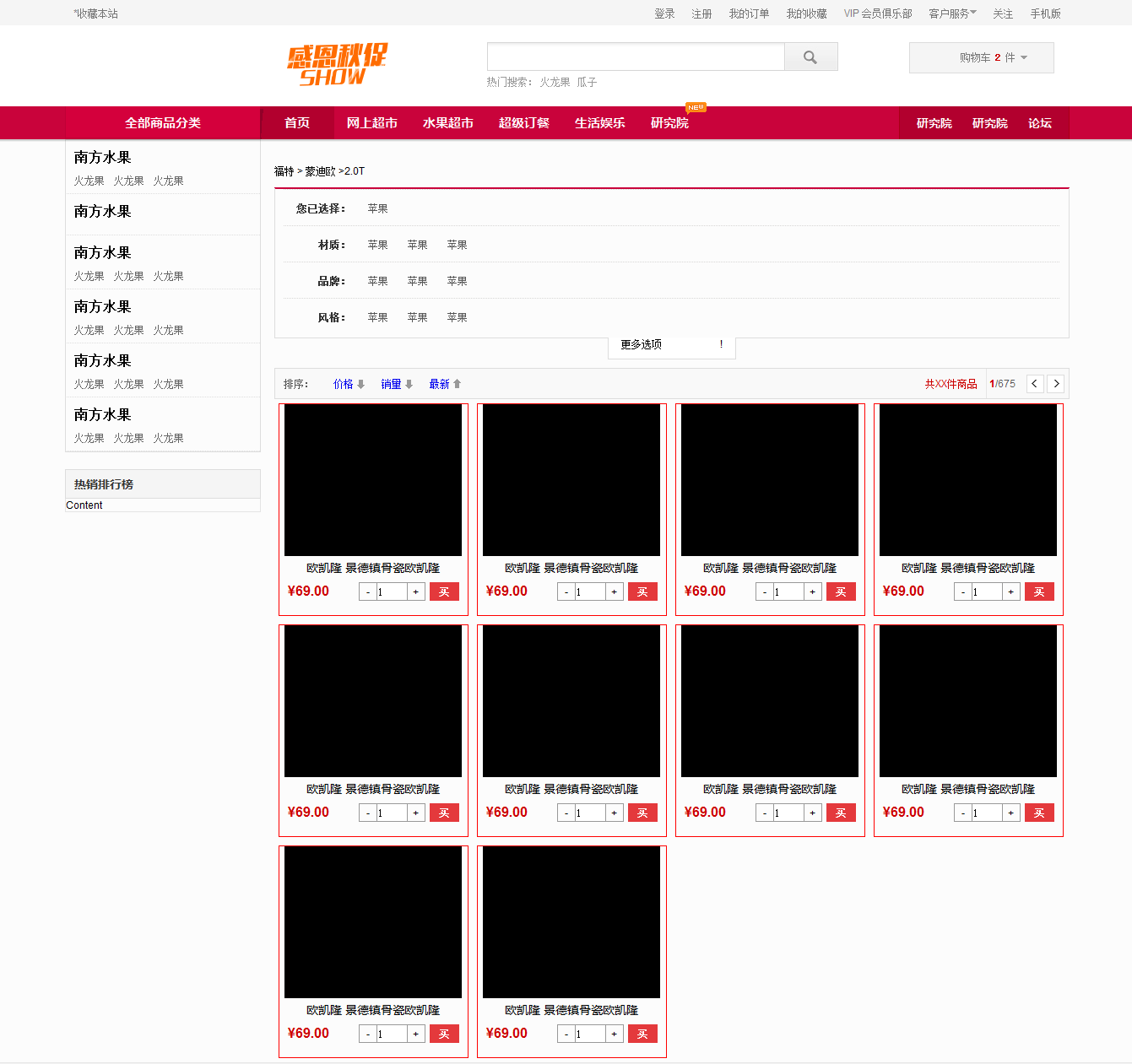
核心代码如下:
<!DOCTYPE html>
<html lang="en">
<head>
<meta charset="UTF-8">
<title>Title</title>
<style>
.pg-header{
height: 40px;
background-color: #dddddd;
line-height: 40px;
width: 1366px;
}
.header_menu{
display: inline-block;
padding: 0 10px 0 10px;
}
.header_menu:hover{
background-color:cornflowerblue;
}
.pg-search{
height: 140px;
line-height: 140px;
margin:2px;
width: 1366px;
}
.pg-item{
height: 45px;
background-color: red;
line-height: 45px;
margin-top: -2px;
width: 1366px;
} </style>
</head>
<body style="margin: 0 auto;">
<div class="pg-header">
<div style="width: 1366px;margin: 0 auto">
<div style="float: left;margin-left: 50px">*收藏本站</div>
<div style="float: right;margin-right: 50px">
<a class="header_menu">登录</a>
<a class="header_menu">注册</a>
<a class="header_menu">我的订单</a>
<a class="header_menu">我的收藏</a>
<a class="header_menu">*VIP会员俱乐部</a>
<a class="header_menu">关注</a>
</div>
</div>
</div>
<div class="pg-search">
<div style="width: 1366px;margin: 0 auto">
<div style="float: left;margin-left: 100px;height:140px;">
<img src="1.jpg" style="height: 110px">
</div>
<div style="float: left;width: 400px;height: 140px;margin-left:-50px;margin-top:-30px">
<div style="width: 400px;height: 40px;position: relative">
<input type="text" style="width: 370px;height: 40px;padding-right: 30px;"/>
<span style="position: absolute;top: 10px;right: 10px;background-image: url(2.jpg);height: 16px;width: 16px;margin-top: 60px"></span>
</div>
<div >
<span style="color: red">热门搜索:</span>
<a>红龙果</a>
<a>香蕉</a>
</div>
</div>
<div style="float: left;margin:25px;border: 1px solid darkgrey;height:50px;line-height:50px;width: 300px;text-align: center">
我的购物车<img src="3.jpg">
</div>
<div style="clear: both"></div>
</div>
</div>
<div class="pg-item">
<div style="width: 1366px">
<div style="width: 1150px;margin: 0 auto;">
<!--width: 1100px;达到“全部商品列表”栏不靠边的效果-->
<div style="float: left;height:45px;width: 200px;text-align:center;background-color: brown;line-height: 45px">
全部商品列表
</div>
<div style="float: left;height:45px;width: 75px;background-color: brown;line-height: 45px;margin-left: 10px;text-align: center">
首页
</div>
<div style="float: left;height:45px;width: 75px;background-color: brown;line-height: 45px;margin-left: 10px;text-align: center">
网上超市
</div>
<div style="float: left;height:45px;width: 75px;background-color: brown;line-height: 45px;margin-left: 10px;text-align: center">
水果超市
</div>
<div style="float: left;height:45px;width: 75px;background-color: brown;line-height: 45px;margin-left: 10px;text-align: center">
超级订餐
</div>
<div style="float: left;height:45px;width: 75px;background-color: brown;line-height: 45px;margin-left: 10px;text-align: center">
生活娱乐
</div>
<div style="float: left;height:45px;width: 75px;background-color: brown;line-height: 45px;margin-left: 10px;text-align: center">
研究院
</div>
<div style="float: right;height:45px;width: 75px;background-color: brown;line-height: 45px;margin-left: 10px;text-align: center">
研究院
</div>
<div style="float: right;height:45px;width: 75px;background-color: brown;line-height: 45px;margin-left: 10px;text-align: center">
研究院
</div>
<div style="float: right;height:45px;width: 75px;background-color: brown;line-height: 45px;margin-left: 10px;text-align: center">
论坛
</div>
<div style="clear: both"></div>
</div>
</div>
</div>
<div style="width: 1366px">
<div style="width: 1150px;margin: 0 auto">
<div style="float: left;width: 200px">
<div style="height: 70px;border: 1px solid silver">
<div style="font-weight: bold;color: purple">南方水果</div>
<br/>
<div>火龙果 火龙果 火龙果</div>
</div>
<div style="height: 70px;border: 1px solid silver">
<div style="font-weight: bold;color:purple">南方水果</div>
<br/>
<div>火龙果 火龙果 火龙果</div>
</div>
<div style="height: 70px;border: 1px solid silver">
<div style="font-weight: bold;color: purple">南方水果</div>
<br/>
<div>火龙果 火龙果 火龙果</div>
</div>
<div style="height: 50px;border: 1px solid silver">
<div style="font-weight: bold;color: purple;background-color: #dddddd">热销排行榜</div>
<div>content</div>
</div>
</div>
<div style="float: right;width:930px;">
<div style="margin-top: 10px">福特>蒙迪欧>2.0T</div>
<div style="height: 190px;border: 1px solid silver;border-top-color: red;margin-top: 10px">
<div style="border-bottom: dotted silver;height: 45px;line-height: 45px">
<span style="font-weight: bold">您已选择:</span>
<span>苹果</span>
</div>
<div style="border-bottom: dotted silver;height: 45px;line-height: 45px">
<span style="font-weight: bold;margin-left: 40px">材质:</span>
<span style="margin-left: 40px">苹果</span>
<span style="margin-left: 40px">苹果</span>
<span style="margin-left: 40px">苹果</span>
</div>
<div style="border-bottom: dotted silver;height: 45px;line-height: 45px">
<span style="font-weight: bold;margin-left: 40px">品牌:</span>
<span style="margin-left: 40px">苹果</span>
<span style="margin-left: 40px">苹果</span>
<span style="margin-left: 40px">苹果</span>
</div>
<div style="height: 45px;line-height: 45px">
<span style="font-weight: bold;margin-left: 40px">风格:</span>
<span style="margin-left: 40px">苹果</span>
<span style="margin-left: 40px">苹果</span>
<span style="margin-left: 40px">苹果</span>
</div>
</div>
<div style="margin-top: 30px;height: 40px;border: solid 1px silver">
<div style="float: left">
<span style="line-height: 40px">排序:</span>
<span style="line-height: 40px;margin-left: 40px">价格↑</span>
<span style="line-height: 40px;margin-left: 40px">销量↑</span>
<span style="line-height: 40px;margin-left: 40px">最新↑</span>
</div>
<div style="float: right;height: 40px;padding-right: 10px">
<span style="color: red;line-height: 40px">共XX件商品</span>
<div style="border: solid 1px silver;display: inline-block">
<span style="height: 40px;">
<span style="color:red;">1</span>
<span>/675</span>
<input type="submit" value="<"/>
<input type="submit" value=">"/> </span>
</div>
</div>
<div style="clear: both"></div>
</div>
<div style="width: 300px;height: 300px;margin-top: 10px;border:solid 1px red;float: left">
<div style="margin-top: 5px;margin-left: 25px">
<img src="4.jpg">
<div style="font-weight: bold">
奥迪A6L 2018款 30周年年型 30 FSI 风尚型
</div>
<div style="margin-top: 15px;">
<span style="color: red;font-weight: bold">¥34.78万</span>
<input type="submit" value="-"/>
<input type="text" value="1" style="width: 40px"/>
<input type="submit" value="+"/>
<span style="background-color: red;width:100px;color: #dddddd ">买买买</span>
</div>
</div>
</div>
<div style="width: 300px;height: 300px;margin-top: 10px;border:solid 1px red;float: left;margin-left: 10px">
<div style="margin-top: 5px;margin-left: 25px">
<img src="5.jpg">
<div style="font-weight: bold">
奔驰C级 2019款 C 260 运动版
</div>
<div style="margin-top: 35px;">
<span style="color: red;font-weight: bold">¥28.88万</span>
<input type="submit" value="-"/>
<input type="text" value="1" style="width: 40px"/>
<input type="submit" value="+"/>
<span style="background-color: red;width:100px;color: #dddddd ">买买买</span>
</div>
</div>
</div>
<div style="width: 300px;height: 300px;margin-top: 10px;border:solid 1px red;float: left;margin-left: 10px">
<div style="margin-top: 5px;margin-left: 25px">
<img src="6.jpg">
<div style="font-weight: bold">
法拉利 GTC4Lusso 2017款 3.9T V8
</div>
<div style="margin-top: 35px;">
<span style="color: red;font-weight: bold">¥322.80万</span>
<input type="submit" value="-"/>
<input type="text" value="1" style="width: 40px"/>
<input type="submit" value="+"/>
<span style="background-color: red;width:100px;color: #dddddd ">买买买</span>
</div>
</div>
</div>
<div style="width: 300px;height: 300px;margin-top: 10px;border:solid 1px red;float: left;">
<div style="margin-top: 5px;margin-left: 25px">
<img src="4.jpg">
<div style="font-weight: bold">
奥迪A6L 2018款 30周年年型 30 FSI 风尚型
</div>
<div style="margin-top: 15px;">
<span style="color: red;font-weight: bold">¥34.78万</span>
<input type="submit" value="-"/>
<input type="text" value="1" style="width: 40px"/>
<input type="submit" value="+"/>
<span style="background-color: red;width:100px;color: #dddddd ">买买买</span>
</div>
</div>
</div>
<div style="width: 300px;height: 300px;margin-top: 10px;border:solid 1px red;float: left;margin-left: 10px">
<div style="margin-top: 5px;margin-left: 25px">
<img src="4.jpg">
<div style="font-weight: bold">
奥迪A6L 2018款 30周年年型 30 FSI 风尚型
</div>
<div style="margin-top: 15px;">
<span style="color: red;font-weight: bold">¥34.78万</span>
<input type="submit" value="-"/>
<input type="text" value="1" style="width: 40px"/>
<input type="submit" value="+"/>
<span style="background-color: red;width:100px;color: #dddddd ">买买买</span>
</div>
</div>
</div>
<div style="width: 300px;height: 300px;margin-top: 10px;border:solid 1px red;float: left;margin-left: 10px">
<div style="margin-top: 5px;margin-left: 25px">
<img src="4.jpg">
<div style="font-weight: bold">
奥迪A6L 2018款 30周年年型 30 FSI 风尚型
</div>
<div style="margin-top: 15px;">
<span style="color: red;font-weight: bold">¥34.78万</span>
<input type="submit" value="-"/>
<input type="text" value="1" style="width: 40px"/>
<input type="submit" value="+"/>
<span style="background-color: red;width:100px;color: #dddddd ">买买买</span>
</div>
</div>
</div>
</div>
</div>
</div>
</body>
</html>
老男孩python作业9-简单的商城页面布局的更多相关文章
- python之urllib2简单解析HTML页面之篇一
一.urllib2简单获取html页面 #!/usr/bin/env python # -*- coding:utf-8 -*- import urllib2 response = urllib2.u ...
- (数据科学学习手札103)Python+Dash快速web应用开发——页面布局篇
本文示例代码已上传至我的Github仓库https://github.com/CNFeffery/DataScienceStudyNotes 1 简介 这是我的系列教程Python+Dash快速web ...
- 老男孩python作业5-开发一个简单的python计算器
开发一个简单的python计算器 实现加减乘除及拓号优先级解析 用户输入 1 - 2 * ( (60-30 +(-40/5) * (9-2*5/3 + 7 /3*99/4*2998 +10 * 568 ...
- 老男孩Day5作业:电子银行购物商城
1.作业需求: 模拟实现一个ATM + 购物商城程序 额度 15000或自定义 实现购物商城,买东西加入 购物车,调用信用卡接口结账 可以提现,手续费5% 支持多账户登录支持账户间转账 记录每月日常消 ...
- 老男孩python作业8-学员管理系统
学员管理系统开发: 需求: 用户角色,讲师\学员, 用户登陆后根据角色不同,能做的事情不同,分别如下 讲师视图 管理班级,可创建班级,根据学员qq号把学员加入班级 可创建指定班级的上课纪录,注意一节上 ...
- 老男孩python作业7-开发一个支持多用户在线的FTP程序
作业6:开发一个支持多用户在线的FTP程序 要求: 用户加密认证 允许同时多用户登录 每个用户有自己的家目录 ,且只能访问自己的家目录 对用户进行磁盘配额,每个用户的可用空间不同 允许用户在ftp s ...
- 老男孩python作业6-选课系统开发
角色:学校.学员.课程.讲师要求:1. 创建北京.上海 2 所学校2. 创建linux , python , go 3个课程 , linux\py 在北京开, go 在上海开3. 课程包含,周期,价格 ...
- 老男孩python作业4-ATM程序开发
实现一个ATM + 购物商城程序: 额度 15000或自定义 实现购物商城,买东西加入 购物车,调用信用卡接口结账 可以提现,手续费5% 支持多账户登录 支持账户间转账 记录每月日常消费流水 提供还款 ...
- 老男孩python作业1
作业1:编写登陆接口 (1)输入用户名密码 (2)认证成功后显示欢迎信息 (3)输错三次后锁定 作业2:多级菜单 (1)三级菜单 (2)可依次选择进入各子菜单 (3)所需新知识点:列表.字典 任务1思 ...
随机推荐
- 窗体的keypreview属性的作用是什么?(设置快捷键和钩子)
如果把窗体的KeyPreview属性设为True,那么窗体将比其内的控件优先获得键盘事件的激活权.比如窗体Form1和其内的文本框Text1都准备响应KeyPress事件,那么以下代码将首先激活窗体的 ...
- myeclipse10启动service窗口报异常
1:找到与之对应的tomcat: 2:删掉“.metadata/.plugins/org.eclipse.core.runtime/.settings/ com.genuitec.eclipse.as ...
- 每天一道算法题(11)——栈的push、pop 序列
题目:输入两个整数序列.其中一个序列表示栈的push 顺序,判断另一个序列有没有可能是对应的pop 顺序.为了简单起见,我们假设push 序列的任意两个整数都是不相等的. 例如:输入的push 序列是 ...
- sh 脚本重启/更新 Tomcat 项目
一.项目文件为一个 jar 包,无须解压 重启 Tomcat 项目 #!/bin/bash echo "kill hot-jdt" kill -9 `ps -ef|grep hot ...
- Codeforces 1107E (Vasya and Binary String) (记忆化,DP + DP)
题意:给你一个长度为n的01串,和一个数组a,你可以每次选择消除一段数字相同的01串,假设消除的长度为len,那么收益为a[len],问最大的收益是多少? 思路:前两天刚做了POJ 1390,和此题很 ...
- HDU 6396(2018多校第七场1011) Swordsman
场上场下各种TLE到怀疑人生...经过大佬指点之后才知道要用fread才能过,一般的快读不行... 题意:一个剑客打小怪兽,有n头小怪兽,剑客和小怪兽有m个属性.只有剑客的m个属性都大于等于某个小怪兽 ...
- ubuntu16配置Mask-RCNN
一.安装Anaconda3 1.下载 下载地址:https://www.continuum.io/downloads 2.安装 在文件目录下执行:bash Anaconda3-4.2.0-Linux- ...
- 高性能MySQL笔记-第4章Optimizing Schema and Data Types
1.Good schema design is pretty universal, but of course MySQL has special implementation details to ...
- poj3557 Map Generator
传送门 题目大意 给定两个数n,p;表示n个点中任意两点连边的概率为p,求生成的图是个连通块的概率 分析 我们发现直接求产生联通块的概率并不容易,于是我们转而考虑计算不能生成联通块的概率,公式如下: ...
- DIY的RPM包怎么签名呢 - 笔记
参考 https://gist.github.com/fernandoaleman/1376720 如果打不开上一个连接,请参考https://www.cnblogs.com/LiuYanYGZ/p/ ...