
idea导入ssm项目启动tomcat报错404
用idea写ssm项目,基于之前一直在用spring boot 对于idea如何运行ssm花费了一番功夫
启动Tom act一直在报404 我搜了网上各种解决办法都不行,花费一天多的时间解决不了
就是在pom中添加下面代码
<build>

        <plugins>

            <plugin>

                <groupId>org.apache.maven.plugins</groupId>

                <artifactId>maven-compiler-plugin</artifactId>

                <version>3.5.</version>

                <configuration>

                    <source>1.8</source>

                    <target>1.8</target>

                </configuration>

            </plugin>

        </plugins>

        <resources>

            <resource>

                <directory>src/main/resources</directory>

                <includes>

                    <include>**/*.properties</include>

                    <include>**/*.xml</include>

                    <include>**/*.ini</include>

                </includes>

                <filtering>false</filtering>

            </resource>

            <resource>

                <directory>src/main/java</directory>

                <includes>

                    <include>**/*.properties</include>

                    <include>**/*.xml</include>

                </includes>

                <filtering>false</filtering>

            </resource>

        </resources>

    </build>
idea不配置各种文件,自己识别不了 需要给指定
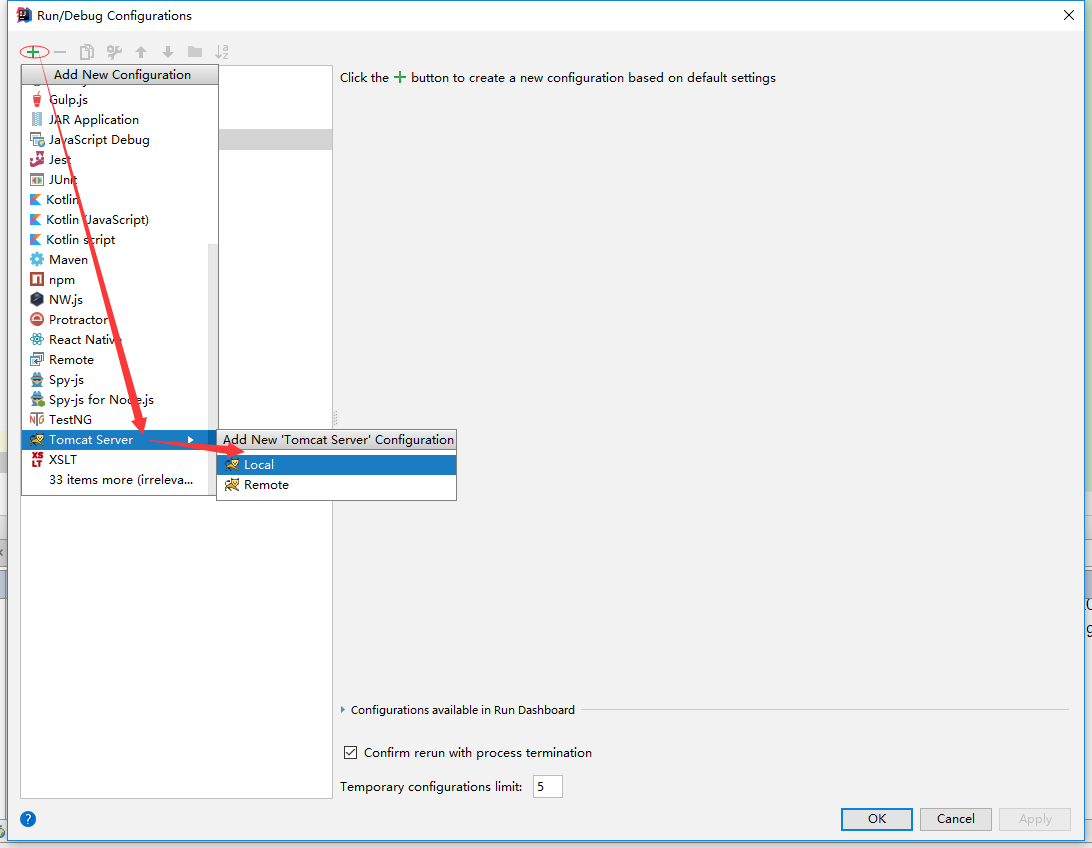
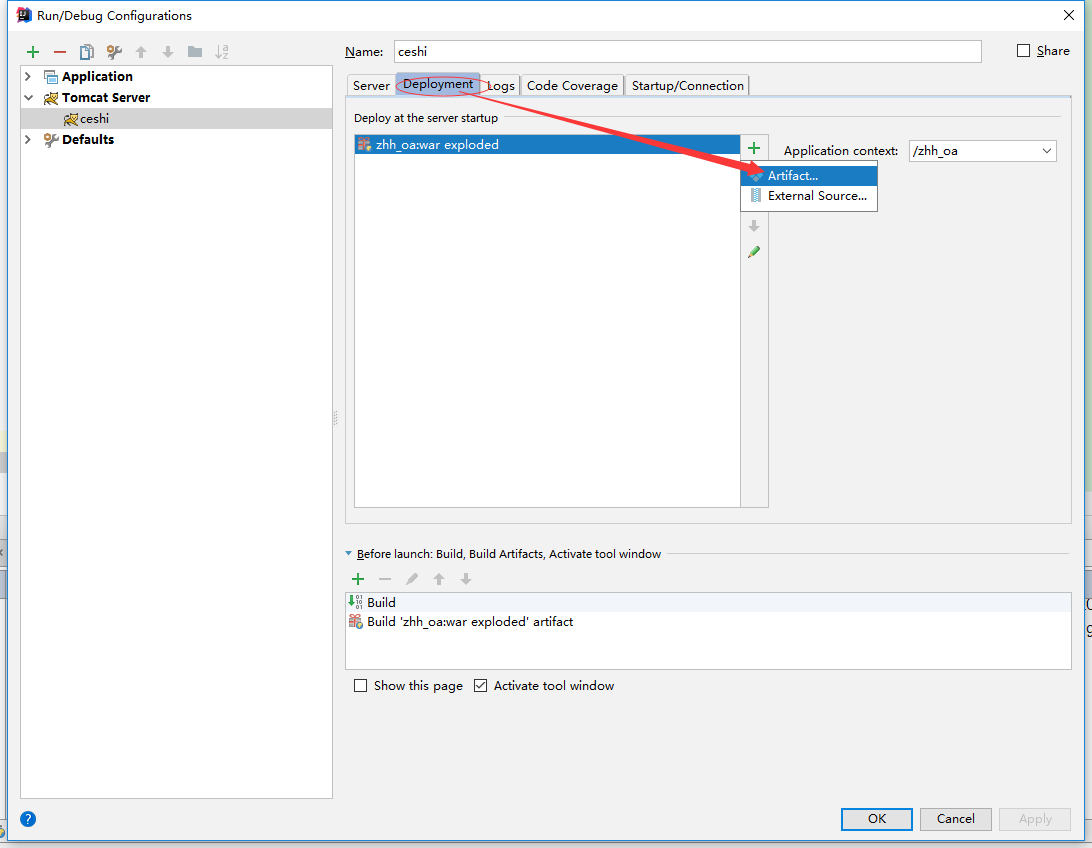
配置tomcat以及jdk
首先配置jdk


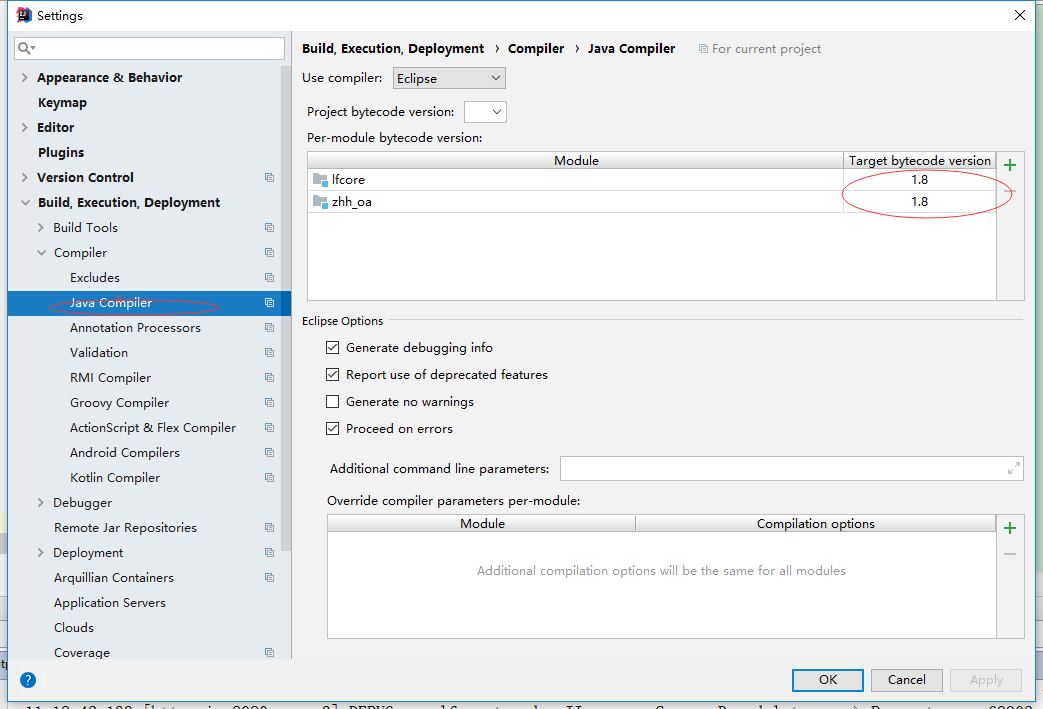
jdk配置完成 配置tomcat



idea导入ssm项目启动tomcat报错404的更多相关文章
- maven 项目启动tomcat报错 java.lang.ClassNotFoundException: org.springframework.web.context.ContextLoaderListener
maven项目启动tomcat报错: java.lang.ClassNotFoundException: org.springframework.web.context.ContextLoaderLi ...
- 使用ssm整合是项目启动tomcat报错java.lang.IndexOutOfBoundsException
解决办法:删除.m2文件夹下的全部仓库,然后重启myeclipse,对项目进行maven project.问题解决. 在没有这样做时,除了tomcat启动会失败,项目还有会报如下错误: ①cvc-co ...
- 【转】Eclipse下启动tomcat报错:/bin/bootstrap.jar which is referenced by the classpath, does not exist.
转载地址:http://blog.csdn.net/jnqqls/article/details/8946964 1.错误: 在Eclipse下启动tomcat的时候,报错为:Eclipse下启动to ...
- eclipse运行项目,tomcat报错:Exception in thread :http-bio-8080-exec-4
eclipse运行项目,tomcat报错:Exception in thread :http-bio-8080-exec-4 转自 https://www.cnblogs.com/yby-blogs/ ...
- Eclipse启动Tomcat报错,系统缺少本地apr库
Eclipse启动Tomcat报错,系统缺少本地apr库. Tomcat中service.xml中的设置情况. 默认情况是HTTP协议的值:protocol="HTTP/1.1" ...
- IDEA启动Tomcat报错1099 is already in use
IDEA中启动Tomcat报错,Error running Tomcat7.0.52: Address localhost:1099 is already in use 或者是 java.rmi.se ...
- 部署Maven项目到tomcat报错:java.lang.ClassNotFoundException: org.springframework.web.context.ContextLoaderListener【转】
部署Maven项目到tomcat报错:java.lang.ClassNotFoundException: org.springframework.web.context.ContextLoaderLi ...
- mysql-connector-java升级到6.0以后启动tomcat报错
mysql-connector-java升级到6.0以后启动tomcat报错 java.sql.SQLException: The server time zone value '�й���ʱ��' ...
- IDEA启动Tomcat报错
Maven编译成功, 可是启动Tomcat报错: Application Server was not connected before run configuration stop, reason: ...
随机推荐
- Jenkins里jobs和workspace什么区别
https://segmentfault.com/q/1010000012575095/a-1020000012590560 简单的说,job 中保存的是项目是在 jenkins 上的配置.日志.构建 ...
- cocos自动图集
对于图像资源,为什么要用图集,cocos官网的解释: 1.合成图集时会去除每张图片周围的空白区域,加上可以在整体上实施各种优化算法,合成图集后可以大大减少游戏包体和内存占用2.多个 Sprite 如果 ...
- [API 开发管理] EOLINKER 升级为多产品架构, AMS V4.5 版本常见问题汇总
自AMS4.5开始,eoLinker 全面升级为多产品架构,部分操作方式较以前有较大改变,本文针对改进部分做重点说明. 在说明之前,我们先通过以下的图文看看AMSV4.5更新了哪些内容: Q:我可以创 ...
- python合并多个txt文件成为一个文件
#coding=utf-8 import os import os.path #文件夹遍历函数 #获取目标文件夹的路径 filedir = './data/click_data' #获取当前文件夹中的 ...
- Django工程
一.Django工程创建 1.Django安装: pip3 install django 安装成功后,会在python的安装目录下“Scripts"中生成”django-admin.exe& ...
- js 简单模板引擎
代码 <!DOCTYPE html> <html> <head> <meta http-equiv="Content-Type" cont ...
- Django基础配置
安装djangopip install Django==1.11.4进入pythonimport django查看版本号django.get_version()创建项目,在合适位置创建一个目录进入你要 ...
- Python - 面对对象(进阶)
目录 Python - 面对对象(进阶) 类的成员 一. 字段 二. 方法 三. 属性 类的修饰符 类的特殊成员 Python - 面对对象(进阶) 类的成员 一. 字段 字段包括:普通字段和静态字段 ...
- Django-搭建win7虚拟环境-virtualenv
为什么要配置Django虚拟环境? 例如:在开发Python Django的时候,系统安装的Python3只有一个版本:3.6.所有第三方的包都会被pip安装到Python3的site-package ...
- LINUX应用开发(面试)
LINUX应用开发工程师职位 本试卷从考试酷examcoo网站导出,文件格式为mht,请用WORD/WPS打开,并另存为doc/docx格式后再使用 说明:应用开发可考察的点非常多,关键的还是C语言和 ...