
js实现科学计算机
js实现科学计算机
一、总结
1、算法:这个科学计算机是用普通基础算法实习的,没有用栈,用栈要简单很多,
2、发现规律,编程分类:编程的时候,运算符分两种,一元运算符和二元运算符,分类了就好写很多了。
3、用了一个全局变量来记录是否已经按下了运算符键。
4、js中with()函数:with函数中,属性的对象名可以省略,因为with中有。
5、substring函数:截取字符串,退格的时候用。
6、(tr>(td>input)*3)*4:快速输出html标签,>号表示从属,*n表示n个
7、css样式要好好看看
二、js实现科学计算机
截图

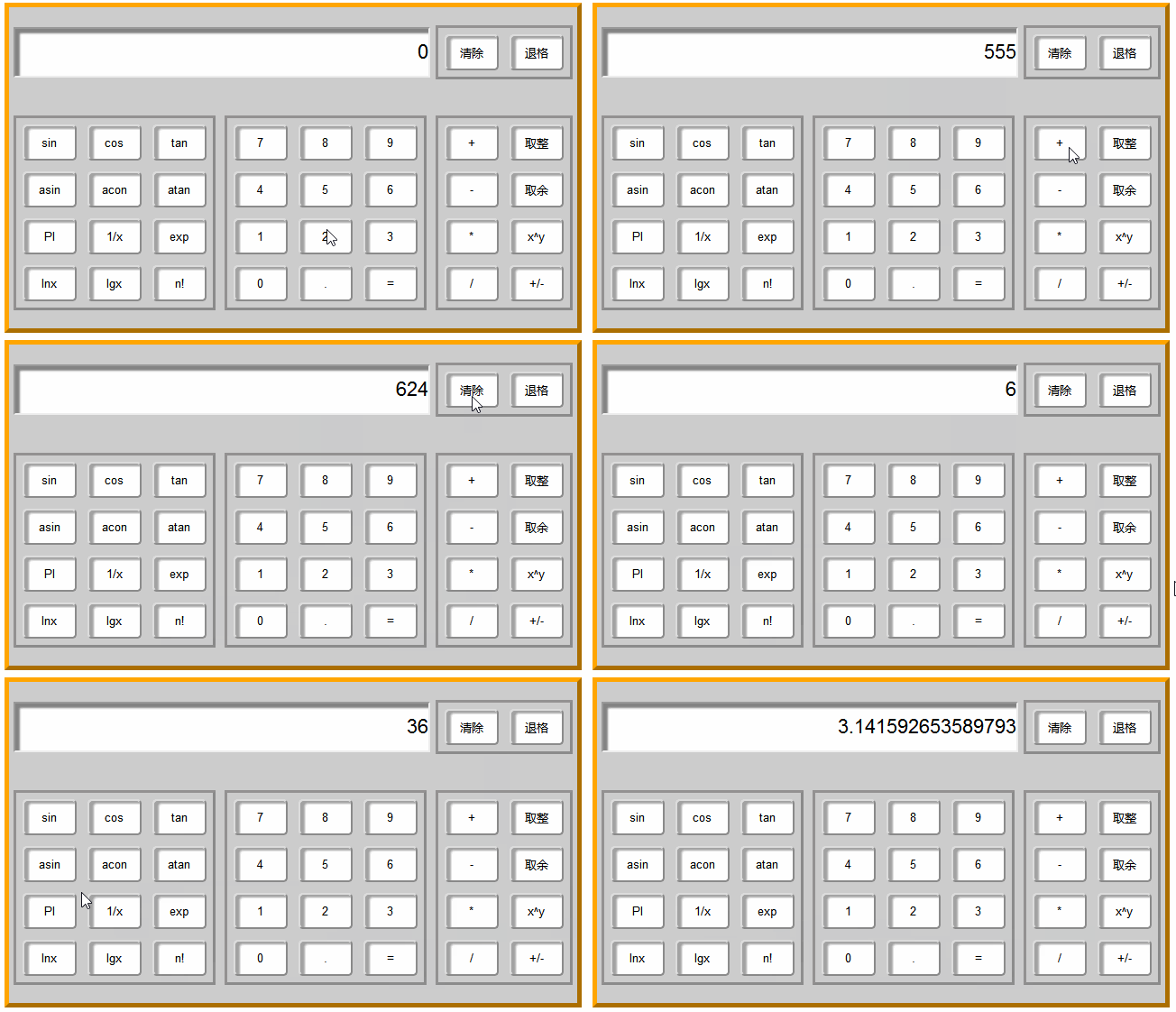
代码
 <!DOCTYPE html>

 <html lang="en">

 <head>

     <meta charset="UTF-8">

     <title>计算器练习</title>

     <style type="text/css">

     table{

         margin: 15px auto;

         font-size: 22px;

         border:5px outset orange;

     }

     #tab-1,#tab-2,#tab-3{

         border:3px outset rgba(15,10,10,0.3);

     }

     input{

         outline: none;

         box-shadow:5px 5px 2px rgba(100,100,100,0.8) inset;

     }

     #txtnum{

         text-align: right;

         height: 50px;

         width: 100%;

         background:#fff;

         font-size: 22px;

     }

     td{

         padding: 5px;

         background: #ccc;

     }

     [type=button]{

         width: 60px;

         height: 40px;

         border-radius: 5px;

         background: #fff;

         box-shadow:5px 3px 2px rgba(100,100,100,0.6) inset;

     }

     </style>

 </head>

 <body>

     <!-- 主表设计 -->

     <table id="main" cellspacing="0">

     <!-- (tr>td*3)*2 快捷方式-->

         <tr>

             <td colspan="2">

                 <input type="text"  id="txtnum" value="0" >

             </td>

             <td>

                 <table id="tab-1">

                     <tr>

                         <td><input type="button" id="cc" value="清除"

                         onclick="txtnum.value='0';result=0 "></td>

                         <td><input type="button" id="tg" value="退格"

                         onclick="backspace()"></td>

                     </tr>

                 </table>

             </td>

         </tr>

         <tr>

             <td>

                 <table id="tab-2">

                     <!-- (tr>(td>input)*3)*4 -->

                     <tr>

                         <td><input type="button" id="sin" value="sin"

                         onclick="math('sin')"></td>

                         <td><input type="button" id="cos" value="cos"

                         onclick="math('cos')"></td>

                         <td><input type="button" id="tan" value="tan"

                         onclick="math('tan')"></td>

                     </tr>

                     <tr>

                         <td><input type="button" id="asin" value="asin"

                         onclick="math('asin')"></td>

                         <td><input type="button" id="acon" value="acon"

                         onclick="math('acon')"></td>

                         <td><input type="button" id="atan" value="atan"

                         onclick="math('atan')"></td>

                     </tr>

                     <tr>

                         <td><input type="button" id="PI" value="PI"

                         onclick="math('PI')"></td>

                         <td><input type="button" value="1/x"

                         onclick="math('1/x')"></td>

                         <td><input type="button" value="exp"

                         onclick="math('exp')"></td>

                     </tr>

                     <tr>

                         <td><input type="button" value="lnx"

                         onclick="math('lnx')"></td>

                         <td><input type="button" value="lgx"

                         onclick="math('lgx')"></td>

                         <td><input type="button" value="n!"

                         onclick="math('n!')"></td>

                     </tr>

                 </table>

             </td>

             <td>

                 <table id="tab-3">

                     <!-- (tr>(td>input)*3)*4 -->

                     <tr>

                         <td><input type="button" id="" value="7"

                         onclick="num('7')"></td>

                         <td><input type="button" id="" value="8"

                         onclick="num('8')"></td>

                         <td><input type="button" id="" value="9"

                         onclick="num('9')"></td>

                     </tr>

                     <tr>

                         <td><input type="button" id="" value="4"

                         onclick="num('4')"></td>

                         <td><input type="button" id="" value="5"

                         onclick="num('5')"></td>

                         <td><input type="button" id="" value="6"

                         onclick="num('6')"></td>

                     </tr>

                     <tr>

                         <td><input type="button" id="" value="1"

                         onclick="num('1')"></td>

                         <td><input type="button" value="2"

                         onclick="num('2')"></td>

                         <td><input type="button" value="3"

                         onclick="num('3')"></td>

                     </tr>

                     <tr>

                         <td><input type="button" value="0"

                         onclick="num('0')"></td>

                         <td><input type="button" value="." onclick="decimal()"></td>

                         <td><input type="button" value="="

                         onclick="compute('=')"></td>

                     </tr>

                 </table>

             </td>

             <td>

                 <table id="tab-3">

                     <tr>

                         <td><input type="button" id="" value="+"

                         onclick="compute('+')"></td>

                         <td><input type="button" id="" value="取整"

                         onclick="math('i')"></td>

                     </tr>

                     <tr>

                         <td><input type="button" id="" value="-"

                         onclick="compute('-')"></td>

                         <td><input type="button" id="" value="取余"

                         onclick="compute('%')"></td>

                     </tr>

                     <tr>

                         <td><input type="button" id="" value="*"

                         onclick="compute('*')"></td>

                         <td><input type="button" id="" value="x^y"

                         onclick="compute('x^y')"></td>

                     </tr>

                     <tr>

                         <td><input type="button" id="" value="/"

                         onclick="compute('/')"></td>

                         <td><input type="button" id="" value="+/-"

                         onclick="reverse()"></td>

                     </tr>

                 </table>

             </td>

         </tr>

     </table>

     <script type="text/javascript">

     //operator 运算符

         var Boo=false;  //判断是否按下计算符号的布尔变量;

         var result=0;  //存储计算数据的变量

         var ope; //存储计算符号的变量

         function $(x){

             return document.getElementById(x)

         }

         function decimal(){

             var txt=$('txtnum');

             if(Boo){

                 txt.value='0.' //若接受过运算符,文本框清零

             } else{

                 if (txt.value.indexOf('.')==-1) { //判断数值中是否已经有小数点

                     txt.value+='.'; //若没有则加上

                 }

             }

             Boo=false; //若接受过运算符,文本框不能清零

         }

         //indexOf() 方法可返回某个指定的字符串值在字符串中首次出现的位置。

         //如果要检索的字符串值没有出现,则该方法返回 -1。

         function num(Num){

             var txt=$('txtnum');

             if (Boo) {

                 txt.value=Num;

                 Boo=false;

             }else{

                 if (txt.value=='0') {

                     txt.value=Num

                 }else{

                     txt.value+=Num;

                 }

             }

         }

         function compute(op){

             var onum=$('txtnum').value;

             if (onum=='') {onum=0}

             Boo=true;

             switch(ope){

                 case '+':

                 result+=parseFloat(onum);break;

                 case '-':

                 result-=parseFloat(onum);break;

                 case '*':

                 result*=parseFloat(onum);break;

                 case '/':

                 result/=parseFloat(onum);break;

                 case '=':

                 result=parseFloat(onum);break;

                 case '%':

                 result%=onum;break;

                 //{result%=onum;break;}break;

                 case 'x^y':

                 result=Math.pow(result,onum);break;

                 //{result=Math.pow(result,onum);break;}break;

                 default:result=parseFloat(onum)

             }

             $('txtnum').value=result;

             ope=op;

         }

         function math(op){

             var onum=$('txtnum').value;

             if (onum==''){alert('数据不能为空')};

             Boo=true;

             with(Math){

                 switch(op){

                     case 'sin':result=sin(onum);break;

                     case 'cos':result=cos(onum);break;

                     case 'tan':result=tan(onum);break;

                     case 'asin':result=asin(onum);break;

                     case 'acos':result=acos(onum);break;

                     case 'atan':result=atan(onum);break;

                     case 'PI':result=PI;break;

                     case '1/x':result=1/onum;break;

                     case 'exp':result=exp(onum);break;

                     case 'lnx':result=log(onum);break;

                     case 'lgx':result=log(onum)/log(10);break;

                     case 'i':result=floor(onum);break;

                     case 'n!':result=jc(onum);break;

                     default:result=parseFloat(onum);

                 }

             }

             $('txtnum').value=result;

         }

         function jc(a){

             if(a==1){

                 return 1;

             }else{

                 return jc(a-1)*a

             }

         }

         function reverse(){

             var Num1=$('txtnum').value;

             if (Num1=='') {

                 alert('数据不能为空')

             }else{

                 $('txtnum').value*=-1;

             }

         }

         function backspace(){

             var txt=$('txtnum');

             txt.value=txt.value.substring(0,txt.value.length-1);

             if (txt.value=='') {txt.value=0}

         }

     </script>

 </body>

 </html>
js实现科学计算机的更多相关文章
- html+css+js实现科学计算器
代码地址如下:http://www.demodashi.com/demo/13751.html 项目描述 纯html+css+js实现一个科学计算器,支持平方开方指数对数等基本函数,支持键盘输入,有简 ...
- Windows下如何更新 node.js
因为在Windows下是没有n模块的并不支持npm install -g n n latest更新,所以只能老老实实安装 1.在Path环境变量下查看自己的node.js安装路径 计算机-属性-高级 ...
- JS简单数据类型
JS数据类型 在计算机中,不同的数据所需要占用的空间是不同的,为了便于把数据分析称所需内存大小不同的数据,充分利用存储空间,于是定义了不同的数据类型 简单数据类型 简单数据类型 说明 默认值 Numb ...
- js - 基础 之 预编译总结
js运行步骤 语法解析(检查有无语法错误) 预编译 解释运行(将 js 翻译成计算机识别的语言(0.1组成),翻译一行执行一行) 预编译 [全局]: 创建 GO( Grobal Object ) 对象 ...
- jquery如此强大,为什么还要写原生呢?
这是一个伪标题,其实是一篇年终总结. 在这家公司一年多,蛮多收获的.大部分来自自己,小部分来自公司. 做前端开发到现在,我觉得可以分为两部分. 前半部分做项目用原生js,jquery以及各种基于jq的 ...
- javascript学习笔记全记录
js的初步了解 1.就是用来修改样式的,修改的是行内样式.任何样式都能够修改. 2.css里面怎么写js就怎么写. 3.任何元素都能加事件:事件都要小写 js的三大 ...
- RESEACH PAPER
个,proquest的username和password赫然在目,别急,再看第4个结 果"HB Thompson Subscription Online Databases", ...
- CMD-NET命令详解(转载)
本文转自http://www.cnblogs.com/chenjq0717/archive/2010/05/09/1730934.html net命令大全,net命令用法,net网络命令,net命令使 ...
- 框架基础:ajax设计方案(二)---集成轮询技术
上一篇文章介绍了ajax技术核心方法,和跨域的问题(只要后台支持跨域默认post就可以),这篇文章讲解一下使用ajax实现的轮询技术,至于iframe,SSE服务器单向推送,以及webSocket ...
随机推荐
- Android Developer:内存分析器
Heap Viewer,Memory Monitor和Allocation Tracker是用来可视化你的app使用内存的补充工具. 使用Memory Monitor Tool来发现是否有不好的内存回 ...
- UI_搭建MVC
新建RootViewController 继承于 UIViewController 新建RootView 继承于 UIView AppDelegate.m 中引入 #import "Root ...
- 操作系统 linux 内核的三种进程调度方法
1.SCHED_OTHER 分时调度策略: 2.SCHED_FIFO 实时调度策略.先到先服务: 3,SCHED_RR 实时调度策略,时间片轮转 . 实时进程将得到优先调用,实时进程依据实时优先级决定 ...
- eclipse中编码的设置
Windows-------->prefenerce------>General-------->Workspace
- vue -- config index.js 配置文件详解
此文章介绍vue-cli脚手架config目录下index.js配置文件 此配置文件是用来定义开发环境和生产环境中所需要的参数 关于注释 当涉及到较复杂的解释我将通过标识的方式(如(1))将解释写到单 ...
- LinkCutTree详解
LCT详解 没有比这再详细的了, 相信我
- LuoguP2764 最小路径覆盖问题(最大流)
题目描述 «问题描述: 给定有向图G=(V,E).设P 是G 的一个简单路(顶点不相交)的集合.如果V 中每个顶点恰好在P 的一条路上,则称P是G 的一个路径覆盖.P 中路径可以从V 的任何一个顶点开 ...
- php开启openssl扩展
windows下开启方法: 1: 首先检查php.ini中:extension=php_openssl.dll是否存在, 如果存在的话去掉前面的注释符‘:’, 如果不存在这行,那么添加extensio ...
- 洛谷 P1957 口算练习题
洛谷 P1957 口算练习题 题目描述 王老师正在教简单算术运算.细心的王老师收集了i道学生经常做错的口算题,并且想整理编写成一份练习. 编排这些题目是一件繁琐的事情,为此他想用计算机程序来提高工作效 ...
- 【Codecraft-18 and Codeforces Round #458 (Div. 1 + Div. 2, combined) B】 Conan and Agasa play a Card Game
[链接] 我是链接,点我呀:) [题意] 在这里输入题意 [题解] 最大值出现次数是偶数. 那么就取次大值. 次大值也是偶数? =>再次 因为你绝对不能取偶数个的. 取了对方就总是能面对一个奇数 ...