
KindEditor文本编辑框的实现
效果图:
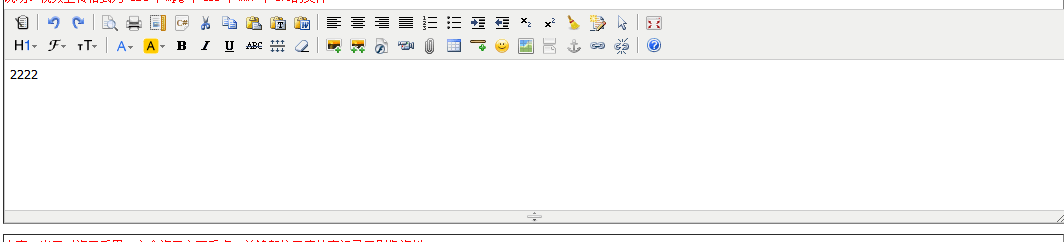
kindeditor 是一个插件
下载地址:
https://files-cdn.cnblogs.com/files/lxnlxn/kindeditor.zip
解压后将其放在项目的js文件夹下边,将js/kindEditor/jsp/lib下的jar包放在项目的WEB-INF下的lib中并且Build Path
jsp页面:引入kindeditor插件
<head>

<link rel="stylesheet" href="${basePath}js/kindEditor/themes/default/default.css" />

<link rel="stylesheet" href="${basePath}js/kindEditor/plugins/code/prettify.css" />

<script charset="utf-8" src="${basePath}js/kindEditor/kindeditor.js"></script>

<script charset="utf-8" src="${basePath}js/kindEditor/lang/zh_CN.js"></script>

<script charset="utf-8" src="${basePath}js/kindEditor/plugins/code/prettify.js"></script>

<script >

	//文本编辑框

	KindEditor.ready(function(K) {

		var	 editor = K.create('textarea[name="supervisionLog.contentText1"]', {

			uploadJson : '${basePath}js/kindEditor/jsp/upload_json.jsp',

			fileManagerJson : '${basePath}js/kindEditor/jsp/file_manager_json.jsp',

			allowFileManager : true,

			//afterBlur: function(){this.sync();}

			//这一句的作用:当失去焦点时执行 this.sync();

			//这个函数作用是同步KindEditor的值到textarea文本框。

			//官方文档解释:

			//sync():将编辑器的内容设置到原来的textarea控件里。

			afterBlur : function(){ this.sync();}
              //追加处。。。。。:记录输入字数的个数

		});

	});

</script>

</head>
<tr>

       <td>

          <font color="red">内容</font>

          <textarea id="supervisionLog.contentText1" name="supervisionLog.contentText1" class="ldTextArea" style="width:100%;height:300px;visibility:hidden;" ${readonly}>${supervisionLog.contentText1}</textarea>

      </td>

</tr>
//追加处。。。。。:记录输入字数的个数
afterChange:  function() {

                $('.word_count1').html(this.count()); //字数统计包含HTML代码

                $('.word_count2').html(this.count('text'));  //字数统计包含纯文本、IMG、EMBED,不包含换行符,IMG和EMBED算一个文字

                var limitNum = ;  //设定限制字数

                var pattern = '' + limitNum + '字';

                $('.word_surplus').html(pattern); //输入显示

                if(this.count('text') > limitNum) {

                    pattern = ('字数超过限制,请适当删除部分内容');

                    //超过字数限制自动截取

                    var strValue = editor.text();

                    strValue = strValue.substring(,limitNum);

                    editor.text(strValue);

                } else {

                    //计算剩余字数

                    var result = limitNum - this.count('text');

                    pattern = '' +  result + '字';

                }

                $('.word_surplus').html(pattern); //输入显示

            }

<p> 还可以输入<span class="word_surplus font12"></span>,您当前输入了 <span class="word_count1 font12"></span> 个文字。(详情:包含HTML代码共: <span class="word_count1 font12"></span> 个文字。 包含纯文本、IMG、EMBED,不包含换行符,共: <span class="word_count2 font12"></span> 个文字。)<br>

 </p>
jsp页面:upload_json.jsp
<%@ page language="java" contentType="text/html; charset=UTF-8" pageEncoding="UTF-8"%>

<%@ page import="java.util.*,java.io.*" %>

<%@ page import="java.text.SimpleDateFormat" %>

<%@ page import="org.apache.commons.fileupload.*" %>

<%@ page import="org.apache.commons.fileupload.disk.*" %>

<%@ page import="org.apache.commons.fileupload.servlet.*" %>

<%@ page import="org.json.simple.*" %>

<%

/**

 * KindEditor JSP

 *

 * 本JSP程序是演示程序,建议不要直接在实际项目中使用。

 * 如果您确定直接使用本程序,使用之前请仔细确认相关安全设置。

 *

 */

//文件保存目录路径

String savePath = pageContext.getServletContext().getRealPath("/") + "attached/";

//文件保存目录URL

String saveUrl  = request.getContextPath() + "/attached/";

System.out.println(saveUrl);

//定义允许上传的文件扩展名

HashMap<String, String> extMap = new HashMap<String, String>();

extMap.put("image", "gif,jpg,jpeg,png,bmp");

extMap.put("flash", "swf,flv");

extMap.put("media", "swf,flv,mp3,wav,wma,wmv,mid,avi,mpg,asf,rm,rmvb");

extMap.put("file", "doc,docx,xls,xlsx,ppt,htm,html,txt,zip,rar,gz,bz2");

//最大文件大小

long maxSize = ;

response.setContentType("text/html; charset=UTF-8");

if(!ServletFileUpload.isMultipartContent(request)){

    out.println(getError("请选择文件。"));

    return;

}

//检查目录

File uploadDir = new File(savePath);

if(!uploadDir.isDirectory()){

    out.println(getError("上传目录不存在。"));

    return;

}

//检查目录写权限

if(!uploadDir.canWrite()){

    out.println(getError("上传目录没有写权限。"));

    return;

}

String dirName = request.getParameter("dir");

if (dirName == null) {

    dirName = "image";

}

if(!extMap.containsKey(dirName)){

    out.println(getError("目录名不正确。"));

    return;

}

//创建文件夹

savePath += dirName + "/";

saveUrl += dirName + "/";

File saveDirFile = new File(savePath);

if (!saveDirFile.exists()) {

    saveDirFile.mkdirs();

}

SimpleDateFormat sdf = new SimpleDateFormat("yyyyMMdd");

String ymd = sdf.format(new Date());

savePath += ymd + "/";

saveUrl += ymd + "/";

File dirFile = new File(savePath);

if (!dirFile.exists()) {

    dirFile.mkdirs();

}

FileItemFactory factory = new DiskFileItemFactory();

ServletFileUpload upload = new ServletFileUpload(factory);

upload.setHeaderEncoding("UTF-8");

List items = upload.parseRequest(request);

Iterator itr = items.iterator();

while (itr.hasNext()) {

    FileItem item = (FileItem) itr.next();

    String fileName = item.getName();

    long fileSize = item.getSize();

    if (!item.isFormField()) {

        //检查文件大小

        if(item.getSize() > maxSize){

            out.println(getError("上传文件大小超过限制。"));

            return;

        }

        //检查扩展名

        String fileExt = fileName.substring(fileName.lastIndexOf(".") + ).toLowerCase();

        if(!Arrays.<String>asList(extMap.get(dirName).split(",")).contains(fileExt)){

            out.println(getError("上传文件扩展名是不允许的扩展名。\n只允许" + extMap.get(dirName) + "格式。"));

            return;

        }

        SimpleDateFormat df = new SimpleDateFormat("yyyyMMddHHmmss");

        String newFileName = df.format(new Date()) + "_" + new Random().nextInt() + "." + fileExt;

        try{

            File uploadedFile = new File(savePath, newFileName);

            item.write(uploadedFile);

        }catch(Exception e){

            out.println(getError("上传文件失败。"));

            return;

        }

        JSONObject obj = new JSONObject();

        obj.put("error", );

        obj.put("url", saveUrl + newFileName);

        out.println(obj.toJSONString());

    }

}

%>

<%!

private String getError(String message) {

    JSONObject obj = new JSONObject();

    obj.put("error", );

    obj.put("message", message);

    return obj.toJSONString();

}

%>
jsp页面:file_manager_json.jsp
<%@ page language="java" contentType="text/html; charset=UTF-8" pageEncoding="UTF-8"%>

<%@ page import="java.util.*,java.io.*" %>

<%@ page import="java.text.SimpleDateFormat" %>

<%@ page import="org.json.simple.*" %>

<%

/**

 * KindEditor JSP

 *

 * 本JSP程序是演示程序,建议不要直接在实际项目中使用。

 * 如果您确定直接使用本程序,使用之前请仔细确认相关安全设置。

 *

 */

//根目录路径,可以指定绝对路径,比如 /var/www/attached/

String rootPath = pageContext.getServletContext().getRealPath("/") + "attached/";

//根目录URL,可以指定绝对路径,比如 http://www.yoursite.com/attached/

String rootUrl  = request.getContextPath() + "/attached/";

//图片扩展名

String[] fileTypes = new String[]{"gif", "jpg", "jpeg", "png", "bmp"};

String dirName = request.getParameter("dir");

if (dirName != null) {

    if(!Arrays.<String>asList(new String[]{"image", "flash", "media", "file"}).contains(dirName)){

        out.println("Invalid Directory name.");

        return;

    }

    rootPath += dirName + "/";

    rootUrl += dirName + "/";

    File saveDirFile = new File(rootPath);

    if (!saveDirFile.exists()) {

        saveDirFile.mkdirs();

    }

}

//根据path参数,设置各路径和URL

String path = request.getParameter("path") != null ? request.getParameter("path") : "";

String currentPath = rootPath + path;

String currentUrl = rootUrl + path;

String currentDirPath = path;

String moveupDirPath = "";

if (!"".equals(path)) {

    String str = currentDirPath.substring(, currentDirPath.length() - );

    moveupDirPath = str.lastIndexOf("/") >=  ? str.substring(, str.lastIndexOf("/") + ) : "";

}

//排序形式,name or size or type

String order = request.getParameter("order") != null ? request.getParameter("order").toLowerCase() : "name";

//不允许使用..移动到上一级目录

if (path.indexOf("..") >= ) {

    out.println("Access is not allowed.");

    return;

}

//最后一个字符不是/

if (!"".equals(path) && !path.endsWith("/")) {

    out.println("Parameter is not valid.");

    return;

}

//目录不存在或不是目录

File currentPathFile = new File(currentPath);

if(!currentPathFile.isDirectory()){

    out.println("Directory does not exist.");

    return;

}

//遍历目录取的文件信息

List<Hashtable> fileList = new ArrayList<Hashtable>();

if(currentPathFile.listFiles() != null) {

    for (File file : currentPathFile.listFiles()) {

        Hashtable<String, Object> hash = new Hashtable<String, Object>();

        String fileName = file.getName();

        if(file.isDirectory()) {

            hash.put("is_dir", true);

            hash.put("has_file", (file.listFiles() != null));

            hash.put("filesize", 0L);

            hash.put("is_photo", false);

            hash.put("filetype", "");

        } else if(file.isFile()){

            String fileExt = fileName.substring(fileName.lastIndexOf(".") + ).toLowerCase();

            hash.put("is_dir", false);

            hash.put("has_file", false);

            hash.put("filesize", file.length());

            hash.put("is_photo", Arrays.<String>asList(fileTypes).contains(fileExt));

            hash.put("filetype", fileExt);

        }

        hash.put("filename", fileName);

        hash.put("datetime", new SimpleDateFormat("yyyy-MM-dd HH:mm:ss").format(file.lastModified()));

        fileList.add(hash);

    }

}

if ("size".equals(order)) {

    Collections.sort(fileList, new SizeComparator());

} else if ("type".equals(order)) {

    Collections.sort(fileList, new TypeComparator());

} else {

    Collections.sort(fileList, new NameComparator());

}

JSONObject result = new JSONObject();

result.put("moveup_dir_path", moveupDirPath);

result.put("current_dir_path", currentDirPath);

result.put("current_url", currentUrl);

result.put("total_count", fileList.size());

result.put("file_list", fileList);

response.setContentType("application/json; charset=UTF-8");

out.println(result.toJSONString());

%>

<%!

public class NameComparator implements Comparator {

    public int compare(Object a, Object b) {

        Hashtable hashA = (Hashtable)a;

        Hashtable hashB = (Hashtable)b;

        if (((Boolean)hashA.get("is_dir")) && !((Boolean)hashB.get("is_dir"))) {

            return -;

        } else if (!((Boolean)hashA.get("is_dir")) && ((Boolean)hashB.get("is_dir"))) {

            return ;

        } else {

            return ((String)hashA.get("filename")).compareTo((String)hashB.get("filename"));

        }

    }

}

public class SizeComparator implements Comparator {

    public int compare(Object a, Object b) {

        Hashtable hashA = (Hashtable)a;

        Hashtable hashB = (Hashtable)b;

        if (((Boolean)hashA.get("is_dir")) && !((Boolean)hashB.get("is_dir"))) {

            return -;

        } else if (!((Boolean)hashA.get("is_dir")) && ((Boolean)hashB.get("is_dir"))) {

            return ;

        } else {

            if (((Long)hashA.get("filesize")) > ((Long)hashB.get("filesize"))) {

                return ;

            } else if (((Long)hashA.get("filesize")) < ((Long)hashB.get("filesize"))) {

                return -;

            } else {

                return ;

            }

        }

    }

}

public class TypeComparator implements Comparator {

    public int compare(Object a, Object b) {

        Hashtable hashA = (Hashtable)a;

        Hashtable hashB = (Hashtable)b;

        if (((Boolean)hashA.get("is_dir")) && !((Boolean)hashB.get("is_dir"))) {

            return -;

        } else if (!((Boolean)hashA.get("is_dir")) && ((Boolean)hashB.get("is_dir"))) {

            return ;

        } else {

            return ((String)hashA.get("filetype")).compareTo((String)hashB.get("filetype"));

        }

    }

}

%>
KindEditor文本编辑框的实现的更多相关文章
- KindEditor富文本编辑框和BeautifulSoup的基本使用
KindEditor富文本编辑框 1.进入官网 2.下载 官网下载:http://kindeditor.net/down.php 本地下载:http://files.cnblogs.com/files ...
- Qt Style Sheet实践(四):行文本编辑框QLineEdit及自动补全
导读 行文本输入框在用于界面的文本输入,在WEB登录表单中应用广泛.一般行文本编辑框可定制性较高,既可以当作密码输入框,又可以作为文本过滤器.QLineEdit本身使用方法也很简单,无需过多的设置就能 ...
- TTabControl、TMemo组件(制作一个简单的多文本编辑框)
TTabControl包含一列字符串标签的tabs 每个标签控制一个对象 首先创建一个TForm;接下来添加TTabControl组件和一个文件对话框TOpenDialog(用于添加文件),然后在TT ...
- JS的文本编辑框jwysiwyg-0.6
一款轻量的用js写的文本编辑框.
- UEditor富文本编辑框学习
1.首先需要引入CSS.JS <!--富文本编辑框--> <link href="${pageContext.request.contextPath}/css/plugin ...
- 文本框、文本编辑框、按钮——axure线框图部件库介绍
1. 与文本面板组合设计表单 文本框主要是在设计页面表单的时候,用的最多,通过与文本面板的组合使用,下面我们通过文本面板和文本框设计了一个简单的注册表单 对于,文本框中的文字,只需要双击即可编辑文字 ...
- MFC常见问题以及解决方法(1)_MFC下文本编辑框按下回车后窗口退出
这里主要介绍遇到这种方法的解决方案,解决方法可能有多种,但这里只给出有效的一种,这里不会详细说明出现问题的原因以及为什么这样解决,想了解更多可以百度,写这个主要是防止以后忘记,做个简单的笔记. 问题: ...
- 03 EditText文本编辑框
二 EditText 文本编辑框 父类: TextView >概念:文本编辑框 可以进行文本编辑 android:textColor="#00f&qu ...
- win32: 文本编辑框(Edit)控件响应事件
过去几年,关于文本编辑框(Edit)控件的响应事件,我都是在主程序 while(GetMessage(&messages, NULL, 0, 0)) { ... } 捕获. 总感觉这种方式让人 ...
随机推荐
- selenium之浏览器驱动
selenium需要配合浏览器的驱动使用,几个主要的浏览器驱动如下 浏览器 链接 Chrome https://sites.google.com/a/chromium.org/chromedriver ...
- 找零钱的算法实现(Java)
简单的算法 基本思路就是将面值从大到小统计(外循环), 若当前金额大于某面值, 则当前金额减掉该面值, 并将面值对应张数+1, 继续往下判断(内循环) public void Change(int m ...
- ZOJ 3199 Longest Repeated Substring
Longest Repeated Substring Time Limit: 5000ms Memory Limit: 32768KB This problem will be judged on Z ...
- [bzoj1468][poj1741]Tree[点分治]
可以说是点分治第一题,之前那道的点分治只是模模糊糊,做完这道题感觉清楚了很多,点分治可以理解为每次树的重心(这样会把数分为若干棵子树,子树大小为log级别),然后统计包含重心的整个子树的值减去各个子树 ...
- 最短路径--Floyd算法
Floyd算法 1.定义概览 Floyd-Warshall算法(Floyd-Warshall algorithm)是解决任意两点间的最短路径的一种算法,可以正确处理有向图或负权的最短路径问题,同时也被 ...
- N天学习一个linux命令之kill
用途 用于终止进程 用法 kill [-s signal|-p] [--] pid... kill -l [signal] 说明 1.默认发送信号15(请求终止进程,程序可以捕获,操作系统会杀死没有对 ...
- HDU 5431
由于最长不超过30个字符(由K的范围确定),于是,枚举所有的字符串,二分中使用二分就可以确定第K小了. #include <iostream> #include <cstdio> ...
- 【LeetCode】Longest Substring Without Repeating Characters 解题报告
[题意] Given a string, find the length of the longest substring without repeating characters. For exam ...
- 有趣的linux shell 命令, 跑马车
apt-get install sl
- Rails 教程
Rails 教程 http://web.siwei.tech/ http://www.siwei.me/