
Android开发笔记(12)——ListView & Adapter
转载请注明:http://www.cnblogs.com/igoslly/p/6947225.html
下一章是关于ListFragment的内容,首先先介绍ListView的相关配置,理解ListFragment也相较容易。
在fznpcy专栏:http://blog.csdn.net/fznpcy/article/details/8658155/有较为详尽的讲解和范例。
ListView & Adapter
一、Adapter
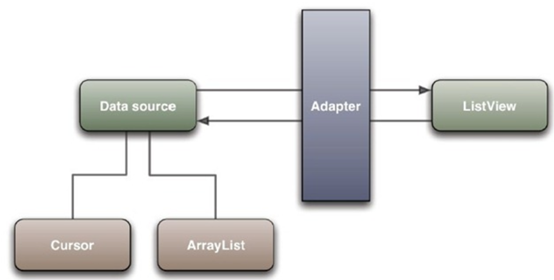
Adapter是连接后端数据和前端显示的适配器接口,是数据和UI(View)之间一个重要的纽带。
在常见的View(List View,Grid View)等地方都需要用到Adapter。
如下图直观的表达了Data、Adapter、View三者的关系:
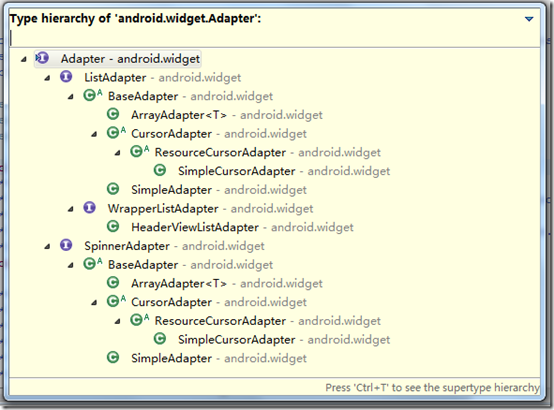
Adapter存在多种形式,但我们这里只介绍常用的ArrayAdapter、SimpleAdapter和BaseAdapter
二、ArrayAdapter
每个Adapter都要自定义各自的item布局文件,ArrayAdapter只包含文字,一般使用android.R.layout.simple_list_item_1(系统定义好的布局文件只显示一行文字)
<TextView xmlns:android="http://schemas.android.com/apk/res/android"

    android:id="@android:id/text1"

    android:layout_width="match_parent"

    android:layout_height="wrap_content"

    android:textAppearance="?android:attr/textAppearanceListItemSmall"

    android:gravity="center_vertical"

    android:paddingLeft="16dp"

    android:paddingRight="16dp"

    android:textColor="#fff"

    android:background="?android:attr/activatedBackgroundIndicator"

    android:minHeight="?android:attr/listPreferredItemHeightSmall"/>
创建ArrayAdapter
String[] strs = {"1","2","3","4","5"};

ArrayAdapter<String> adapter = new ArrayAdapter<String>(this,android.R.layout.xxx,strs);
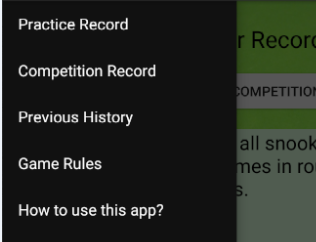
当然也可以在Android Studio — strings.xml中直接定义ArrayList。
    <string-array name="list_item">

        <item>Practice Record</item>

        <item>Competition Record</item>

        <item>Previous History</item>

        <item>Game Rules</item>

        <item>How to use this app?</item>

        <item>User Information</item>

    </string-array>
在App的Drawer Layout中既可以简单使用,设定菜单列表。
三、SimpleAdapter
SimpleAdapter较ArrayAdapter能实现更复杂的结构,可放ImageView(图片),Button(按钮),CheckBox(复选框)等等。
包含ListView可直接继承ListActivity,和普通的Activity没有太大的差别,不同就是对显示ListView做了许多优化,方面显示而已。
<LinearLayout xmlns:android="http://schemas.android.com/apk/res/android"

    android:layout_width="match_parent"

    android:layout_height="wrap_content"

    android:orientation="horizontal">

    <LinearLayout

        android:layout_width="0dp"

        android:layout_weight="8"

        android:layout_height="match_parent"

        android:orientation="vertical">

        <TextView

            android:layout_width="match_parent"

            android:layout_height="0dp"

            android:layout_weight="1"

            android:text="Null"

            android:textSize="20sp"

            android:padding="2dp"

            android:textColor="@color/black"

            android:id="@+id/list_competition_player"/>

        <TextView

            android:layout_width="match_parent"

            android:layout_height="0dp"

            android:layout_weight="1"

            android:text="Null"

            android:textSize="16sp"

            android:padding="2dp"

            android:id="@+id/list_competition_date"/>

    </LinearLayout>

    <LinearLayout

        android:layout_width="0dp"

        android:layout_weight="3"

        android:layout_height="match_parent">

        <TextView

            android:layout_width="match_parent"

            android:layout_height="match_parent"

            android:text="100"

            android:gravity="center"

            android:textSize="24sp"

            android:textColor="@color/black"

            android:id="@+id/list_competition_scoreA"/>

    </LinearLayout>

    <LinearLayout

        android:layout_width="0dp"

        android:layout_weight="1"

        android:layout_height="match_parent">

        <TextView

            android:layout_width="match_parent"

            android:layout_height="match_parent"

            android:text="—"

            android:gravity="center"

            android:textSize="28sp"/>

    </LinearLayout>

    <LinearLayout

        android:layout_width="0dp"

        android:layout_weight="3"

        android:layout_height="match_parent">

        <TextView

            android:layout_width="match_parent"

            android:layout_height="match_parent"

            android:text="100"

            android:gravity="center"

            android:textSize="24sp"

            android:textColor="@color/black"

            android:id="@+id/list_competition_scoreB"/>

    </LinearLayout>

</LinearLayout>
接收参数包含:
this,布局文件(alist.XML),Hash Map,布局文件控件Id。Hash Map的每个键值数据,和布局文件中对应id的组件,一一映射。
创建列表ArrayList,每个元素即是单独的Hash Map,根据key word关键字添加字符串 / 图片名。
map.put("key_word1","value1");
List<Map<String, Object>> list = new ArrayList<Map<String, Object>>();

            Map<String, Object> map = new HashMap<String, Object>();

            map.put("title", "G1");

            map.put("info", "google 1");

            map.put("img", R.drawable.i1);

            list.add(map);
创建SimpleAdapter
SimpleAdapter adapter = new SimpleAdapter(this,getData(),R.layout.vlist,

                    new String[]{"title","info","img"},

                    new int[]{R.id.title,R.id.info,R.id.img});
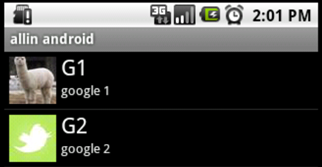
实际效果图
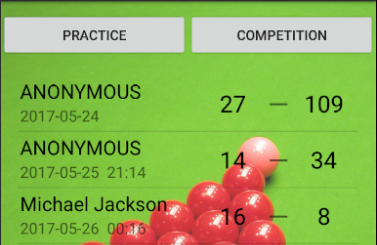
包含图片的效果图
四、BaseAdapter
在列表上添加Button,实时修改Adapter,都必须使用BaseAdapter。
SimpleAdapter也继承于BaseAdapter。
BaseAdapter是抽象类,必须自定义一个Adapter继承它,也可结合ViewHolder进行显示。
/* 当List有大量的数据需要加载的时候,会占据大量内存,影响性能,这时候就需要按需填充并重新使用view来减少对象的创建
* 最快的方式是定义一个Viewholder,将convex的tag设置为Viewholder,不为空时重新使用即可
* findViewById是在解析layout.xml布局那种其中的子View,解析xml是一个力气活,所以提出了ViewHolder的概念
* 使用一个静态类,保存xml中的各个子View的引用关系,这样就不必要每次都去解析xml了。
*/
继承BaseAdapter定义时,必须重载4个函数:getCount()、getItem(int position)、getItemId(int position)、getView(int position, View convertView, ViewGroup parent)
    public class CompetitionListAdapter extends BaseAdapter {

        private LayoutInflater mInflater=null;

        public CompetitionListAdapter(Context context){

            this.mInflater=LayoutInflater.from(context);

        }

        @Override

        public int getCount(){

            return  competitionlist.size();

        }

        @Override

        public Object getItem(int position){

            return competitionlist.get(position);

        }

        @Override

        public long getItemId(int position){

            return position;

        }

        @Override

        public View getView(int position, View convertView, ViewGroup parent){

            ViewHolder holder = null;

            if (convertView ==null){

                holder = new ViewHolder();

                convertView = mInflater.inflate(R.layout.history_list_competition,null);

                holder.date=(TextView)convertView.findViewById(R.id.list_competition_date);

                holder.scoreA=(TextView)convertView.findViewById(R.id.list_competition_scoreA);

                holder.scoreB=(TextView) convertView.findViewById(R.id.list_competition_scoreB);

                holder.player=(TextView)convertView.findViewById(R.id.list_competition_player);

                convertView.setTag(holder);

            }else {

                holder = (ViewHolder)convertView.getTag();

            }

            holder.date.setText((String)competitionlist.get(position).get("date"));

            holder.scoreA.setText((String)competitionlist.get(position).get("scoreA"));

           holder.scoreB.setText((String)competitionlist.get(position).get("scoreB"));

            holder.player.setText((String)competitionlist.get(position).get("player"));

            return convertView;

        }

        private class ViewHolder{

            public TextView date;

            public TextView player;

            public TextView scoreB;

            public TextView scoreA;

        }

    }
当数据源有修改时,需要notifyDataSetChanged()告知。
        public void setDataList(List<Map<String,Object>> list){

            if (list!=null){

                competitionlist=list;

                notifyDataSetChanged();

            }

        }
本笔记内容均为个人学习整理,转载请注明博客园-igoslly
Android开发笔记(12)——ListView & Adapter的更多相关文章
- android学习笔记12——ListView、ListActivity
ListView.ListActivity ==> ListView以垂直列表的形式显示所有列表项. 创建ListView的方式: 1.直接使用ListView创建 2.Activity继承Li ...
- 【转】Android开发笔记(序)写在前面的目录
原文:http://blog.csdn.net/aqi00/article/details/50012511 知识点分类 一方面写写自己走过的弯路掉进去的坑,避免以后再犯:另一方面希望通过分享自己的经 ...
- Android开发笔记——以Volley图片加载、缓存、请求及展示为例理解Volley架构设计
Volley是由Google开源的.用于Android平台上的网络通信库.Volley通过优化Android的网络请求流程,形成了以Request-RequestQueue-Response为主线的网 ...
- [置顶] Android开发笔记(成长轨迹)
分类: 开发学习笔记2013-06-21 09:44 26043人阅读 评论(5) 收藏 Android开发笔记 1.控制台输出:called unimplemented OpenGL ES API ...
- 【转】Android开发笔记——圆角和边框们
原文地址:http://blog.xianqu.org/2012/04/android-borders-and-radius-corners/ Android开发笔记——圆角和边框们 在做Androi ...
- 《ArcGIS Runtime SDK for Android开发笔记》
开发笔记之基础教程 ArcGIS Runtime SDK for Android 各版本下载地址 <ArcGIS Runtime SDK for Android开发笔记>——(1).And ...
- Android开发笔记:打包数据库
对于数据比较多的控制一般会加入SQLite数据库进行数据存储,在打包时这些数据库是不自动打包到apk中的,如何创建数据库呢 方法1:将创建数据库的sql语句在SQLiteHelper继承类中实现,在第 ...
- Android开发笔记--hello world 和目录结构
原文:Android开发笔记--hello world 和目录结构 每接触一个新东西 都有一个hello world的例子. 1.新建项目 2.配置AVD AVD 没有要新建个,如果不能创建 运行SD ...
- [APP] Android 开发笔记 003-使用Ant Release 打包与keystore加密说明
接上节 [APP] Android 开发笔记 002 5. 使用ant release 打包 1)制作 密钥文件 release.keystore (*.keystore) keytool -genk ...
- [APP] Android 开发笔记 002-命令行创建默认项目结构说明
接上节:[APP] Android 开发笔记 001 4. 默认项目结构说明: 这里我使用Sublime Text 进行加载.
随机推荐
- Shell脚本备份数据库
使用crontab 定时备份数据库 1. 编辑crontab 规则,定时执行脚本 2. 在my.cnf 文件中加 [mysqldump] user=root password=密码 3.编写shell ...
- Linux之FTP/TFTP(vsftp、vsftpd) HTTP(httpd、apache) DHCP(dhcpd)
FTP/TFTP(vsftp.vsftpd): FTP是File Transfer Protocol(文件传输协议)而中文简称为"文传协议".用于Internet上的控制文件的双向 ...
- Cent os常见操作命令
1.查看防火墙状态:firewall-cmd –-state 2.关闭防火墙:systemctl stop firewalld.service 3.禁止防火墙开机启动:systemctl disabl ...
- 1.git上手篇总结
阅读 Git 原理详解及实用指南 记录 上手 1: Git 的最基本的工作模型 从 GitHub 把中央仓库 clone 到本地(使用命令: git clone) 把写完的代码提交(先用 git ad ...
- 《零压力学Python》 之 第四章知识点归纳
第四章(决策和循环)知识点归纳 if condition: indented_statements [ elif condition: Indented_statements] [else: Inde ...
- 在 ServiceModel 客户端配置部分中,找不到引用协定“XXX”的默认终结点元素
一.问题 在调用远程web services接口时出现了以下问题: 二.可能的原因和解决方法 网站根目录里的web.config文件缺少了相应的配置信息 <?xml version=" ...
- N天学习一个linux命令之ssh
用途 通过加密连接,远程登录主机和在远程主机执行命令,也可以用于转发x11和tcp,也可用于搭建VPN.第一次连接时,会弹出远程主机公钥指纹确认信息,通过这个方式防止中间人攻击. 用法 ssh [op ...
- Equals和==的差别
java中的数据类型.可分为两类: 1.基本数据类型 包含:byte,short,char,int,long,float,double,boolean .基础数据类型比較大小的时候使用的是双等号(= ...
- 怎样给你的Android 安装文件(APK)瘦身
本文源地址:怎样给你的Android 安装文件(APK)瘦身 Android的apk文件越来越大了这已经是一个不争的事实. 在Android 还是最初版本号的时候,一个app的apk文件大小也还仅仅有 ...
- 【Android】ListView 优化
重用 ListView Item ListView创建时其会创建屏幕可容纳数量的 Item.ListView 滚动时,刚消失的 item 会被保存到回收池中.新出现的 item 从回收池中获取避免反复 ...