
windows系统VS2017编译boost
1. 下载boost, 解压,进入boost源目录
2. 打开vs2017 x86 CMD工具,输入bootstrap.bat,等待初始化完毕
x86编译
bjam stage --toolset=msvc-14.1 --without-graph --without-graph_parallel --stagedir="D:\boost\boost_1_69_0\bin\vc141-x86" link=static runtime-link=shared runtime-link=static threading=multi debug release
3. VS2017
创建测试项目
// TestBoost.cpp : 此文件包含 "main" 函数。程序执行将在此处开始并结束。

//

#include "pch.h"

#include <boost/lexical_cast.hpp>

#include <boost/regex.hpp>

#include <iostream>

using namespace std;

int main()

{

	using boost::lexical_cast;

	int a = lexical_cast<int>("123");

	double b = lexical_cast<double>("123.0123456789");

	string s0 = lexical_cast<string>(a);

	string s1 = lexical_cast<string>(b);

	cout << "number: " << a << "  " << b << endl;

	cout << "string: " << s0 << "  " << s1 << endl;

	int c = 0;

	try {

		c = lexical_cast<int>("abcd");

	}

	catch (boost::bad_lexical_cast& e) {

		cout << e.what() << endl;

	}

	return 0;

}
配置头文件和库目录
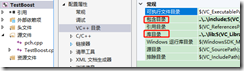
清理,重新生成,运行,测试。
windows系统VS2017编译boost的更多相关文章
- 在 Windows系统中编译node.js 源代码
Node.js 在 Windows 下只能通过 Microsoft Visual Studio 编译,因此你需要首先安装 Visual Studio 或者免费的 Visual Studio Expre ...
- VS2017编译boost库
1.http://www.boost.org/ 下载boost库. 2.解压到 D:\ProgramFiles\boost 3.环境配变量配置 VS2017更加注重跨平台性,安装文件较 ...
- Windows下VS2017编译OpenCV 3.4.0-rc
简述 很久没有用过OpenCV了,这次需要做一点图像处理相关的工作,又需要用起来,这里记录一下编译的过程.之前介绍过使用vs2015编译opencv2.4的帖子在这里. 编译好的文件在这里https: ...
- 阿里物联网平台(一)Windows系统+VS2017 模拟设备端接入
https://blog.csdn.net/panwen1111/article/details/88365636 一.阿里物联网平台 平台地址:https://account.aliyun.com ...
- vs2017编译boost 1.70.0
目前最新版本的boost库是1.70.0.现在在学习使用cinatra搭建c++的http服务器,需要用到boost库中的asio,下载了一下最新版本的boost库,捣鼓了半天. 1.下载 boost ...
- go语言在Windows系统下编译成linux系统可执行文件
package main import ( "fmt" "os" "os/exec" ) //filepath: 要编译的文件的路径 fun ...
- 如何在Windows系统上基于Sublime搭建Python的编译环境
刚刚接触到Python,直接在计算机上编译时不能正确的运行,所以将一些有关编译环境调试的知识总结了一下. 环境搭建: Python在 windows系统上编译的时候可能会出现一些编译无法运行的情况,我 ...
- windows系统,boost编译安装
windows系统,boost编译安装vs2017 1.下载https://www.boost.org/users/download/下载windows对应的zip包解压 2.配置vc环境变量我的是: ...
- boost在windows下的编译(vs2010)
首先说下环境,win7,vs2010. 先在http://www.boost.org/users/download/上下载boost安装包,我下的是1.52.0版. 按照说明,直接运行“bootstr ...
随机推荐
- 16.Odoo产品分析 (二) – 商业板块(9) – 网站生成器(1)
查看Odoo产品分析系列--目录 安装"电子商务"模块时,该模块会自动安装,但网站生成器是电子商务的前提,因此,先分析该模块,在下面就是对电子商务模块的分析. 1. 编辑网站 安装 ...
- Android 组件的三种点击事件写法
一.准备工作 1.项目结构 2.布局文件(activity_main.xml) <?xml version="1.0" encoding="utf-8"? ...
- 网站流量统计PV&UV
统计网站pv和uv PV是网站分析的一个术语,用以衡量网站用户访问的网页的数量. 对于广告主,PV值可预期它可以带来多少广告收入.一般来说,PV与来访者的数量成正比,但是PV并不直接决定页面的真实来访 ...
- Ubuntu搭建NFS服务器,NFS协议详细分析
目录 1. Ubuntu搭建NFS服务器 2. NFS协议分析 2.1 实验拓扑: 2.2 在kali抓包分析 1. Ubuntu搭建NFS服务器 NFS(Network FileSystem,网 ...
- VMware安装Centos7后有线线缆被拔出
背景:在win10 系统中的虚机软件VMware Workstation中安装CentOS7桌面版,安装过程中没有设置网络 1.确认你win10系统打开了这两个服务:VMware DHCP Servi ...
- 剑指offer(java版)【转】
面试题 2 :实现单例模式 1. 饿汉式单例类 public class SingletonClass { private static final SingletonClass instance=n ...
- spring4笔记----Spring几种常用的容器后处理器
PropertyPlaceholderConfigurer 属性占位符配置器 PropertyOverrideConfigureer 重写占位符配置器 CustomAutowireConfig ...
- [20181109]12cR2 的pre_page_sga参数
[20181109]12cR2 的pre_page_sga参数.txt --//12CR2改变了参数pre_page_sga设置为True.设置为true有好处也有缺点.--//先看看官方的定义:ht ...
- sql 语句按字段指定值排序及分页
为特定字段赋值并排序 表[Table_temp]中列[col1]为字符,属性为varchar(),排序时需要按照B.A.C的顺序显示,则可按照以下SQL语句: select * from Table_ ...
- sql server连接oracle并实现增删改查
需要一个软件ODAC112040Xcopy_64bit 我连接的oracle是11g r2 sqlserver 是 2016 软件下载 https://pan.baidu.com/s/1OpYmpR ...