
mybatis入门篇:Mybatis高级查询
1、ResultMap的association与collection
association与collection功能类似,区别是一对一与一对多,这里以association为例。
首先说明一下需求:通过员工ID获取员工信息,同时获取员工的角色,涉及到了员工信息表、角色表、还有二者的关联表。最简单的做法是写一个SQL语句,语句里写了三个表,互相关联进行查询,但这种方式存在问题:1、SQL语句不易维护 2、复用性不强 3、我只想获取用户的信息,不用角色信息时,查询了多余的信息,徒增消耗。
解决办法:1、对每个实体都定义一个基础的ResultMap,根据需要继承基础ResultMap再添加自定义的属性 2、在ResultMap中使用association或者collection进行关联查询 3、使用y延迟加载,需要角色信息时再去查询。
实际操作过程:
新建实体类User和Role
package com.forest.owl.entity;

import java.util.Date;

public class Role {
    private Long id;

    private String roleName;

    private Integer enabled;

    private Long createBy;

    private Date createTime;

    private Long updateBy;

    private Date updateTime;

    public Long getId() {
        return id;
    }

    public void setId(Long id) {
        this.id = id;
    }

    public String getRoleName() {
        return roleName;
    }

    public void setRoleName(String roleName) {
        this.roleName = roleName;
    }

    public Integer getEnabled() {
        return enabled;
    }

    public void setEnabled(Integer enabled) {
        this.enabled = enabled;
    }

    public Long getCreateBy() {
        return createBy;
    }

    public void setCreateBy(Long createBy) {
        this.createBy = createBy;
    }

    public Date getCreateTime() {
        return createTime;
    }

    public void setCreateTime(Date createTime) {
        this.createTime = createTime;
    }

    public Long getUpdateBy() {
        return updateBy;
    }

    public void setUpdateBy(Long updateBy) {
        this.updateBy = updateBy;
    }

    public Date getUpdateTime() {
        return updateTime;
    }

    public void setUpdateTime(Date updateTime) {
        this.updateTime = updateTime;
    }
}
package com.forest.owl.entity;

import java.util.Date;
import java.util.List;

public class User {
    private Long id;

    private String userName;

    private String userPassword;

    private String userPhone;

    private String userEmail;

    private Date createTime;

    private Date updateTime;

    private byte[] headImg;

    private Role role;

    public Long getId() {
        return id;
    }

    public void setId(Long id) {
        this.id = id;
    }

    public String getUserName() {
        return userName;
    }

    public void setUserName(String userName) {
        this.userName = userName;
    }

    public String getUserPassword() {
        return userPassword;
    }

    public void setUserPassword(String userPassword) {
        this.userPassword = userPassword;
    }

    public String getUserPhone() {
        return userPhone;
    }

    public void setUserPhone(String userPhone) {
        this.userPhone = userPhone;
    }

    public String getUserEmail() {
        return userEmail;
    }

    public void setUserEmail(String userEmail) {
        this.userEmail = userEmail;
    }

    public Date getCreateTime() {
        return createTime;
    }

    public void setCreateTime(Date createTime) {
        this.createTime = createTime;
    }

    public Date getUpdateTime() {
        return updateTime;
    }

    public void setUpdateTime(Date updateTime) {
        this.updateTime = updateTime;
    }

    public byte[] getHeadImg() {
        return headImg;
    }

    public void setHeadImg(byte[] headImg) {
        this.headImg = headImg;
    }

    public Role getRole() { return role; }

    public void setRole(Role role) { this.role = role; }
}
然后编写Mapper.xml,首先先编写BaseResultMap
UserMapper.xml
  <resultMap id="BaseResultMap" type="com.forest.owl.entity.User">
    <id column="id" jdbcType="BIGINT" property="id" />
    <result column="user_name" jdbcType="VARCHAR" property="userName" />
    <result column="user_password" jdbcType="VARCHAR" property="userPassword" />
    <result column="user_phone" jdbcType="VARCHAR" property="userPhone" />
    <result column="user_email" jdbcType="VARCHAR" property="userEmail" />
    <result column="create_time" jdbcType="TIMESTAMP" property="createTime" />
    <result column="update_time" jdbcType="TIMESTAMP" property="updateTime" />
    <result column="head_img" jdbcType="LONGVARBINARY" property="headImg" />
  </resultMap>
RoleMapper.xml
  <resultMap id="BaseResultMap" type="com.forest.owl.entity.Role">
    <id column="id" jdbcType="BIGINT" property="id" />
    <result column="role_name" jdbcType="VARCHAR" property="roleName" />
    <result column="enabled" jdbcType="INTEGER" property="enabled" />
    <result column="create_by" jdbcType="BIGINT" property="createBy" />
    <result column="create_time" jdbcType="TIMESTAMP" property="createTime" />
    <result column="update_by" jdbcType="BIGINT" property="updateBy" />
    <result column="update_time" jdbcType="TIMESTAMP" property="updateTime" />
  </resultMap>
编写RoleMapper.xml获取Role的接口和XML
package com.forest.owl.mapper;

import com.forest.owl.entity.Role;

public interface RoleMapper {
    Role selectByPrimaryKey(Long id);
}
RoleMapper.xml
  <select id="selectByPrimaryKey" resultMap="BaseResultMap">
    select id, role_name, enabled, create_by, create_time, update_by, update_time
    from role
    where id = #{id,jdbcType=BIGINT}
  </select>
然后编写UserMapper.xml
  <resultMap id="UserAndRole" extends="BaseResultMap" type="com.forest.owl.entity.User">
    <association property="role" fetchType="lazy" column="{id=role_id}" select="com.forest.owl.mapper.RoleMapper.selectByPrimaryKey"/>
  </resultMap>

  <select id="selectUsersById" resultMap="UserAndRole">
    SELECT u.*, ur.role_id
    FROM user u
    INNER JOIN user_role ur on ur.user_id=u.id
    WHERE u.id=#{id}
  </select>
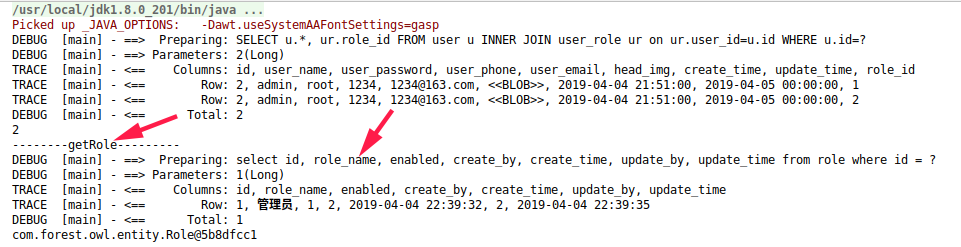
可以看到,UserMapper的SQL语句中少了role表,这样SQL语句就简洁多了。需要注意,association中的fetchType=“lazy”选项,当执行getRole()的时候,才回去查询角色信息加载到查询结果中。如果用户还是需要在触发某个方法时加载全部数据,则可以配置mybatis的配置选项lazyLoadTriggerMethods,按需加载。
对于3.4.1 及之前版本的mybatis用户,还需要配置mybatis-config.xml的一个选项:
<setting name="aggressiveLazyLoading" value="false"/>
测试:
    @Test
    public void UserMapperTest(){
        SqlSession sqlSession = getSqlSession();
        UserMapper userMapper = sqlSession.getMapper(UserMapper.class);
        List<User> userList = userMapper.selectUsersById(();
        System.out.println(userList.size());
        System.out.println("--------getRole---------");
        System.).getRole());
    }
执行结果
collection的代码
User实体类
package com.forest.owl.entity;

import java.util.Date;
import java.util.List;

public class User {
    private Long id;

    private String userName;

    private String userPassword;

    private String userPhone;

    private String userEmail;

    private Date createTime;

    private Date updateTime;

    private byte[] headImg;

    private List<Role> roleList;

    public Long getId() {
        return id;
    }

    public void setId(Long id) {
        this.id = id;
    }

    public String getUserName() {
        return userName;
    }

    public void setUserName(String userName) {
        this.userName = userName;
    }

    public String getUserPassword() {
        return userPassword;
    }

    public void setUserPassword(String userPassword) {
        this.userPassword = userPassword;
    }

    public String getUserPhone() {
        return userPhone;
    }

    public void setUserPhone(String userPhone) {
        this.userPhone = userPhone;
    }

    public String getUserEmail() {
        return userEmail;
    }

    public void setUserEmail(String userEmail) {
        this.userEmail = userEmail;
    }

    public Date getCreateTime() {
        return createTime;
    }

    public void setCreateTime(Date createTime) {
        this.createTime = createTime;
    }

    public Date getUpdateTime() {
        return updateTime;
    }

    public void setUpdateTime(Date updateTime) {
        this.updateTime = updateTime;
    }

    public byte[] getHeadImg() {
        return headImg;
    }

    public void setHeadImg(byte[] headImg) {
        this.headImg = headImg;
    }

    public List<Role> getRoleList() { return roleList; }

    public void setRoleList(List<Role> roleList) { this.roleList = roleList; }
}
UserMapper.xml
<?xml version="1.0" encoding="UTF-8"?>
<!DOCTYPE mapper PUBLIC "-//mybatis.org//DTD Mapper 3.0//EN" "http://mybatis.org/dtd/mybatis-3-mapper.dtd">
<mapper namespace="com.forest.owl.mapper.UserMapper">
  <resultMap id="BaseResultMap" type="com.forest.owl.entity.User">
    <id column="id" jdbcType="BIGINT" property="id" />
    <result column="user_name" jdbcType="VARCHAR" property="userName" />
    <result column="user_password" jdbcType="VARCHAR" property="userPassword" />
    <result column="user_phone" jdbcType="VARCHAR" property="userPhone" />
    <result column="user_email" jdbcType="VARCHAR" property="userEmail" />
    <result column="create_time" jdbcType="TIMESTAMP" property="createTime" />
    <result column="update_time" jdbcType="TIMESTAMP" property="updateTime" />
    <result column="head_img" jdbcType="LONGVARBINARY" property="headImg" />
  </resultMap>

  <resultMap id="UserAndRole" extends="BaseResultMap" type="com.forest.owl.entity.User">
    <collection property="roleList" columnPrefix="role_" fetchType="lazy"
                resultMap="com.forest.owl.mapper.RoleMapper.BaseResultMap">
      <id property="id" column="id"/>
      <result column="role_name" property="roleName" />
      <result column="enabled" property="enabled" />
      <result column="create_by" property="createBy" />
      <result column="create_time" property="createTime" />
      <result column="update_by" property="updateBy" />
      <result column="update_time" property="updateTime" />
    </collection>
  </resultMap>

  <select id="selectUsersById" resultMap="UserAndRole">
    SELECT u.*,
    r.id role_id,
    r.role_name role_role_name,
    r.enabled role_enabled,
    r.create_by role_create_by,
    r.create_time role_create_time,
    r.update_by role_update_by,
    r.update_time role_update_time
    FROM user u
    INNER JOIN user_role ur on ur.user_id=u.id
    INNER JOIN role r on r.id=ur.role_id
    WHERE u.id=#{id}
  </select>
</mapper>
UserMapper接口
package com.forest.owl.mapper;

import com.forest.owl.entity.User;

public interface UserMapper {
    User selectUsersById(Long id);
}
测试:
    @Test
    public void UserMapperTest(){
        SqlSession sqlSession = getSqlSession();
        UserMapper userMapper = sqlSession.getMapper(UserMapper.class);
        User user = userMapper.selectUsersById(();
        System.).getRoleName());
        System.).getRoleName());
    }
mybatis入门篇:Mybatis高级查询的更多相关文章
- mybatis入门篇:通过SqlSession.selectList进行数据查询
作为一个java菜鸟,早就从慕课网中学到一些基本的mybatis的用法,但是一直不成体系,懵懵懂懂,既然正式入了java这个坑,就打算好好学学,所以买了本<MyBatis从入门到精通>,在 ...
- Mybatis入门篇之结果映射,你射准了吗?
目录 前言 什么是结果映射? 如何映射? 别名映射 驼峰映射 配置文件开启驼峰映射 配置类中开启驼峰映射 resultMap映射 总结 高级结果映射 关联(association) 例子 关联的嵌套 ...
- MyBatis入门篇
一.什么是MyBatis MyBatis 本是apache的一个开源项目iBatis, 2010年这个项目由apache software foundation 迁移到了google code,并且改 ...
- mybatis入门基础(六)----高级映射(一对一,一对多,多对多)
一:订单商品数据模型 1.数据库执行脚本 创建数据库表代码: CREATE TABLE items ( id INT NOT NULL AUTO_INCREMENT, itemsname ) NOT ...
- mybatis入门篇:代码生成器(MyBatis Generator)
这篇文章只是按照自己的需要去配置代码生成器,未对所有配置进行讲解,需要了解具体详情的,请到官网查阅文档.传送门:http://www.mybatis.org/generator/ 1.首先引入相关的依 ...
- MyBatis(7)高级查询
本次全部学习内容:MyBatisLearning 高级查询: 对于整体的工程是时候增加一点文件了: 具体用到那个类再去说明类的内容 一对一查询: 1.resultType进行实现: 执行的sq ...
- mybatis入门(三):mybatis的基础特性
mybatis的知识点: 1.mybatis和hibernate本质区别和应用场景 hibernate:是一个标准的ORM框架(Ojbect relation mapper对象关系映射).入门门槛较高 ...
- Mybatis入门之MyBatis基础
一.MyBatis概述 1.ORM模型简介 ORM:对象关系映射(Object Relation Mapping) 1)传统JDBC程序的设计缺陷(实际项目不使用) a.大量配置信息硬编码 b.大量的 ...
- mybatis入门--初识mybatis
初识mybatis 今天,一起来说说mybits这个框架吧.这是一个持久层的框架.之前叫做ibatis.所以,在它的代码中出现ibatis这个词的时候,不要感到惊讶.不是写错了,它确实就是这个样子的. ...
- 《Java从入门到放弃》入门篇:hibernate查询——HQL
不知不觉又到了hibernate的最后一篇了,只感觉时光飞逝~,岁月如梭~! 转眼之间,我们就···························,好吧,想装个X,结果装不下去了,还是直接开始吧· ...
随机推荐
- Container 组件
Container 组件 padding: const EdgeInsets.fromLTRB(10, 0, 30, 0),//内边距 margin: const EdgeInsets ...
- vm12pro 安装winxp过程 记录1(涵个人问题)
1.百度的xp资源 选好iso文件后出现如下情景: 2.百度以后是要在一开始的首次界面就选择从哪个盘开始 3.选择了“Windowgs PE”选项…加载出界面后选择了ghost xp…现在…黑屏了…… ...
- JS拖拽div(移动)
<!doctype html><html><head> <meta charset="utf-8"> <title>JS ...
- Python中的常用魔术方法介绍
1.__init__ 初始化魔术方法 触发时机:初始化对象时触发(不是实例化触发,但是和实例化在一个操作中) 参数:至少有一个self,接收对象 返回值:无 作用:初始化对象的成员 注意:使用该方式初 ...
- 一个简单的定向python爬虫爬取指定页面的jpg图片
import requests as r import re resul=r.get("http://www.imooc.com/course/list") urlinfo=re. ...
- python 迭代器 一个奇怪的解决方法
一般我们在类里面写迭代器都是如下写法: class IterableSomthing: def __iter__(self): return self def __next__(self): retu ...
- day01知识点
1.计算机基础 2.Python的历史 3.编码语言分类 Python是一门动态解释性的强制类型定义语言 4.Python的解释器种类 5.变量 法律规则:字母,数字,下划线(数字不能 ...
- H3C BFD MAD检测方式的IRF典型配置举例
一.组网需求 由于网络规模迅速扩大,当前中心交换机(Device A)转发能力已经不能满足需求,现需要在保护现有投资的基础上将网络转发能力提高一倍,并要求网络易管理.易维护. 二.组网图 三.配置思路 ...
- 使用iframe方式获得svg中的DOM元素,和svg 的 contentDocument 返回 null
碰到这个的相关问题,百度找了好久,找到了个解决方法,原址 https://segmentfault.com/q/1010000009001758 var iframe = document.getEl ...
- 理解OpenShift(7):基于 Prometheus 的集群监控
理解OpenShift(1):网络之 Router 和 Route 理解OpenShift(2):网络之 DNS(域名服务) 理解OpenShift(3):网络之 SDN 理解OpenShift(4) ...