
【整理】Linux 下 自己使用的 debug宏 printf
#ifdef __DEBUG_PRINTF__

/*

*

* Some Debug printf kit for devlopment

*

* Date   : 2019.03.04

*

* Editor : SCHIPS

*

*/

#include <stdio.h>

/* Debug with file name and line. */

#define DEBUG(format,...)           printf(""format"\n",  ##__VA_ARGS__ )

#define DEBUG_RED(format,...)       printf("\033[30m\033[31m"format"\033[0m\n", ##__VA_ARGS__)

#define DEBUG_GREEN(format,...)     printf("\033[30m\033[32m"format"\033[0m\n", ##__VA_ARGS__)

#define DEBUG_YELLOW(format,...)    printf("\033[30m\033[33m"format"\033[0m\n", ##__VA_ARGS__)

#define DEBUG_PURP(format,...)      printf("\033[30m\033[35m"format"\033[0m\n", ##__VA_ARGS__)

#define DEBUG_BLUE(format,...)      printf("\033[30m\033[36m"format"\033[0m\n", ##__VA_ARGS__)

/* Debug printf infomration with color. */

#define DEBUG_FL(format,...)        printf("["__FILE__"](%05d) - %s]\n  "format"\n", __LINE__, ##__VA_ARGS__ ,  __FUNCTION__)

#define DEBUG_FLR(format,...)       printf("\033[30m\033[31m["__FILE__"](%05d) - %s]\n\033[0m  "format"\n", __LINE__, __FUNCTION__,##__VA_ARGS__)

#define DEBUG_FLG(format,...)       printf("\033[30m\033[32m["__FILE__"](%05d) - %s]\n\033[0m  "format"\n", __LINE__, __FUNCTION__,##__VA_ARGS__)

#define DEBUG_FLY(format,...)       printf("\033[30m\033[33m["__FILE__"](%05d) - %s]\n\033[0m  "format"\n", __LINE__, __FUNCTION__,##__VA_ARGS__)

#define DEBUG_FLP(format,...)       printf("\033[30m\033[35m["__FILE__"](%05d) - %s]\n\033[0m  "format"\n", __LINE__, __FUNCTION__,##__VA_ARGS__)

#define DEBUG_FLB(format,...)       printf("\033[30m\033[36m["__FILE__"](%05d) - %s]\n\033[0m  "format"\n", __LINE__, __FUNCTION__,##__VA_ARGS__)

#define DEBUG_SFL(format,...)       printf("["__FILE__"](%05d) - %s]  "format"\n", __LINE__, ##__VA_ARGS__ ,  __FUNCTION__)

#define DEBUG_SFLR(format,...)      printf("\033[30m\033[31m["__FILE__"](%05d) - %s]\033[0m  "format"\n", __LINE__, __FUNCTION__,##__VA_ARGS__)

#define DEBUG_SFLG(format,...)      printf("\033[30m\033[32m["__FILE__"](%05d) - %s]\033[0m  "format"\n", __LINE__, __FUNCTION__,##__VA_ARGS__)

#define DEBUG_SFLY(format,...)      printf("\033[30m\033[33m["__FILE__"](%05d) - %s]\033[0m  "format"\n", __LINE__, __FUNCTION__,##__VA_ARGS__)

#define DEBUG_SFLP(format,...)      printf("\033[30m\033[35m["__FILE__"](%05d) - %s]\033[0m  "format"\n", __LINE__, __FUNCTION__,##__VA_ARGS__)

#define DEBUG_SFLB(format,...)      printf("\033[30m\033[36m["__FILE__"](%05d) - %s]\033[0m  "format"\n", __LINE__, __FUNCTION__,##__VA_ARGS__)

#define SC_CLEAR() printf("\033[2J")

#if 0

    /* Another format to Print (Too ugly to me to use.)*/

    #define DEBUGA(fmt,args...)         printf("[%s(%05d) - %s]\n  "#fmt"\n", __FILE__, __LINE__, __FUNCTION__, ##args)

#endif

#else

#define DEBUG(format,...)

#define DEBUG_RED(format,...)

#define DEBUG_GREEN(format,...)

#define DEBUG_YELLOW(format,...)

#define DEBUG_PURP(format,...)

#define DEBUG_BLUE(format,...)

#define DEBUG_FL(format,...)

#define DEBUG_FLR(format,...)

#define DEBUG_FLG(format,...)

#define DEBUG_FLY(format,...)

#define DEBUG_FLP(format,...)

#define DEBUG_FLB(format,...)

#define DEBUG_SFL(format,...)

#define DEBUG_SFLR(format,...)

#define DEBUG_SFLG(format,...)

#define DEBUG_SFLY(format,...)

#define DEBUG_SFLP(format,...)

#define DEBUG_SFLB(format,...)

#define SC_CLEAR(format,...)

#endif
debug.h
#include <stdio.h>

#if 1

//    To turn on/off Debug printf;

    #define __DEBUG_PRINTF__

#endif

#include "debug.h"

void fun1(void)

{

    DEBUG("DEBUG");

    DEBUG_RED("RED.");

    DEBUG_GREEN("GREEN.");

    DEBUG_YELLOW("YELLOW.");

    return ;

}

void fun2(char* buff)

{

    int i = ;

    DEBUG_FL("fun2");

    DEBUG_FLB("i = %d", i);

    DEBUG_FLR("buff = %s", buff);

    DEBUG_FLP("buff = %s", buff);

    return ;

}

void fun3(char* buff, int i)

{

    DEBUG_SFL("fun3");

    DEBUG_SFLB("i = %d", i);

    DEBUG_SFLR("buff = %s", buff);

    DEBUG_SFLP("buff = %s", buff);

    return ;

}

int main(void)

{

    SC_CLEAR();

    fun1();

    printf("---------\n");

    fun2("fun 2");

    printf("---------\n");

    fun3("fun3",);

    return ;

}
demo_main.c
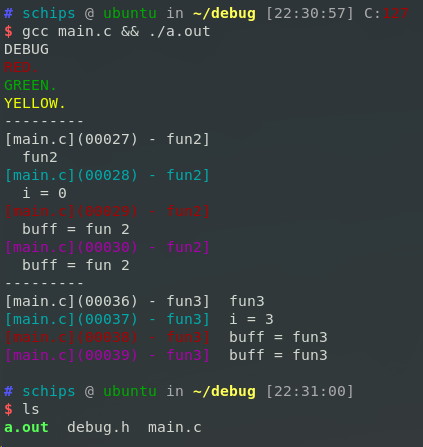
【整理】Linux 下 自己使用的 debug宏 printf的更多相关文章
- Linux下Tomcat启动设置debug模式启动
原文: https://blog.csdn.net/li295214001/article/details/42077247 https://blog.csdn.net/jackie_xiaonan/ ...
- Linux下的两个经典宏定义 转
http://www.linuxidc.com/Linux/2016-08/134481.htm http://www.linuxidc.com/Linux/2013-01/78003.htm htt ...
- Linux下的两个经典宏定义【转】
转自:http://www.linuxidc.com/Linux/2015-07/120014.htm 本文首先介绍Linux下的经典宏定义,感受极客的智慧,然后根据该经典定义为下篇文章作铺垫. of ...
- 笔记整理——Linux下C语言正则表达式
Linux下C语言正则表达式使用详解 - Google Chrome (2013/5/2 16:40:37) Linux下C语言正则表达式使用详解 2012年6月6日Neal627 views发表评论 ...
- 归纳整理Linux下C语言常用的库函数----文件操作
在没有IDE的时候,记住一些常用的库函数的函数名.参数.基本用法及注意事项是很有必要的. 参照Linux_C_HS.chm的目录,我大致将常用的函数分为一下几类: 1. 内存及字符串控制及操作 2. ...
- 整理 Linux下列出目录内容的命令
在 Linux 中,有非常多的命令可以让我们用来执行各种各样的任务.当我们想要像使用文件浏览器一样列出一个目录下的内容时,大家第一时间想到的是 ls 命令.但只有 ls 命令能实现这个目的吗?显然不是 ...
- C语言:类似linux内核的分等级DEBUG宏(打印宏)
总结几种log打印printf函数的宏定义 http://blog.chinaunix.net/uid-20564848-id-73402.html #include <stdio.h> ...
- 归纳整理Linux下C语言常用的库函数----时间日期数学及算法
在没有IDE的时候,记住一些常用的库函数的函数名.参数.基本用法及注意事项是很有必要的. 参照Linux_C_HS.chm的目录,我大致将常用的函数分为一下几类: 1. 内存及字符串控制及操作 2. ...
- 归纳整理Linux下C语言常用的库函数----内存及字符串控制及操作
在没有IDE的时候,记住一些常用的库函数的函数名.参数.基本用法及注意事项是很有必要的. 参照Linux_C_HS.chm的目录,我大致将常用的函数分为一下几类: 1. 内存及字符串控制及操作 2. ...
随机推荐
- 青蛙的约会 POJ - 1061 (exgcd)
两只青蛙在网上相识了,它们聊得很开心,于是觉得很有必要见一面.它们很高兴地发现它们住在同一条纬度线上,于是它们约定各自朝西跳,直到碰面为止.可是它们出发之前忘记了一件很重要的事情,既没有问清楚对方的特 ...
- 【XSY2719】prime 莫比乌斯反演
题目描述 设\(f(i)\)为\(i\)的不同的质因子个数,求\(\sum_{i=1}^n2^{f(i)}\) \(n\leq{10}^{12}\) 题解 考虑\(2^{f(i)}\)的意义:有\(f ...
- bzoj 3673 可持久化并查集 by zky
Description n个集合 m个操作操作:1 a b 合并a,b所在集合2 k 回到第k次操作之后的状态(查询算作操作)3 a b 询问a,b是否属于同一集合,是则输出1否则输出0 0<n ...
- SQL中使用循环结构
解答 FOR,LOOP,WHILE,REPEAT是UDB/400的一种内部循环控制,用于遍历表中符合条件的每一行记录. 例如:目的:更新employee库,把所有北京籍员工的工资提高10% 例一:使用 ...
- 「POJ 1135」Domino Effect(dfs)
BUPT 2017 Summer Training (for 16) #3G 题意 摆好的多米诺牌中有n个关键牌,两个关键牌之间有边代表它们之间有一排多米诺牌.从1号关键牌开始推倒,问最后倒下的牌在哪 ...
- 【 HDU 2177 】取(2堆)石子游戏 (威佐夫博弈)
BUPT2017 wintertraining(15) #5C hdu2177 题意 两个人轮流取石子,可以取一堆的任意非负整数个或两堆取相同个,先取完的输. 给定若干组数据:a,b表示两堆的石子数量 ...
- Centos7下源码编译安装python3.6
测试环境: 操作步骤: 1. 下载Python源码包(python3.6.0) 官网下载地址:https://www.python.org/downloads/ 搜狐下载地址:http://mirro ...
- Python中字符串、列表、元组、字典、集合常用方法总结
- 生成SSH密钥添加到GitHub
将自己的过程和踩坑写下来 一.检查是否有SSH 1.打开Git的目录文件,下图是我电脑中git的文件目录 2.点击git-bash.exe,输入ssh查看电脑中是否已存在ssh,会出现以下结果,证明已 ...
- 前端JS Excel导出
本文转载自:https://blog.csdn.net/plmzaqokn11/article/details/73604705 下载table2Excel插件 <input type=&quo ...