
Embed dll Files Within an exe (C# WinForms)—Winform 集成零散dll进exe的方法
A while back I was working on a small C# WinForms application in Visual Studio 2008. For the sake of simplifying the deployment process of the application, having all of its components bundled up into one exe file would make it much easier to manage. But–documentation and tutorials on embedding dll files within an exe file were outdated, incomplete, or simply didn’t work.
The best example out of the lot was an excerpt from a book, posted on an MSDN blog by its author. Unfortunately, it didn’t work as presented and didn’t include clear instructions on how or where to implement it. However, it still offered a very good starting point. After some research, trial and error, and with the help of the Visual Studio debugger, here’s the solution.
Note: This method allows you to place dll files into any subfolder or series of subfolders within your project without needing to change any code after the fact. If you wish to forgo the use of a subfolder (placing the dll files in the project root), or use a hard-coded path to your subfolder(s) containing the dll files instead, there are alternative methods which would be more appropriate, but won’t be covered here.
1) The dll files themselves need to be embedded in the Visual Studio project, rather than just referenced. In your project, create a folder in the project’s root to store the dll files (right click on the project name > add > new folder) . I named mine “lib”.
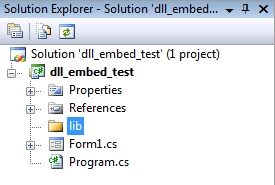 2) Copy and paste your dll (and any accompanying support or definition files) into the lib folder. For purposes of this tutorial, the example dll used will be Cassia.
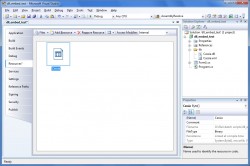
3) Next, include the dll as a project resource. Right click on the project name > properties (or Project menu > yourprojectname Properties). Go to the “Resources” tab.
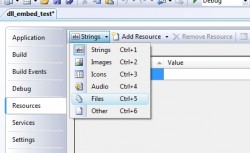
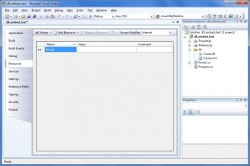 Select “Files”, as shown here:
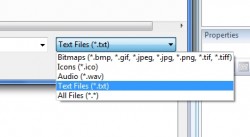
 Click “Add Resource”, change the file type to “all files”, and navigate to the “lib” file where your dll is located. Select it and click “Open”.
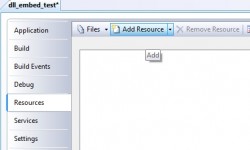
 The dll file should now be included as a project resource:
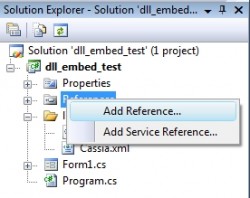
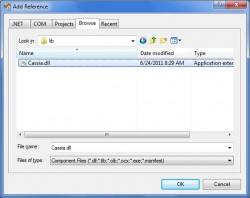
 4) Add a reference to the dll file in the project. In the Solution Explorer pane, right click on “References” > Add Reference (Or, Project menu > Add Reference). Click the Browse tab, navigate to the lib folder where the dll is located, select the dll file, and click “Ok”. A reference to your dll will then appear under the references folder in your project.
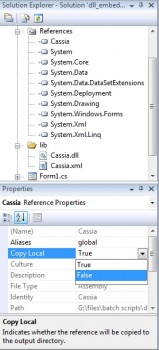
5) By default, compiled files and project references are copied to the bin folder when the project is built. This will need to be prevented. Under the “References” folder, select the reference to your dll file. In the properties pane (or right click > properties), look for the attribute named “Copy to output directory”, and set the value to false.
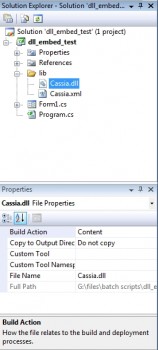
 Next, select the dll file under the “lib” folder. In the properties pane, look for the attribute “copy to output directory” and set the value to “Do not copy”.
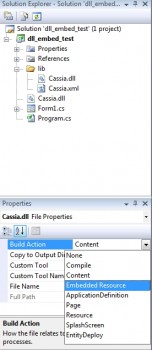
Also look for the attribute “Build Action” and set the value to “Embedded Resource”. This indicates how the file will be treated and accessed when the project is built.
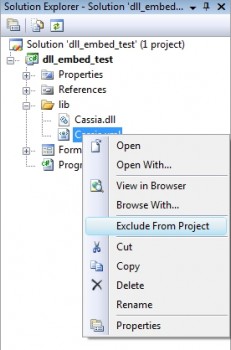
 Lastly, exclude extraneous files accompanying the dll file, such as help files and XML definitions files–they are not needed in the project when it is built. Right click on the file (such as the XML definitions file) and click “Exclude From Project”. Now it will not be copied to the bin folder when the project is built.
6) In the code view for your executing WinForm, include the namespaceSystem.Reflections. This is important for some of the code responsible for loading your embedded dll file(s).
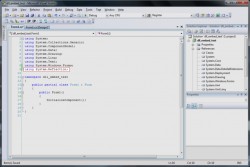
7) In the code view for your executing WinForm, this code should be placed in the constructor method (usually named the same as the form). It needs to appear before theInitializeComponent() method:
|
1
2
3
4
5
6
7
8
9
10
11
12
|
AppDomain.CurrentDomain.AssemblyResolve += (sender, args) =>{ string resourceName = new AssemblyName(args.Name).Name + ".dll"; string resource = Array.Find(this.GetType().Assembly.GetManifestResourceNames(), element => element.EndsWith(resourceName)); using (var stream = Assembly.GetExecutingAssembly().GetManifestResourceStream(resource)) { Byte[] assemblyData = new Byte[stream.Length]; stream.Read(assemblyData, 0, assemblyData.Length); return Assembly.Load(assemblyData); }}; |
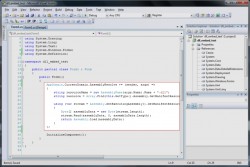
Upon launching the exe, this code is responsible for detecting what dll files are needed and are being referenced, and load them from their embedded location.
8) In the code view for your executing WinForms application, you can now include the dll file’s namespace(s) .
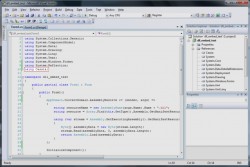
9) In order to test everything, you will need to implement code from the dll file’s namespace(s), so that the AssemblyResolve event is triggered. However, if you include code from the dll’s namespace(s) within the constructor, Application.Run() will throw a “file not found” error for your dll file when the WinForms application is built and executed.
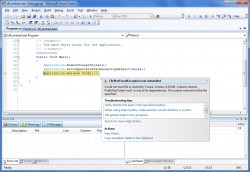 To correct this, you will need to place any code using the dll file namespace(s) in another method outside of constructor method. This is because the event handler for the assembler cannot be located within the same method that is calling it. It’s simple enough to do, but it’s just one caveat to be aware of.
Embed dll Files Within an exe (C# WinForms)—Winform 集成零散dll进exe的方法的更多相关文章
- 关于.Net中Process的使用方法和各种用途汇总(二):用Process启动cmd.exe完成将cs编译成dll
上一章博客我为大家介绍了Process类的所有基本使用方法,这一章博客我来为大家做一个小扩展,来熟悉一下Process类的实际使用,废话不多说我们开始演示. 先看看我们的软件要设计成的布局吧. 首先我 ...
- 将dll放进exe[.Net]
原文:将dll放进exe[.Net] 两种方案: 1.使用ILMerge工具. 缺点:需离开工程,使用第三方工具(ILMerge). 2.将dll作为Resource放进exe,exe执行时动态加载( ...
- 控件注册 - 利用资源文件将dll、ocx打包进exe文件(C#版)
原文:控件注册 - 利用资源文件将dll.ocx打包进exe文件(C#版) 很多时候自定义或者引用控件都需要注册才能使用,但是如何使要注册的dll或ocx打包到exe中,使用户下载以后看到的只是一个e ...
- 将DLL文件直接封装进exe执行文件中(C#)
前言:由于项目需要,需制作一个注册机,将个人PC的MAC值和硬盘序列号与软件进行绑定,由于笔者的C++不是很好,所以采用C#进行开发.但在采用C#的时候,获取硬盘的MAC值和序列号的时候又不是很准确, ...
- APSC4xSeries_Ver32.exe在win764位提示缺少DLL错误解决办法
APSC4xSeries_Ver32.exe在win764位提示缺少DLL错误解决办法 从网上下载oatime_epson-me1清零软件,Stylus4xProgram_Ver32的 解决办法:还是 ...
- 将Winform程序及dll打包成可执行的exe
使用场景 通常开发的Winform程序,引用了其他类库后,在输出目录下都会产生很多DLL文件,exe执行时必须依赖这些DLL.想要Winform程序只有一个可执行exe文件,又不想打包成安装包,就可以 ...
- Winform程序及dll打包成一个可执行的exe
使用场景 通常开发的Winform程序,引用了其他类库后,在输出目录下都会产生很多DLL文件,exe执行时必须依赖这些DLL.想要Winform程序只有一个可执行exe文件,又不想打包成安装包,就可以 ...
- Qt Dll总结(二)——创建及使用Qt的Dll(转载)
先讲一下对QT动态链接库的调用方法,主要包括: 1.显式链接DLL,调用DLL的全局函数,采用Qt的QLibrary方法 2.显示链接DLL,调用DLL中类对象.成员函数.(通过对象即可实现类成员函数 ...
- Windows系统查看xxx.dll、xxx.lib文件的导出函数、依赖文件等信息的方法
1.查看xxx.dll或xxx.exe文件的导出函数.依赖文件等信息,使用Depends软件即可. 2.查看xxx.lib文件的导出函数.依赖文件等信息,使用Visual Studio附带工具dump ...
随机推荐
- golang的第一个deadlock
package main import ( "fmt" "math/rand" ) func push(c chan []int) { ...
- Java mysql 日期相关
获取当前系统时间和日期并格式化输出: import java.util.Date;import java.text.SimpleDateFormat; public class NowString { ...
- eclipse快捷键用不了
ctrl+shift+R是eclipse最常用的快捷键之一,用于打开资源,输入文件名或文件名中的前几个字母,就可以打开工作区中任意文件 今天在打开eclipse,使用该快捷键时,提示“该快捷方式所指向 ...
- MVC 微信支付
微信支付方式有好几种,俺研究了跟自己需要的两种,即:JS API网页支付和Native原生支付,这两个名词实在是有目的难懂.JS API网页支付:我的理解是在微信浏览器里面可以调用微信支付控件的支付方 ...
- 利用ClouderaManager启动HBase时,出现 master.TableNamespaceManager: Namespace table not found. Creating...
1.错误描述: 出现上述这个错误的原因是我之前已经安装了Cloudera Manager中的CDH,其中添加了所有的服务,当然也包含HBase.然后重新安装的时候,就会出现如下错误: Failed t ...
- js传url中文参数乱码问题
$("#btnKeyWord").click(function () { window.open("/Atraction/Atraction.aspx?keyword=& ...
- HDU 4734 F(x)
这题可能非递归版好写? #include<iostream> #include<cstdio> #include<cstring> #include<algo ...
- Why NSAttributedString import html must be on main thread?
The HTML importer should not be called from a background thread (that is, the options dictionary inc ...
- Day16_集合第二天
1.LinkedList类(掌握) 1.特点 底层数据结构是链表,查询慢,增删快 线程不安全,效率高. LinkedList 成员方法 void addFirst(Object o) 添加 void ...
- augustus, gene prediction, trainning
做基因组注释 先用augustus训练,然后再用maker做基因注释 augustus提供一些训练好的,如果有和你的物种非常接近的,直接用提供的,没有的话再自己训练. 网址: http://bioin ...