
ssm中mapper注入失败的传奇经历
最近因为要测试一个功能,需要用最短的时间来启动服务,开启测试程序,但平常所用的框架中已经集成了各种三方的东西,想着那就再重新搭建一个最简单的ssm框架吧。
搭建可参考:简单ssm最新搭建
搭建过程并不麻烦,整合springmvc测试成功,接口正常调用,最后整合mybatis后,在service中注入调用时出现了问题,启动服务时报错如下:
No qualifying bean of type 'com.test.mapper.TpmTestLogMapper' available: expected at least 1 bean which qualifies as autowire candidate. Dependency annotations: {@org.springframework.beans.factory.annotation.Autowired(required=true)}
一、bug解决
首先先说一下我的错误原因:web.xml中没有配置监听器listener,也就是下边这些代码:
(其实配置了,但是不知道为什么最后发现是注释掉的,真的 头大!!!)
  <!-- Spring监听器 -->

    <listener>

        <listener-class>org.springframework.web.context.ContextLoaderListener</listener-class>

    </listener>
(文末附有完整的web.xml配置,直接到文末)
那么为什么没有配置监听,就导致mybatis注入失败了呢,这就不得不提到监听配置其中的一个作用了,监听加载容器配置文件,也就是Spring的配置文件applicationContext.xml。
加载流程: tomcat服务启动时,会首先加载web.xml,然后监听器会默认去加载Spring的相关配置文件,从而创建spring容器中的各个bean组件。
默认加载的配置文件路径是:WEB-INF/applicationContext.xml,当然很多时候我们为了项目结构的清晰,会将此配置文件放在resource下,这时也需要在web.xml中额外配置
   <!--spring的其他配置文件(包括mybatis配置文件) -->

    <context-param>

        <param-name>contextConfigLocation</param-name>

        <param-value>

            classpath*:spring-applicationContext.xml

        </param-value>

    </context-param>
错误原因总结:启动文件web.xml中没有配置监听器,导致我的Spring相关配置文件没有加载,所以其中引入的spring-mybatis配置文件更不会加载,bean没有创建成功,最终导致了在service中调用时注入失败。
二、排查思路
排查过程中的思路:
spring-mybatis整合配置文件路径是否正确,能否被扫描到
mapper.java和mapper.xml之间有没有联系起来,数据库配置是否正确,mapper接口是否可以扫描到(查看配置文件)
- 有没有扫描到mapper.xml文件(查看编译文件,及对应路径是否正确)
1、检查spring-mybatis配置文件,在web.xml中是否可以扫描到:在serviceImpl中手动获取,看能否获取到
  @Override
  public void ceshi(TpmTestLog tpmTestLog) {
    //手动获取创建
      ApplicationContext ac = new ClassPathXmlApplicationContext("classpath:spring-mybatis.xml");
      TpmTestLogMapper bean = ac.getBean(TpmTestLogMapper.class);
      bean.insert(tpmTestLog);
      System.out.println(bean.toString());
  }
测试是否可以成功获取到,可以,则表示mybatis路径正确,可以在web.xml中被正常扫描。
2、检查mybatis配置文件是否正确:主要是下方标红的两项配置会造成此错误
    <!-- 读取配置文件信息 -->

    <context:property-placeholder ignore-unresolvable="true" location="classpath:jdbc.properties"/>

    <bean name="dataSource" class="com.alibaba.druid.pool.DruidDataSource" init-method="init" destroy-method="close">

        <!-- 数据库基本配置 -->

        <property name="driverClassName" value="${jdbc.driver}" />

        <property name="url" value="${jdbc.url}" />

        <property name="username" value="${jdbc.username}" />

        <property name="password" value="${jdbc.password}" />

        <!-- 初始化连接数量 -->

        <property name="initialSize" value="${jdbc.initialSize}"/>

        <!-- 最大并发连接数量 -->

        <property name="maxActive" value="${jdbc.maxActive}"/>

        <!-- 最小空闲连接数 -->

        <property name="minIdle" value="${jdbc.minIdle}"/>

        <!-- 配置获取连接等待超时的时间 -->

        <property name="maxWait" value="${jdbc.maxWait}" />

        <!-- 超过时间限制是否回收 -->

        <property name="removeAbandoned" value="${jdbc.removeAbandoned}" />

        <!-- 超过时间限制多长 -->

        <property name="removeAbandonedTimeout" value="${jdbc.removeAbandonedTimeout}" />

        <!-- 配置间隔多久才进行一次检测,检测需要关闭的空闲连接,单位是毫秒 -->

        <property name="timeBetweenEvictionRunsMillis" value="${jdbc.timeBetweenEvictionRunsMillis}" />

        <!-- 配置一个连接在池中最小生存的时间,单位是毫秒 -->

        <property name="minEvictableIdleTimeMillis" value="${jdbc.minEvictableIdleTimeMillis}" />

        <!-- 用来检测连接是否有效的sql,要求是一个查询语句-->

        <property name="validationQuery" value="${jdbc.validationQuery}" />

        <!-- 申请连接的时候检测 -->

        <property name="testWhileIdle" value="${jdbc.testWhileIdle}" />

        <!-- 申请连接时执行validationQuery检测连接是否有效,配置为true会降低性能 -->

        <property name="testOnBorrow" value="${jdbc.testOnBorrow}" />

        <!-- 归还连接时执行validationQuery检测连接是否有效,配置为true会降低性能  -->

        <property name="testOnReturn" value="${jdbc.testOnReturn}" />

        <property name="logAbandoned" value="true" />

        <!-- 配置监控统计拦截的filters,wall用于防止sql注入,stat用于统计分析 -->

        <property name="filters" value="stat" />

    </bean>

    <!-- MyBatis SqlSessionFactoryBean 配置 -->

    <bean id="sqlSessionFactory" class="org.mybatis.spring.SqlSessionFactoryBean">

        <property name="dataSource" ref="dataSource"/>

        <!-- 自动扫描Mapping.xml文件 -->

        <property name="mapperLocations" value="classpath:com/test/mapper/xml/*.xml"/>

        <!-- 配置MyBaties全局配置文件:mybatis-config.xml -->

        <property name="configLocation" value="classpath:mybatis-config.xml"/>

        <!-- 扫描model包 xml中parameterType就可以使用类名,不用全路径 -->

        <property name="typeAliasesPackage" value="com.test.model"/>

    </bean>

    <!-- 加载 mapper.xml对应的接口 配置文件 -->

    <bean id="mapperScannerConfigurer" class="org.mybatis.spring.mapper.MapperScannerConfigurer">

        <!-- 给出需要扫描mapper接口包 -->

        <property name="basePackage" value="com.test.mapper"/>

        <!-- 注入sqlSessionFactory -->

        <property name="sqlSessionFactoryBeanName" value="sqlSessionFactory" />

    </bean>

    <!-- (事务管理)transaction manager, use JtaTransactionManager for global tx -->

    <bean id="transactionManager" class="org.springframework.jdbc.datasource.DataSourceTransactionManager">

        <property name="dataSource" ref="dataSource" />

    </bean>

    <tx:annotation-driven transaction-manager="transactionManager"/>

</beans>
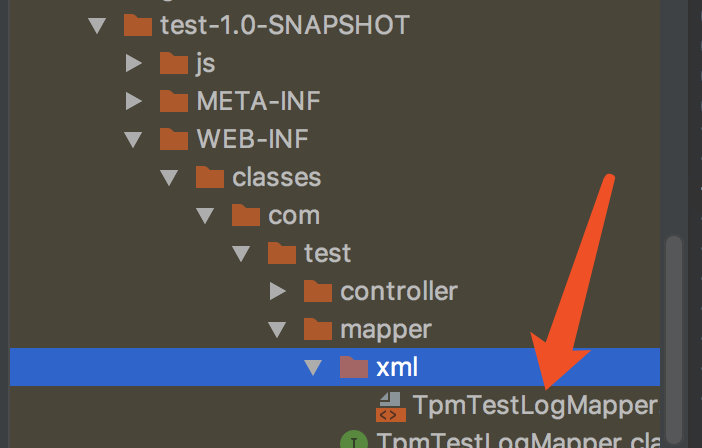
3、mapper.xml文件是否可以被正确扫描到,编译后的文件中是否存在以及路径是否正确
<?xml version="1.0" encoding="UTF-8"?>

<web-app xmlns="http://java.sun.com/xml/ns/javaee"

         xmlns:xsi="http://www.w3.org/2001/XMLSchema-instance"

         xsi:schemaLocation="http://java.sun.com/xml/ns/javaee

          http://java.sun.com/xml/ns/javaee/web-app_3_0.xsd"

         version="3.0">

    <!--spring的其他配置文件(包括mybatis配置文件) -->

    <context-param>

        <param-name>contextConfigLocation</param-name>

        <param-value>

            classpath*:spring-applicationContext.xml

        </param-value>

    </context-param>

    <!-- 编码过滤器 -->

    <filter>

        <filter-name>encodingFilter</filter-name>

        <filter-class>org.springframework.web.filter.CharacterEncodingFilter</filter-class>

        <async-supported>true</async-supported>

        <init-param>

            <param-name>encoding</param-name>

            <param-value>UTF-8</param-value>

        </init-param>

    </filter>

    <filter-mapping>

        <filter-name>encodingFilter</filter-name>

        <url-pattern>/*</url-pattern>

    </filter-mapping>

    <!-- Spring监听器 监听加载相关配置文件-->

    <listener>

        <listener-class>org.springframework.web.context.ContextLoaderListener</listener-class>

    </listener>

    <!--防止Spring内存溢出监听器-->

    <listener>

        <listener-class>org.springframework.web.util.IntrospectorCleanupListener</listener-class>

    </listener>

    <!--Spring MVC servlet-->

    <servlet>

        <servlet-name>springmvc</servlet-name>

        <servlet-class>org.springframework.web.servlet.DispatcherServlet</servlet-class>

        <init-param>

            <param-name>contextConfigLocation</param-name>

            <param-value>classpath*:spring-mvc.xml</param-value>

        </init-param>

        <load-on-startup>1</load-on-startup>

    </servlet>

    <servlet-mapping>

        <servlet-name>springmvc</servlet-name>

        <url-pattern>/</url-pattern>

    </servlet-mapping>

    <welcome-file-list>

        <welcome-file>/index.jsp</welcome-file>

        <welcome-file>/index.html</welcome-file>

        <welcome-file>/reg.html</welcome-file>

    </welcome-file-list>

</web-app>
ssm中mapper注入失败的传奇经历的更多相关文章
- 【Intellij idea】spring中@Autowired注入失败
@Autowired注入失败失败的解决办法? 现有的解决的方案是: 打开file-settings或者ctrl+alt+s -> Editor 然后在Inspections 点击搜索栏 输入Sp ...
- springtest mapper注入失败问题解决 {@org.springframework.beans.factory.annotation.Autowired(required=true)}
花费了一下午都没有搜索到相关解决方案的原因,一是我使用的 UnsatisfiedDependencyException 这个比较上层的异常(在最前面)来进行搜索, 范围太广导致没有搜索到,而且即便是有 ...
- SpringBoot:SpringBoot中@Value注入失败
1. 第一步检测语法是否正确 @Value("${test}") private String test; 2.第二步检测配置文件中是否有进行配置 url=testusername ...
- 解决 Springboot中Interceptor拦截器中依赖注入失败
问题: 在Springboot拦截器Interceptor中使用@Resource依赖注入时,发现运行的时候被注解的对象居然是null,没被注入进去 原配置为: @Configurationpubli ...
- SpringBoot中service注入失败(A component required a bean of type 'XXService' that could not found)
先写了JUnit,发现启动不了,注释掉有问题的service也不可以.可能是因为spring开始时会加载所有service吧. 按照网友们的说法,一般需要检查: 1.入口类有没有写MapperScan ...
- mybatis的mapper注入失败
因为处在两个不同的资源文件夹下: 导致classpath无法加载其中一些文件,所以修改为classpath*后顺利进行. <!-- 加载spring容器 --> <!-- neede ...
- 记一个SpringBoot中属性注入失败的问题Consider defining a bean of type ''' in your configuration
今天遇到的一个问题: 代码检查了好几次,都没有错误,但是启动时就会报错Consider defining a bean of type ''' in your configuration. 启动类在c ...
- 关于SpringBoot集成myBatis时,mapper接口注入失败的问题
问题描述: 在Spring Boot集成myBatis时,发现启动时,mapper接口一直注入失败. 现象如下: VehicleDAO就是需要的mapper对象,一个简单的接口. 已经在applica ...
- IntelliJ IDEA中Mapper接口通过@Autowired注入报错的正确解决方式
转载请注明来源:四个空格 » IntelliJ IDEA中Mapper接口通过@Autowired注入报错的正确解决方式: 环境 ideaIU-2018.3.4.win: 错误提示: Could no ...
随机推荐
- PHP数组教程
定义数组 PHP数组array是一组有序的变量,其中每个变量被叫做一个元素. 一.定义数组 可以用 array() 语言结构来新建一个数组.它接受一定数量用逗号分隔的 key => value ...
- 机器学习、深度学习实战细节(batch norm、relu、dropout 等的相对顺序)
cost function,一般得到的是一个 scalar-value,标量值: 执行 SGD 时,是最终的 cost function 获得的 scalar-value,关于模型的参数得到的: 1. ...
- framework7使用问题汇总
framework7 是个非常漂亮的Html框架,最近有个微信公众号的项目使用到了这个,后期还可以封装成APP. 淘宝版和中文官网都是V1,V2只能看英文版的http://framework7.io/ ...
- Opencv中K均值算法(K-Means)及其在图像分割中的应用
K均值(K-Means)算法是一种无监督的聚类学习算法,他尝试找到样本数据的自然类别,分类是K由用户自己定义,K均值在不需要任何其他先验知识的情况下,依据算法的迭代规则,把样本划分为K类.K均值是最常 ...
- OpenGL(四) 左右手坐标系及基本坐标变换
左手坐标系.右手坐标系.笛卡尔坐标系 左手坐标系:伸开左手,大拇指指向X轴正方向,食指指向Y轴正方向,其他三个手指指向Z轴正方向. 右手坐标系:伸开右手,大拇指指向X轴正方向,食指指向Y轴正方向,其他 ...
- 嵌入式开发(*(volatile unsigned long *)) 认识
一个.说明 (*(volatile unsigned long *)) 这个语句对于不同的计算机体系结构,设备可能是port映射,也可能是内存映射的. 假设系统结构支持独立的IO地址空间.而且是por ...
- 使用FileStream向txt格式的文本文件 "追加" 新内容并读取
原文:使用FileStream向txt格式的文本文件 "追加" 新内容并读取 //得到文件路径. static string filePath = AppDomain.Curren ...
- VMware Workstation克隆linux虚拟机操作
1.删除MAC地址,修改IP [root@xuegod63 network-scripts]# vim ifcfg-eth0 [root@xuegod63 network-scripts]# cat ...
- [PHP7.0-PHP7.2]的新特性和新变更
php7发布已经升级到7.2.里面发生了很多的变化.本文整理php7.0至php7.2的新特性和一些变化. 参考资料: http://php.net/manual/zh/migration70.new ...
- 宽字符std::wstring的长度和大小问题?sizeof(std::wstring)是固定的32,说明std::wstring是一个普通的C++类,而且和Delphi不一样,没有负方向,因为那个需要编译器的支持
std::wstring ws=L"kkkk"; int il=ws.length(); int ia=sizeof(ws); int ib=sizeof(&qu ...