
python3+pyQt5+QtDesignner实现窗口化猜数字游戏
描述:使用QtDesignner设计界面,pyQt5+python3实现主体方法制作的猜数字游戏。
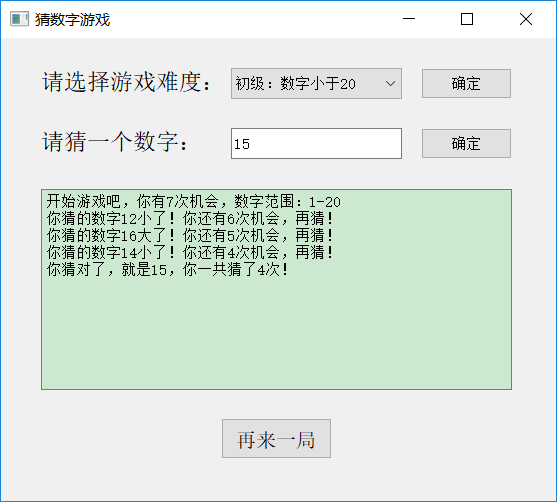
游戏规则:先选择游戏等级:初级、中级、高级、魔鬼级,选择完游戏等级后点击“确定”,然后后台会自动生成一个与游戏等级匹配的“神秘数字”,游戏玩家在文本框内输入数字,再点击文本框旁边的“确定”,即可比较玩家所猜数字是否就是“神秘数字”。
游戏界面:
源代码:
代码1:guessNumberGame.py (界面代码)
 # -*- coding: utf-8 -*-

 # Form implementation generated from reading ui file 'guessNumberGame.ui'

 #

 # Created by: PyQt5 UI code generator 5.11.3

 #

 # WARNING! All changes made in this file will be lost!

 from PyQt5 import QtCore, QtGui, QtWidgets

 class Ui_Form(object):

     def setupUi(self, Form):

         Form.setObjectName("Form")

         Form.resize(555, 463)

         self.label = QtWidgets.QLabel(Form)

         self.label.setGeometry(QtCore.QRect(40, 90, 181, 31))

         self.label.setObjectName("label")

         self.comboBox = QtWidgets.QComboBox(Form)

         self.comboBox.setGeometry(QtCore.QRect(230, 30, 171, 31))

         self.comboBox.setObjectName("comboBox")

         self.comboBox.addItem("")

         self.comboBox.addItem("")

         self.comboBox.addItem("")

         self.comboBox.addItem("")

         self.pushButton_2 = QtWidgets.QPushButton(Form)

         self.pushButton_2.setGeometry(QtCore.QRect(420, 30, 91, 31))

         self.pushButton_2.setObjectName("pushButton_2")

         self.pushButton = QtWidgets.QPushButton(Form)

         self.pushButton.setGeometry(QtCore.QRect(420, 90, 91, 31))

         self.pushButton.setObjectName("pushButton")

         self.textBrowser = QtWidgets.QTextBrowser(Form)

         self.textBrowser.setGeometry(QtCore.QRect(40, 151, 471, 201))

         self.textBrowser.setObjectName("textBrowser")

         self.lineEdit = QtWidgets.QLineEdit(Form)

         self.lineEdit.setGeometry(QtCore.QRect(230, 90, 171, 31))

         self.lineEdit.setObjectName("lineEdit")

         self.label_3 = QtWidgets.QLabel(Form)

         self.label_3.setGeometry(QtCore.QRect(40, 30, 181, 31))

         self.label_3.setObjectName("label_3")

         self.pushButton_3 = QtWidgets.QPushButton(Form)

         self.pushButton_3.setGeometry(QtCore.QRect(220, 380, 111, 41))

         font = QtGui.QFont()

         font.setFamily("Agency FB")

         font.setPointSize(12)

         self.pushButton_3.setFont(font)

         self.pushButton_3.setObjectName("pushButton_3")

         self.retranslateUi(Form)

         QtCore.QMetaObject.connectSlotsByName(Form)

     def retranslateUi(self, Form):

         _translate = QtCore.QCoreApplication.translate

         Form.setWindowTitle(_translate("Form", "猜数字游戏"))

         self.label.setText(_translate("Form", "<html><head/><body><p><span style=\" font-size:14pt;\">请猜一个数字:</span></p></body></html>"))

         self.comboBox.setItemText(0, _translate("Form", "初级:数字小于20"))

         self.comboBox.setItemText(1, _translate("Form", "中级:数字小于30"))

         self.comboBox.setItemText(2, _translate("Form", "高级:数字小于50"))

         self.comboBox.setItemText(3, _translate("Form", "魔鬼级:数字小于100"))

         self.pushButton_2.setText(_translate("Form", "确定"))

         self.pushButton.setText(_translate("Form", "确定"))

         self.label_3.setText(_translate("Form", "<html><head/><body><p><span style=\" font-size:14pt;\">请选择游戏难度:</span></p></body></html>"))

         self.pushButton_3.setText(_translate("Form", "再来一局"))
界面代码
代码2:runGuess.py (方法主体代码)
 # -*- coding: utf-8 -*-

 import sys,random,time

 from PyQt5.QtWidgets import QApplication, QWidget, QMainWindow

 from guessNumberGame import Ui_Form

 times=1 #声明一个模块内的全局变量;用于记录猜数字的次数

 rand=20#声明一个模块内的全局变量;神秘数字的最大范围

 allTimes=7#声明一个模块内的全局变量;游戏最大次数

 class mwindow(QWidget, Ui_Form):

     def __init__(self): #初始化

         super(mwindow, self).__init__()  #这是对继承自父类的属性进行初始化。而且是用父类的初始化方法来初始化继承的属性。

         self.setupUi(self)

     #定义一个方法:从下拉框选择游戏难度

     def gameLevel(self):

         times=1

         global rand,allTimes

         level=self.comboBox.currentIndex()

         if level==0:

             rand=20

             allTimes=7

         if level==1:

             rand=30

             allTimes=10

         if level==2:

             rand=50

             allTimes = 15

         if level==3:

             rand=100

             allTimes = 20

     #定义一个方法:选择游戏难度后生成一个随机的神秘数字

     def getRandNum(self):

         global theNum,times

         times=1           #每次选择游戏难度并点击“确定”后,已猜数字次数都重新归为1

         w.pushButton.setEnabled(True)   #设置pushButton可点击(即选择了游戏难度之后,pushButton才可点击)

         theNum=random.randint(1,rand)

         self.textBrowser.append('开始游戏吧,你有%d次机会,数字范围:1-%d' %(allTimes,rand))

         # self.textBrowser.append(str(theNum)) #直接显示神秘数字,用于调试时使用

     #定义一个方法:点击“确定”按钮的事件,用于比较所猜数字和神秘数字

     def guess(self):

         global allTimes,times #使用全局变量times

         yourNum = int(self.lineEdit.text()) #从文本框获取到输入的数字,并转化为int型

         if yourNum < theNum and times < allTimes:

             text = "你猜的数字%d小了!你还有%d次机会,再猜!" %(yourNum,allTimes-times)

             self.textBrowser.append(text)   #把提示信息写入textBrowser

             times += 1

         elif yourNum > theNum and times <allTimes:

             text =  "你猜的数字%d大了!你还有%d次机会,再猜!" %(yourNum,allTimes-times)

             self.textBrowser.append(text)

             times += 1

         elif yourNum == theNum and times <allTimes:

             text = '你猜对了,就是%d,你一共猜了%s次!' % (theNum,times)

             self.textBrowser.append(text)

         else:

             text = '%d次机会用完了你也没猜对!神秘数字其实是:%d' %(allTimes,theNum)

             self.textBrowser.append(text)

     #定义一个方法:点击“再来一局”时触发的事件

     def reStart(self):

         self.textBrowser.clear()  #清除textBrowser内的内容

         self.lineEdit.clear()     #清除lineEdit内的内容

         w.pushButton.setEnabled(False)  #设置pushButton不可点击(即在选择游戏难度之前,pushButton不可点击)

 if __name__ == '__main__':

     app = QApplication(sys.argv)

     w = mwindow()

     w.pushButton.setEnabled(False)  #设置pushButton不可点击(即在选择游戏难度之前,pushButton不可点击)

     w.pushButton.clicked.connect(w.guess)   #绑定guess方法

     w.pushButton_2.clicked.connect(w.getRandNum)

     w.comboBox.currentIndexChanged.connect(w.gameLevel)

     w.pushButton_3.clicked.connect(w.reStart)

     w.show()

     sys.exit(app.exec_()) #使程序一直循环运行直到主窗口被关闭终止进程(如果没有这句话,程序运行时会一闪而过)
python3+pyQt5+QtDesignner实现窗口化猜数字游戏的更多相关文章
- python3.3使用tkinter实现猜数字游戏代码
发布时间:2014-06-18 编辑:www.jbxue.com 原文地址:http://www.jbxue.com/article/python/22152.html python3.3使用tk ...
- Python3基础学习-while循环实例- 猜数字游戏
需求: 猜数字游戏, 要求如下: 给个数字, 比如是66. 让用户一直猜,直到猜对退出. 中间输入q或Q也能退出 如果猜大了,提示用户猜小一点; 如果猜小了,提示用户猜大一点; likely = 66 ...
- 通过游戏学python 3.6 第一季 第二章 实例项目 猜数字游戏--核心代码--猜测次数 可复制直接使用 娱乐 可封装 函数
猜数字游戏--核心代码--猜测次数 #猜数字--核心代码--猜测次数 number=33 amount=3 count=0 while count<=amount: conversion ...
- 通过游戏学python 3.6 第一季 第一章 实例项目 猜数字游戏--核心代码 可复制直接使用 娱乐 可封装 函数
本文实例讲述了python实现的简单猜数字游戏.分享给大家供大家参考.具体如下: 给定一个1-99之间的数,让用户猜数字,当用户猜错时会提示用户猜的数字是过大还是过小,知道用户猜对数字为止,猜对数字用 ...
- C语言猜数字游戏
猜数字游戏,各式各样的实现方式,我这边提供一个实现方式,希望可以帮到新手. 老程序猿就不要看了,黑呵呵 源代码1 include stdio.h include stdlib.h include ti ...
- 不一样的猜数字游戏 — leetcode 375. Guess Number Higher or Lower II
好久没切 leetcode 的题了,静下心来切了道,这道题比较有意思,和大家分享下. 我把它叫做 "不一样的猜数字游戏",我们先来看看传统的猜数字游戏,Guess Number H ...
- java 猜数字游戏
作用:猜数字游戏.随机产生1个数字(1~10),大了.小了或者成功后给出提示. 语言:java 工具:eclipse 作者:潇洒鸿图 时间:2016.11.10 >>>>> ...
- 【原创Android游戏】--猜数字游戏Version 0.1
想当年高中时经常和小伙伴在纸上或者黑板上或者学习机上玩猜数字的游戏,在当年那个手机等娱乐设备在我们那还不是很普遍的时候是很好的一个消遣的游戏,去年的时候便写了一个Android版的猜数字游戏,只是当时 ...
- 【原创Android游戏】--猜数字游戏V1.1 --数据存储,Intent,SimpleAdapter的学习与应用
--------------------------------------------------------------- V0.1版本 上次做完第一个版本后,发现还有一些漏洞,并且还有一些可以添 ...
随机推荐
- WPF依赖项属性不需要包装属性也可以工作
using System;using System.Collections.Generic;using System.Linq;using System.Text;using System.Threa ...
- C# 声明基于角色的安全性
using System;using System.Collections.Generic;using System.Linq;using System.Security;using System.S ...
- 【shell】递归函数----调用自身的函数
什么是递归函数? 一句话,调用自己的函数称为递归函数! #!/bin/bash declare -i count checkoutCount(){ read -p "Enter an cou ...
- 【Linux】scp“免密” 远程copy较多文件
一.linux脚本实现自动输入密码 使用Linux的程序员对输入密码这个举动一定不陌生,在Linux下对用户有严格的权限限制,干很多事情越过了权限就得输入密码,比如使用超级用户执行命令,又比如ftp. ...
- 八荣八耻 IT版
八荣八耻 IT版以可配置为荣,以硬编码为耻:以系统互备为荣,以系统单点为耻:以随时可重启为荣,以不能迁移为耻:以整体交付为荣,以部分交付为耻:以无状态为荣,以有状态为耻:以标准化为荣,以特殊化为耻:以 ...
- 零元学Expression Blend 4 - Chapter 45 ListBox里的物件不能换行吗?
原文:零元学Expression Blend 4 - Chapter 45 ListBox里的物件不能换行吗? ListBox里的排列不是垂直就是水平,觉得这样的排列很枯燥乏味吗? 想要它变聪明吗? ...
- 判断jQuery选择器结果为空 - CSDN博客
原文:判断jQuery选择器结果为空 - CSDN博客 jQuery选择器获取到的是一个对象,所以无论页面上存在或者不存在元素,这个对象都不为空.因此,如果要使用jQuery检查元素再给某个页面上是否 ...
- UWP开发-获取设备唯一ID
EasClientDeviceInformation deviceInfo = new EasClientDeviceInformation(); this.showDeviceInfo.Items. ...
- Android Java调用Qt写的so库
有时候,我们反编译apk得到一个so库,如果直接使用这个so库的话,必须使用原来so库同样的package名字,才能用.这样人家反编译你的apk,就知道你侵犯了人家的版权.为了达到混淆的目的,我们可以 ...
- Ceph OpenSSL
Ceph OpenSSL 1. SSL介绍 SSL(Secure Sockets Layer 安全套接层),及其继任者传输层安全(Transport Layer Security,TLS)是为网络通信 ...